VeeroTech Review: The Secret to Exceptional Performance and Support! (March 2026)

We have spent a lot of time putting together this VeeroTech review covering the great things they do, where they could improve, and giving you all the crucial information to know if they are the right host for you so you can make an informed decision when it’s time to hit that order button and get your server setup, whether it’s your first experience in buying web hosting or just an additional server to go with many you already own.
VeeroTech is what you might call a “grassroots” hosting company, their popularity seems to spread mainly by word of mouth, which is a very good sign in the hosting world, as many people have had bad experiences with many of the more popular hosts, so when you have a dark horse contender coming along and doing everything the right way, you get excited to share with your friends – and we are very happy to share VeeroTech with you right now.
They are like a well-kept secret. Sometimes when people find a great host, they want to avoid telling too many people because they worry that if the host becomes too popular, their popularity will suffer. VeeroTech has proven that it is perfectly capable of dealing with growing pains and is more than worthy of all the praise it receives. But make no mistake, this is not an unknown company that no one has heard of, it comes highly recommended by industry experts.
VeeroTech is also highly recommended by the web hosting community on Reddit, which is very critical and knowledgeable about this sort of thing, so their recommendations mean a lot. But don’t take her word for it, let’s dig a little deeper.
Up to Save 40% Off on VeeroTech Best Values
VeeroTech Review: Features
Before we delve into the details, here’s a summary of some of the features that make VeeroTech stand out. We’ll cover each of these in greater detail before the end of this shared hosting review.
VeeroHost is a smaller company than some of the larger web hosting companies, which is an advantage because they really get to know you and your website and can offer you exactly what you need. There is a real personal, tailored feel to it, even though it is only costing you as low as a few dollars a month. A host like VeeroHost is a little more expensive than Hawk Host, for example, but when you compare the level of customer service, it’s clear why.
So, there’s the basics, now let’s dig a little deeper and take a look at the different plans VeeroTech offers, along with some suggestions on which one might be right for whom.
Hosting Options from VeeroTech

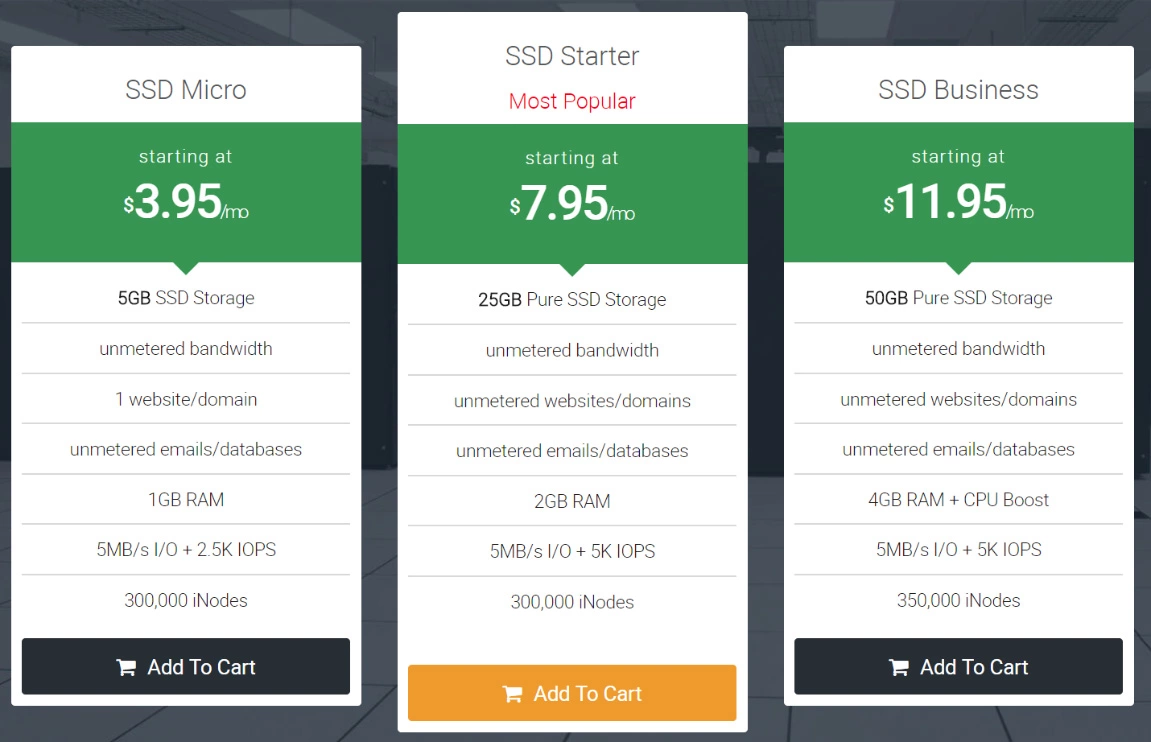
VeeroTech WordPress hosting provides you with a server configured and optimized specifically for WordPress, where you don’t have to worry about installing it. Their smart optimizations and SSD servers ensure that you are getting exceptional performance for shared hosting.
This is ideal for someone who is going to be using WordPress and isn’t super versed in server maintenance or is really interested in getting under the hood, so to speak. If you just want something that’s going to work and get the job done, and you’re not getting a ton of visitors to your site, however, this may be the perfect option.
- PRICE: $3.95 per month
FEATURES: SSD drives, instantly ready to go
- WordPress is already installed for you on your enterprise-grade servers
- 5 GB of ultrafast SSD storage
- 1 GB of ram
- Free daily backups
- Integration with CloudFlare
- SpamExperts spam filtering
- DDoS protection,
- And a few other useful behind-the-scenes features not typically found in this price range
They also offer a higher level for $8.95 per month called WordPress Pro, which includes 35 GB of storage and 2 GB of RAM. For a little more than double the price, you get a lot more resources.
In addition, there’s a $12 plan called Business SSD that offers 50 GB of storage, 4 GB of RAM, and a CPU speed boost. The main difference between the $3.95 SSD option and the other shared hosting options is that the more basic option only allows for one website, while Business SSD allows for an unlimited amount. However, it is not designed specifically for WordPress (but it still works great for WordPress just the same, you will simply need to install WP yourself, which is very easy to do, and we’re pretty sure their support staff would be happy to help with that either way).
If you need to host additional sites, you’ll save 20% for each additional package you order.
Veerotech Managed VPS Hosting
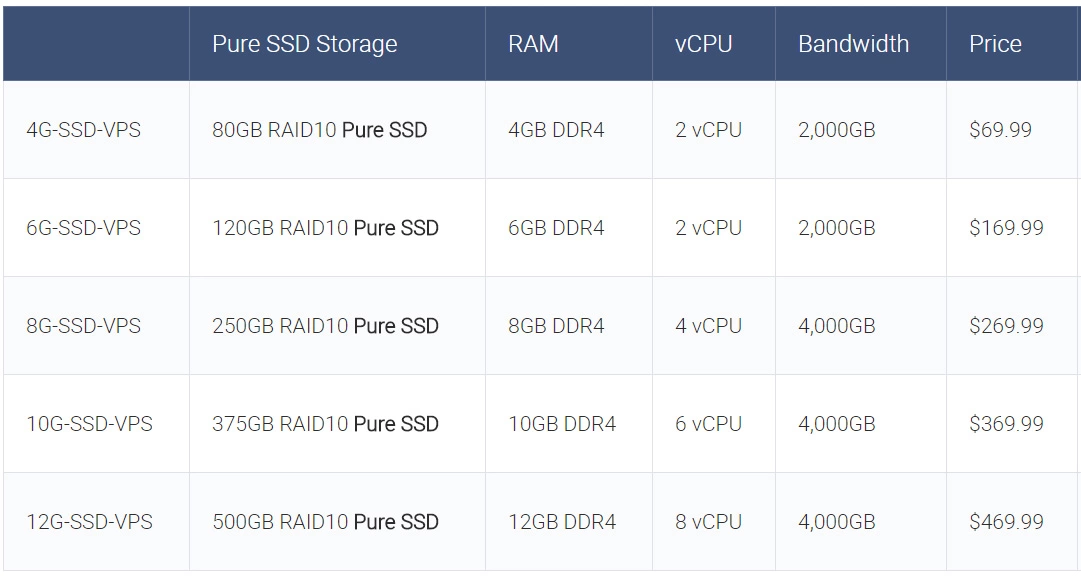
If your website is really popular, you need to invest in better hosting, and VeeroTech’s Managed VPS is the answer. You get the same support and expertise you would get from any of their other packages, with a much more powerful server backing you up. The only downside? You’ll have to pay for it. VeeroTech’s managed VPS options start at $69.99 and go all the way up to $469.99. This may seem like a lot to pay for a website that isn’t generating a lot of traffic or revenue, but for websites that are generating revenue and absolutely, positively need to be running at peak performance at all times, this is a small price to pay.
Let’s compare their entry-level VPS with their higher-end offering to get a feel for both extremes and just keep in mind that there are three other options in the middle so you can make sure you’re getting exactly what you need without overspending. Also, note that it’s incredibly easy to upgrade as your needs grow, so don’t worry about starting at a cheaper level and seeing how it goes before deciding to upgrade to something more powerful. You’ll get the same support and help, the only difference is the resources you’ll receive.
- VeeroTech’s 4G-SSD-VPS comes with 4GB of DDR4 ram, 2 vCPUs, and 2,000GB of bandwidth for $69.99.
- Their 12G-SSD-VPS option comes with 12GB of DDR4 ram, 8 vCPUs, and 4,000GB of bandwidth and comes in at $469.99.
Let’s now look at what are the most important criteria when choosing a hosting company. We have divided all the most important aspects of great web hosting into the following categories so that you can decide which ones matter most to you, thus giving them more weight in your final decision.
Price/Value
For very high-quality shared hosting, VeeroTech is reasonably priced. There are cheaper options, but VeeroTech generally brings more to the table that makes it worthwhile. Offerings such as daily backups, SSD drives across the board, and free SSL certificates are all things you can expect to pay extra for a lot of the time, yet they are all included even with VeeroTech’s most affordable plans.
When it comes to their managed VPS packages, they start at $69.99, which is a bit more than you might spend with some other options, for example, KnownHost’s offerings start at less than half the price, which can certainly muddy the waters and make the decision more difficult. In this comparison, for example, the most basic level of Knownhost VPS is $25 and has twice the bandwidth and 8 times as many CPU cores as VeeroTech is currently offering, even though VeeroTech is almost 3 times the price.
So, when it comes to shared hosting, we can recommend VeeroTech as one of the best options and shared hosting really seems to be their bread and butter. At least for the moment, it’s hard to recommend their VPS packages, not to say that they aren’t solid servers, but it doesn’t necessarily seem to be a focus for them at the moment, so they stick to VPS companies with the scale to offer more competitive packages.
Support
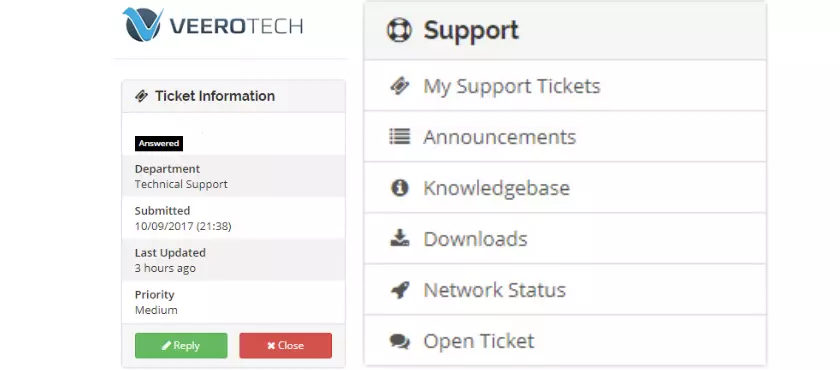
It’s always good to test the support of a hosting company. We contacted VeeroTech support for more information, and they responded to our initial message within 3-4 minutes with a thorough response.
It’s always nice when you can ask about several different things, and you can tell that the person on the other end was really paying attention to carefully address each concern.
They were hesitant to give us an “average” response time because their goal is to resolve the issue with the first response and not a lot of back and forth. A common little “trick” in the hosting world is to respond immediately to the first support request by saying, “I’m looking into this”, because it dramatically reduces the average response time, even when it takes much longer to actually resolve the issue.
So in this case, VeeroTech earns points for taking their time to investigate and resolve the problem rather than trying to pile on unnecessary back-and-forth dialog just to inflate the numbers. That said, they have technicians available 24 hours a day to help with any issues that arise, and our experience has been very good so far.
They have a very clear support scope that details exactly what you can expect from each of their different levels of servers, and VeeroTech charges $50 per hour for any help you need beyond what is covered by them.
For their shared servers, here’s what’s covered: “server-side support; PHP, LiteSpeed, Apache*, server functionality, network connectivity, and performance management.”
In addition, they say they will do their best to help with third-party scripts and WordPress bugs, but they don’t guarantee to offer full support in these cases.
When it comes to licensed software they provide, such as WHMCS, VeeroTech describes their support as follows: “While we do provide bundled software licenses for applications, we only provide a low level, “best effort” scope of support for these products.”
These types of disclaimers of what they will and will not cover are not something totally unique in the hosting world, and it’s good to be upfront about it. However, it’s important to note that there are a lot of things that would fall under the umbrella of being at VeeroTech’s discretion as to whether or not they will help with it or whether or not you will be charged extra for that particular problem.
They do not provide root access, with the reason being “due to full server management and monitoring”, basically saying that you don’t need root access because they will take care of it. For novice users, this won’t be a big deal, but more experienced webmasters may be annoyed by this, especially since some of the “extras” in terms of customer service are a bit up in the air.
Performance
We installed a new instance of WordPress on one of VeeroTech’s more basic servers to see what it would look like. This is a completely new install with a plugin called Autoptimize that helps optimize some of the code a bit, nothing major, there is still room for improvement. Now, once you have a full site built with multiple plugins and so on, you can expect your site to take longer than this to load, obviously, but this gives you a good idea of where you are starting:

A little over half a second for 160.8 kB is not perfect, but it’s definitely doable, and considering that this server only costs a few dollars a month, it’s definitely nothing to lose sleep over. With further optimizations, we could get the load time even more, and if speed is your biggest concern, look for a VPS instead. As for sharing, this is a solid score, and we’re happy with it.
It’s worth noting that their shared hosting packages include backups that are completed daily on a rolling weekly basis. However, you should have your own plan for backing up your site because in the unlikely event that something happens to your server that causes permanent damage, you don’t want to have all your backups in the same place.
For VPS customers, free backups are not included, but they encourage you to consider their paid backup solutions. Again, your best bet will be backups that are not stored on the same server. However, it doesn’t hurt to use numerous backup solutions in case something goes wrong with one of them. Redundancy is always good, and you can never be too prepared when it comes to data loss.
Veerotech Review on the Ease of Use
For the average user, the VeeroTech platform is pretty standard and you will intuitively know what to do. For more advanced users, as mentioned above, the lack of root access can be a problem, especially if you don’t want to have to wait for them to make certain changes or install certain software that requires root access.
Take a look at your customer area:
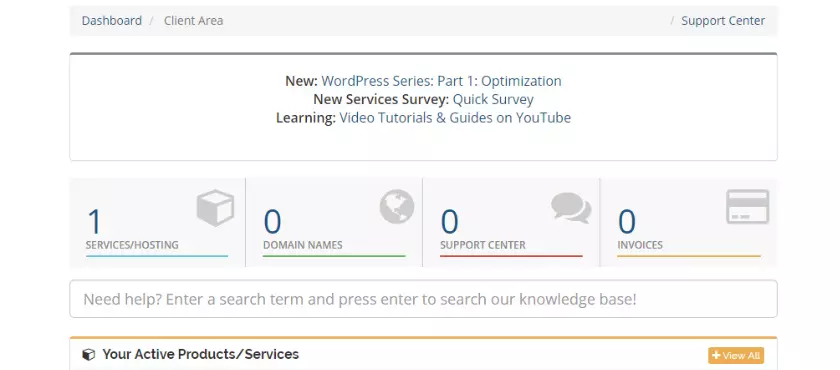
It’s all very clean and easy to navigate, you can find exactly what you are looking for. As you can see, we only have one account with them, but for someone with multiple accounts, it becomes increasingly useful to have everything in one place.
You’ll also notice that at the top of the image above, they have a whole series on using WordPress effectively, starting with optimization and covering all the important aspects. Next, they have a survey for new customers to make sure their needs are being met and to gather useful information to improve their service, which is a very good look and makes for a great first impression. Finally, they have links to an assortment of resources on YouTube for those who like to learn visually.
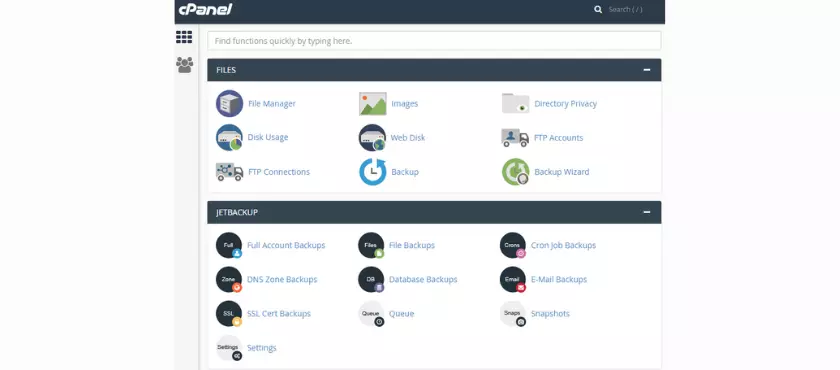
You’ll find your standard cPanel ready to go so you can handle all the day-to-day stuff easily. If you’ve used it before, you know what to expect. If you haven’t used cPanel before, don’t worry, as you can see, it’s very simple and incredibly well-documented all over the web.
Overall, VeeroTech has impressed us, and they are doing a great job. The amount of resources you will need really depends on the popularity of your website and how well-optimized it is. VeeroTech’s sales department will be happy to discuss some options with you.

Henry Sprung is an e-commerce tech blogger with several years of experience in online retail. Alex’s blog focuses on topics such as online marketplaces, payment processing, and digital marketing for e-commerce businesses. Henry’s expertise in e-commerce provides valuable insights into the latest trends in online retail and how businesses can use these platforms to grow their sales. He is a valuable resource for online retailers and entrepreneurs looking to start their own e-commerce businesses.
To read more similar articles, click here
Thanks for visiting our Website. If you appreciate our work, kindly show us some support in our comments section 🙂