Typeform Review: Supercharge Your Marketing with Stunning Survey Campaigns! (March 2026)

Typeform Review: Revolutionize your form-building experience with Typeform: the ultimate online form builder designed with user-friendliness in mind. Say goodbye to complex coding – now you can effortlessly craft interactive quizzes, surveys, and various forms tailored to your specific industry. With a rich selection of over 120 integration possibilities, such as Slack, Mailchimp, Monday, Google Analytics, and HubSpot, seamlessly incorporating your data into your workflow has never been easier.
Imagine streamlining your team’s collaboration and communication effortlessly through Slack integration. Picture having the power to customize every aspect of your forms, from videos to logos, all within the intuitive Typeform interface. Plus, with a vast library of 100+ templates at your disposal, you’re guaranteed to find the perfect fit for your needs. Join us as we embark on an in-depth exploration of Typeform’s pricing, features, interface, support, and more to determine if it’s the ideal solution for you!
Table of Contents
Typeform: Plans & Pricing
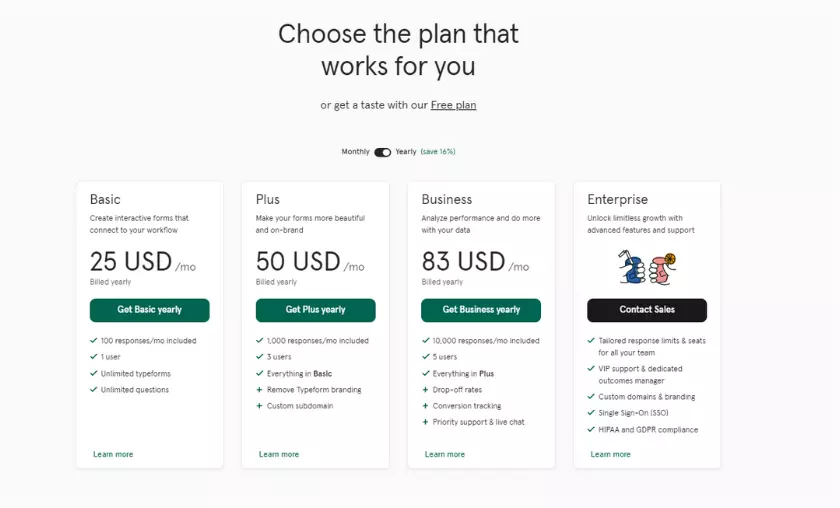
Typeform’s free plan offers unlimited forms, question branching, multiple templates, over 500 Zapier integrations, and more. However, you can only insert ten questions per form and receive ten responses per month on the free plan.
The Basic plan allows you to create interactive forms for $25/month. Although it is limited to only 1 user, you will get unlimited forms and questions with up to 100 responses per month.
Next is the Plus plan, which allows you to create forms based on your brand requirements. At a cost of $50 per month, it allows you to collect 1,000 responses per month, which I think is enough for a small-scale business. In addition to everything the Basic Plan offers, it offers additional features such as custom subdomains, premium themes, Typeform branding removal, and live chat support.
The Business plan, priced at $83 per month, allows you to collect 10,000 responses per month and add up to five users. It’s an ideal plan if you’re looking for more data analytics and integration with Salesforce. For example, information on abandonment rates can help you understand why the response dropped without completion. Other benefits include priority support, conversion tracking, etc.
Finally, you have the Enterprise plan with an on-demand pricing model. With it, you can experience unlimited growth and advanced features like VIP support and HIPAA and GDPR compliance. Response limits can be tailored to your needs and teams can work together more comprehensively.
Typeform: Features
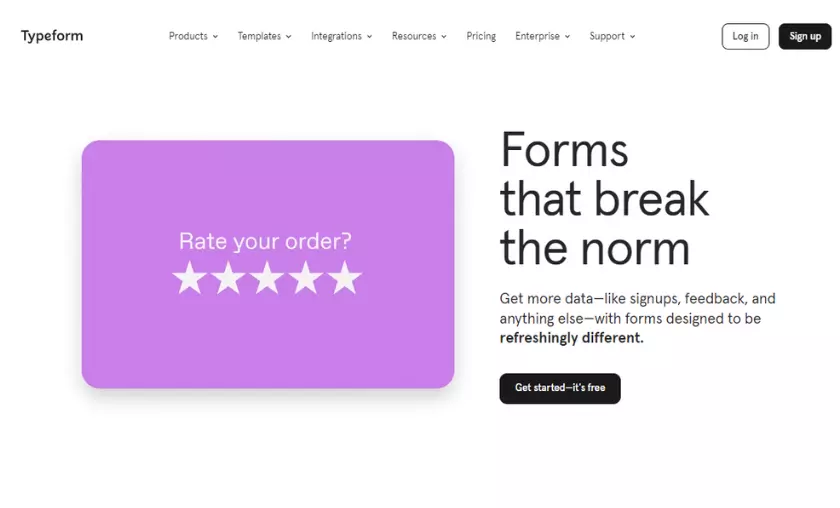
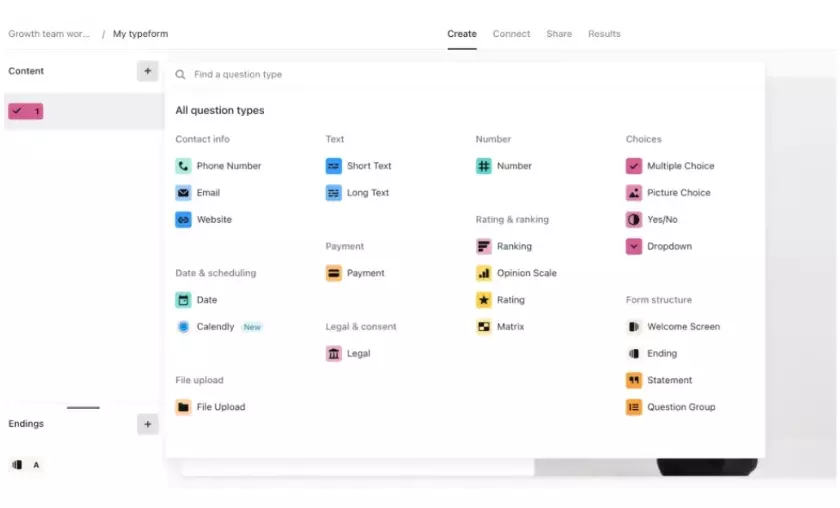
Typeform has a very modern feel compared to its peers. You can use it to collect various data for better research. There are more than 20 types of questions, from rating to ranking, for people to share their opinions differently. Other questions include contact information, dates, file upload, multiple choice and more. Typeform helps you create forms and surveys that flow – let’s look at the following features to understand how.
The builder allows you to branch questions as needed to get a more complete picture. For example, asking whether a product is simply “good” or “bad” may not be enough. Typeform allows you to embed custom follow-up questions based on the user’s previous answers.
You can use skip logic, one of Typeform’s most impressive features. Your respondents won’t have to answer irrelevant questions because they won’t even see them with the help of a logical skip.
For example, if you are trying to create a survey about animals that starts with the question “Are you a dog lover or a cat lover?“, you can set the following questions based on the answer. Cat lovers will jump directly to the question about cats, and dog lovers will have to answer questions related to dogs.
You can connect Typeform with top applications such as Calendly, Hubspot, Excel Online, Google Analytics, etc. to save time and effort. For example, with Calendly integration, you can add a Calendly question directly into your form. Calendly is a scheduling platform that allows you to easily schedule meetings either in person or online. With this integration, the respondent can book a meeting with you directly from the form without having to jump to another window.
Similarly, the Excel and Typeform integration allows you to easily share response results or data with other team members. Typeform responses can be sent to Excel Online to convert data into charts and more.
With options like Stripe and Square, you can easily process online payments and grow your business.
If you are looking forward to creating an online form for your company, you will be glad to know that Typeform offers over 100 templates covering industry niches such as marketing, products, human resources, and much more. The most popular template categories include order forms, feedback, application and evaluation forms, etc.
Just select the template of your choice and edit the slides of the pre-filled questions. The templates are eye-catching and stand out for their design and aesthetics, a feature not offered by other competitors.
Security
Typeform is aware of the importance of the data collected and ensures its security. The services are built with integrity and confidentiality and adhere to data processing standards such as GDPR, one of the strictest international privacy regulation standards.
It is also HIPAA or Health Insurance Portability and Accountability Act compliant. HIPAA ensures that Typeform maintains technical, administrative, and physical safeguards to protect e-PHI or health information collected through an electronic form.
Typeform: Interface & in Use
Typeform’s interface is intuitive and easy to use. A tech novice won’t find it difficult to create forms, even though it’s not a drag-and-drop builder. You can choose from the many templates available, create forms from scratch or add custom markup.
Adding new fields is easy: just click on the “more” icon in the upper left corner and choose from over 25 field types. The builder is divided into three parts: the left panel contains all the field questions, the middle section contains the form itself and the right panel contains the editor.
Just select the question you want to edit in the left pane and make changes in the right pane.
The right panel also contains the “design” and “logic” tabs. You can use “design” to add different pre-designed themes to your form, while the second one will help you define the flow of questions and the logic of your form.
The “Connect” button at the top allows you to integrate your form with other applications and software such as Excel, Microsoft Teams, Slack, Dropbox, etc. I tried connecting Google Sheets with my form, which was done in about a minute with no delays or problems.
Overall, the form builder is extremely easy to use, even for beginners. It has a modern design and allows you to create visually appealing forms.
Typeform: Support
The Typeform help center is divided into different sections that make it easy to submit tickets: all you have to do is select a category of query and follow the instructions. You can also use the available blogs, discussions, and videos to better understand the platform.
Typeform also has an active community to share your problems and learn from other Typeform users. However, the platform lacks external email or phone support, which increases response time, meaning that Typeform’s actual customer support is average at best.
Typeform: the Competition
Typeform is on par with other popular form builders such as Formstack, Jotform, and Zoho Forms. Drawing a line between the three is difficult as they all offer similar features.
However, if you’re looking for an affordable solution, Zoho Forms will be a better choice. Its Basic plan, priced at just $10 per month, offers most of the advanced features a business might need, along with 10,000 submissions per month.
However, with Typeform’s Basic plan, you can only accept 100 responses per month, that too at the cost of $25. However, Typeform offers better customizable templates and easier logical setup.
When it comes to a feature-packed form builder, Jotform beats Typeform. With more than 300+ widgets, 100+ integrations, and 30+ charging options, Joform is an all-in-one solution. However, all of this comes at a starting price of $39 per month.
Although Jotform has a free plan, there’s not much you can do with it, as it only offers 5 forms. On the other hand, Typeform’s free plan offers unlimited forms, making it an absolute winner for those on a tight budget.
FAQ’s
Can I collect payments through Typeform?
Yes, Typeform supports online payment processing through integrations with platforms like Stripe and Square. This feature is particularly useful for businesses looking to monetize their offerings, whether it’s selling products, services, or event tickets directly through their forms.
Is there a limit to the number of forms I can create?
Typeform’s free plan offers unlimited form creation, allowing you to build as many forms as you need. However, certain plans have limits on the number of responses you can collect per month. Upgrading to paid plans unlocks higher response limits and additional features.
What is logic jump, and how can I use it in my forms?
Logic jump is a powerful feature that lets you create dynamic paths in your forms based on respondents’ answers. You can ask follow-up questions that are relevant to the choices they make, creating a more personalized and engaging survey experience for participants.
How does Typeform compare to its competitors like Formstack and Jotform?
Typeform stands out with its modern design, interactive features, and diverse range of integrations. While competitors offer similar functionality, Typeform’s focus on aesthetics and user experience sets it apart. Jotform, for instance, offers more widgets and integrations, while Formstack provides a competitive pricing structure.
What support options are available if I encounter issues?
Typeform provides a comprehensive help center with categorized sections for easy query submission. Additionally, there’s an active community where users can share experiences and solutions. While there’s no external email or phone support, the available resources and community discussions offer valuable assistance.

Mike DaVinci HighTechBlogging.com
Mike DaVinci is a skilled content writer with a talent for storytelling. He specializes in creating captivating narratives that engage readers and leave them feeling inspired. His writing has been featured in various publications, including magazines, blogs, and business websites. Mike’s particular interest in human interest stories allows him to uncover the heart of any story and convey it to his readers in an emotional and authentic way. He believes that storytelling is a powerful tool for connecting with people and inspiring positive change in the world.
To read more similar articles, click here
Thanks for visiting our Website. If you appreciate our work, kindly show us some support in our comments section. 🙂