TMDHosting Review: Discover the Perfect Hosting Solution for Your Business! (March 2026)

This review of TMDHosting was compiled after several months of testing. You will find valuable information about prices, usability, performance, security, and customer support. You know… the most important things you need before choosing a particular hosting provider.
I’m willing to bet that you’ve never heard of TMDHosting. To be honest, neither did I until a few months ago. Considering what I do, it was only logical that I test the company and tell you about it.
Well, TMDHosting has it all – shared and cloud hosting, VPS, and dedicated servers. The prices are low overall. Even the dedicated servers are affordable, starting at $42.49/month, which is in the same range as Bluehost.
To test the provider, I started with the cheapest option – shared hosting. The provider claims to offer 16 times faster web hosting. It also guarantees an uptime of an incredible 99.99%. These and many other promises like unlimited disk space, bandwidth, and more made me curious to see what the hoster really has to offer.
So I rolled up my sleeves and got to work. If you’re curious about what I found out, read on in this TMDHosting review.
For those whose time is worth more than my technical ramblings, just skip to the end and take a look at the final conclusion.
| ⭐️Rating: | 3.6 ⭐⭐⭐⭐ |
| 💲Price: | Prices start at $2.99/month |
| ▶️Uptime: | 99.98% |
| 🏘Hosting types: | Shared, WordPress, Cloud, VPS, reseller, dedicated |
| 🌎Server locations: | United States and Europe |
| 👩💻Support: | 24/7 live chat and tickets |
| 🔥Coupons: | TMDHosting coupon 70% OFF |
Table of Contents
Pros & Cons of TMDHosting
TMDHosting Pricing
TMDHosting offers good prices for all its hosting types. The cheapest shared hosting plan costs only $2.99/month. If you’re looking for a WordPress-specific plan or cloud hosting plans – both are also available at a very reasonable price. You can also choose between VPS, reseller or dedicated server hosting.
| Shared Hosting | Best For |
| Shared Hosting | beginner-friendly hosting for smaller websites. Get up to 70% OFF TMDHosting! |
| WordPress Hosting | Affordable WordPress-focused hosting. |
| Cloud Hosting | Slightly more advanced users. Very affordable and powerful hosting. |
| VPS Hosting | Larger websites and online stores. A slightly more advanced solution. |
| Reseller Hosting | Website designers, developers or those who want to resell websites. |
| Dedicated Hosting | Website designers, developers, or those who want to resell websites. |
It is quite clear that TMDHosting offers everything you can think of – from shared hosting to dedicated servers. However, since shared hosting is the most requested service, it is exactly what I will focus on in this TMDHosting review.
For shared hosting, TMDHosting has 3 plans. All packages include a free domain, SSL, unlimited bandwidth and storage, as well as unlimited email accounts, caching, and free access to Weebly Sitebuilder.
Of course, each plan has its own set of features too:
| Plan | Features | Price |
| Starter | 1 website and basic caching. It’ll be best suited for a personal blog or a small project. | $2.99/mo |
| Business | Unlimited websites and includes 128MB Memcache instance. For a small-to-medium business site or a popular blog, this is the plan. | $4.99/mo |
| Enterprise | Unlimited websites plus Wildcard SSL, Opcache, and a Memcached instance of 256MB. I recommend this plan to a medium business website. | $8.99/mo |
Now, before I get to the other pricing details, you should know that TMDHosting offers these plans for both Linux and Windows. The latter is a bit more expensive. Most people opt for Linux hosting, but you know… it’s always good to have options.
There is no package deal, so the best value depends on your needs.
If one website is enough for you, look no further than the Startup package. You get unlimited storage, bandwidth, and free services like domain and SSL. That’s more than enough for a well-functioning website.
However, if a single website is too little for you, you should take a look at the Business offer. It’s almost the same as the Startup plan, but you can host as many websites as you want.
Best Value:
The best possible price you can get at TMDHosting is if you purchase Starter for a 3-year period. If you opt for a 36-month billing cycle, the monthly rates will remain as low as $2.99/month for the first installment.
Overall, TMDHosting is one of the cheaper hosting providers. The initial prices are very reasonable, and the increased renewal is nothing to pull your hair out over.
I would also like to mention TMDHosting’s 60-day money-back guarantee policy. Considering this is double the 30-day money-back guarantee, it’s a win in my books.
In summary, TMDHosting is affordable and has a comprehensive offering for most shared hosting needs. And a 60-day money-back guarantee is impressive.
Hosting Management – is It Easy to Use?
Ease of use is a crucial factor when choosing a hosting provider, regardless of experience level. That’s exactly what I tested for this TMDHosting review, and the hoster seems to score well in that department.
The provider has a very simple native user interface as well as a cPanel integration. Both panels are very easy to use, so you won’t have to spend any time experimenting.
The very first thing you will see after creating an account is TMDHosting’s native user interface.
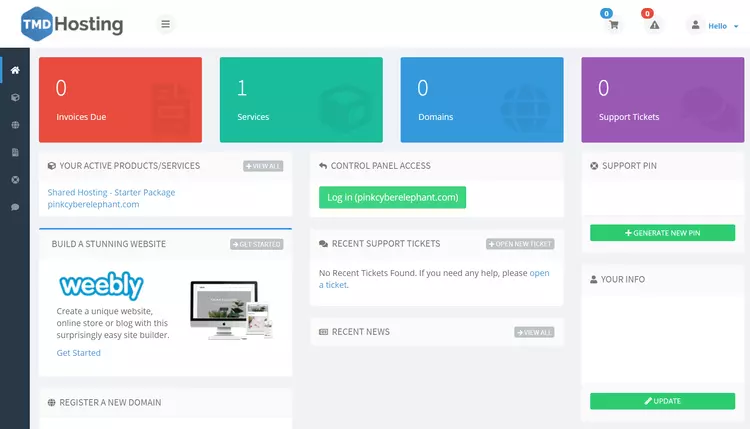
I like that it is not cluttered and very simple. From here you can access and manage active services, the number of domains or tickets you have open.
But that’s about it. I haven’t used the dashboard for anything other than billing and accessing the cPanel.
That brings me to TMDHosting’s choice of website management. So let’s take a look at the cPanel.
How Does TMDHosting Control Panel Look Like?
To manage the website, TMDHosting uses a slightly customized cPanel. When I say “slightly”, I only mean the design, because the functions are practically the same. However, I must admit that TMDHosting’s version is clearer and just as easy to use.
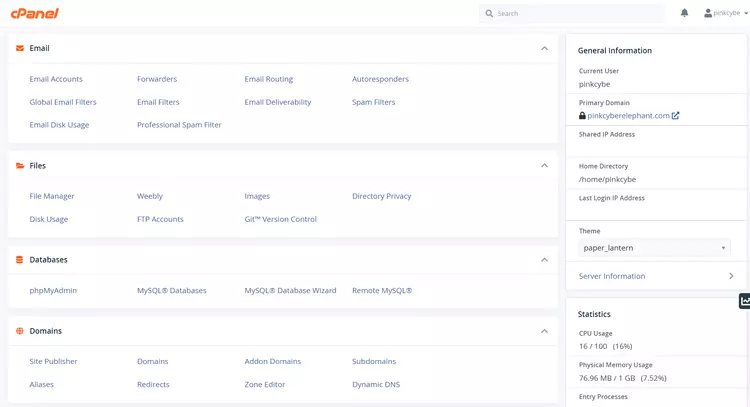
From here, you will manage all the important aspects of your website, such as:
Overall, cPanel is considered to be the simplest control panel. It is extremely simple and well-structured, so managing the website will be a breeze.
All in all, TMDHosting is very easy to use. The native user interface is not cluttered and is only useful for billing and cPanel access. At the same time, the cPanel integration ensures that everything runs smoothly. Most people are familiar with it, and if you’re not, you’ll get the hang of it faster than with a website management panel.
Performance – is TMDHosting Fast?
When it comes to performance, TMDHosting has me very confused. During the preparation of this TMDHosting review, the uptime proved to be good, and the loading time could keep up with some of the fastest hosting providers on the market. However, the response time disappointed me. Let’s dive in to analyze all of this in more detail.
TMDHosting Uptime & Response Time
To test the uptime and response time of TMDHosting, I monitored the website for almost a month. During this time, the provider had 4 outages. These resulted in 7 minutes of downtime or a total uptime of 99.98%.
I should note that TMDHosting gives an uptime guarantee of 99.999%. Since it is quite difficult to maintain such a good uptime (unexpected outages can always happen), TMDHosting promises to compensate you if your uptime drops below 99.999%.
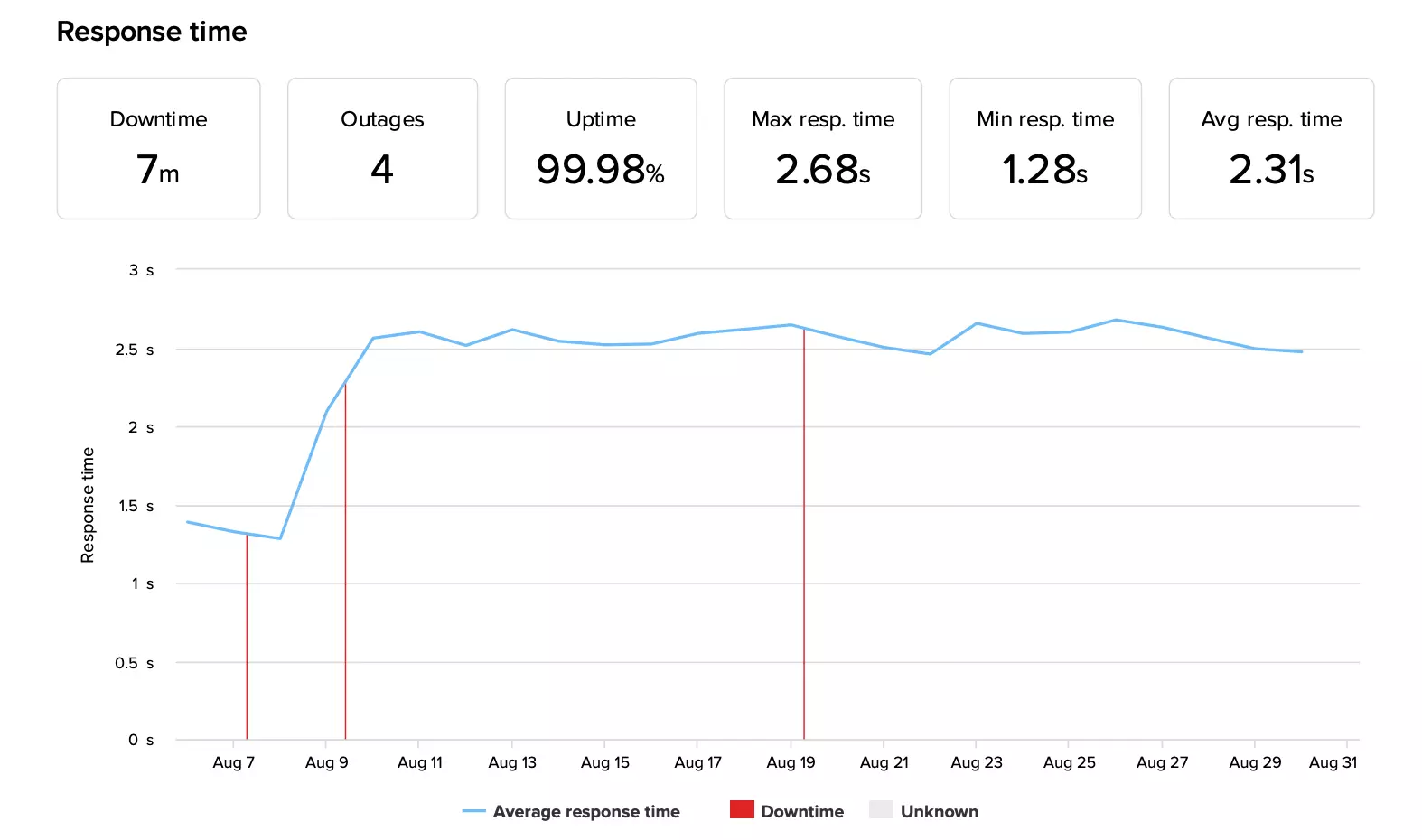
While the uptime was reasonable, I cannot say the same for the response time. The average response time increased to 2.31 seconds. That’s almost four times the market average of 600 ms.
This might be a point where you decide you’ve seen enough. However, I would like to point out to you that this is a very bizarre measure. This is the only time you will see such a poor result, because the other performance results will pleasantly surprise you.
Now about the website loading speed!
TMDHosting Hosting Speed
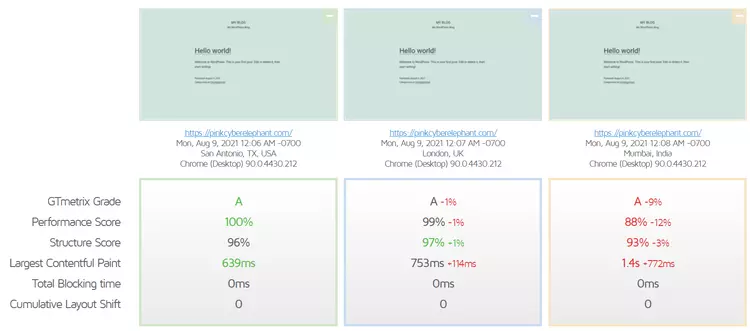
As a starting point, I installed a blank WordPress website and tested its loading speed from three locations – the US, UK and India. Since my site is hosted in the US, the fastest LCP (Largest Content Paint) was also in the US – only 639 ms. As expected, the farther I got from the origin server, the longer my website took to load.
But why is LCP important?
The largest Content Paint is one of the few metrics Google considers when sorting websites. If your LCP is below 2.5 seconds, you can expect to rank in Google Paradise, also known as the first page. Sometimes, this can be a factor in determining whether your website gets a spot at all.
It seems that TMDHosting didn’t have any problems, as the time was only 1.4 seconds even for the most distant site. That leaves more than enough room for maneuver.
Good To Know:
TMDHosting has 7 data centers worldwide, so you can choose a server that is closer to your target audience. You can choose either Chicago (USA), Phoenix (USA), London (UK), Amsterdam (Netherlands), Singapore (Singapore), Tokyo (Japan) or Sydney (Australia).
Everything went well with a blank website, but what about a fully built website?
It seems that TMDHosting passed this test with flying colors. The LCP of the fully built website barely increased to 870 ms. This is a great result, because it leaves a lot of room for the undesirable 2.5 seconds.
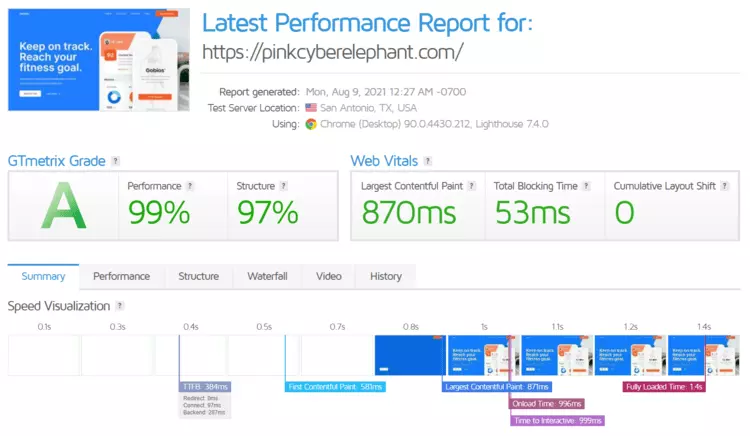
Now that we are examining a content-filled website, LCP is not the only metric we should evaluate. Another important metric is the full load time, which is only 1.4 seconds. As long as this value is below 3 seconds, the website is guaranteed to have fewer bounces due to long loading times.
Overall, TMDHosting performed very well in terms of speed. The LCP was great, under 2.5 even on the other side of the world, and the full load time was only 1.4 seconds.
So far so good, but how will TMDHosting perform under a little pressure? Let’s find out.
TMDHosting Stress Testing
A stress test is used to test a provider’s ability to handle traffic. At some point, your website traffic might spike, and you want to be sure the provider can handle it.
To begin the test, I sent 50 VUs (virtual users) to my site and let them hang there for about 5 minutes. Keep in mind that 50 VUs is a lot for shared hosting, as such continuous traffic could result in 50,000 monthly visits. But I wanted to test the limits of TMDHosting.
And it seems that 50 VUs was just too much for TMDHosting.
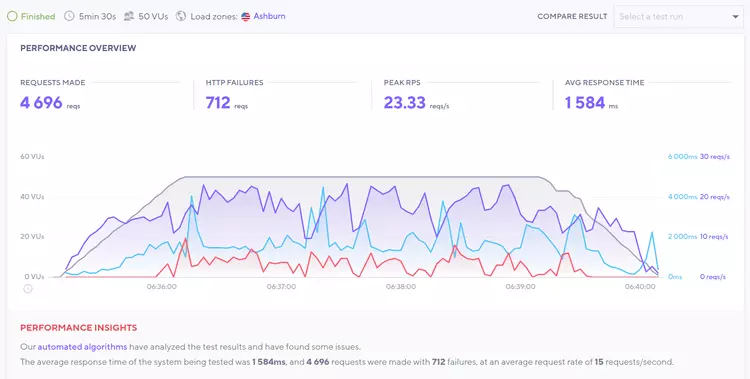
Simply put, the provider was overwhelmed with such intensity. Out of 4696 requests sent to the server, almost ⅕ failed (red line). Okay, so 50 VUs broke the camel’s back, but I’m still curious how much TMDHosting can handle.
I decreased the number of visitors by 5 until I passed the test. The first success was with 30 VUs.
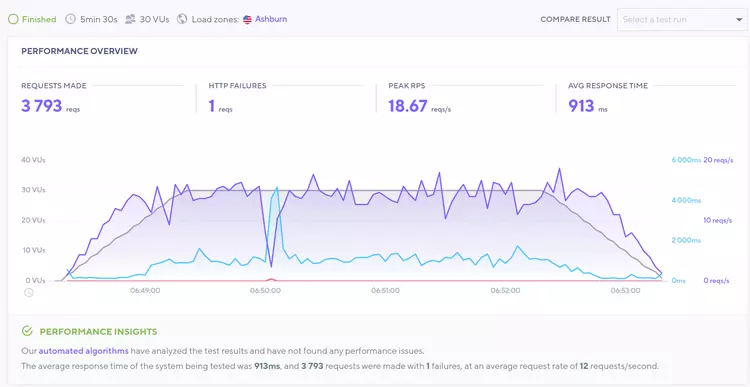
This time the graph looks much better. The response time (blue line) has remained relatively stable, and there is only one failed request (red line). The single failed request indicates that this is the maximum we can expect from TMDHosting’s cheapest tariff.
Even if the first stress test failed, keep in mind that 50 VUs is a very high traffic that not every shared hosting provider can handle. Even 30 VUs is considered a high number, but TMDHosting performed well in the end.
In general, TMDHosting managed to give me good performance results overall. Although the response time worried me for a second, the provider’s loading speed and reasonable stress test results proved that there is nothing to worry about too much.
Security – is TMDHosting Safe?
When it comes to security, it seems that TMDHosting offers everything necessary.
To prepare this TMDHosting review, I had to see how secure the provider is. And I was not disappointed. All plans include the most important features like SSL, firewalls and backups for free. However, there are a few additional paid options as well.
As for the free security features, here’s what you get:
If you are willing to spend some money on security, here are a few paid options:
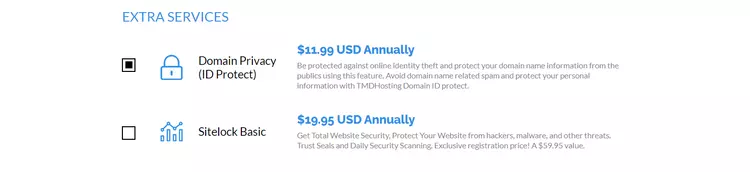
While preparing this TMDHosting review, I found that the hoster takes security seriously and provides many features for free. At least most of them. With the in-house web firewall and live malware protection, you are protected against the most common threats.
Will TMDHosting Customer Support Help Me?
TMDHosting’s customer support team can be reached through 2 channels: Live Chat and a ticketing system. Both options are available 24/7. Even more, the provider guarantees that someone will help you in 15 minutes or less. You can also search the extensive knowledge base.
Of course, I wanted to test this 15-minute guarantee from TMDHosting, so for this TMDHosting review, I decided to use the live chat option – my favorite. Lo and behold, it took less than a minute for an agent to get back to me. The agent was also very friendly.
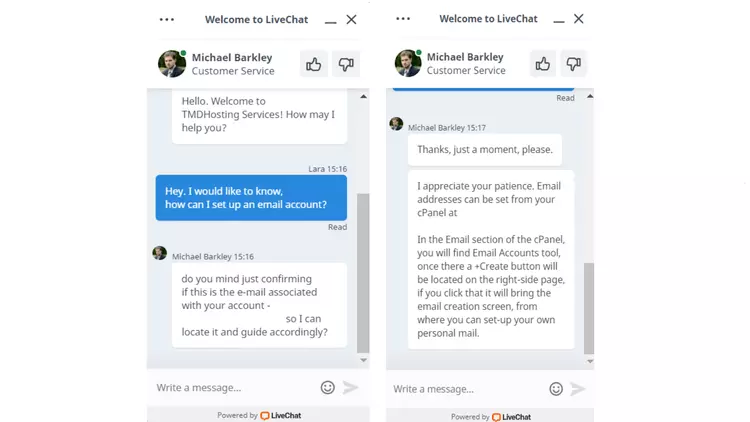
I didn’t ask for anything complicated. I just wanted to know how to set up an email account. The agent immediately gave me quick step-by-step instructions. I think it’s great when agents give specific answers, even if they’re simple, rather than just providing a link to the knowledge base.
Now, if you are looking for answers yourself or want to learn more about hosting and what TMDHosting has to offer, you can access the provider’s knowledge base.
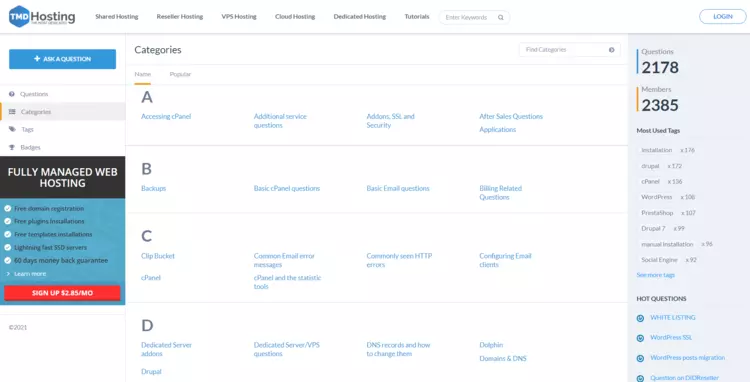
It contains useful and updated articles on many different topics. Also, the topics are arranged alphabetically, and I really like that. I’m almost obsessed with it. To be honest, it makes searching much easier.
All in all, I was more than satisfied with TMDHosting’s customer service. I didn’t have to wait long for a support representative to get back to me; they were friendly and helpful. Also, the knowledge base provides plenty of information that you will need over time.
TMDHosting Review – The Final Verdict
Well, there you have it. For this TMDHosting review, I managed to look at the most important aspects that can make or break a hosting provider, and TMDHosting easily passed my test. With the good and the bad, I think this provider can give you what you need.
Let’s briefly go over the most important aspects again.
| Feature | 3.6⭐⭐⭐⭐ | Affordable Solution for Smaller Projects |
| Pricing | 3⭐⭐⭐ | TMDHosting is an affordable provider with prices starting at $2.99/month for 36-month subscriptions. However, the price for renewal is almost twice as high. |
| Ease of Use | ⭐⭐⭐⭐ | TMDHosting is very easy to use, as it uses a standard CPanel to manage the website. |
| Performance | ⭐⭐⭐ | The provider’s performance was confusing. The uptime (99.98%) was lower than guaranteed, and the response time was a very low 2.31 seconds. However, the load time of a fully built website was a very fast 1.4 seconds. |
| Security | ⭐⭐⭐⭐ | The provider’s performance was confusing. The uptime (99.98%) was lower than guaranteed, and the response time was a very low 2.31 seconds. However, the load time of a fully built website was very fast 1.4 seconds. |
| Support | I had a good experience with TMDHosting’s customer support. I got a response in less than a minute, and all my questions were answered promptly. | TMDHosting has many free security features, such as SSL certificates, backups, firewalls and DDoS protection. |
So Who Do I recommend TMDHosting to?
In summary, I think TMDHosting is more than suitable for beginners and small businesses. It’s affordable, easy to use, customer support is good, and you have plenty of features to play around with.
Alternatives to TMDHosting
While TMDHosting review proved that it is a decent hosting provider with some powerful suits, people may look for something else. That’s why I’m willing to offer a couple of alternatives – Hostinger and HostGator.
Hostinger
Hostinger is known in the hosting world for its insanely low prices and excellent performance. Prices start at just $1.99/month for shared hosting. When you’re ready, you can upgrade to Hostinger’s cloud or VPS hosting, whose prices start at $3.99/month and $1.99/month, respectively.
Although Hostinger’s prices are low, its performance is outstanding, which makes it one of the most powerful hosting providers on the market. Besides, it has a custom control panel called hPanel, which is easy to use.
HostGator
HostGator is another affordable alternative to TMDHosting. Prices start at $2.75/month for shared hosting, and you can always upgrade to VPS or dedicated hosting when you’re ready. Prices start at $23..95/month and $89.98/month.
HostGator may not perform as well as Hostinger, but it still manages to deliver decent results. Moreover, the provider offers resource-rich plans, and with a classic cPanel for website management, it is very easy to use.
FAQ’s
Is TMDHosting good?
Yes, TMDHosting is good. It is a reliable provider that delivers good performance results without spending a lot of money.
Can you choose a server location with TMDHosting?
Yes, you can choose a server location at TMDHosting. First, you will be asked to choose a data center when you create your account. There are 7 options spread all over the world.
Does TMDHosting use cPanel?
Yes, TMDHosting uses cPanel, but in a slightly modified form. Don’t worry, I’m talking about the design, not the functionalities.
Is TMDHosting secure?
Yes, TMDHosting is secure. TMDHosting has chosen to provide many of its security features for free, such as SSL certificates, backups, live malware protection, firewalls, etc. However, you can also purchase some additional security features.
Is TMDHosting good for WordPress?
TMDHosting is good for creating a WordPress website, thanks to the pre-built Word

Alan Brock is an entrepreneurship-focused tech blogger with a track record of founding several startups and involvement in the tech startup scene for many years. Eric’s blog delves into startup funding, team building, and product development. He provides a critical perspective on the challenges and opportunities that come with starting a business, as well as the latest trends in the startup world. Alan’s experience as a startup founder has made him a go-to source for anyone looking to launch their own tech startup.
To read more similar articles, click here.
Thanks for visiting our Website. If you appreciate our work, kindly show us some support in our comments section. 🙂