Both SiteGround and GoDaddy are popular and well-known names in the hosting industry. However, they are not completely equivalent. Therefore, it is only natural to compare SiteGround with GoDaddy to find out which is the better option for you.
SiteGround is the most popular option due to its powerful shared hosting plans, excellent security features and low prices. For this reason, we call SiteGround the winner of this comparison.
On the other hand, GoDaddy is also a good option, with a diverse collection of hosting services and a cheap domain name registration.
Check out this comparison between SiteGround and GoDaddy to see how exactly SiteGround won against GoDaddy based on price, ease of use, performance, security and customer support features.
Table of Contents
SiteGround vs GoDaddy: Quick Comparison
| SiteGround | GoDaddy | |
| Rating | 4.3⭐⭐⭐⭐ | 4.0⭐⭐⭐⭐ |
| Price from | From $3.99/month | From $6.99/month |
| Free domain | No | Yes |
| Hosting types | Shared WordPress/WooCommerce and cloud hosting | Shared, WordPress, Business, VPS, Dedicated |
| Control panel | Custom control panel Site Tools | cPanel |
| Security | Free SSL certificates, weekly/daily backup, DDoS protection, 2-factor-authentication, AI anti-bot protection, and a Security plugin | 24/7 network security, DDoS protection |
| Website migration | Free automated WordPress migration or paid professional site transfer | Around $99 for website migration |
| Extras | Staging, caching, emails, white-label, collaboration tools, and CDN | Office 365 email |
| Website | www.siteground.com | www.godaddy.com |
Winner: SiteGround
SiteGround vs GoDaddy: Hosting Pricing Comparison
SiteGround is a cheaper hosting provider overall than GoDaddy. Although GoDaddy offers a shared hosting plan that costs $6.99/month compared to SiteGround’s $2.99/month.
Well, apart from shared hosting, here are the prices of the other hosting services offered by both providers.
| Hosting type | SiteGround | GoDaddy |
| Shared hosting | $2.99/month | $3.99/month |
| WordPress hosting | $3.99/month | $8.99/month |
| WooCommerce hosting | $3.99/month | $29.99/month |
| Cloud hosting | $100.00/month | ❌ |
| VPS hosting | ❌ | $9.99/month |
| Reseller hosting | $6.69/month | ❌ |
| Windows hosting | ❌ | $5.99/month |
| Dedicated hosting | ❌ | $139.99/month |
| Visit SiteGround | Visit GoDaddy |
GoDaddy offers more types of hosting services compared to SiteGround, but they are also quite expensive. However, since shared hosting is the most popular option, it will be the main point of this comparison topic.
The cheapest shared hosting offer from SiteGround allows you to host a single website with 10 GB of SSD space and free SSL protection. You also get unlimited bandwidth, support for an unlimited number of email accounts, and access to useful tools like advanced security features, native CDN, SuperCacher plugin, and daily automatic backups. All this for just $3.99/month.
GoDaddy’s cheapest shared hosting plan, on the other hand, allows you to host 1 website with unlimited bandwidth. You also get 25 GB of storage, a free domain for 1 year, and a free annual subscription to Microsoft 365 email for the first year.
The disadvantage of the GoDaddy plan is that there is no option for automatic daily backups and no free SSL protection.
However, when it comes to domain costs, GoDaddy has an advantage. With GoDaddy, you get a “.com” TLD for only $0.01/year if you sign a 2-year contract – the second year is renewed for $18.99. Thus, the total cost of a .com domain for 2 years is $19.00.
In comparison, SiteGround charges a flat $17.99/year for a .com domain. So you’ll spend $35.98 in 2 years for a .com domain with SiteGround, making GoDaddy the better option.
Overall, SiteGround offers much more value and features for the money compared to GoDaddy. is a much cheaper option than GoDaddy. Therefore, SiteGround is the winner in this category as it offers more value for your money for much less.
Winner: SiteGround
SiteGround vs GoDaddy: Ease of use
When it comes to SiteGround vs. GoDaddy, they are both great in terms of usability. However, SiteGround is more intuitive with its native dashboard and custom control panel – Site Tools – which makes it easier to use. GoDaddy also has a native dashboard that takes care of the easy stuff. But for more advanced options, you get the cPanel. It’s good and functional, but can be a bit overwhelming for new users, so SiteGround is more beginner-friendly.
With SiteGround, the entire user experience revolves around a central dashboard that you access after creating a new account. From here you can access your default settings such as account details, available services, websites, billing information, etc.

From the Websites section, you can access the Site Tools for each hosted website. The general interface looks like this:

As you can see, it looks very similar to the WordPress dashboard. You have a left sidebar where you can switch between different settings for your website, speed optimization, WordPress, domain, email settings, website stats and developer options. You can also pin your frequently used tools at the top, giving you a quick overview of your website information right below.
Now let’s talk about GoDaddy. The native dashboard is very efficient – it’s very clear and provides easy access to all the basic options. You can even set up your website and manage domains, email accounts, etc. right from the dashboard.

However, for advanced hosting management options, GoDaddy offers the cPanel.
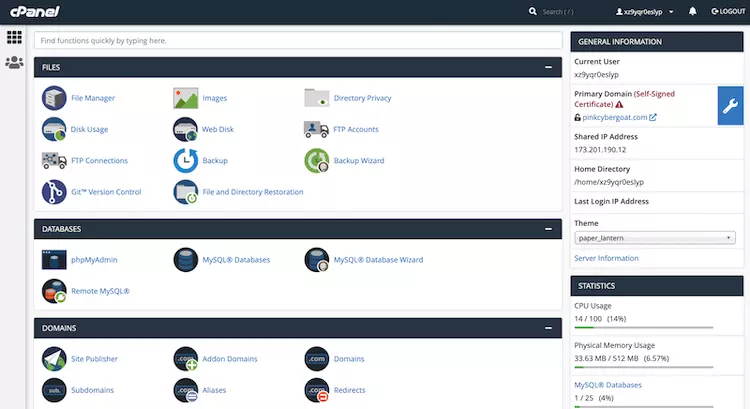
As you can see, cPanel looks much clearer compared to the SiteGround tools. There is a “General Information” section on the right side and all the different settings and tools front and center.
From the cPanel you can access your WordPress core files or email settings, manage your databases and domains, enable SSL and much more. Here you’ll also find tools like Softaculous or Installatron, which allow you to install a content management system like WordPress in just a few clicks.
If you’re new, it can be scary and overwhelming to have so many tools in front of you. In this round of SiteGround vs GoDaddy, we give SiteGround the edge because it’s more intuitive and beginner-friendly.
Winner: SiteGround
SiteGround vs GoDaddy: Performance
We compared SiteGround with GoDaddy in terms of performance and SiteGround comes out on top again. It outperforms GoDaddy by having twice as little downtime and faster loading times, which makes SiteGround a much more reliable and faster hosting provider.
To get more accurate results when comparing SiteGround and GoDaddy’s performance, we tested both hosting providers up close for two months.
Uptime & Response Time
With SiteGround we had an uptime of 99.99%. During this time we had 3 outages with a total of 7 minutes downtime. Compared to the average downtime in the industry, that’s outstanding! SiteGround guarantees 99.9% uptime, so you don’t have to worry about your website being down for extended periods of time.
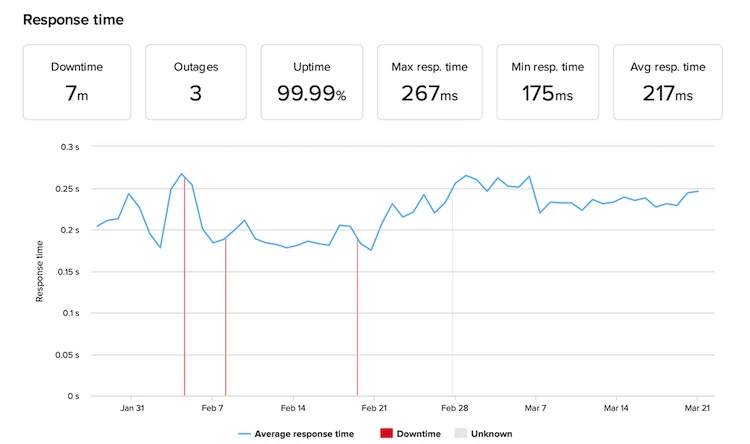
In terms of response time – the time to retrieve the first byte of data and HTTP headers – we got an average of 217 ms. To give you a better idea, the market average is 600 ms, which puts SiteGround in the top group.
At GoDaddy, we measured an uptime of 99.98%. Just like the other hosting provider, there were 3 outages, but the downtime was more than double, reaching 16 minutes in total. Nevertheless, this is within industry standards and you are promised an uptime guarantee of 99.9%.
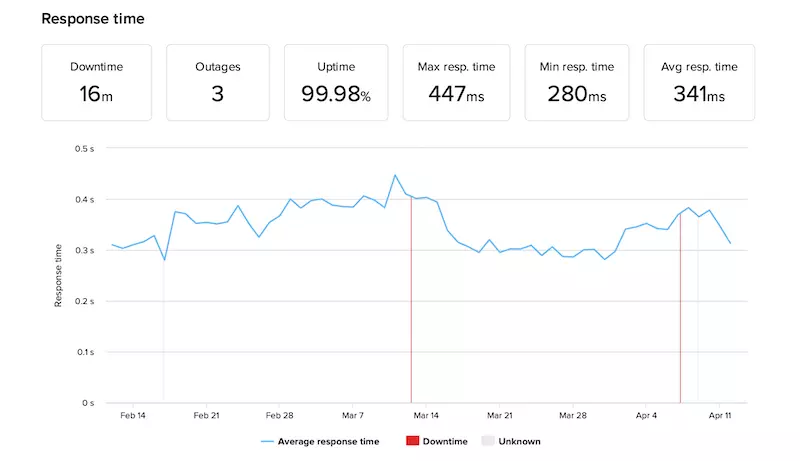
The average response time of 341 ms was also good and within the industry average. However, it is worth noting that it was somewhat inconsistent, fluctuating between a maximum of 447 ms and a minimum of 280 ms.
Overall, SiteGround has a better uptime and a faster response time, which earned it the victory in this round.
Website Speed
Website speed is as important as other measures. You don’t want your visitors to churn because of a slow website, do you? That’s why we compared SiteGround and GoDaddy in terms of speed as well.
Before you look at the results, it is important that you understand what the terms we are going to use mean:
Now that you know what the results mean, let’s take a look at how SiteGround performed on GTmetrix.
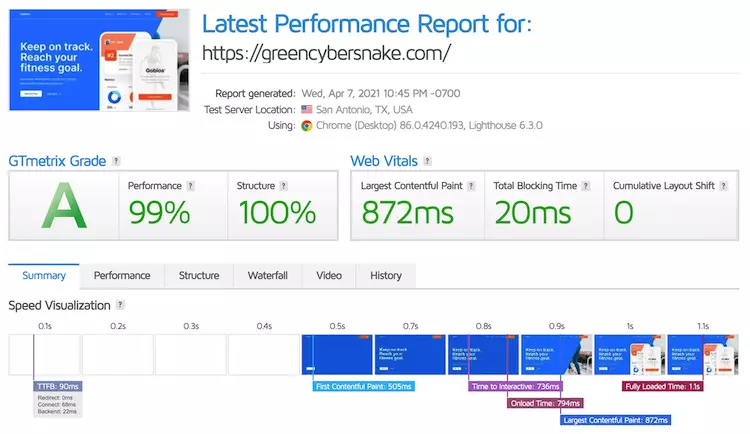
We received an LCP of 872ms and a Fully Loaded Time of 1.1s. Both values are within Google’s recommendations as well as the industry average, which is excellent!
In the next step, we examined the performance of GoDaddy on GTmetrix. We measured the same time for LCP and Fully Loaded Time with 1.5s. Both values are within the industry average, but are significantly slower compared to SiteGround.
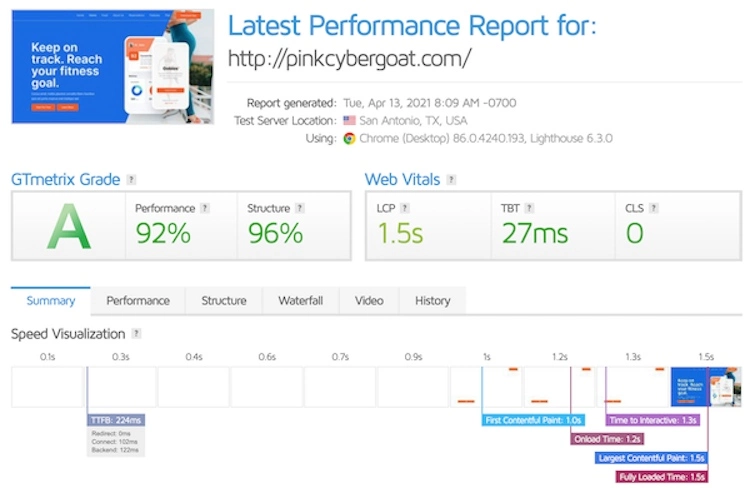
Overall, SiteGround is more reliable with 99.99% uptime compared to 99.98% for GoDaddy. It is also faster with 872ms LCP, 1.1s fully loaded time and 217 average response time. GoDaddy lags far behind with an LCP of 1.5 and an average response time of 341ms.
SiteGround wins out over GoDaddy in terms of website performance. While both providers offer 99.9% uptime, SiteGround had twice as much downtime. Both providers’ load and response times were within the industry average, but SiteGround was still significantly faster than GoDaddy.
Winner: SiteGround
SiteGround vs GoDaddy: website security
SiteGround offers a much more comprehensive and robust security solution compared to GoDaddy. It’s no surprise that SiteGround appears in our list of the most secure hosting providers. The reason is that with SiteGround you get access to many advanced security features for free.
SiteGround offers the following security features for free:
In addition, SiteGround also offers Domain Data Protection as a paid security add-on. It costs $12 for the 1st year and $24 for renewals.
In comparison, GoDaddy offers very basic security options – features you simply can’t do without. And if you want additional security, there’s a hefty fee.
Here’s what you get for free:
All other security features are accessible via paid add-ons. The Website Security add-on is a single package that combines an SSL certificate, a web application firewall (WAF) and an anti-malware system. However, the whole thing costs $4.75/month – that’s even more than the basic plan itself.
Overall, SiteGround is a more secure provider than GoDaddy. By comparison, SiteGround offers many more security features that are included for free in its plans, and few additional features that cost extra. While GoDaddy offers very few security features for free and you have to pay extra to get a comprehensive security package.
Winner: SiteGround
SiteGround vs GoDaddy: customer support
When it comes to SiteGround vs GoDaddy, the results are quite similar when it comes to customer service. Both offer 24/7 support via phone and live chat. However, SiteGround can also be contacted via tickets.
That being said, SiteGround’s support system is designed to be more of a “help yourself” system, something DIYers like. Each page contains helpful widgets with useful tips on how each button, tool or feature works. There is also an extensive knowledge base of helpful articles and tutorials at your disposal.
However, if you run into any technical issues and need human assistance, you can always call the very helpful and friendly SiteGround staff. If you prefer texting to talking, you can also start a live chat. This will trigger the intelligent chatbot, which will either redirect you to a potentially helpful knowledge base article or connect you with a support representative, who, by the way, will respond very quickly.
In comparison, GoDaddy’s customer service is very conventional. You get an extensive knowledge base called the Help Center, which contains hundreds of guides and answers to frequently asked questions. However, if you want help from a human, you can contact them either by phone or live chat.
In our experience, the support team is knowledgeable and helpful. However, we did run into some issues when trying to connect with the support team via live chat.
All in all, we could almost call this aspect of the service a draw between SiteGround and GoDaddy, as both offer excellent customer support. But we have to give SiteGround the edge because of its thoughtful and helpful widgets throughout the interface.
Winner: SiteGround
Conclusion
The showdown between SiteGround and GoDaddy has shed light on the key differences between these two web hosting providers. While GoDaddy boasts a strong brand presence and a wide range of services, SiteGround stands out with its exceptional performance, robust features, and reliable customer support. Whether you prioritize speed, security, or scalability, SiteGround emerges as the clear winner in this ultimate showdown. So, if you’re looking for a web hosting provider that combines top-notch performance with excellent support, SiteGround should be your go-to choice. Don’t settle for anything less when it comes to your website’s success.
FAQs
Why should I consider SiteGround over GoDaddy?
As someone who has used both SiteGround and GoDaddy, I found SiteGround to be a better option for several reasons. Firstly, SiteGround offers superior website performance and faster loading times compared to GoDaddy. Their server infrastructure is optimized for speed and reliability, ensuring a smooth browsing experience for your visitors. Additionally, SiteGround provides excellent customer support, with knowledgeable and responsive agents who are available 24/7. They go above and beyond to assist you with any technical issues or questions you may have. Lastly, SiteGround’s user-friendly interface and intuitive control panel make it easier to manage your website, domain, and email settings.
Is GoDaddy a good choice for beginners?
While GoDaddy is often marketed as a beginner-friendly option, in my experience, it may not be the best choice for beginners. The interface and control panel can be overwhelming and confusing, especially for those who are new to website hosting. SiteGround, on the other hand, offers a more user-friendly experience with its intuitive control panel, making it easier for beginners to navigate and manage their websites.
Which hosting provider offers better customer support?
In my personal experience, SiteGround outshines GoDaddy in terms of customer support. SiteGround’s support team is highly responsive and knowledgeable, available 24/7 via live chat, phone, and ticketing system. They go the extra mile to ensure your questions are answered and any issues are resolved promptly. GoDaddy’s customer support, while decent, may not be as prompt or as knowledgeable in some cases.
How does SiteGround compare to GoDaddy in terms of website performance?
SiteGround excels in website performance compared to GoDaddy. SiteGround has a solid infrastructure and utilizes cutting-edge technologies like SSD storage, NGINX web server, and the latest PHP versions. These optimizations result in faster loading times and improved overall website performance. GoDaddy, on the other hand, may not offer the same level of performance optimization, and their shared hosting plans can sometimes be slower, especially during peak traffic periods.
Are there any notable pricing differences between SiteGround and GoDaddy?
While both SiteGround and GoDaddy offer competitive pricing, there are some differences to consider. SiteGround’s pricing is generally higher than GoDaddy’s, but it reflects the higher quality of service and performance they provide. SiteGround’s plans often include additional features and resources that contribute to a better overall hosting experience. GoDaddy, on the other hand, may have more budget-friendly options, but it’s important to carefully evaluate the included features and performance to ensure it meets your specific needs.
To read more similar articles, click here.
Thanks for visiting our Website. If you appreciate our work, kindly show us some support in our comments section. 🙂

Norman Dwemer is a tech blogger who focuses on the future of technology. his blog delves into emerging technologies such as artificial intelligence, blockchain, and quantum computing, as well as their potential impact on our lives and society. Rachel’s writings provide a sneak peek into the future of tech, examining the possibilities and risks of these cutting-edge technologies. he also shares the most recent developments and research in these fields, delivering the latest news and insights to his readers. Norman’s visionary outlook on the world of tech has establihed his as an authoritative figure for anyone interested in the forefront of technology.