In this comparison between SiteGround and Bluehost, we will test both providers to find out everything about them; we will see which one is more suitable for your website. We will talk about the prices, usability, performance and security, as well as customer support.
If one thing is for sure, it’s that both Bluehost and SiteGround are big names in the industry. Yet, each of them seems to have a specific purpose. In our experience, Bluehost is the first choice for beginners thanks to its ease of use. SiteGround, on the other hand, is more aimed at businesses.
But we should also mention that Bluehost and SiteGround focus on WordPress and are recommended by WordPress. That’s a big recommendation, and we have a question: does that mean both providers are good?
In this comparison between Bluehost and SiteGround, we want to find out why these providers are worth such a recommendation. We also want to find out which of the two providers you should trust with your website.
Table of Contents
SiteGround vs Bluehost: Quick Comparison
Both SiteGround and Bluehost are well known in the web hosting industry. Bluehost is often the provider that introduces new users to web hosting and development. Meanwhile, SiteGround is known for its speed-focused WordPress features and good customer support. Still, at first glance, Bluehost and SiteGround are incredibly similar.
Both focus on WordPress, and neither company has a complicated user interface. The most obvious differences are in pricing and performance.
Here’s a quick overview of how these providers compare in each area. You can also get to the verdict right away.
| SiteGround | Bluehost | |
| Rating | 4.3⭐⭐⭐⭐ | 4.5⭐⭐⭐⭐⭐ |
| Price from | From $3.99/month | From $2.95/month |
| Free domain | No | Yes |
| Hosting types | Shared WordPress/WooCommerce and cloud hosting | Shared, WordPress, WooCommerce, VPS, and dedicated hosting |
| Control panel | Custom control panel Site Tools | Modern native dashboard with the classic cPanel integration |
| Security | Free SSL certificates, weekly/daily backup, DDoS protection, 2-factor-authentication, AI anti-bot protection, and a Security plugin | Free SSL, 24/7 server monitoring, and Cloudflare DDoS protection |
| Support | 24/7 live chat, email, and phone | 24/7 live chat, ticketing, and phone |
| Website migration | Free automated WordPress migration or paid professional site transfer | Free automated WordPress migration or paid ($149.99) professional site transfer |
| Extras | Staging, caching, emails, white-label, collaboration tools, and CDN | Staging, emails, website builder, Cloudflare CDN (content delivery network) |
| Website | www.siteground.com | www.bluehost.com |
Winner: SiteGround
Pricing Comparison
In a price war between SiteGround and Bluehost, Bluehost is slightly cheaper. While SiteGround’s cheapest shared hosting plan costs $3.99/month, Bluehost’s shared hosting prices start at $2.95/month.
Besides, both hosters have more to offer:
| Hosting type | SiteGround | Bluehost |
| Shared hosting | ✔️ | ✔️ |
| WordPress hosting | ✔️ | ✔️ |
| WooCommerce hosting | ✔️ | ✔️ |
| Cloud hosting | ✔️ | ❌ |
| VPS hosting | ❌ | ✔️ |
| Reseller hosting | ✔️ | ❌ |
| Dedicated hosting | ❌ | ✔️ |
| Visit SiteGround | Visit Bluehost |
Most people stop at shared hosting, which is why this is the focus of my comparison.
But there are few similarities. While both providers offer free SSL certificates and a CDN, and allow you to host a single website at the cheapest rate, that’s about it. The differences are quite large:
So, even at a much lower price, with Bluehost you get more server resources and a free domain. At the same time, SiteGround offers daily backups and advanced caching, both of which can cost more than $5/month. For the cheapest plans, the choice depends on your needs – do you need more storage for a personal website, or do you need more security and performance for a small business website?
In either case, the advertised prices are only for the initial term, and you’ll need to purchase the plan for a set period of time to enjoy the offer.
Providers have slightly different approaches to discounts. Bluehost increases prices with each shorter billing period and keeps the price the same for renewals. SiteGround, on the other hand, increases prices with longer billing periods but discounts for renewals.
But is the cheapest rate also the right one for you and does it offer the best value for money when it comes to making a decision? We briefly analyzed all the rates on offer and came to the following conclusion.
SiteGround has 3 plans that range from $3.99/month to $10.69/month with annual subscriptions. But not all of them offer the same features.
The plans that are worthwhile with SiteGround are GrowBig and GoGeek, as all the additional high-end services are available there:
Best Value
The best price for SiteGround plans hides under the 3-year subscription. It’s the most expensive billing option initially, but renewals are the cheapest, which means long-term savings. For example, GrowBig costs $17.49/month with a 3-year subscription for as long as you need it, while the 1-year option renews for a much higher $24.99/month.
Meanwhile, Bluehost offers 4 plans that range from $2.95/month to $13.95/month, with each option offering more and more features.
The cheapest plan is very basic, although it offers a generous 50 GB of storage. The most expensive plan is too expensive for shared hosting, at least in our opinion. So it’s best to take a look at it:
Best Value
You get the best price if you choose the Plus plan with the 3-year subscription. That’s $5.95/mo and quite affordable $11.99/mo on renewal.
By the way, both providers offer a 30-day money-back guarantee. Just keep in mind that third-party services and domains are non-refundable and there may be additional conditions.
The bottom line is that Bluehost is cheaper than SiteGround. So if you need something affordable, Bluehost is your guy. SiteGround offers more premium features in its plans, so we think the higher prices are justified. Still, Bluehost is the winner here based on price alone.
Winner: Bluehost
Hosting management: Ease Of Use
After using Bluehost and SiteGround for a few months, we were impressed with their ease of use. Both providers have excellent dashboards. SiteGround has developed the Site Tools control panel for advanced settings, while Bluehost has opted for cPanel integration.
We would also like to add that both SiteGround and Bluehost made the right choice in terms of user interface. They are intuitive, so even a beginner can find everything with ease.
Account Management Dashboard
When you access the SiteGround dashboard for the first time, you’ll get tips and steps to set up and optimize your website. If you follow everything, you will have a working website in no time. This is a great guide for beginners.

The top menu is great for navigation. Here you can find both website and account management tools. In the Websites section, you can add new websites and access the Control Panel, which is the most important part of the main dashboard.
Speaking of which, each website gets its own administration panel where you can easily access the website tools or the WordPress kit, as well as set up additional and important services like the native CDN and SSL.

Bluehost does not disappoint either and offers a guide with a list of recommended actions. Here you can even tick the boxes when a certain step is done. Ideal even for beginners.
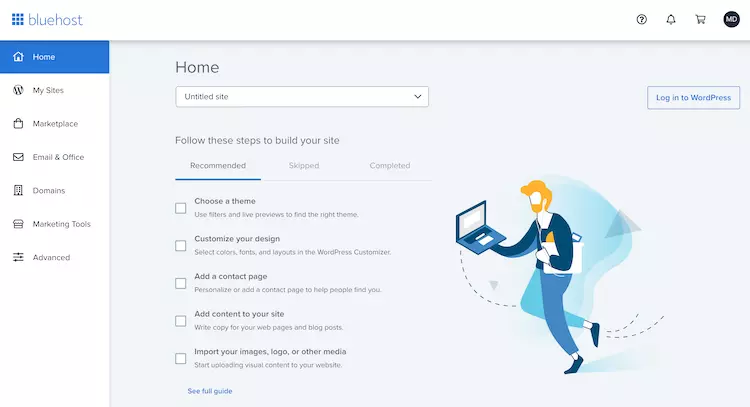
Bluehost also has a menu, but on the left side. It’s incredibly intuitive, so even beginners can easily find their way around. There you can add new sites (My Sites) and access the individual administration sections of each site. If you want to install something other than WordPress, you’ll find a selection of programs like Joomla and Drupal in the marketplace.
The Email & Office tab lists paid email accounts, while under Domains you can configure everything related to your website name, such as creating subdomains or managing redirects. And if you’re looking for advanced settings, the Advanced button will take you directly to the cPanel.
What we particularly liked about this interface is the separate administration area for each individual website. Under My Websites, all the websites you’ve created are listed, and clicking on them takes you to very comprehensive settings.

It’s similar to SiteGround, but Bluehost offers more management options. Here you can manage backups, implement the free CDN with one click, check security settings, see all plugins on your site and manage general settings. Oh, we forgot to mention the handy “Log in to WordPress” button as well.
Of course, not everything can be good, and although we tried to find bugs with both dashboards, we couldn’t find anything significant. One thing we didn’t like was that SiteGround kept logging us out when we weren’t active. With Bluehost, we didn’t like the constant switching back and forth from one site to another.
The bottom line is that Bluehost and SiteGround have created simple and easy-to-use dashboards so that even newbies can have a smooth experience.
Control Panel Comparison
While SiteGround decided to create its own custom control panel called Site Tools, Bluehost opted for a seamless cPanel integration. While cPanel is the usual favorite, we have to admit that SiteGround’s Site Tools are just as efficient. Perhaps even more efficient.
Since SiteGround focuses primarily on WordPress, Site Tools offers many options for setting up, developing and managing WordPress websites.
We’ve tested many hosting providers over the years, and those that offer a custom control panel rarely make the grade. They all strive for cPanel perfection, but they rarely make it. Well, SiteGround has succeeded. Site Tools is intuitive and functional.
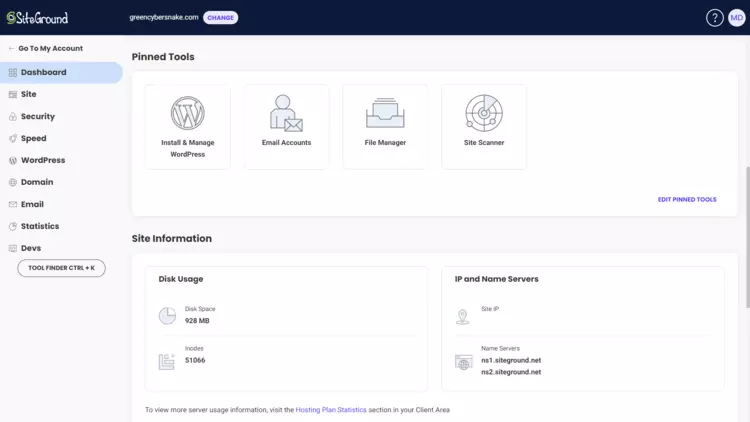
The menu on the left is straightforward and easy to navigate. In the “Security” category you can easily find SSLs, under “Domain” you can add additional domains or create subdomains, and under “Speed” you can enable or disable performance enhancements. You can also pin the most frequently used tools to the main page for quick access.
We had no problems when we wanted to perform various actions, such as creating a new website or setting up an e-mail address. Everything went smoothly.
Bluehost’s control panel, on the other hand, was more familiar to us. cPanel is now in our muscle memory. To access it, you need to click the Advanced button in the main dashboard.
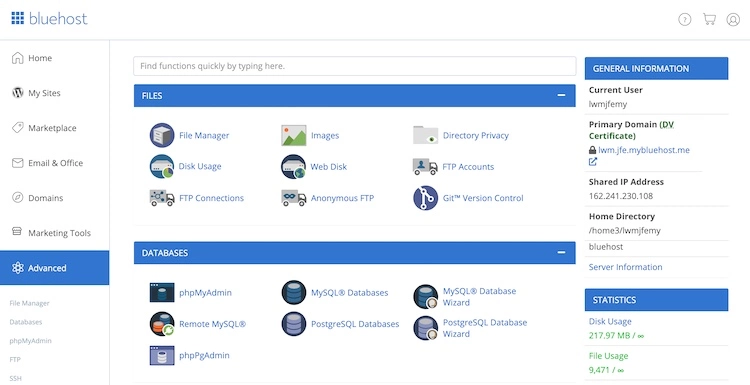
We hardly need to explain cPanel. From here you can access databases, create free email accounts, access the file manager and update PHP versions. If you are a beginner, you don’t need to worry. cPanel is easy to use and has built-in explanations for each tool. Also, there is a small search bar at the top in case you need to look for a specific function.
On the other hand, Bluehost has removed the entire Domains category from cPanel and integrated its own tool into the main menu on the left. I’m not sure why the cPanel tool wasn’t good enough for Bluehost, but it took us some time to get comfortable with it.
You have to remember that while Bluehost has integrated cPanel beautifully, we think SiteGround wins this round. SiteGround has created a custom control panel that makes some actions less time consuming and easier.
Website Staging Environments
SiteGround offers website staging starting from GrowBig, while Bluehost allows creating staging environments even with the cheapest rate.
A staging environment allows you to create a copy of your website. If you make some changes and make mistakes, the original website won’t suffer. Once you get the results you want, you can transfer the changes to the live site and all is well.
SiteGround offers an excellent WordPress testing environment. All you need to do is give it a name and click the Create button.

The provider creates a copy of your website from a backup copy, which you can work on freely. When you are satisfied with the changes, you can put it into operation just as easily as you created the copy. All of this is done through the Site Tools control panel.
The Bluehost staging tool is integrated directly into WordPress and is similarly easy to use. You simply initiate the creation of the copy, work on it, and make the changes live once you’re happy with them.
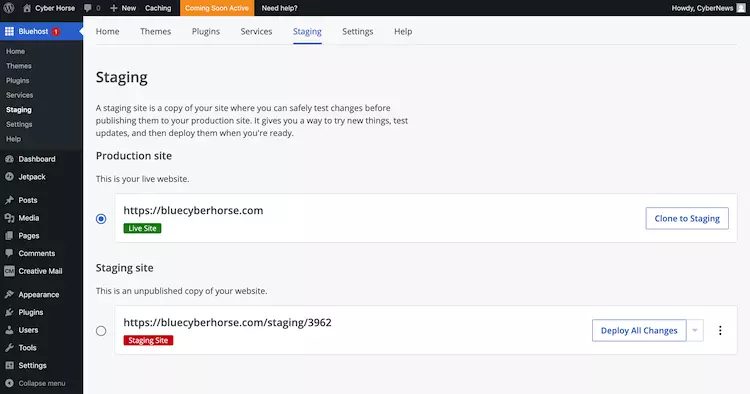
At this point, we would really like to praise Bluehost. It’s very rare that a staging tool is included in the cheapest tariff, even though it’s one of the features that can literally keep your website from collapsing. SiteGround is also amazing, but you need at least a mid-range tariff to use the tool.
All in all, both SiteGround and Bluehost have excellent interfaces and website management tools. But there are a few differences. While Bluehost comes out on top when it comes to site staging and simplicity, SiteGround offers a custom panel that is intuitive and easy to navigate.
Winner: SiteGround
SiteGround vs Bluehost performance
When it comes to comparing the performance of SiteGround and Bluehost, it’s clear that SiteGround is the one that focuses more on speed. While both providers were equally reliable with an uptime of 99.99%, SiteGround was both faster at loading websites and able to handle higher traffic.
Uptime & Response Time
Both Bluehost and SiteGround achieved 99.99% uptime. Bluehost was monitored for a little over 2 months, SiteGround only a few days before 2 months expired.
In all that time, SiteGround had 3 outages – a total of 7 minutes of downtime. As for the response time, it was quite stable with an average of 217 ms – one of the best results we have ever received, to be honest.

Bluehost had 6 failures with a total downtime of 11 minutes. However, the response time was not as stable. Initially, Bluehost was slower with a peak of 703 ms. Later, the speed stabilized and the provider achieved an average response time of 361 ms.
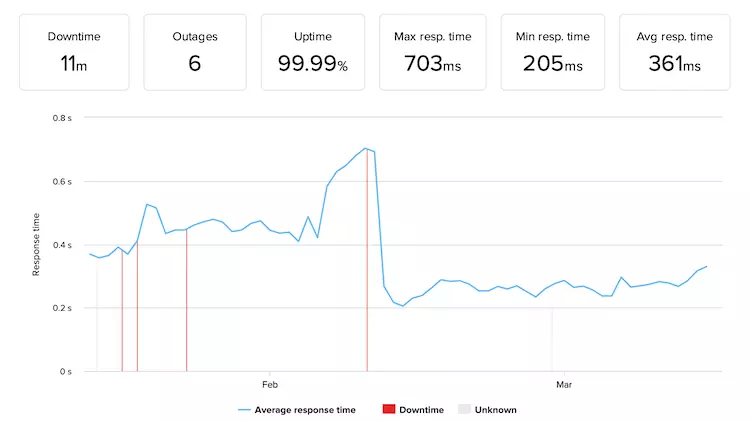
In general, both providers achieved excellent results in terms of uptime. You cannot expect anything better. SiteGround was a bit faster, though.
But as a rule of thumb, if the response time is up to 500 ms, it is considered excellent. In general, shared hosting providers achieve values around 600 ms, which makes SiteGround and Bluehost top performers in the industry.
Website Speed
In the speed department, SiteGround is a clear winner. Its Largest Contentful Paint (LCP) time is 872ms. In this time, SiteGround loads the most important parts of your website. It only takes a little longer, 1.1 seconds, for the loading circle to actually stop spinning.

LCP is very important here, as it shows both users and Google whether the website is fast. Up to 2.5 seconds is considered a good result.
At Bluehost, the LCP value is a bit slower at 1.8 seconds with no further delay until the site is fully loaded.
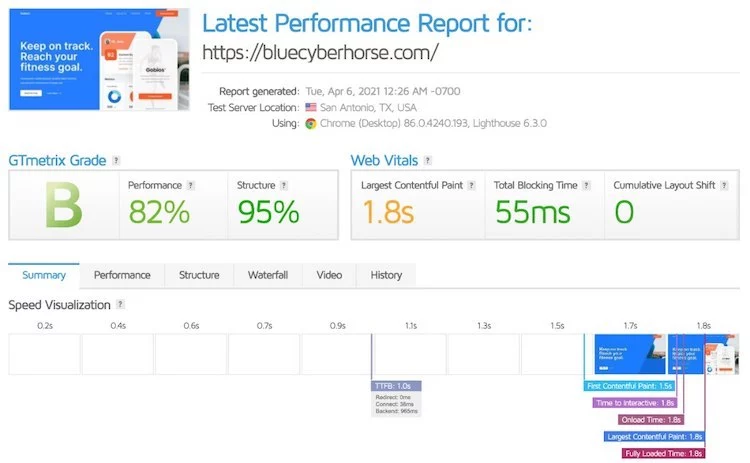
While Bluehost fits into the “good” result, there remains a smaller gap to fall out of this classification. Still, a load time of 1.8 seconds is something that very few websites achieve.
All in all, SiteGround wins the speed battle, but Bluehost is fast enough as well. Besides, it’s no surprise why SiteGround is faster – it uses the most advanced technology available, while Bluehost relies on older technology.
Stress Testing Results
To compare how each provider responds to a real-world scenario when 10 users scroll through a page, we sent 50 bots to each site over 5 minutes.
SiteGround handled the test perfectly. If you look at the blue line, which represents speed, it’s mostly steady. Even when more and more visitors (the gray line) are added.

This graph shows us that SiteGround doesn’t even flinch when the server is under heavy load.
As for Bluehost… It was not able to handle 50 bots. We talked about this in detail in the vendor’s performance review. We had to take out 5 bots at a time to find out how much it could handle. It turned out to be 15 virtual users.

Nevertheless, the blue line increases along with the gray one, which means that the provider has become slower.
This is not a perfect result and shows that Bluehost lacks performance compared to SiteGround.
Nevertheless, 50 VUs is the ultimate maximum we expect from a shared hosting provider. So, a performance-oriented provider like SiteGround is capable of delivering that performance. Meanwhile, 15 visitors at the same time is not so little either.
So again, the choice depends on your needs. Do you need the best of the best for a very competitive website, or are you just starting out and a cheaper option with reliable but not so powerful servers is sufficient?
All in all, both providers show good performance results. However, SiteGround proved to be faster and more powerful than Bluehost. It loaded pages twice as fast and was able to handle more than three times as much traffic.
Winner: SiteGround
Website security
In the security department, it’s easy to see which vendor is on top. SiteGround goes the extra mile and includes many security features in its plans. Bluehost, on the other hand, offers you only the bare essentials and makes you pay for the rest.
Well, both providers offer you the basics. SiteGround and Bluehost offer SSL certificates, CDN, and spam protection. SiteGround, however, offers some extras, such as daily backups. If you want this feature with Bluehost, you’ll have to pay $1.99/month for it or at least choose the Choice Plus plan.
Additionally, SiteGround also offers:
If you want the same level of security with Bluehost, you’ll have to pay at least $1.99/month more.
Since shared hosting means that numerous users are on the same server, you’d think that security would be taken much more seriously. SiteGround gets it. Bluehost… not so much.
Overall, both SiteGround and Bluehost offer basic protection. SiteGround, however, goes a step further and gives you more than just the minimum. Needless to say, SiteGround wins in this case.
Winner: SiteGround
Customer support
As far as customer support is concerned, SiteGround and Bluehost are very similar. They both have 24/7 live chat, phone and email options. You also get access to documentation and tutorials in knowledge bases. Bluehost did well in our test of live chat, but not as well as SiteGround.
One thing is for sure – it is easier to reach Bluehost support because each page has a corresponding button. With SiteGround, it’s better to read the knowledge base first before contacting support. And even then, you won’t be redirected to live chat for every category or issue. Some questions are redirected to tickets because SiteGround optimizes its support for efficiency. And that actually works.
The chat with SiteGround was one of the best we’ve had. A representative got back to us right away, and she was very friendly from the start. We wanted to know how many sites we could connect with the GrowBig plan.

We have to say that Toni gave us the most honest answer to this question. Normally agents would dodge this question. She even went a step further and told us how many WordPress sites we can connect and how many one-page HTML sites. She even had a reason for her openness – why would she lie when once we start using the service, we’ll figure out the limits ourselves?
Our experience with Bluehost’s customer service representative was similar, but not quite as pleasant.
We waited less than a minute for a representative to contact us, so that was immediate. This time, we wanted to know what collaboration tools Bluehost offered. If any.
We felt that the employee didn’t quite understand what we were about. She recommended BlueSky, a service where you can build a website with the help of Bluehost experts. But that’s not the answer we were looking for.

When we explained to the customer service representative that we were not interested in BlueSky Collaborators, she told us that no other collaboration tools were available.
So after some initial misunderstanding, we got my answer. But overall, we liked the experience with SiteGround better.
In addition to live chat, you can also access vendor knowledge bases. SiteGround has this help widget that appears on every page. And depending on which page you are on, you will get a list of the most popular questions about that page. If needed, you will be redirected directly to the knowledge base.
If you visit Bluehost’s dedicated support center, you will find something very similar. However, there are also several categories, such as FAQs, WordPress, Domains, Email or other interesting topics.

Both providers take good care of their documentation and tutorials, but SiteGround is perhaps a bit more up-to-date.
All in all, both SiteGround and Bluehost offer good customer support. The live chat is better at SiteGround, as the staff there is friendlier. They also seem to be more knowledgeable. Also, it is very easy to find tutorials at both providers.
Winner: SiteGround
Conclusion
The SiteGround vs Bluehost showdown offers a comprehensive comparison of these two hosting providers. The quick comparison reveals that both offer competitive pricing, with SiteGround being more affordable. Bluehost stands out in terms of hosting management, providing an intuitive account management dashboard and user-friendly control panel. SiteGround, on the other hand, excels in offering advanced website staging environments for easy testing and deployment.
In terms of performance, both providers deliver impressive uptime and response time, while Bluehost focuses on fast website speeds and SiteGround showcases exceptional stress testing results. Both providers prioritize website security and offer reliable customer support. Ultimately, choosing between SiteGround and Bluehost will depend on your specific needs and preferences, considering factors such as pricing, ease of use, performance, security, and customer support.
FAQs
Why did you choose SiteGround over Bluehost?
I chose SiteGround over Bluehost because of its superior performance and reliability. I extensively researched both hosting providers and found that SiteGround consistently had faster loading times and better uptime. Additionally, SiteGround’s customer support is highly praised, and their user-friendly interface made it easy for me to manage my website.
Is Bluehost a good option for beginners?
Yes, Bluehost is a great option for beginners. They offer a user-friendly interface and have a one-click WordPress installation, which makes it easy to set up a website. Bluehost also provides 24/7 customer support, ensuring that beginners can get assistance whenever they need it.
Does SiteGround offer better customer support than Bluehost?
In my experience, SiteGround’s customer support has been exceptional. They offer 24/7 live chat, phone, and ticket support, and their team is knowledgeable and responsive. I’ve received prompt and helpful assistance whenever I encountered any issues. While Bluehost also provides customer support, I found SiteGround’s support to be more reliable and efficient.
Which hosting provider offers better performance: SiteGround or Bluehost?
SiteGround has consistently outperformed Bluehost in terms of performance. SiteGround utilizes the latest technologies, such as SSD storage, NGINX servers, and the SuperCacher plugin, which significantly improve website loading times. Their servers are also highly optimized, resulting in better overall performance. Bluehost, on the other hand, may experience occasional performance issues, especially during peak traffic periods.
Can I easily migrate my website from Bluehost to SiteGround?
Yes, migrating your website from Bluehost to SiteGround is relatively straightforward. SiteGround provides a free website migration service, where their experts will handle the entire process for you. They will transfer your website files, databases, and domain name to ensure a smooth transition. SiteGround’s migration tool makes it convenient for users to switch hosting providers without any hassle.
To read more similar articles, click here.
Thanks for visiting our Website. If you appreciate our work, kindly show us some support in our comments section. 🙂

Norman Dwemer is a tech blogger who focuses on the future of technology. his blog delves into emerging technologies such as artificial intelligence, blockchain, and quantum computing, as well as their potential impact on our lives and society. Rachel’s writings provide a sneak peek into the future of tech, examining the possibilities and risks of these cutting-edge technologies. he also shares the most recent developments and research in these fields, delivering the latest news and insights to his readers. Norman’s visionary outlook on the world of tech has establihed his as an authoritative figure for anyone interested in the forefront of technology.