Today we’re going to look at Namecheap vs SiteGround. Normally, most people think that this is a classic ratio of quality to quantity, but our tests revealed something quite different. Let’s just say things aren’t always what they seem.
SiteGround is a pretty popular host, and with over 1.8 million websites hosted on its servers, there are few hosters more popular than them. Namecheap is also very popular, and the hoster has created a niche for itself by offering, as the name suggests, dirt-cheap hosting plans, something that SiteGround hasn’t quite managed to do yet.
Both hosters will compete against each other in terms of performance, customer service, pricing and many other important aspects of hosting. After each comparison, we will pick a winner, and in the end, we will have a final winner. However, you don’t have to agree with our decision, the most important thing is that you have the data to draw your own conclusions.
Table of Contents
Namecheap vs. SiteGround: Quick Comparison
Namecheap offers more expensive shared hosting plans for beginners. However, if you are new to web hosting or are just migrating your website, SiteGround is a better choice. With SiteGround, you get high-quality chat support and many hosting features that would be very expensive elsewhere.
Namecheap is the older host, founded in 2000 by Richard Kirkendall. Both hosts offer roughly the same services, including shared hosting, managed WordPress hosting, VPS hosting and dedicated server hosting. However, SiteGround is not a domain registrar, but you can register domains through SiteGround.
While Namecheap has earned a reputation for offering an extremely affordable service, SiteGround targets a different kind of customer and offers amazing customer support and performance at pretty expensive prices. SiteGround, on the other hand, was founded two years later by university friends in Bulgaria.
| Namecheap | SiteGround | |
|---|---|---|
| Founded in: | 2000 | 2004 |
| BBB Rating | F | A |
| Performance Rating | 3.2 / 5 | 4.4 / 5 |
| Support Rating | 4.1 / 5 | 4.9 / 5 |
| Our Rating: | 3.5 / 5 | 4.5 / 5 |
Both hosters have managed to hold their own very well. Namecheap has more than two million customers and has registered over seven million domains as a domain registrar. In fact, Namecheap is primarily a domain registrar and nothing else. We would say that Namecheap is also the best SiteGround alternative when it comes to buying domain names.
Basically, this is a comparison between two hosts selling essentially the same product, but targeting different market segments. It should be exciting to see how they do.
Popularity, Is It Really That Important?
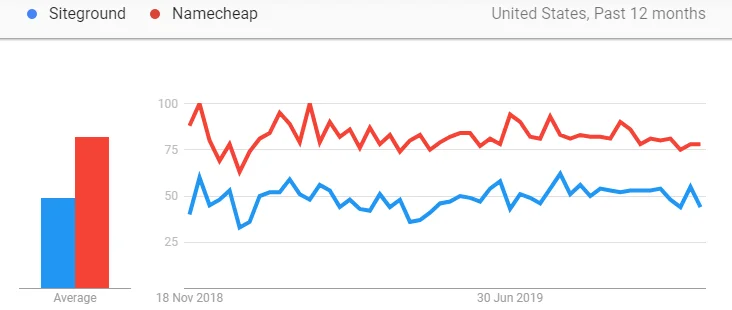
Since these are two extremely popular hosters, the question of the most popular hoster might not really be relevant. However, some people still think that popularity has something to do with the quality of hosting offered. Well, this couldn’t be further from the truth.
Some of the most popular hosts like GoDaddy and HostGator have really shocking statistics, while some of the less popular ones like A2 Hosting and WP Engine have been really impressive. This shows that the degree of a host’s popularity is rather irrelevant in the question of how good the host is.
Remember
Now that we are done with all that, if popularity is still that important to you, you should probably choose Namecheap. It is the more popular host. But if you want to base your decision on the quality of hosting from both hosts, then you need to read on.
Performance Comparison
We will use two important metrics to measure the quality of hosting, namely uptime and speed. Also take a look at the locations of the Siteground data centers, as we have tested from various locations around the world. If you have a data center close to your audience location, performance can be significantly increased. If you are interested in more detailed performance statistics, we recommend reading our in-depth SiteGround review.
Uptime
While Namecheap had an average uptime of 99.95% during our test period, SiteGround performed with an almost perfect uptime of 99.99%. For this reason alone, we should be able to say that SiteGround has better uptime.
However, when deciding on the quality of a host’s uptime, we don’t just look at uptime statistics. We also check whether a hoster offers an uptime guarantee and what compensation is promised if the uptime falls below this guarantee.
Uptime Guarantee
SiteGround offers an uptime guarantee of 99.99% on an annual basis. This means that if the uptime falls below 99.99%, users are entitled to some compensation. The agreement states that if uptime is less than 99.99% but more than 99%, users are entitled to one month of free hosting. For every 1% hosting that is below 99%, customers are also entitled to one month of free hosting (you can read the refund policy here).

Namecheap also has an uptime guarantee, but it’s not as structured as SiteGround’s and is a bit simpler in our opinion. Namecheap offers a 99.9% uptime guarantee and users are entitled to one free day of hosting for every hour of downtime if the uptime falls below 99.9%.
It is clear that SiteGround is absolutely above Namecheap when it comes to uptime guarantees as well.
Winner: SiteGround
SiteGround has easy uptime and easily outperforms Namecheap. That’s hardly competition. In fact, SiteGround is right up there with some of the best hosts in uptime like Bluehost.
Speed
Hopefully, this will be more of a competition. Since we already had websites on both hosters’ servers, we started checking server speed (we checked response times first, i.e. time to first byte) and our results were…. somewhat. Before testing, we disabled all speed optimization plugins to be as fair as possible. We tested from various locations, and here’s a snapshot of our results:
| SiteGround Speed | Namecheap Speed | |
|---|---|---|
| New York | 64ms | 109ms |
| Sydney | 241ms | 379ms |
| London | 70ms | 91ms |
| Singapore | 389ms | 406ms |
| Vancouver | 300ms | 482ms |
| New Delhi | 813ms | 914ms |
| Ottawa | 413ms | 489ms |
| Berlin | 291ms | 197ms |
| Amsterdam | 400ms | 912ms |
| Bangladesh | 895ms | 1.3 seconds |
SiteGround was the fastest in our test with an average response time of 421 ms. Namecheap, however, was a distant second with 708 ms. Not particularly inspiring from Namecheap, but it is what it is.
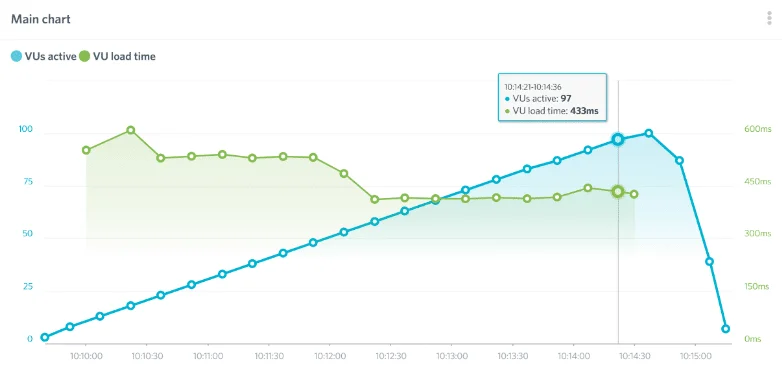
To measure stability and see if speeds degrade when traffic skyrockets (which it sometimes does), we sent over a hundred virtual users to our sites and checked whether or not speeds remained stable. As you can see below, SiteGround’s speed was relatively stable, while the same cannot be said about Namecheap.
Datacenters
SiteGround has data centers scattered around the globe, for example, in America, the UK, the Netherlands, and Singapore (for a full list, click here and see if you can find one near your main audience’s location).
Namecheap, on the other hand, has data centers in just two countries, the US and the UK.
CDN (Content Delivery Network)
Content delivery systems keep your website cached on servers all over the world and make it easier for visitors to load your page as fast as possible. It’s obvious that a server with CDN installed is faster than one without it.

Unfortunately, Namecheap doesn’t offer CDN integration on shared hosting plans, which is quite a shame since most hosters, especially the high-ranking ones like BlueHost and even the lower ones like DreamHost, at least offer Cloudflare CDN integration.
SiteGround, on the other hand, offers CDN (Cloudflare) integration on all hosting plans. This means that we have a clear winner here.
Winner: SiteGround
It’s clear as day. SiteGround is a much faster hoster, and it’s not even close.
Ease of Use
There are two things we are absolutely convinced of. First, no one wants to spend valuable time struggling with a confusing and unnecessarily complex user interface. Secondly, every webmaster, regardless of their skill level, wants to receive all the help they can from their hoster. Hosters that fulfill this requirement are immensely better than those that don’t.
User Interface
Where better to start? When it comes to user interface design, only two answers come to mind for us: Plesk and cPanel. SiteGround answers this question quite simply by offering cPanel for all hosting plans. Namecheap also offers cPanel for shared hosting plans, so there are no problems here.
Sign-up Process
The registration process was fairly simple with both providers. We only had to click through about three pages of forms before signing up. One thing we found interesting, however, is that Namecheap allows payment in Bitcoin, which is pretty awesome.
App Integration, Installation & Marketplace
Both hosts are great for multiple content management systems and provide access to MOJO Marketplace. Many things, including professional services, plug-ins, themes, templates, and add-ons, can be easily purchased through the marketplace. Both hosts also offer support for one-click WordPress installation, so you can set up a WordPress site as soon as you have access to your workspace.
Free Site Migration
It makes absolutely no sense to us that some hosters still don’t offer at least a free website migration, we’re looking at you, GoDaddy, or as Matt says down at Accounting, MovingPatriachicalFigure. But it is what it is, and some hosters still don’t offer it. SiteGround does offer free website migration, but only on select plans, and those are the higher-end plans. And you know what? We’ll be specific. If you purchase SiteGround’s Startup plan, you are not entitled to the single website migration service offered by SiteGround.
The Problem With Namecheap’s Migration Service
Namecheap, on the other hand, comes with a few problems. While Namecheap basically offers free website migration as published on their website, things get a bit more complicated along the way. First of all, we were impressed by Namecheap’s free website migration policy, which even promises that you’ll get a free year of hosting if your cPanel isn’t transferred within 24 hours or less and if you have more than 15 minutes of downtime.
Nice, isn’t it? But when we tried to contact customer support to understand how this service works, we were slain by a wall of knowledgebase articles that were mostly irrelevant to the question we were asking. This is annoying. We did some research on the Internet and found that many people had the same problem. This brings us to the question of whether or not Namecheap offers a free site migration. Literally, nobody knows.
Free Domains

Just like the free migration of websites, the free provision of domains should be a matter of course. Our experience with SiteGround has shown us that this is not the case. Unlike other providers such as GoDaddy and Bluehost, SiteGround is not interested in such philanthropic exercises of giving free domains to customers.
So, no, you won’t get a free domain with SiteGround. However, since Namecheap has made a name for itself registering domains, all offers come with a free domain. In fact, we’d be especially disappointed if they didn’t. But they do, so no disappointment for us. Praise be to the Lord of hosts.
Website Builder

If you don’t want to create your website with a content management system like WordPress, you can use the services of a website builder to create your own website. Many hosters offer the services of Weebly, a third-party website builder, and SiteGround does as well. Weebly is free to use, at least with SiteGround.
Namecheap, on the other hand, has recently developed a DIY site builder. While searching for a catchy and cool name (presumably there was a meeting on the subject), a clever mind came up with the name Website Builder, which is definitely not generic or common. We assume the other bright minds in the room agreed as well.
We tested Namecheap Website Builder and it was easy to use. Despite the fact that the website builder is set up like a separate service alongside the regular cPanel, which was a bit confusing as we had to keep re-entering passwords, the experience didn’t make us wish we were pressing our foot on an iron container. This means that it went reasonably well.
Staging Environments
For new users, a staging environment is probably one of the most important things to have. It allows you to test your ideas on a dummy version of your site, and if you make a mistake, it prevents that mistake from going online. SiteGround offers a staging environment for select plans (so not for the StartUp plan) and Namecheap offers a separate staging environment called Sandbox. However, you need to sign up for it separately.
Winner: SiteGround
Free domain or not, SiteGround is the winner for us because we experienced an absolute lack of drama, something that Namecheap sorely lacked.
Money-Back Guarantee
SiteGround offers a basic thirty-day money-back guarantee for shared hosting plans and a fifteen-day money-back guarantee for cloud hosting plans. Namecheap’s money-back guarantee is also quite short, with the host only offering a thirty-day money-back guarantee for VPS, shared hosting and dedicated server hosting plans. For reseller plans, there is only a 14-day money-back guarantee. The usual refund conditions apply to both hosts, as the price of additional services like free domains will be deducted from your refund.
Winner: SiteGround
This was a really poor performance, especially because we saw that providers like A2 Hosting and BlueHost offer incredible money-back guarantees. There has to be a winner and our choice falls on SiteGround.
SiteGround vs Namecheap: Customer Support & Reliability
If no one has told you this yet, allow us to be the first to break the news to you. Hosting can be a breakneck job. And since it can be so technical, even the best and most experienced webmasters regularly find themselves in a bind. In such situations, your host’s customer support is usually the saving grace. That’s why it’s important that customer support is easily accessible and very helpful.
Customer Support Tests
Both SiteGround and Namecheap use roughly the same customer support channels, and both are open 24/7. SiteGround offers ticketing, phone, and live chat support, which is industry standard, so no complaints there. Namecheap also offers all of these options, with the exception of phone support.
Since both providers are so popular, we didn’t expect great things from either of them. This is because, in our experience, the most popular hosters usually don’t have the best customer service. However, we weren’t sure if this rule would apply to SiteGround and Namecheap as many people, both online and offline, seem to rate the customer service of both hosters very highly. All in all, we were excited to start testing.
Live Chat Test
We first tried to connect to a representative via Namecheap’s live chat channel. The connection was fast enough (less than five minutes or so). Then the problem started. The staff was friendly enough, but could only answer our most basic questions. For other questions, we were either redirected to another live representative (who, unsurprisingly, was unable to answer our questions), or we were confused (for lack of a better word) with mostly irrelevant articles from the knowledge base. Were we disappointed? Yes.
It took little or no time to connect with a SiteGround live representative, and a live representative spoke with us within seconds. Once we were connected to a live representative, we were able to see their picture, a brief resume, their hobbies, and even an introductory paragraph from the host.
This raised our expectations, and we are happy to say that SiteGround met those expectations with ease. The staff we spoke with easily understood our questions and were able to answer them all succinctly. The live chat experience we had was certainly better than the one we had with Namecheap.
Phone Support

SiteGround did a great job providing us with excellent phone support.
Ticketing Support
Tickets are returned by both hosts, and within 24 hours! The responses are short and sweet, and we found it easy to follow the instructions there. The ticket channel is, in our opinion, the best way to get advice from customer service, especially if it’s not an urgent matter.
Knowledge Base
Both hosts have an up-to-date knowledge base, and HostGator maintains an extensive and well-coordinated FAQ section.
Winner: SiteGround
The winner from the start was SiteGround. The customer support structure offered is far superior to Namecheap’s. In fact, in terms of customer support, only hosters with a small customer base, like WP Engine and BlueHost, can even begin to match SiteGround’s customer support. You can check how well SiteGround compares to A2 Hosting if you like.
Security Analysis
The Internet is a dangerous place, and although all hosters offer at least some level of standard security, the quality is rarely the same. Simply put, some hosters are more reliable than others, and some offer more for free than others.
Backup Policy
When you’re working on the Internet, one of the first things you need to think about is your backup policy. And believe us, a good backup is often the difference between a sigh of relief and a lot of tears and gnashing of teeth. SiteGround offers a free, limited daily backup and restore service of thirty days for shared hosting plans and seven days for cloud hosting plans.
The backup tool offered by SiteGround allows users to easily create backups and restore old versions of your website, and you get access to 30 backup copies of your website for every day of the last month. Subscribers to the StartUp plan, however, do not have access to this tool, but they can add it to their account by purchasing it.
Namecheap has a backup tool called Auto-Backup, which is free on premium shared hosting plans and backs up data automatically. However, with other, lower plans, users have to pay between $2.44 and $4.44 for this service. In addition, Namecheap offers a standard weekly backup service. However, if your website becomes larger than 25 GB and/or contains more than 20,000 inodes, it will be automatically excluded from the weekly backups.
Firewall Protection
SiteGround provides firewall protection with ModSecurity, an open source firewall web application firewall. This technology provides comprehensive protection for websites hosted on SiteGround’s servers and protects websites from hackers attempting to gain access to databases stored on the servers. For firewall protection, Namecheap also uses ModSecurity, which is configured to protect against cross-site scripting, session hijacking, malicious user agents, SQL injection, Trojans and other similar threats.
ModSecurity supports a flexible rules engine that can perform both simple and complex operations. Basically, SiteGround and Namecheap use the same level of firewall protection.
Winner: SiteGround
We have rarely come across hosts with the sort of comprehensive security coverage offered by SiteGround. Coupled with a great and free (for the most part, at least) backup service, SiteGround has managed to triumph yet again.
Namecheap Vs Siteground: Pricing Analysis, How Much Should You Really Pay?
If you’re a cheapskate (as we sometimes are), one of the things you consider before you buy something is the price. It’s the same with hosting. As we like to say, you can even forgive bad hosting if the price is right. So, we will not only look for the cheapest web hosting, but for the one that offers the best value for money.
Initially, we will only compare shared hosting and managed WordPress hosting plans. Why, you may ask. Well, the answer is quite simple: most websites on the Internet are hosted on shared servers, and we are a democratic type.
Shared Hosting Price Comparison
SiteGround has three levels of shared hosting plans and they are the StartUp, GrowBig and the GoGeek plans. Namecheap also has three shared hosting plans and they are the Stellar, Stellar Plus and Stellar Business plans.

SiteGround’s basic plan is the StartUp plan and includes one website, 10 GB of storage, unlimited bandwidth, free Cloudflare CDN, free SSL certificate, free daily backups and unlimited email. The plan costs $3.99. Namecheap’s cheapest plan (yes, that was on purpose, too. Sue us) is the Stellar plan, which includes three websites, 20 GB of SSD and unmetered bandwidth for $1.98 per month.

Namecheap’s cheapest plan (yes, that was on purpose, too. Sue us) is the Stellar plan, which includes three websites, 20 GB of SSD and unmetered bandwidth for $1.98 per month.
Managed WordPress Hosting Plans
Both hosters offer three tiers of managed WordPress hosting. While SiteGround mostly keeps the names and prices of the shared hosting plans, Namecheap changes the offer completely and offers three tiers called EasyWp Starter, EasyWp Turbo and EasyWp Supersonic.

Namecheap’s cheapest offer is the EasyWp Starter plan with 10 GB of storage and a capacity for 50,000 monthly visits. It costs $34.88.
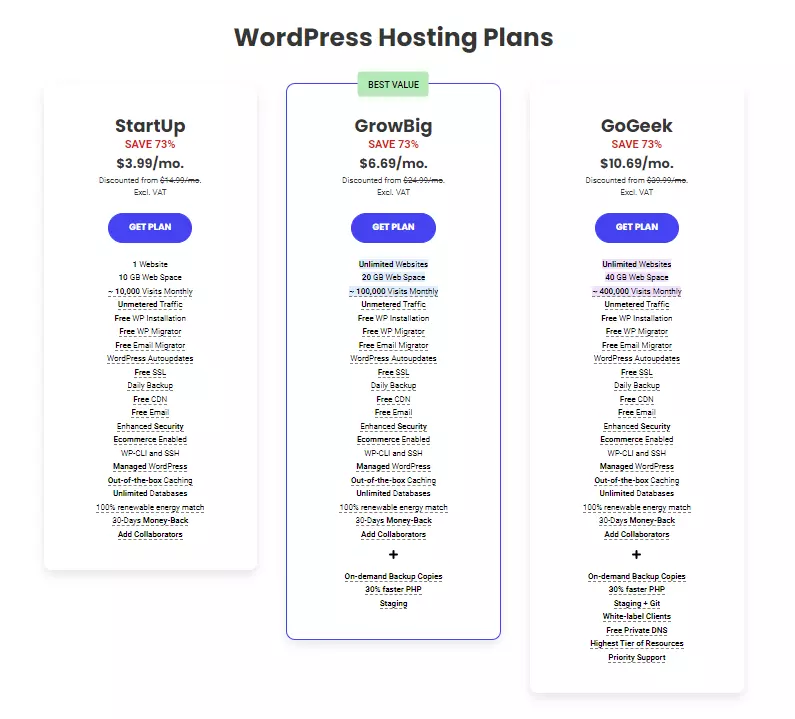
This plan is directly comparable to SiteGround’s cheapest WordPress plan, the StartUp plan, which has the same specifications as the shared hosting plan and costs $3.99. The StartUp plan has a capacity for about 10,000 visits.
The prices offered by both hosts for this plan are now somewhat comparable, and since SiteGround’s performance is far superior, we would choose SiteGround.
Winner: Namecheap
Despite the fact that SiteGround offers more overall, we cannot deny that Namecheap prices and value offered simply blows SiteGround away. Even more popular and cheaper hosters like GoDaddy and HostGator will have a hard time beating Namecheap’s prices.
Namecheap vs SiteGround: Extra Features Comparisons
SiteGround Has The Following Extra Features:
Namecheap Has The Following Extra Features:
Winner: Namecheap
This may be a bit subjective, but we feel that SiteGround’s features are overall more important for running a website than Namecheap’s.
Namecheap vs SiteGround: Major Differences
Conclusion
For SiteGround, it was quite simple. Overall, SiteGround emerges as the winner, losing out on only one crucial point, and that is the price. However, if you’re on a budget and aren’t particularly concerned about the overall quality of the hosting you’re paying for, Namecheap is probably the best hoster for you. On the other hand, if you are like us and care about things like speed, uptime and customer support, you should choose SiteGround. For us, the answer to the Namecheap vs. SiteGround question is quite simple: SiteGround is vastly superior to Namecheap.
FAQ’s
How was the customer support of both hosting providers?
Both SiteGround and HostGator offered good customer support, but SiteGround impressed me more. Their support team was not only responsive but also knowledgeable and willing to go the extra mile to assist with any issues I encountered.
What about the features provided by SiteGround and HostGator?
SiteGround and HostGator both offer a range of features, but SiteGround’s offerings seemed more advanced and tailored for various website needs. Their user-friendly control panel and additional tools like free website migration and daily backups were impressive.
Were there any issues with the usability of their interfaces?
Not at all! Both SiteGround and HostGator provide user-friendly interfaces that are easy to navigate, even for someone with limited technical knowledge like myself.
Did you encounter any downsides with either SiteGround or HostGator?
One minor downside I noticed with SiteGround was the limited storage space on their basic plans, which may not be ideal for websites with extensive media content. As for HostGator, occasional slow response times from customer support were reported.
How was the experience of migrating your website to SiteGround or HostGator?
Migrating my website to both SiteGround and HostGator was relatively smooth. Both hosting providers offer free website migration services, which made the process hassle-free. However, I noticed that SiteGround’s support team was more hands-on during the migration process, ensuring that everything went smoothly and without any issues.
To read more similar articles, click here.
Thanks for visiting our Website. If you appreciate our work, kindly show us some support in our comments section. 🙂

Norman Dwemer is a tech blogger who focuses on the future of technology. his blog delves into emerging technologies such as artificial intelligence, blockchain, and quantum computing, as well as their potential impact on our lives and society. Rachel’s writings provide a sneak peek into the future of tech, examining the possibilities and risks of these cutting-edge technologies. he also shares the most recent developments and research in these fields, delivering the latest news and insights to his readers. Norman’s visionary outlook on the world of tech has establihed his as an authoritative figure for anyone interested in the forefront of technology.