iThemes Security Review: The Ultimate Website Defense (March 2026)

Let’s go in the deep of the iThemes Security plugin Review
Keep your site locked down and secure with the comprehensive iThemes Security plugin. In our iThemes Security review, you’ll discover how it protects your site from all kinds of security threats, from brute force login attempts to annoying bots and vulnerabilities.
Table of Contents
Why Do You Need a Security Plugin?

It is true that WordPress is a fairly secure CMS right out of the box. It receives frequent updates to fix bugs and plug security holes as they arise.
But it is also one of the most hacker-attacked content marketing systems due to its enormous popularity.
Despite their efforts to keep their sites secure, most users are not security experts. They may not be aware of security best practices and may inadvertently introduce vulnerabilities through their actions (or lack of action).
All sites are vulnerable. Hackers attack all types of websites, not only to steal data but also to spread malicious code to visitors.
And, if your site is hacked, it can be a major blow from which it is difficult to recover. Not only do you have to repair your hacked site, but also the damage done to your reputation. Your users may have trouble trusting your site in the future.
About iThemes Security
iThemes Security is the best WordPress security plugin created by the security experts at iThemes. The plugin helps you to secure and protect your WordPress site from all security threats and gives you peace of mind. It is simple and easy to use; you can easily use it even if you are a beginner.
The plugin fixes the most common security issues and protects your site from hacks, malware, and breaches. It adds an extra layer of protection to your WordPress site to make it impossible for online villains to crack your site.
The main features of the plugin are brute force protection, file change detection, 404 detection, secure password enforcement, and database backups. In addition, there are many more brilliant security features in the plugin. Above all, instant email notifications upon threat detection help you fix problems quickly.
Lock Down Your Site with iThemes Security Pro
The Pro version of iThemes provides more advanced features and automation to save you time and keep your site even more secure, including:
How to Set Up iThemes Security On Your Site
Important: Before installing the iThemes Security plugin and activating any of its security features, be sure to make a full backup of your site. This is because the plugin makes changes to the database and site files that, on rare occasions, can cause problems with your site.
After installing and activating the plugin, you will see a notification to activate iThemes Brute Force Network Protection, which is free. This connects you to the iThemes network, so known brute force attackers already in your database will be automatically blocked from entering your site

Just fill in your email address to get the free API key.
Now you can go to Security ” Settings to choose the security options you want to enable.
Looking at the settings screen can be a bit overwhelming with all the options available:

However, you will notice that the recommended options are automatically displayed, while the more advanced ones are hidden.
Each option has a brief description of what it does. You can choose which ones you want to enable and configure.
Features with an Enable button are easy to configure: just click the button and you’re done.
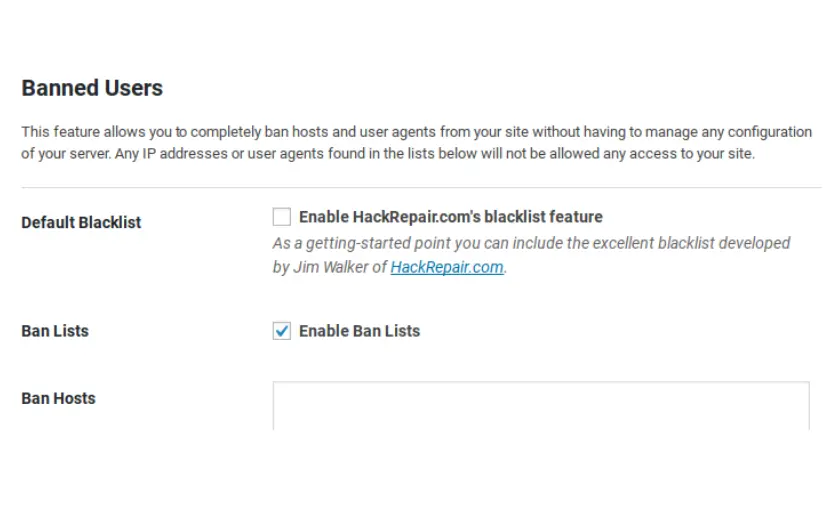
Features with a Configure options button may require you to review the settings or fill in some options to get started. For example, if you click Prohibited Users, you can manually enter specific IP addresses to prohibit:
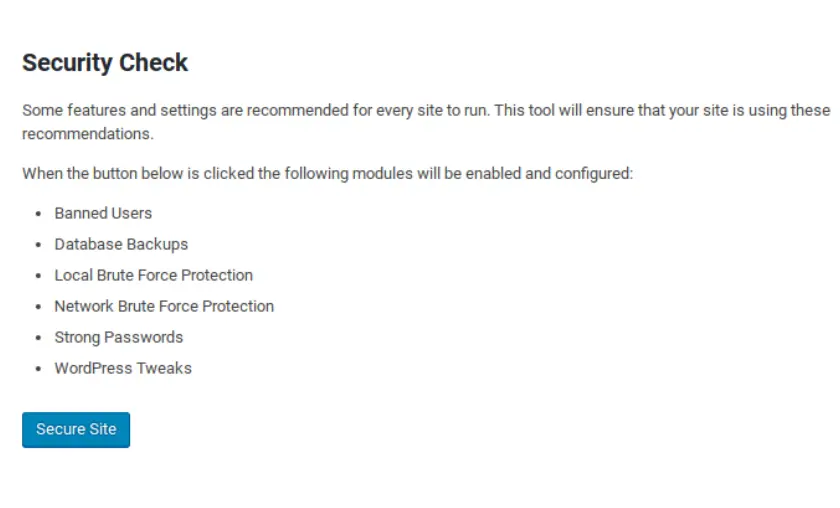
You can also navigate to Security ” Security Check to scan your site.
Support & Documentation
The explanations provided in the plugin control panel make it clear what each option does. The FAQ on WordPress.org addresses the most common problems and the steps you can take to fix the problem. More help articles are also available on the official iThemes support site.
For the free version of the plugin, community support is available on the WordPress.org support forums, where users help each other. Most support issues are resolved quickly.
Users of iThemes Security Pro have access to official developer support.
Pricing for iThemes Security
iThemes Security has 3 different pricing plans called Basic, Plus, and Agency. You can choose a plan depending on the number of sites you want to use iThemes Security on.
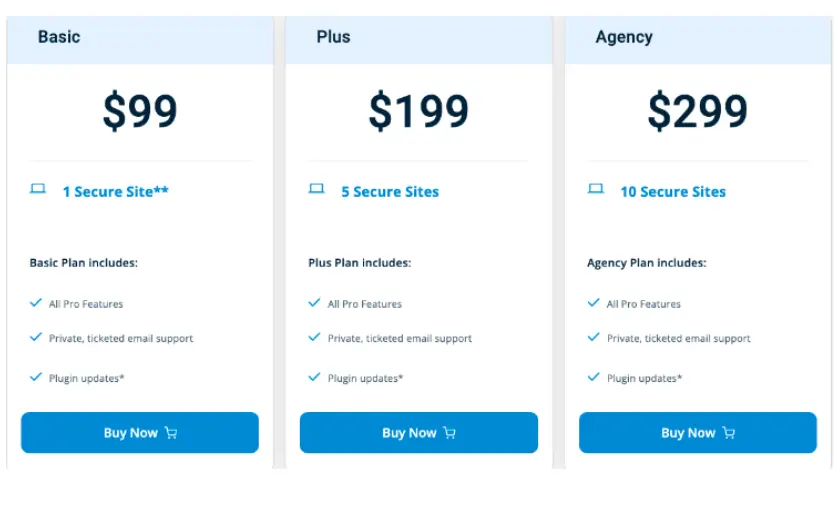
Basic is the initial plan that costs $99 per year and supports 1 WordPress site. If you only manage 1 website, this is the ideal plan for you.
If you have up to 5 sites, check out the Plus plan for $199. It’s ideal for medium-sized business owners and freelancers.
For up to 10 sites, there is an Agency plan at $299.
All plans include 1 year of technical support and 1 year of plugin updates. iThemes Sync helps you manage multiple WordPress sites from a single dashboard, including one-click WordPress updates, uptime monitoring, WordPress theme, plugin manager, etc.
iThemes Security vs. WordFence Security
Looking for the best security plugin for your website?
You may have heard of WordFence Security, another popular free security plugin.
After testing both plugins, we found that, while WordFence Security may be a good basic security plugin, it puts a significant load on your server and has a clunky user interface. (See our full review of WordFence Security for more details).
iThemes Security has some features that may slow down your site, such as the File Change Detection features, but overall it works better. Keep in mind: anything that continuously scans your files will consume resources.
However, because iThemes Security is so customizable, you can choose which features to enable. You can easily avoid those that may slow down your site, or only run them during periods of low traffic.
FAQ’s
Does the free version of iThemes Security provide sufficient protection?
The free version of iThemes Security offers a good level of protection with essential security features. However, if you manage multiple websites or require advanced automation and additional security measures like 2-factor authentication and password expiration enforcement, upgrading to iThemes Security Pro is recommended for comprehensive protection.
Does iThemes Security provide customer support for its users?
Yes, users of iThemes Security Pro have access to official developer support, which ensures timely assistance and guidance for any security-related queries or issues. Additionally, for the free version, community support is available on the WordPress.org support forums, where users can help each other with common issues and solutions.
What is the purpose of a security plugin for WordPress?
A security plugin for WordPress serves the vital function of fortifying your website against various cyber threats and vulnerabilities. It provides multiple layers of protection, including blocking malicious IP addresses, detecting unauthorized file changes, enforcing strong passwords, and scanning for malware. Ultimately, the security plugin helps maintain the integrity and safety of your WordPress site, ensuring a safer user experience for visitors.
Is WordPress not secure enough on its own? Why do I need a security plugin?
While WordPress is continuously updated to address security concerns, its widespread popularity makes it a target for hackers. Many users may not be security experts and could inadvertently introduce vulnerabilities. A security plugin like iThemes Security adds an extra layer of protection, safeguarding your site from sophisticated attacks and emerging threats that may not be fully addressed by default WordPress security measures.
Can a security plugin slow down my website?
Some security features, like File Change Detection, may consume server resources and potentially impact website speed. However, with iThemes Security, you have the flexibility to enable or disable specific features, allowing you to tailor the plugin according to your site’s needs. Selectively enabling resource-intensive options during low-traffic periods can minimize any impact on site performance.

Mike DaVinci HighTechBlogging.com
Mike DaVinci is a skilled content writer with a talent for storytelling. He specializes in creating captivating narratives that engage readers and leave them feeling inspired. His writing has been featured in various publications, including magazines, blogs, and business websites. Mike’s particular interest in human interest stories allows him to uncover the heart of any story and convey it to his readers in an emotional and authentic way. He believes that storytelling is a powerful tool for connecting with people and inspiring positive change in the world.
To read more similar articles, click here
Thanks for visiting our Website. If you appreciate our work, kindly show us some support in our comments section. 🙂