In this comparison between Hostinger vs HostGator, I will give you a detailed breakdown of the prices, usability, performance, security and customer support for both hosting providers.
Hostinger and HostGator offer very affordable hosting solutions, which makes them extremely attractive for users on a tight budget. Not only that, but both providers excel in reliable and fast performance results.
They also cover basic security needs and have a trained team of customer service representatives available 24/7 in case something goes wrong.
On the surface, both providers seem very similar, but are they really? In this comparison between HostGator and Hostinger, I want to uncover the differences and help you choose the right provider for you.
Table of Contents
Hostinger vs HostGator: Quick Comparison
Both Hostinger and HostGator are well-known and affordable hosting providers that come up with resource-rich plans and good performance results. Hostinger is a star when it comes to the lowest prices on the market, while HostGator is known for its “unlimited” hosting plans.
To better understand how the two compare to each other, I’ve created a table with the main features of the providers. However, if you want to see a more detailed summary, skip to the conclusion at the end.
| Hostinger | HostGator | |
| Rating | 4.8⭐⭐⭐⭐⭐ | 4.0⭐⭐⭐⭐ |
| Price from | From $2.99/month | From $3.75/month |
| Free domain | No | Yes |
| Hosting types | WordPress, VPS, cloud, cPanel, Minecraft, and CyberPanel VPS hosting | WordPress, VPS, cloud, and dedicated server hosting |
| Control panel | Native hPanel control panel | Native dashboard +slightly customized cPanel integration |
| Security | Free SSL, server monitoring, weekly/daily backups, DDoS protection, 2-factor-authentication | Free SSL, server monitoring, automated backups, and DDoS protection |
| Support | 24/7 live chat and email | 24/7 live chat and phone |
| Website migration | WordPress, cPanel & WHM, and other control panel migrations | WordPress and cPanel & WHM website migration |
| Extras | RoR hosting support, email account, and caching | RoR hosting support and email accounts |
| 💻 Website | www.hostinger.com | www.hostgator.com |
Winner: Hostinger
Hostinger vs HostGator: Pricing Comparison
Between the two hosting providers, Hostinger offers more affordable plans starting at just $2.69/month. In comparison, HostGator’s cheapest shared hosting plan costs $2.75/month.
As for other types of hosting, here are some of the scalable options that both providers offer:
| Hosting type | Hostinger | HostGator |
| Shared hosting | ✔️ | ✔️ |
| WordPress hosting | ✔️ | ✔️ |
| Cloud hosting | ✔️ | ✔️ |
| VPS hosting | ✔️ | ✔️ |
| cPanel hosting | ✔️ | ❌ |
| Minecraft hosting | ✔️ | ❌ |
| CyberPanel hosting | ✔️ | ❌ |
| Dedicated hosting | ❌ | ✔️ |
| Visit Hostinger | Visit HostGator |
As you can see, both hosting providers offer many hosting services. However, the most popular option is still shared hosting, and that’s what I’m going to focus on.
Both hosting providers have a few features in common. You get a custom domain name, an SSL certificate and at least 100 email accounts with all shared hosting plans from Hostinger and HostGator.
Here you can see what the cheapest offer from the two providers looks like:
Looking at the feature list, you might think that HostGator is better with unlimited storage. However, there is no such thing as “unlimited“. Host has set a limit for disk and bandwidth usage, which is customized for hosting websites for individuals and small businesses.
Although the cheapest options are always tempting, both Hostinger and HostGator have 2 other shared hosting offers to entice you.
So, which of these offers best suits your needs and requirements?
Hostinger offers you 2 shared and 1 cloud hosting option with prices ranging from $2.99/month to $9.99/month.
According to Hostinger, the Premium plan is the most popular option at $2.99/month, and for good reason. For a reasonable price, you can host 100 websites and the storage space is very generous (100 GB). Plus, a free domain is included.
One more thing: Hostinger offers a 30-day money-back guarantee. Within this period, you can get a full refund for the services. Note, however, that a domain name is non-refundable.
Best Value
To get the best value for your money at Hostinger, you should consider the Premium plan. For $2.99/month you get generous hosting space and the freedom to host up to 100 websites and email accounts.
Just like Hostinger, HostGator also has 3 shared hosting plans. Prices for these start at $3.75/month and go up to $6.25/month.
HostGator also has a plan that it considers the best value for money among the 3. The provider’s official recommendation is its baby plan for $4.50/month. And it’s not hard to see why. For just $0.75/month more than Hatchling, you can host unlimited websites. At the same time, the renewal fees for Baby are much lower than for the Business plan.
One note: HostGator offers a 30-day money-back guarantee. However, note that items like a domain name are non-refundable.
Best Value
If 1 website isn’t enough for you, I suggest signing up for a 3-year subscription with the Baby plan. For $4.50/month you can host an unlimited number of websites, along with unlimited storage, bandwidth and email accounts.
In short, both vendors deliver resource-rich plans at very competitive prices. However, if price is considered the main decision factor, Hostinger wins this round.
Winner: Hostinger
Hostinger vs HostGator: Ease Of Use
Both Hostinger and HostGator are aimed at beginners and therefore offer simple user interfaces. Although similar in terms of simplicity, Hostinger and HostGator use different management systems. Hostinger gives you a single native hPanel, while HostGator uses a classic mix of native dashboard and cPanel.
One great thing about Hostinger is that it makes the setup process extremely fast and easy. Immediately after account creation, you will find yourself in an automatic account setup wizard.
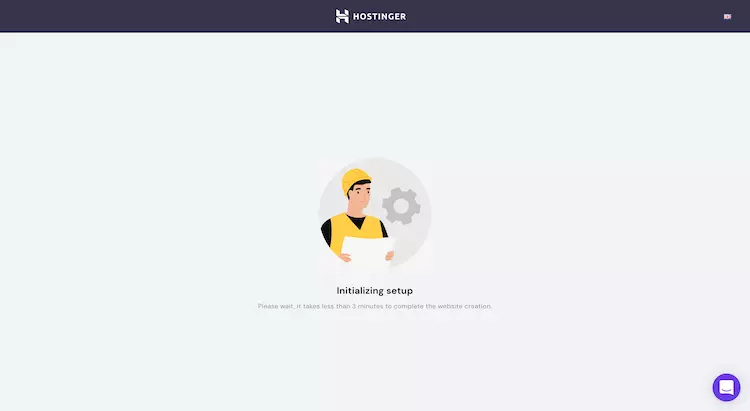
It will help you activate SSL certificates, register domains and set up your hosting environment.
You’ll also be able to use Hostinger’s custom control panel – hPanel. It offers a clean, organized and user-friendly interface that will let you access and manage various tools such as domain names, SSL configuration, email accounts, databases, a CMS installer and much more.

On the other hand, there is HostGator, which includes a native user interface and cPanel.
HostGator’s native UI handles basic tasks such as billing, connecting to support, accessing the HostGator marketplace, and serves as a link to the cPanel.

Through the cPanel you can access more advanced tools, such as email accounts and files on your server, database management and security features. Simply put, all the settings for managing your website and the most important tools are located in the cPanel.

Here you can also find the Softaculous Installer app, which allows you to install WordPress or any other CMS of your choice. You can find more information about the provider’s management features in the HostGator review.
Overall, both providers are very simple and easy to use in terms of management. However, with its custom control panel and automatic setup wizard that practically holds your hand, Hostinger comes out on top in this round.
Winner: Hostinger
Hostinger vs HostGator Performance
In my time with Hostinger and HostGator, I’ve found that both hosting services offer similar performance. However, to determine a winner, I ran both through a series of tests. In doing so, I found that Hostinger offered slightly better uptime, response time, and faster loading speeds.
The performance difference between HostGator and Hostinger is not that great. However, as your site grows and you add more content, graphics, CSS/JS scripts, etc., the slight advantage of Hostinger might be just what you need.
Uptime & Response Time
For this test, I examined both providers over an almost identical period of time – just under 2 months. Here are my results.
In the 2 months of the study, Hostinger did not have a single failure, resulting in a perfect uptime of 100%.
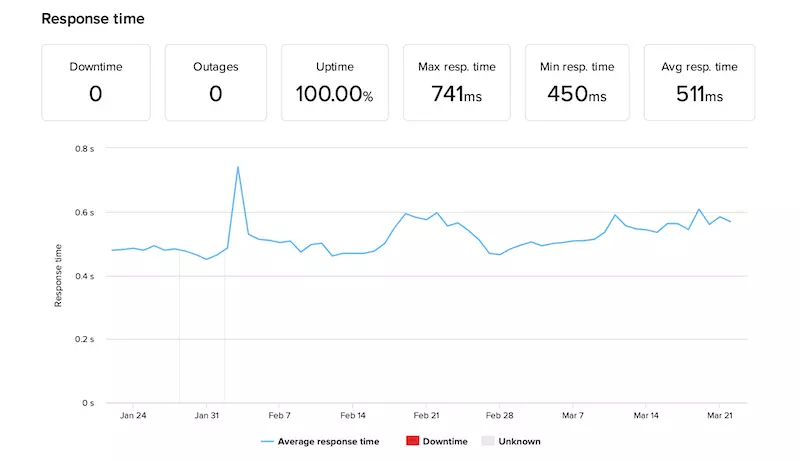
That is excellent! However, it is not realistic to expect 100% availability in the long run (>1 year). However, Hostinger gives a standard 99.9% uptime guarantee.
As for response time, I’ve achieved an average response time of 511 ms – this is the time it takes for the browser to retrieve the HTTP headers and the first byte of data. This is also within the industry average of 600 ms.
HostGator experienced 3 outages or 5 minutes of downtime in 2 months. This has brought HostGator’s uptime to an impressive >99.99%.
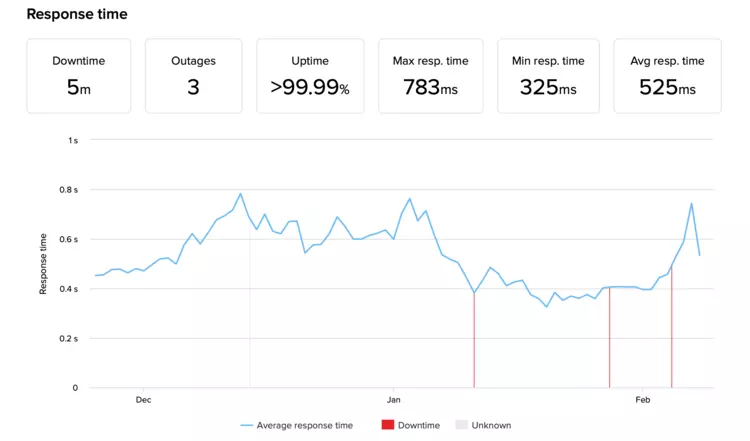
Just like Hostinger, HostGator also offers the usual 99.9% uptime guarantee. Knowing that, I’m even more impressed with the results I got.
In terms of server speeds, I got an average response time of 525 ms. That’s only slightly slower than Hostinger, but HostGator is still below the market average of 600 ms.
In short, both hosters performed valiantly and went hand-in-hand in terms of uptime and response time. However, I have to admit that Hostinger performed slightly better overall.
Website Speed
I host my website with both providers in the USA. Therefore, the loading speed also takes place in the USA. It’s important to know that HostGator has data centers only in the USA, while Hostinger lets you choose one of four locations (USA, Lithuania, Netherlands and Singapore) for their shared hosting packages.
Now, before I talk about the speed and performance of each hosting provider, you need to familiarize yourself with a few terms:
With that in mind, here’s how my Hostinger website performed:
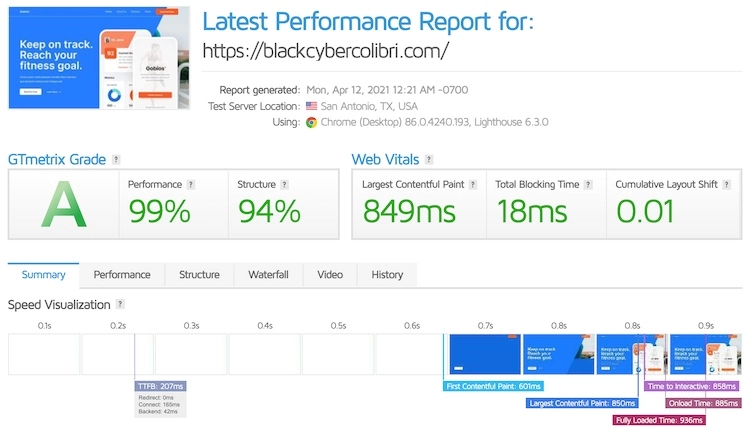
As you can see, the site has an LCP of 849ms and a Fully Loaded Time of 936ms. Both values are far below the industry average, which again proves how fast Hostinger is. This easily puts Hostinger among the fastest hosting providers on the market.
Moving on, here’s how my HostGator website held up:
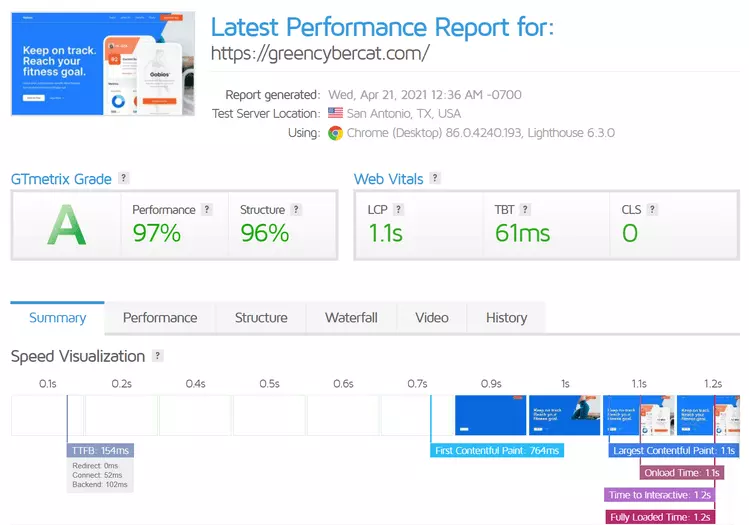
As you can see, the LCP here is 1.1s, while the Fully Loaded Time is 1.2s. Again, both measurements are well below the undesirable 2.5 and 3 seconds respectively.
However, Hostinger is slightly faster than HostGator, which gives him the win in this round.
Overall, Hostinger and HostGator are pretty much equal rivals in terms of overall performance. However, it’s pretty clear that this comparison between Hostinger and HostGator is in Hostinger’s favor, as Host was more reliable and faster overall.
Winner: Hostinger
Website Security
Hostinger and HostGator cover the basic security features you need to keep your website safe and secure. With both hosting providers you’ll find the following features:
Hostinger also has 2-factor authentication. HostGator, on the other hand, does without this basic feature.
Apart from that, it is worth mentioning that Hostinger offers weekly backups with the Basic and Premium plans. Daily backups are only available with the Business plan. Unfortunately, HostGator is not that transparent. All plans receive automatic backups. While it states that backups can be done daily, weekly, and monthly, the schedule is unclear, and you will be asked to pay if you want to restore any of the versions.
There are also some differences in the way Hostinger and HostGator handle server-level security:
Apart from these basic security features, HostGator offers you the possibility to install add-ons:
It is worth noting that these are third-party security add-ons. You can easily get these features from Hostinger by installing similar or alternative security plugins. Therefore, to compare Hostinger and HostGator, I will only look at their free security features.
Overall, Hostinger is slightly more attractive in terms of security. Its clear backup policies and additional 2FA feature make it a very secure hosting provider. Apart from that, both providers are identical.
Winner: Hostinger
Customer support
Both Hostinger and HostGator have 24/7 live chat support and fairly detailed knowledge bases. In addition, Hostinger offers support via email, while HostGator’s agent can be reached by phone.
Whenever I test a provider’s support, I opt for the live chat option as I find it the fastest and most convenient. Here are my findings on each provider:
With Hostinger, I had to wait up to 20 minutes before I was connected to a support expert. However, once I got through, my issue was resolved within a few minutes. The support staff was also extremely friendly and helpful, which is always a plus.
On the other hand, I was connected to a HostGator support representative within a few seconds. It did take 9 minutes for the employee to resolve my issue, but to be fair, it was not a common error. The staff was also very helpful and friendly, which always leaves a good impression.
Now, as far as knowledge bases go, both providers offer very well-organized, informative and easy-to-navigate options. For any problem you might have, you will most likely be able to find an article.
Overall, Hostinger and HostGator have very knowledgeable support staff and extensive knowledge bases. However, I must say that the lack of phone support at Hostinger and email support at HostGator deducts some points.
Winner: Hostinger
Conclusion
In the ultimate showdown between Bluehost and DreamHost, a quick comparison highlights significant differences in various aspects of web hosting. Both providers offer competitive pricing, but DreamHost’s transparent and inclusive approach sets it apart. While Bluehost excels in user-friendly hosting management with its default dashboard, DreamHost provides advanced customization options through its control panel, appealing to more tech-savvy users. Moreover, Bluehost offers a plethora of extra website management features, granting users greater control and flexibility.
In terms of performance, DreamHost proves to be a reliable choice with impressive uptime and response times, ensuring consistent website availability. On the other hand, Bluehost takes the lead in website speed and stress testing, catering to users with performance-sensitive needs. Security-wise, both companies implement robust measures, but Bluehost places strong emphasis on safeguarding user data and digital assets, making it a preferred choice for those prioritizing website protection.
When it comes to customer support, both providers offer responsive assistance, but Bluehost stands out with exceptional support services, delivering timely and comprehensive solutions to user queries. Ultimately, the choice between Bluehost and DreamHost will depend on individual preferences and specific hosting requirements. Whether seeking simplicity, high performance, or top-notch customer service, both hosting providers offer distinct advantages, making them suitable for various types of users and businesses.
FAQs
How is the performance of HostGator’s shared hosting compared to Hostinger?
In my experience, Hostinger’s shared hosting tends to perform slightly better than HostGator’s shared hosting. Hostinger’s servers seem to handle traffic spikes more effectively and offer faster loading times for websites.
Which hosting provider has better customer support?
From my perspective, both Hostinger and HostGator have decent customer support, but Hostinger’s support team has been more responsive and helpful in my experience. They usually resolve issues faster and provide more comprehensive solutions.
Are there any significant differences in the user interface between the two hosts?
Yes, there are notable differences in the user interface. Hostinger uses a custom control panel, which is clean, intuitive, and user-friendly. HostGator, on the other hand, employs cPanel, which some users may find overwhelming initially.
Which host offers better uptime for websites?
In my personal experience, both Hostinger and HostGator offer reliable uptime for websites. However, Hostinger boasts slightly better uptime percentages, ensuring that your website stays online with minimal interruptions.
Does HostGator have any advantages over Hostinger?
Yes, HostGator does have some advantages. They offer a wider range of hosting options, including dedicated servers, which can be beneficial for larger websites with high traffic volumes. Additionally, HostGator’s cPanel may appeal to users who are already familiar with it.
To read more similar articles, click here.
Thanks for visiting our Website. If you appreciate our work, kindly show us some support in our comments section. 🙂

Norman Dwemer is a tech blogger who focuses on the future of technology. his blog delves into emerging technologies such as artificial intelligence, blockchain, and quantum computing, as well as their potential impact on our lives and society. Rachel’s writings provide a sneak peek into the future of tech, examining the possibilities and risks of these cutting-edge technologies. he also shares the most recent developments and research in these fields, delivering the latest news and insights to his readers. Norman’s visionary outlook on the world of tech has establihed his as an authoritative figure for anyone interested in the forefront of technology.