Hostinger and DreamHost are two of the best hosting providers in the industry. They offer fantastic hosting services for websites and other applications, regardless of the CMS, programming language or web app installed. However, in our experience, they are particularly good at hosting WordPress websites.
Despite the excellent performance of these hosters, it is necessary to make a comparison between Hostinger and DreamHost. This way, we can compare the advantages and disadvantages of the hosters to find out which one is better and in which areas. Consequently, you can choose Hostinger or DreamHost after you know the better hoster for your website or other projects.
Table of Contents
Hostinger vs DreamHost: Quick Comparison
As mentioned before, Hostinger and DreamHost are excellent hosters. Hostinger is a Lithuania-based company that specializes in providing an optimized hosting environment for users worldwide. It uses powerful technologies and hosts high-speed websites. Whether your website needs Joomla, Drupal, PrestaShop, WordPress, etc., Hostinger is great all around without compromising performance in any way.
On the other hand, DreamHost is an American company that offers hosting services. WordPress.org highly recommends DreamHost for hosting a WordPress site, and the hoster continues to provide excellent hosting services. Although DreamHost specializes in hosting WordPress websites, it is also excellent with other CMSs.
Now, let’s do a thorough comparison between DreamHost and Hostinger in several important areas, so you know what to expect from the hosts in each area.
Hostinger vs DreamHost: Which Has More Hosting Types & Plans?
The availability of hosting types is the first benchmark we use to make our comparison between Hostinger and DreamHost.
A web host must offer many hosting types so that users can easily switch from one to another. This switch can be caused by the growth of the website or by special requirements for new projects. However, if this is not the case, the transition becomes difficult during growth, as one may have to move to another web host.
In most cases, this process is time-consuming and capital-intensive. Moreover, you may experience downtime of your website during the migration. Although migrating your website to Hostinger or SiteGround is free, with most other hosts it is a paid service and technically not easy to do by yourself.
Therefore, it is better to choose a provider with multiple hosting types to facilitate scaling. Does DreamHost or Hostinger offer more hosting types? Let’s find out!
Hostinger
Hostinger has Shared, WordPress, Cloud, VPS, Minecraft Server, cPanel and CyberPanel hosting types.

These are seven hosting types in total. Each hosting type has different plans with different server configurations. Thus, you can choose a plan that is suitable for your website.
It also allows for easy scaling within a server and between servers.
DreamHost
On the other hand, DreamHost has Shared, WordPress, Managed WP, Cloud, VPS and Dedicated server hosting types.
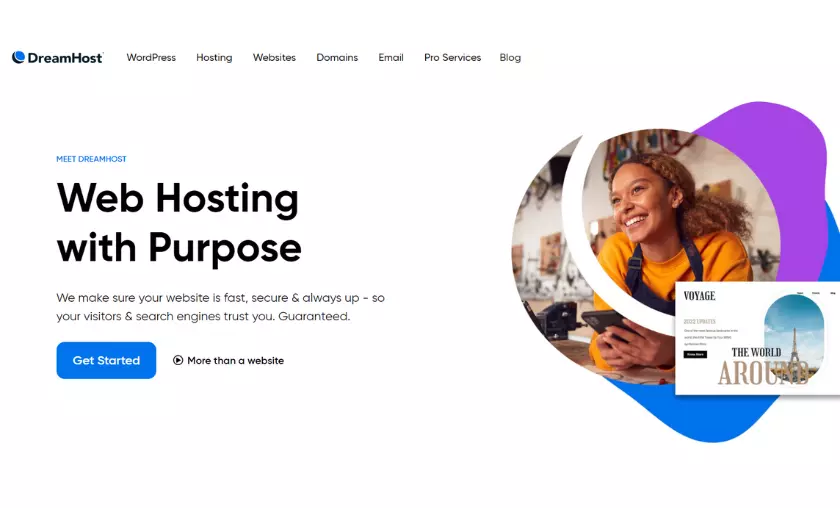
Just like Hostinger, you can access many hosting plans and choose the one you need for your project. At the same time, the availability of the six hosting types means that you won’t have to think about migrating your website if you need a more powerful server.
If we make a comparison between DreamHost and Hostinger based on the above results, we can see that the latter provider has more hosting types. While Hostinger does not offer two of the hosting types offered by DreamHost, it has three specific hosting types that its competitor does not offer either.
The Managed WordPress hosting that Hostinger lacks can be replaced with cloud hosting. This leaves Hostinger lacking only dedicated server hosting. DreamHost, on the other hand, has no way to compromise for the missing hosting types.
Thus, when considering Hostinger or DreamHost due to the availability of hosting types, it is more advisable to choose the former.
Plans & Prices: Hostinger vs DreamHost
Affordability is another area we took a close look at during the duel between Hostinger and DreamHost. The goal is to find out which hosting provider is more affordable based on the features included in its plans and offers the best value for money.
When choosing a provider, it is not enough to just look at the prices of its plans to believe that it is cheap. Some hosters offer cheap rates only to charge exorbitant fees for extensions and renewals. In this case, they hoard the essential features and force users to buy them separately.
Considering all these factors, let’s see if DreamHost or Hostinger is cheaper.
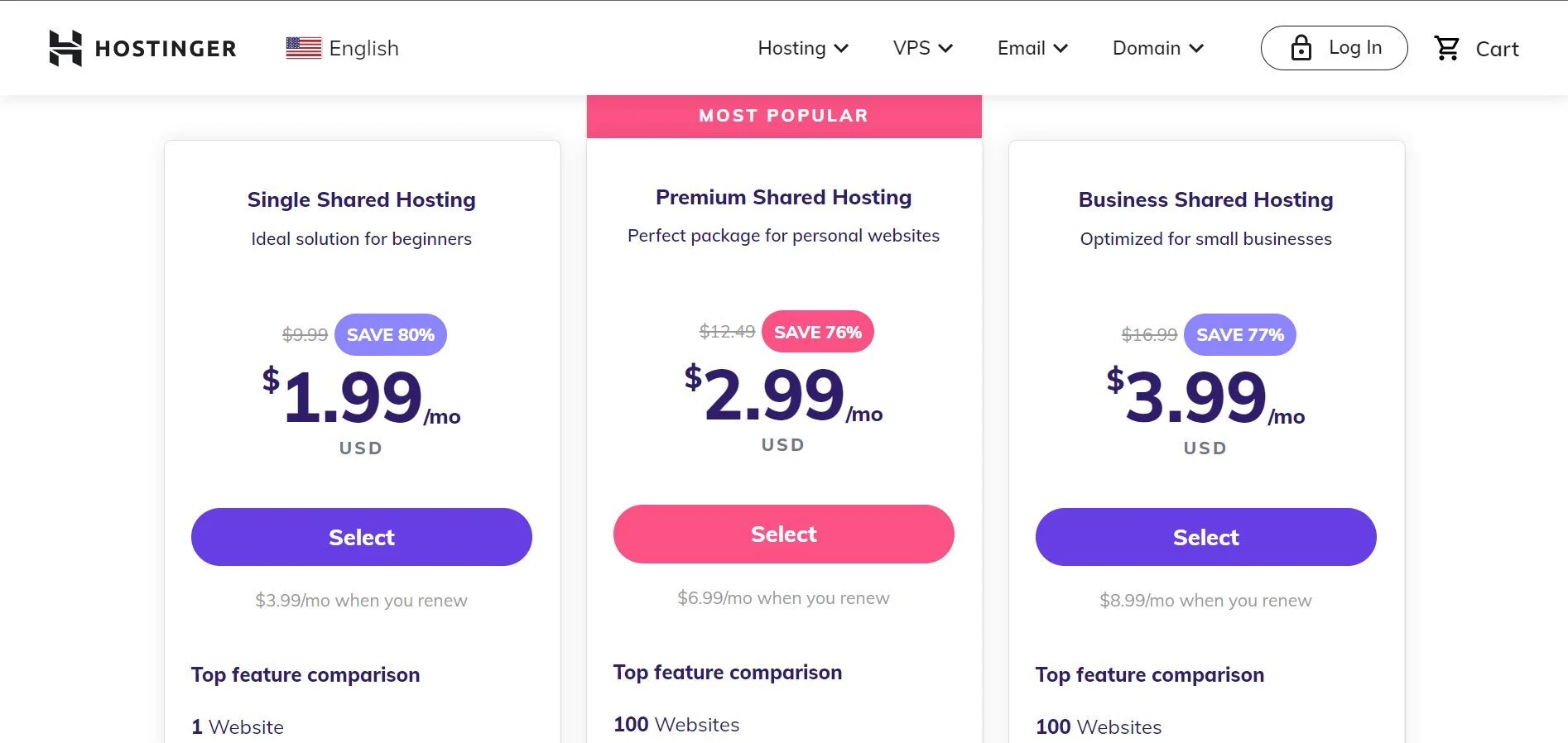
Hostinger’s pricing starts at $2 per month for the Single plan for a 48-month subscription and renews for $4 per month. This shared server has 50 GB of SSD storage, 100 GB of monthly bandwidth, and the ability to host a website.
Moreover, you get a free email account, free SSL certificates, automatic weekly backups, malware scanning and removal, Hostinger Website Builder, and managed WordPress features. You can access all the essential features without paying for add-ons.
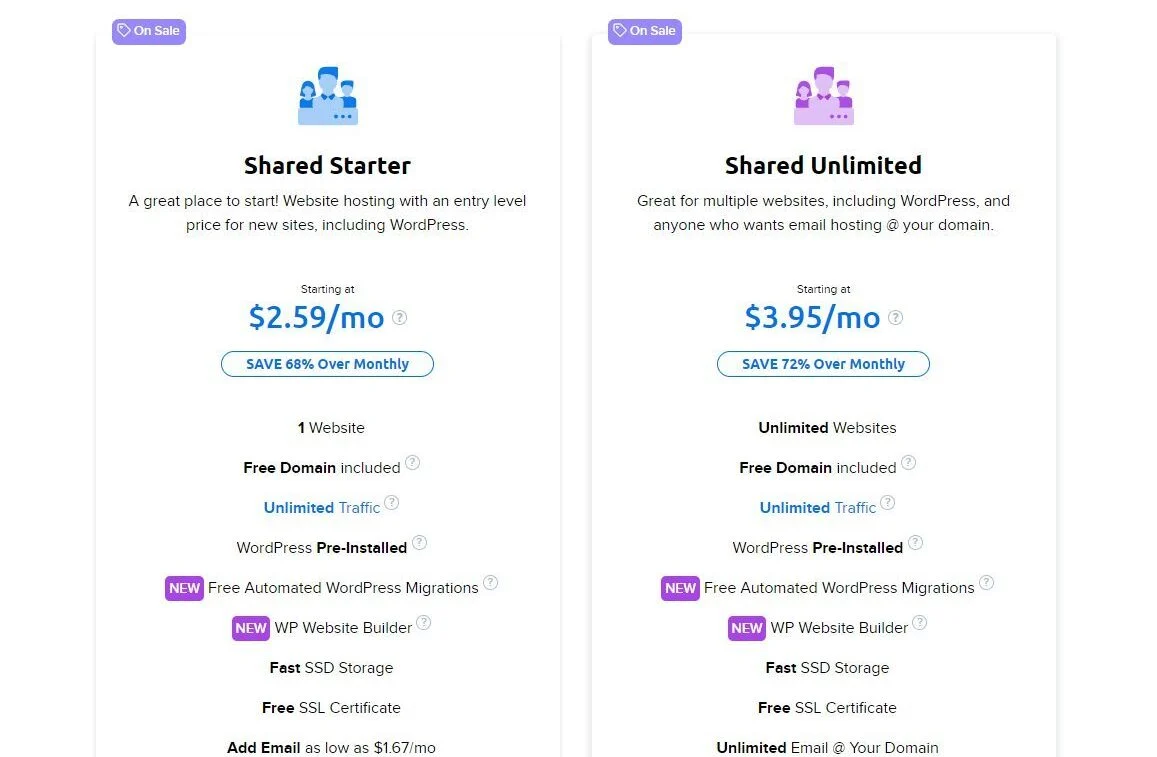
On the other hand, the cheapest plan on DreamHost, Shared Starter, costs a bit less than $3 per month on a 36-month billing period. Its renewal price is $6 per month.
It is also a shared server that can host only one website. You get 50 GB of SSD storage, unmetered bandwidth, managed WP features, a free domain name and data protection, free SSL certificates, and automatic daily backups.
If we make a quick comparison between Hostinger Single and DreamHost Shared Starter, we can see that the former has more features and is quite cheaper. While Single doesn’t offer a free domain name or unlimited bandwidth, Shared Starter lacks a malware scanner and free email hosting. You’ll have to pay an additional $3 a month for DreamShield Protection and almost $2 a year for a mailbox.
When it comes to domain name registration, DreamHost is much cheaper than Hostinger. However, when it comes to domain name renewals, the reverse is true, as Hostinger charges lower fees. For example, registering a .com domain name with DreamHost costs about $8 for the first year and then renews for almost $18 per year. In contrast, registering a .com domain name costs about $10 for the first year and renews for nearly $14 per year thereafter. The same pattern holds true for other domain extensions.
So, if you have to choose Hostinger or DreamHost for cost reasons, the former is the right choice.
Hostinger Pricing
Here are some of the shared hosting packages on Hostinger with their prices and included features:
DreamHost Pricing
DreamHost has two other plan, Shared Starter, Shared Unlimited, under its shared hosting type.
Shared Starter costs about $2.59 per month and renews at $9 per month on a 3-year subscription.
Shared Unlimited costs about $3.95 per month and renews at $11 per month on a 3-year subscription. In addition to the features of Shared Starter, you get unlimited storage and email hosting. You can also host an unlimited number of websites. However, the package still lacks security features.
Which Host Has More and Better Features, Hostinger or DreamHost?
In our comparison between Hostinger and DreamHost, we have examined the general features of both hosts.
The main goal is to find the right host for your specific business or website needs. While some hosts offer certain features along with their packages, others may require you to use third-party services. The latter is both inconvenient and costly, especially when it comes to essential features that your website or business needs.
Therefore, depending on the features you need, it is better to choose a hoster that offers these features and integrates them into its packages. Will this be Hostinger or DreamHost? Let’s see!
Hostinger Features
In our experience, Hostinger is one of the providers with the largest feature set. Unlike other companies, it does not emphasize selling add-ons. Instead, it provides the features and limits them only slightly. However, these limitations can be removed by simply upgrading your plans.
Here are some of the features that are available at Hostinger for all hosting plans:
Other free features at Hostinger include Access Manager, FTP accounts, DNS management, MySQL databases, and multiple server locations with a choice of data center. You also get features like Git, SSH access, cron jobs, multiple PHP versions, and dedicated IP addresses.
DreamHost Features
DreamHost offers great hosting features, but not all of them are free. Unlike Hostinger, some plans require you to purchase additional services for certain features like security and email hosting. Also, some hosting types don’t have certain essential features at all, and you have to switch types at a high cost to get them. Examples of these are staging tools for WP and on-demand backups and 1-click recovery. To get these features, you need at least a ~$17 per month plan.
Here are some of the features DreamHost offers in its hosting plans:
Other features include MySQL databases, FTP accounts, SSH access, IPv4 and IPv6 addresses and server monitoring.
Our results show that although DreamHost has fewer features than Hostinger, it limits the available important features to certain hosting types.
Therefore, in our DreamHost vs Hostinger comparison in terms of features, we can conclude that the latter is the better choice.
Which Host Performs Better, Hostinger or DreamHost?
Another area that our comparison between Hostinger and DreamHost branched out into was performance.
Regardless of the type of website you want to host, it’s not enough to choose a popular provider. The success of a website is directly related to how good the hoster is in terms of performance.
In this DreamHost vs Hostinger duel, we compare the two hosters in terms of web server software, website loading speed, peak server performance, data center locations and uptime. Even though one hoster may not be better in all areas, it is best to choose the one that performs better in most areas. Alternatively, you can choose the one that performs better in the most important areas of your website or business.
Hostinger vs DreamHost Speed Tests Comparison
Website loading speed is crucial in today’s world. Users are constantly boycotting slow websites in favor of fast ones. Consequently, the former lose traffic and revenue. Moreover, Google recently made loading speed a criterion for ranking websites on its search engine results pages (SERPs) through the Core Web Vitals test. So if you’re aiming for high levels of organic traffic, your website needs to load faster than your competitors’ websites.
To achieve this goal, you must first choose the right hoster for your website. In general, Google recommends that a website should load within 3 seconds, and any later time is too slow. We have tested both hosters and found that they meet this requirement. But will Hostinger or DreamHost give you a faster website? We will see.
But before we do, here are some metrics we used during our speed tests and what they mean:
Hostinger Speed Test
For our speed comparison between Hostinger and DreamHost, we tested both products in practice. For our tests, we purchased the Premium package and installed WordPress on our test site.
The Neve theme and a starter site were activated, and we performed our speed tests without any customization or optimization. For this test, we used the popular and trusted GTmetrix tool to test website performance.
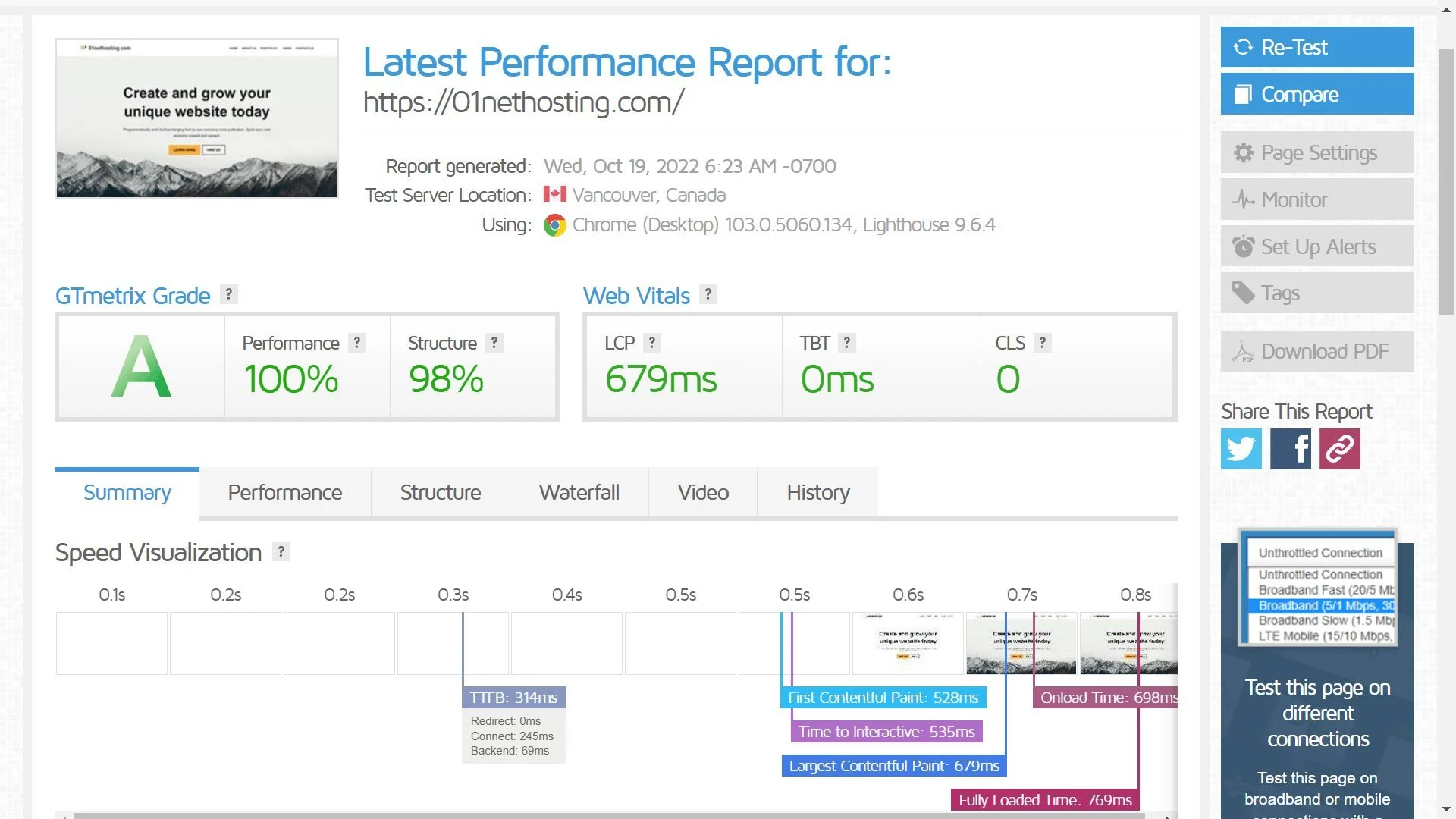
From the above results we can see that our Hostinger site passed the tests on all levels. It shows that the Hostinger server is fast and optimized for high performance, as it loaded our website in less than a second!
At the same time, our excellent results for LCP and LCP show the effectiveness of the NVMe SSD we used. With a few speed tweaks or a server upgrade, a website hosted at Hostinger can load in less than 769 ms. This performance can be achieved with the LiteSpeed Cache for WordPress (LSCWP) plugin.
DreamHost Speed Test
Our DreamHost speed test was also performed with GTmetrix under the same configurations as the competitor. We purchased the Shared Unlimited package and installed WP for this test.
Surprisingly, DreamHost performed better than Hostinger in the speed tests.
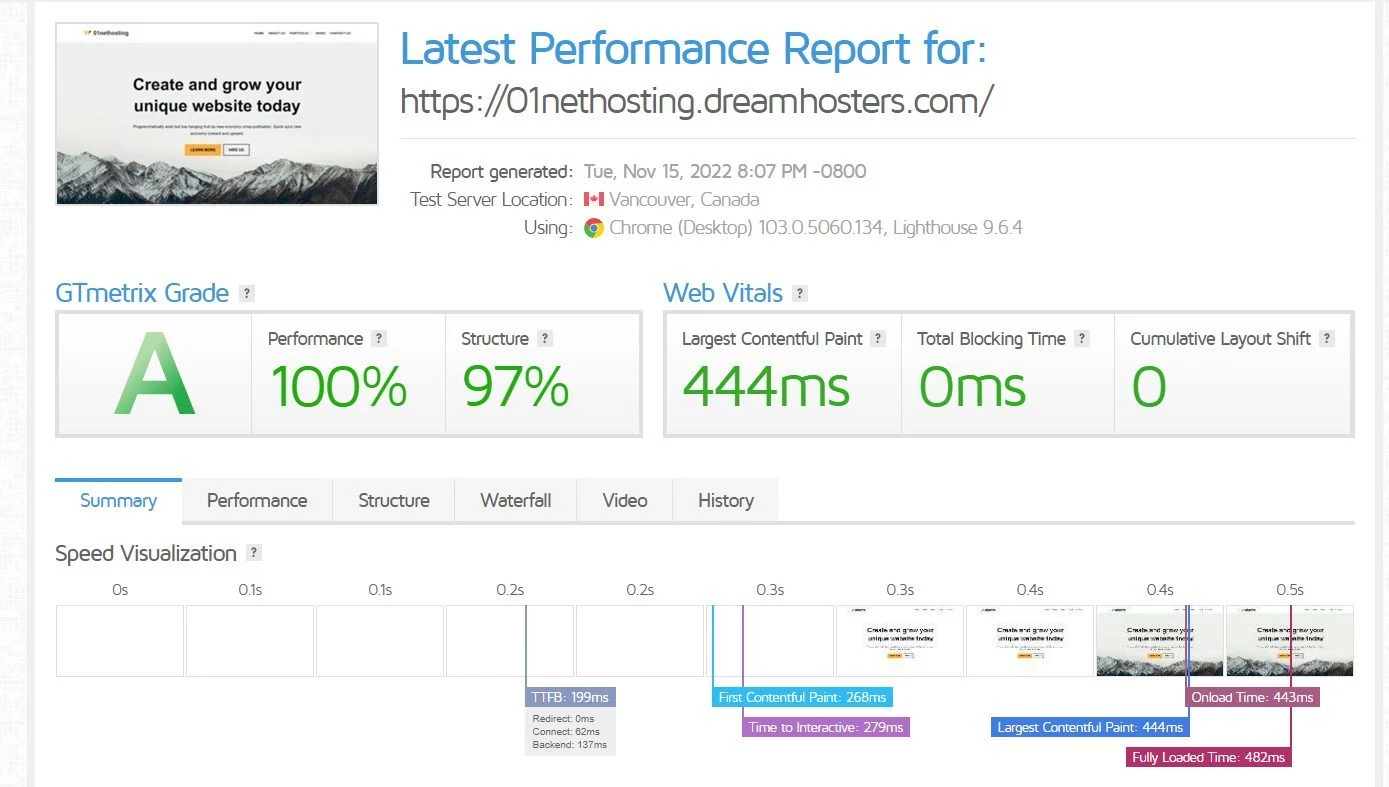
From the above results we can conclude that the DreamHost server can load a WP site in less than 500 ms! That’s insanely fast! Comparing Hostinger and DreamHost, the latter outperforms the former in all aspects. The best part is that you can make your website even faster with a little optimization.
So, if you have to choose between Hostinger or DreamHost to host a website where speed matters, the latter is recommended.
Uptime Tests
Uptime is another important aspect that we discuss in our comparison between DreamHost and Hostinger. Regardless of what type of website you want to run, your goal should be to stay online most of the time, so that visitors who try to access your website don’t encounter errors that tell them that your business is offline. This is terrible and could result in a loss of visitors and revenue. It could also affect your SEO performance.
Both hosters promise 99.90% uptime on all their servers. However, when it comes to dedicated server hosting, DreamHost promises 100% uptime.
To confirm the authenticity of these promises, we checked the uptime of both hosters on Pingdom for six months to know how long they can stay online.
We found DreamHost to have 99.960% uptime, including four consecutive months of 100% uptime. On the other hand, Hostinger had 99.997% uptime for the same period, with 100% uptime for five consecutive months.
From these results, it is clear that both hosts have excellent uptime. However, Hostinger keeps your website online more consistently than DreamHost.
Load & Response Tests
Another series of tests we performed for our comparison between DreamHost and Hostinger were load and response tests. The test checks whether Hostinger or DreamHost can handle a busy website or traffic surges. Choosing a host that can’t handle them will result in a loss of traffic and revenue, which will also affect SEO performance.
For this test, we sent 1000 virtual visitors to our experimental pages via Loader.io within one minute. The server of our Hostinger test website handled this traffic without any problems. We recorded 43 ms, 47 ms and 301 ms as the fastest, average and slowest response times, respectively.
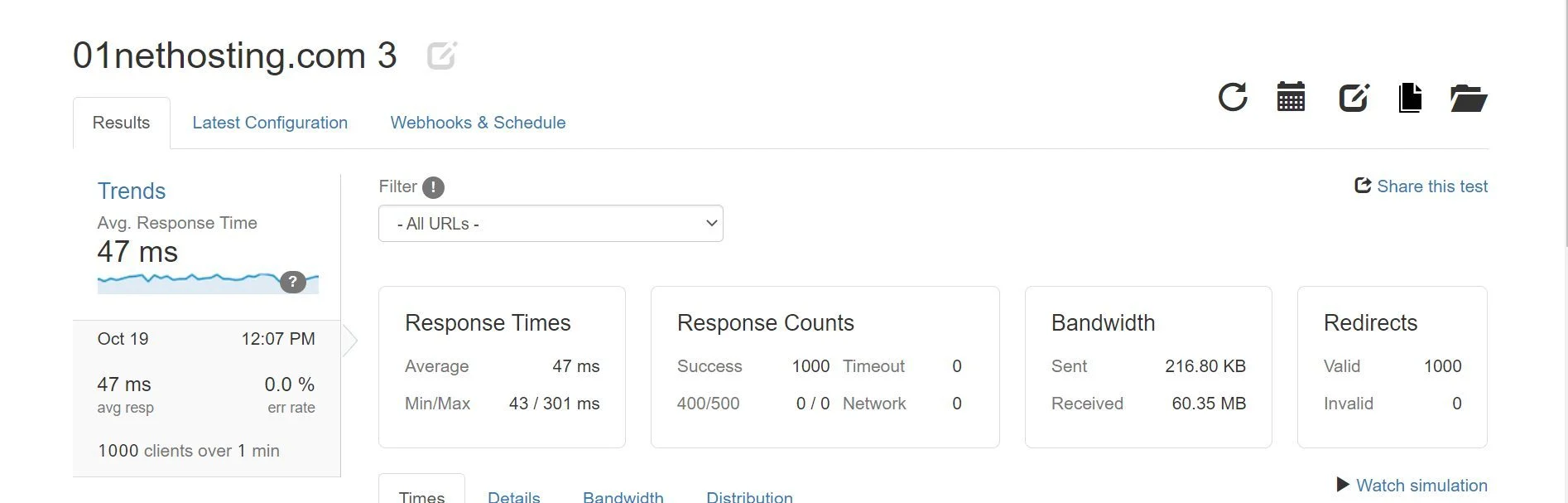
Unfortunately, the server for our DreamHost trial website did not pass the test well. The fastest, average and slowest response times were 770 ms, 7230 ms and 10935 ms, respectively. There was also a 51.4% error rate, and only 186 visitors were eventually able to access the site.
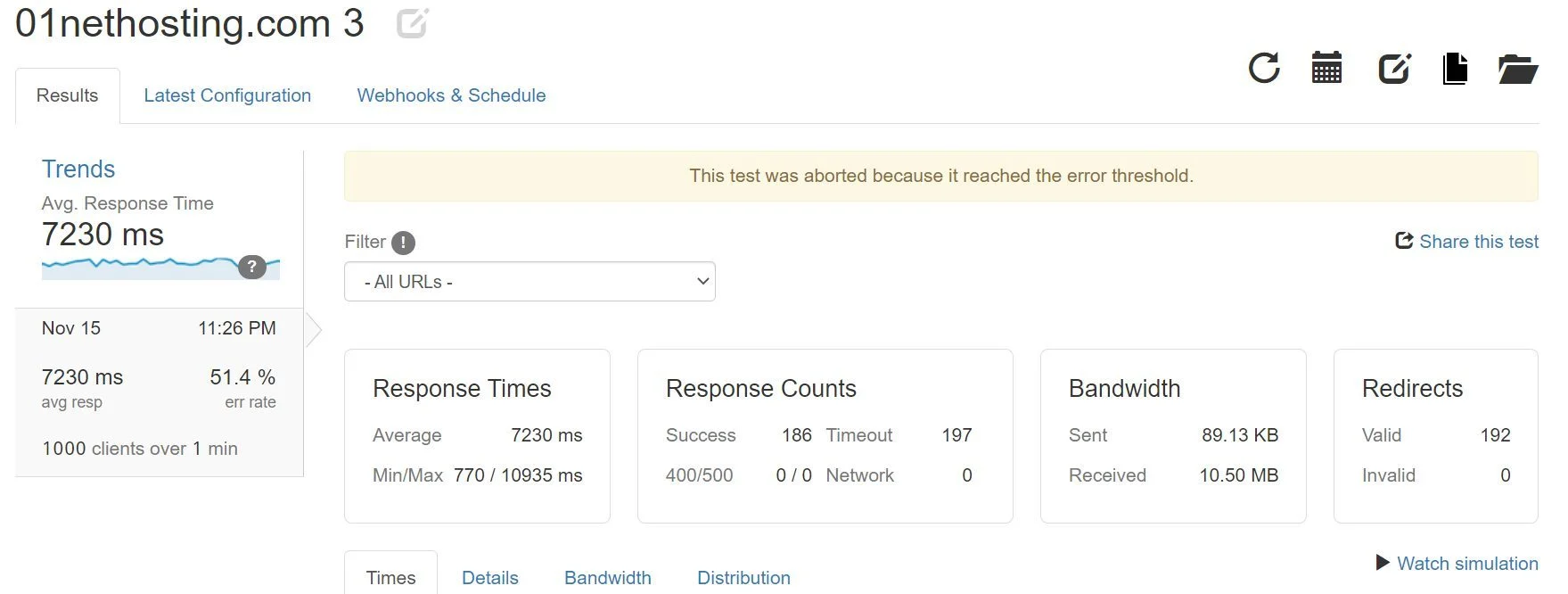
Therefore, we recommend the former if you have to choose Hostinger or DreamHost for a high-traffic website. The difference in the performance of their web server software can be seen here.
Data Centers & Their Locations
The location of data centers is another aspect we examined in our Hostinger vs DreamHost duel. A data center is the place where the server that runs a website is located. So, server response times and website loading speeds depend on how close the data center is to your visitors. The closer the data center is to your audience, the lower the latency (network delay) and the faster your website loads. Therefore, you have better chances to rank your website for the target audience.
DreamHost has only two data centers located in Ashburn, Virginia and Hillsboro, Oregon. This limits the top performance of your website to these states and their surrounding areas. So, if you want to target Europe, it is not advisable due to possible latency issues. You can switch between these data centers whenever you want, which is great if one of them (the US states) is your target.
In contrast, Hostinger has nine data centers on four continents (North America, South America, Asia, and Europe). Also, you can switch between them once every 30 days for free. This way you’ll be able to target specific continents and not be limited to the United States.
Hostinger vs DreamHost: Control Panel & User Experience
In our comparison between DreamHost and Hostinger, we also took into account the available control panel and the ease of use.
Both hosters use custom control panels and are quite intuitive. However, the DreamHost panel is too minimalistic, especially for shared servers. On the dashboard, you can directly access only some important settings like MySQL databases, file manager, webmail and WP Admin dashboard. For others, such as domain management, SSL, backups, etc., you need to find the settings yourself. Besides, switching between sites for management is complicated.
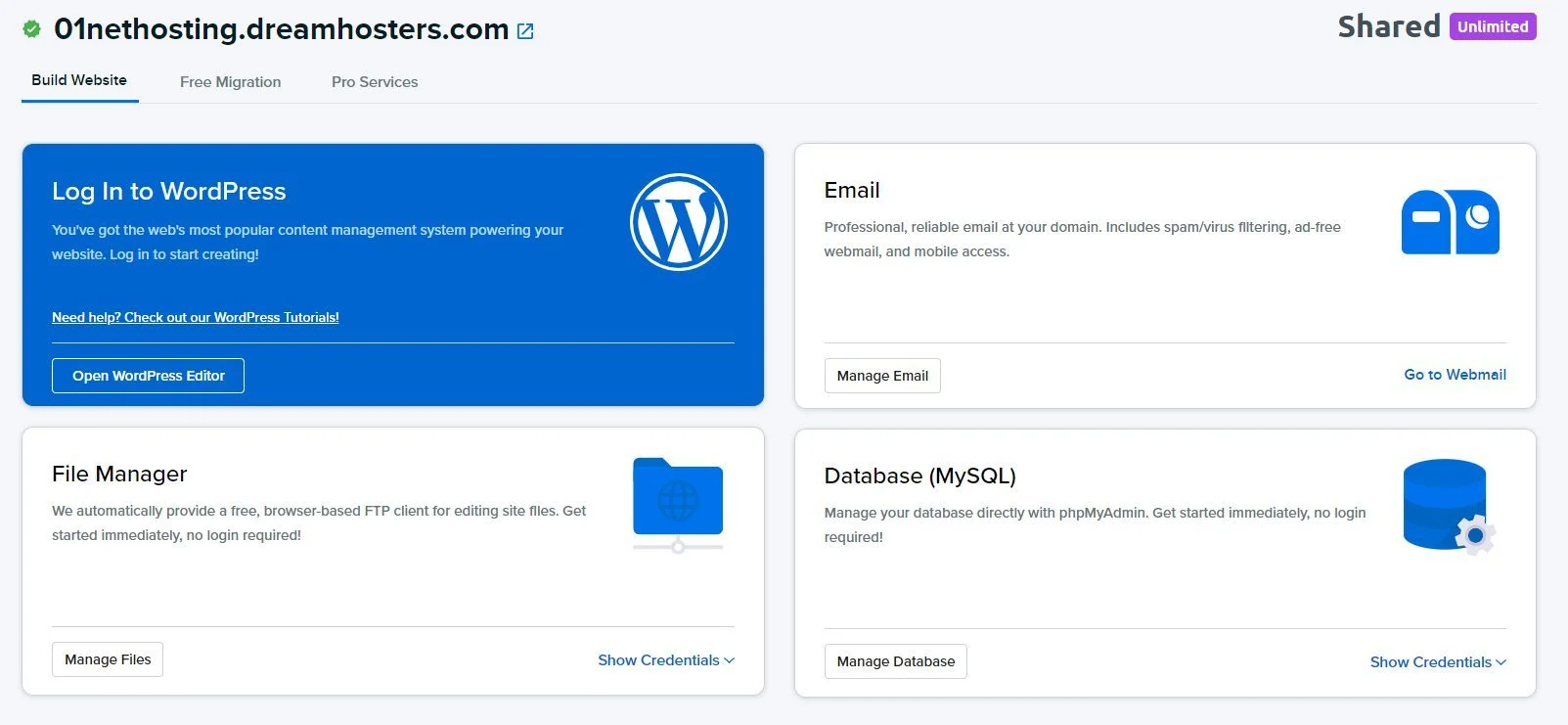
In contrast, Hostinger hPanel is both simple and feature-rich. The user interface is designed in such a way that beginners can easily find what they are looking for. Even if you get lost, there’s a search bar where you can type a keyword, and you’ll be shown all the related settings in the left sidebar. So you won’t have any problems navigating through your hPanel and managing your website.
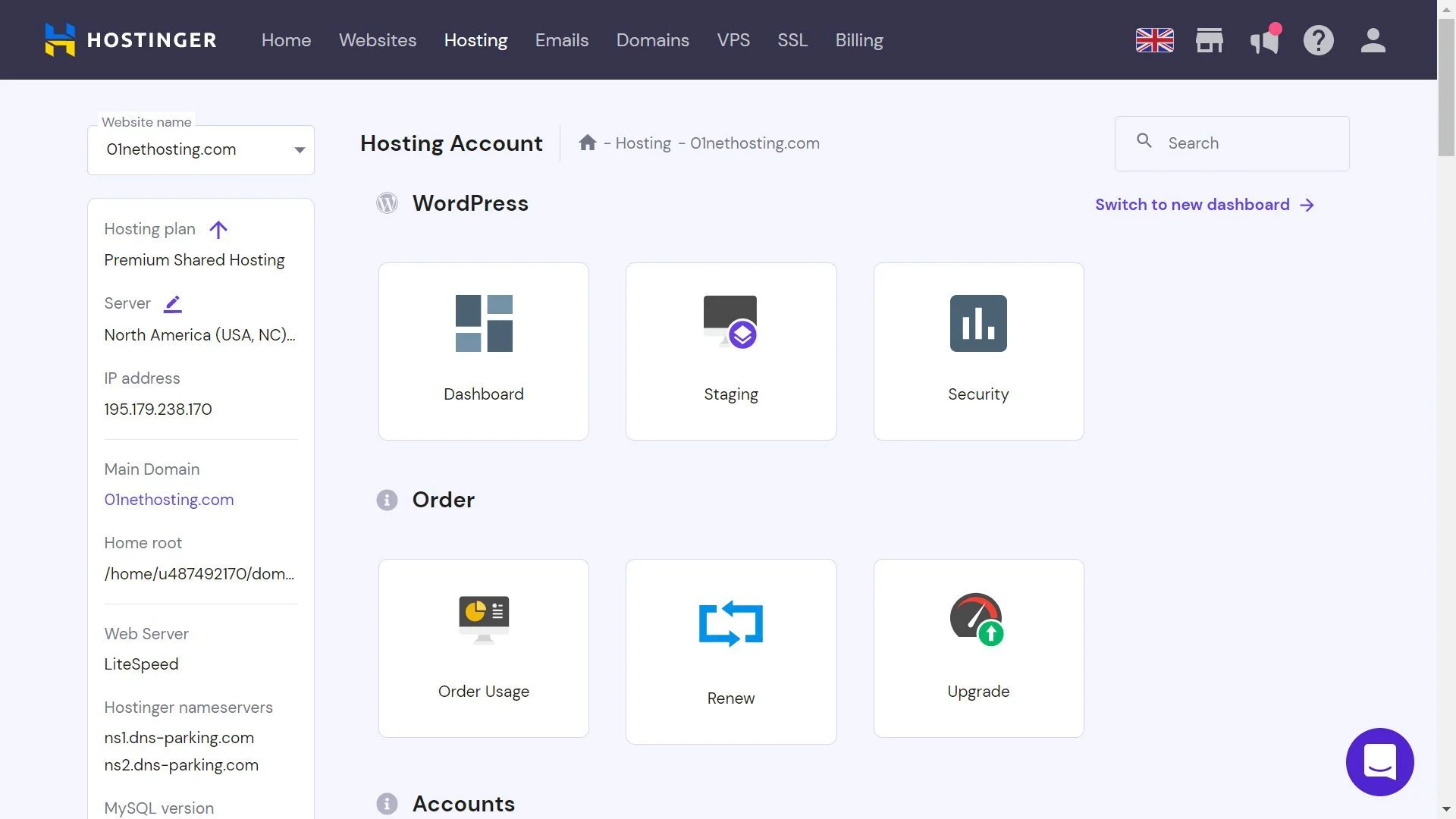
Therefore, for the Hostinger vs DreamHost comparison in terms of control panel and ease of use, the former takes the cake!
Which is More Secure, Hostinger or DreamHost?
Another important aspect we considered when comparing DreamHost and Hostinger is security. Since your server and website contain sensitive data, security measures must be taken against breaches or human errors.
When we examined whether Hostinger or DreamHost is more secure, we found that the latter is great but leaves a lot to be desired when it comes to security. First of all, DreamHost doesn’t offer any other free security features for shared hosting besides free SSL certificates, SSH access, spam protection, automatic WP Core updates and automatic backups. You will have to perform malware scans and removals yourself by paying for the add-on. Moreover, the web application firewall (WAF) is too basic to block sophisticated threats. The hoster explicitly says that its firewalls can block threats, but not all of them. That’s not exactly reassuring!
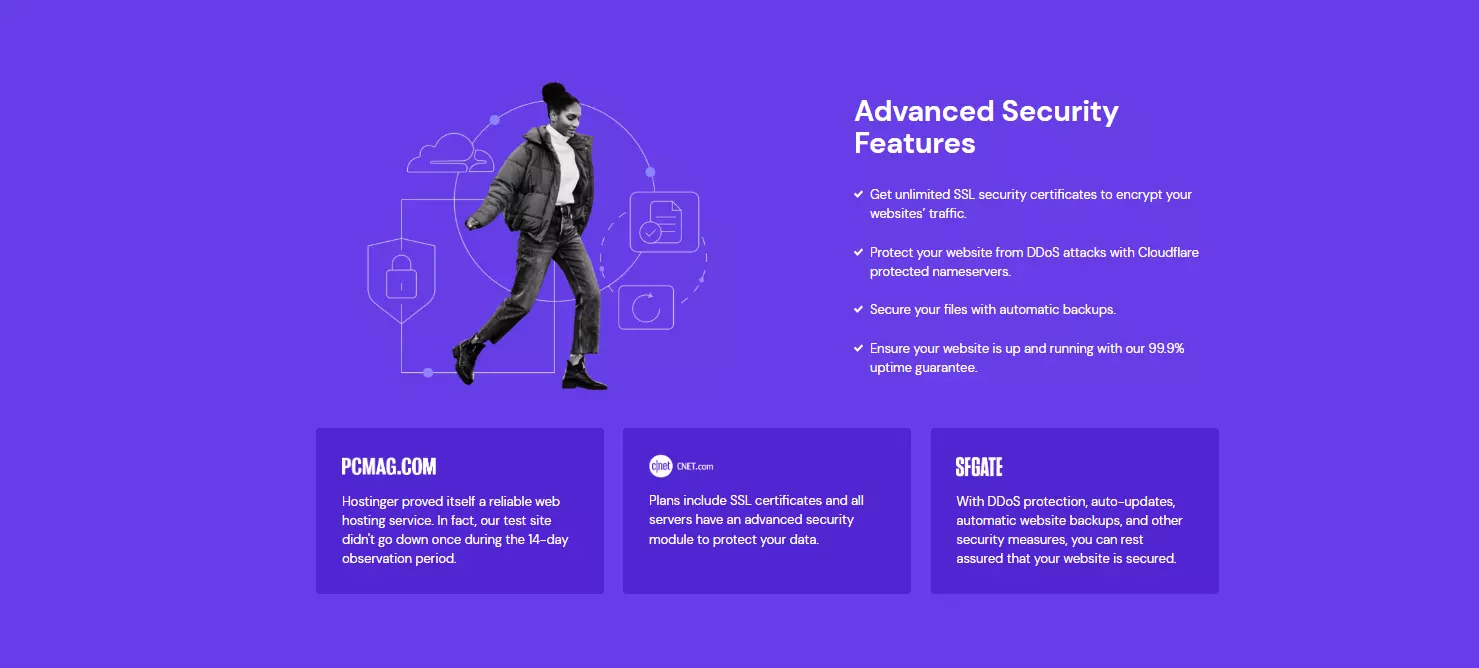
On the other hand, Hostinger is equipped with all of DreamHost’s security features, in addition to Cloudflare-protected nameservers, a homegrown WAF, DDoS protection, and Hotlink Protection (prevents malicious websites from using your content or bandwidth).
All these features are also available with shared hosting plans, and you don’t have to purchase any add-ons. Moreover, they are more powerful than what DreamHost offers.
Hostinger vs DreamHost: Customer Support
The last aspect we considered in this DreamHost vs Hostinger duel was the customer support.
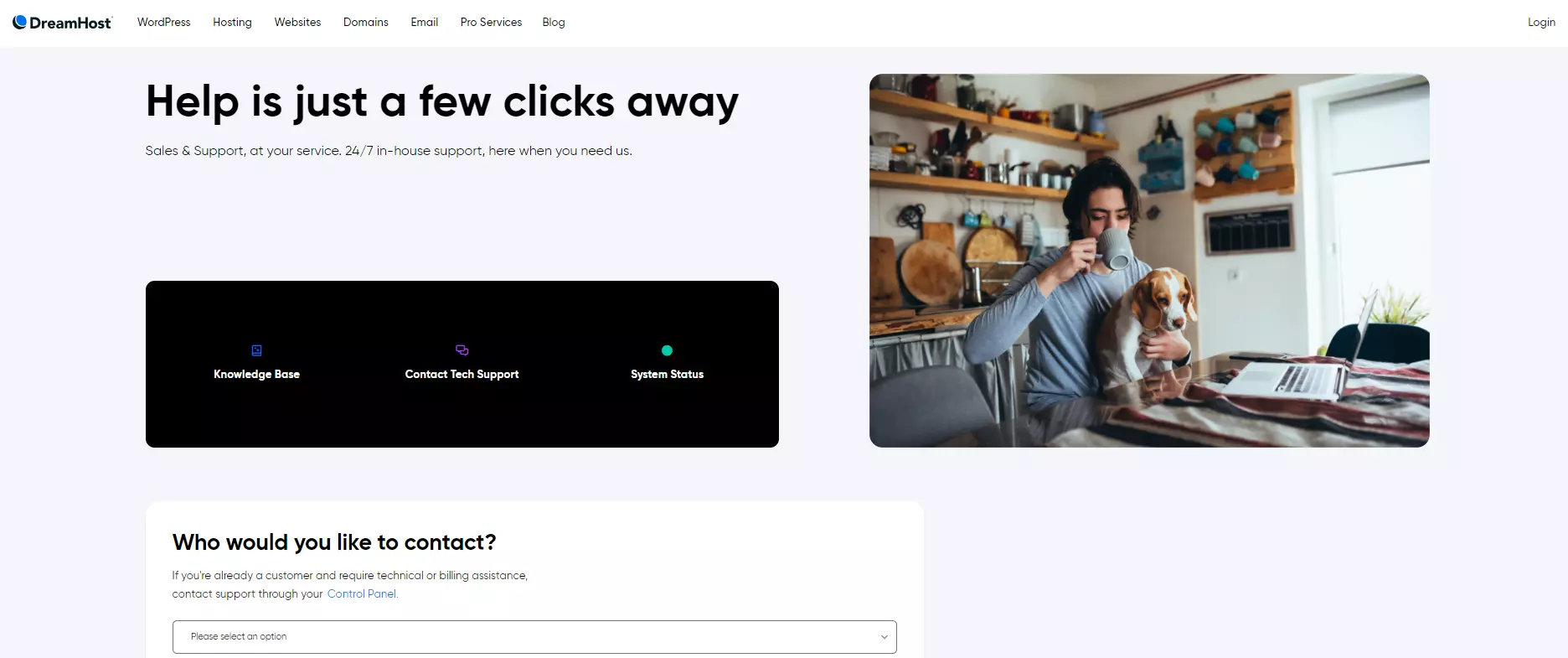
DreamHost has a 24/7 customer support that can be reached via live chat, ticket system and phone callbacks. In our hands-on experience, the provider offers very competitive response times, but needs to work on the competence of its employees.
When we tested the customer support, the small problem we intentionally caused could not be solved by the employee, and he offered to restart our website to fix it! It’s terrible to think that we were advised to do this because of a simple, everyday problem. However, the clerk had to refer our case to a higher level team to take care of it. Nevertheless, most of the tutorials in the knowledge base are well illustrated and helpful for self-study.
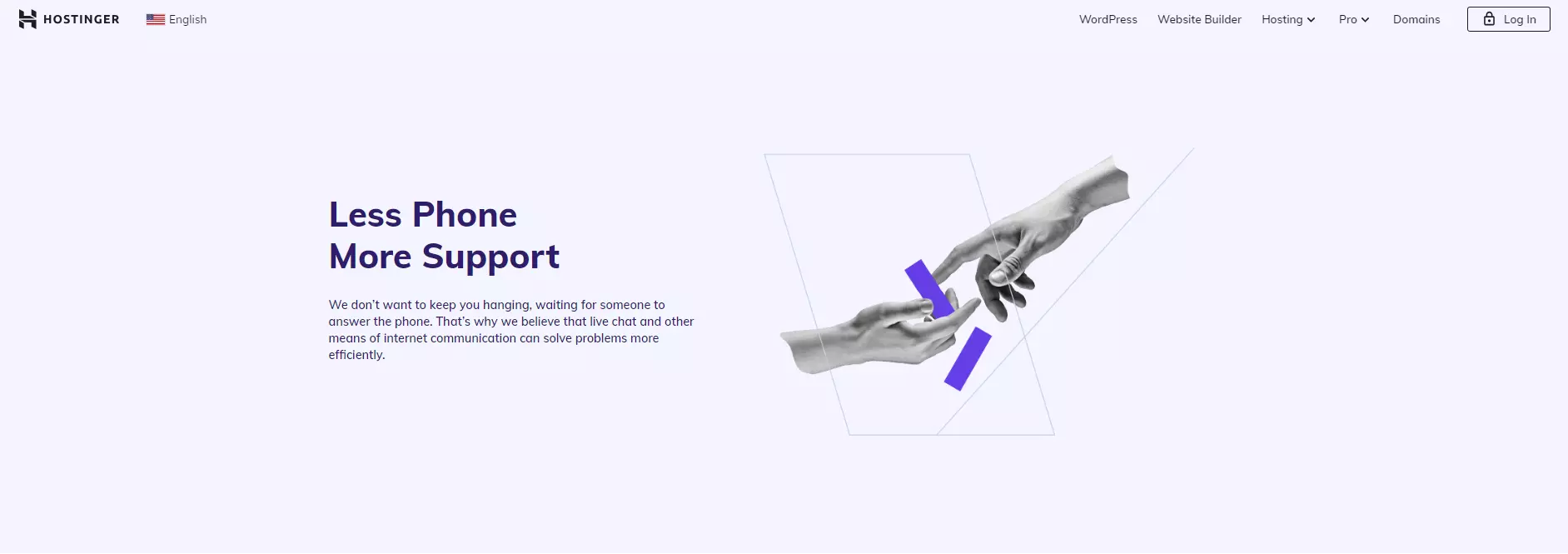
In contrast, Hostinger offers 24/7 customer support via live chat and emails only. Their live chat channel is easily accessible from any page on their website. In our experience, the agents are quick and knowledgeable. The same problem that a DreamHost support agent couldn’t solve was handled by a Hostinger agent without any issues. There is also a better-illustrated knowledge base and a helpful YouTube channel for self-learners.
Therefore, the winner of the comparison between Hostinger and DreamHost in terms of customer support is the former.
Conclusion
In the ever-evolving world of web hosting, the clash between Hostinger and DreamHost has been subjected to thorough examination across various aspects. Both providers offer diverse hosting types and plans, each with its own unique strengths and pricing structures. Hostinger prides itself on competitive pricing and feature-rich plans, while DreamHost excels in providing a wide array of hosting options.
Performance is a strong suit for both Hostinger and DreamHost, as they showcase commendable results in speed tests, uptime, and response times, ensuring a reliable hosting experience for users. Moreover, their strategically located data centers contribute to efficient global reach. When it comes to user experience, both Hostinger and DreamHost offer intuitive control panels, but individual preferences play a role in deciding the more suitable option.
Security is a shared priority, with both providers implementing robust measures to safeguard users’ data and websites. Lastly, exceptional customer support is a hallmark of Hostinger and DreamHost, with both companies offering responsive and helpful assistance to their customers. Ultimately, the choice between Hostinger and DreamHost depends on individual needs, preferences, and priorities, as both providers stand as solid choices, guaranteeing a satisfying and reliable web hosting experience for various online ventures.
FAQs
How is the performance of Hostinger compared to DreamHost?
Hostinger surprised me with its exceptional performance. The load times and server response were consistently fast, ensuring a smooth browsing experience for visitors to my website. DreamHost’s performance was solid too, but I noticed some occasional dips in speed during peak traffic hours. Overall, Hostinger seemed to provide more consistent performance.
Are there any significant differences in the features offered by Hostinger and DreamHost?
Yes, there are some notable differences. Hostinger boasts an impressive array of features, especially in their higher-tier plans, which include free domain registration, daily backups, and a website builder. DreamHost, on the other hand, focuses on providing a more developer-friendly environment with robust support for various programming languages and frameworks.
Which hosting provider has better customer support?
In my experience, both Hostinger and DreamHost offer reliable customer support, but I found Hostinger’s support to be more responsive and helpful. They have a live chat feature that allows you to quickly get in touch with their support team, and they were always quick to resolve my issues. DreamHost’s support was also good, but the response time was sometimes slightly longer.
Is there a difference in the ease of use between Hostinger and DreamHost?
Hostinger’s user interface is intuitive and straightforward, making it easy for beginners to navigate and manage their hosting account. Their control panel is well-designed and beginner-friendly. DreamHost, while not as visually appealing, offers more advanced options and customization for experienced users, but it might be a bit overwhelming for newcomers.
What about the availability of server locations for both hosting providers?
Hostinger has an extensive network of server locations around the world, which is beneficial for global audiences. DreamHost also offers multiple data centers, but their coverage is not as extensive as Hostinger’s. If your target audience is spread across different continents, Hostinger might be a better choice.
To read more similar articles, click here.
Thanks for visiting our Website. If you appreciate our work, kindly show us some support in our comments section. 🙂

Norman Dwemer is a tech blogger who focuses on the future of technology. his blog delves into emerging technologies such as artificial intelligence, blockchain, and quantum computing, as well as their potential impact on our lives and society. Rachel’s writings provide a sneak peek into the future of tech, examining the possibilities and risks of these cutting-edge technologies. he also shares the most recent developments and research in these fields, delivering the latest news and insights to his readers. Norman’s visionary outlook on the world of tech has establihed his as an authoritative figure for anyone interested in the forefront of technology.