In this comparison, I will analyze HostGator and GoDaddy side by side. I’ll focus on pricing, ease of use, performance, security, and customer support. After all, these are the most important things you pay for.
These two companies are probably the most well-known in the online services market. GoDaddy is the largest domain registrar and also a web hosting provider. And HostGator is one of the top choices for beginners when it comes to web hosting.
So I’m not surprised that you compare these two providers.
However, the popularity or the promises of the provider are never enough to make a decision. So I bought the accounts, set up the websites and went exploring.
In this comparison, I tested and evaluated the pricing, ease of use, performance, security, and customer support to find out everything I could about them. So let’s get started right away with a brief overview of today’s candidates.
Table of Contents
HostGator vs GoDaddy: Quick Comparison
HostGator and GoDaddy are two popular options for anyone who wants to create a website. However, HostGator offers cheaper prices and all-inclusive hosting packages. GoDaddy, on the other hand, is more expensive and geared towards business users.
| HostGator | GoDaddy | |
| Rating | 4.0⭐⭐⭐⭐ | 4.0⭐⭐⭐⭐ |
| Price from | From $3.75/mo | From $2.99/mo |
| Free domain | Yes | Yes |
| Hosting types | Shared, WordPress, VPS, cloud, and dedicated | Shared, WordPress, Business, VPS, Dedicated |
| Control panel | Native dashboard and a slightly customized cPanel integration | Modern native dashboard with the classic cPanel integration |
| Security | Free SSL, server monitoring, automated backups, and DDoS protection | 24/7 network security, DDoS protection |
| Website migration | WordPress and cPanel & WHM website migration | Around $99 for website migration |
| Extras | RoR hosting support and email accounts | Office 365 email |
| Website | www.hostgator.com | www.godaddy.com |
Winner: HostGator
HostGator vs GoDaddy: Pricing Comparison
HostGator is a cheaper option than GoDaddy, starting at $3.75/month for shared hosting plans. Meanwhile, GoDaddy’s more expensive shared hosting plans start at $6.99/month, although an additional discount may be available, such as GoDaddy’s 2022 Black Friday Sale. GoDaddy’s shared hosting prices go up to $21.99/month for the most expensive plan. HostGator’s prices, on the other hand, are $6.25/month for the cheapest plan.
Both providers also have:
| Hosting type | HostGator | GoDaddy |
| Shared hosting | ✔️ | ✔️ |
| WordPress hosting | ✔️ | ✔️ |
| WooCommerce hosting | ❌ | ✔️ |
| Cloud hosting | ✔️ | ❌ |
| VPS hosting | ✔️ | ✔️ |
| Dedicated hosting | ✔️ | ✔️ |
| Visit HostGator | Visit GoDaddy |
While there are many hosting solutions out there, shared hosting is by far the most popular option. That’s why I decided to focus on it here.
There are some similarities between the HostGator and GoDaddy offerings. With both providers, you get free domain names for a year. However, only HostGator offers free SSL certificates in all plans. The entry-level plans also start with the 1 website limitation, both offer
I must note that GoDaddy occasionally has some special offers. These offers are the reason why this provider is much more tempting in price.
Discount
If you just want to dip your toes into the hosting world, GoDaddy is currently offering a great discount on its Economy plan. If you opt for a 12-month subscription, you’ll get a deal for $6.99 per month. Grab it while you can!
Regardless of the discount, HostGator seems to come out on top here, especially during HostGator’s Black Friday sale. Not only is it cheaper, but it also offers better features like “unlimited” SSD storage and email accounts, as well as free SSL certificates. This begs the question: Is HostGator better overall than GoDaddy?
It should be noted that GoDaddy offers 100GB of SSD storage and only one email account. And while HostGator claims that both are unlimited, we all know that there is no such thing as truly unlimited. There are always limitations of some sort. Regardless, the advertised prices are just a one-time thing, and the renewal prices will be higher.
If we look at the long-term value, HostGator is cheaper overall. Although the initial payment will be higher. But with a massive discount, GoDaddy takes the throne for the best short-term value. Also, high renewal rates are nothing unusual and simply cannot be avoided. No matter which provider or plan you choose, rates will revert back to the standard price after the initial period.
Just keep in mind that the cheapest rate is usually quite restrictive. You may well need more than one website at some point, forcing you to upgrade.
If the cheapest rates only look good in theory, which ones are really worth your time?
For starters, HostGator offers 3 shared hosting plans that cost between $2.75 and $5.25 per month. That’s if you choose the 36-month billing cycle.
HostGator here, very subtly (with a bright orange block), suggests that Baby plan is the one that offer the best value.
And I have to agree. You can connect as many sites as you want for only $0.75/month more than Hatchling. The baby plan renewal is also $5.00 cheaper than the business plan.
If you’re looking for SEO tools and daily backups, the Business plan offers the former for free, while all plans charge for the latter.
Best value
To get the most out of HostGator, you should consider the Baby plan. To secure the initial promotional price, you need to choose a 3-year subscription. The first payment will round up to $210.94 for the 3 years, after renewal it will go up to $551.52 for the same time.
Alternatively, GoDaddy offers 4 shared hosting plans that range from $6.99 to $21.99 per month. Again, a three-year subscription is required to access these rates. And renewal rates are significantly higher as well – the cheapest economy plan renews for $9.99 per month.
Although GoDaddy selected the Ultimate plan as its best recommendation, it’s really not worth the price. In fact, all GoDaddy plans are quite expensive for the features offered.
If you are looking for more powerful rates, you should consider other alternatives. In the meantime, the Economy plan is unbeatable if you want to see how web hosting works and create a small website. With a 12-month billing period, it costs just $6.99/month. Although it’s an entry-level plan, you’re guaranteed unmetered bandwidth.
Best value
To secure the best price, you should opt for the Economy plan. You can get it for only $6.99/month for the first year. After the renewal, the plan will cost you $119.88.
It seems that it is simply too expensive to get the same resources at GoDaddy as at HostGator. Therefore, you have to sacrifice some features to get a better price. Besides, the discounted price at GoDaddy is only valid for one year.
Moreover, both GoDaddy and HostGator offer the usual 30-day money back guarantee. However, note that both providers charge a non-refundable domain fee. Also, HostGator’s refund policy only applies to shared hosting plans. And to get a refund from GoDaddy, you need to contact customer service and request it manually.
In the end, I have to say that HostGator’s pricing structure is much more attractive than GoDaddy’s. The shared hosting is significantly cheaper and offers better value for money in the long run. Moreover, the plans are more comprehensive, and even the cheapest HostGator plan offers an SSL certificate. However, when it comes to short-term value for money, GoDaddy gives HostGator a run for its money.
Winner: HostGator
Hosting Management: Ease Of Use
Comparing the usability of HostGator and GoDaddy, there are not many differences. Both providers have custom
for the most important settings. For advanced customization, cPanel interfaces are also available. In addition, both offer modern and intuitive internal website builders.
Ease of use is important because you want to spend as little time as possible setting up the basics. That way, you can focus on the actual website development. For this reason, I decided to first compare HostGator and GoDaddy in terms of their functionality and usability.
Let’s take a look at what I found out and see which hoster guarantees a better user experience.
Account Management Dashboard
HostGator and GoDaddy both use beginner-friendly standard user interfaces. Both providers offer access to a full suite of management tools from their main dashboards.
First, I took a look at HostGator’s user interface. It contains links to a number of useful tools. You can find SSL management, WordPress installation, and email accounts right on your dashboard. Users can also access most other basic tools from the menu on the left side of the screen. In addition, there is a cPanel link for advanced management.
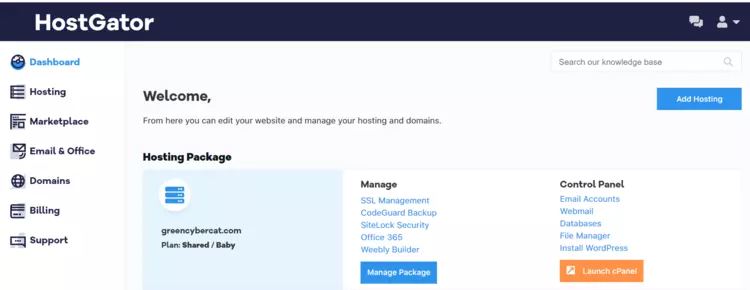
With this user dashboard, you can quickly set up the most important things for your website – install WordPress, create a professional email, and secure everything with an SSL.
At the same time, GoDaddy’s user interface is just as impressive. It’s laid out a little differently, and the main dashboard lists the products and services you’ve signed up for.
From here, you can also easily set up your entire website. When you first log in to your account, GoDaddy makes sure you install WordPress and have a working domain. After that, it serves as the hub for navigating your account.
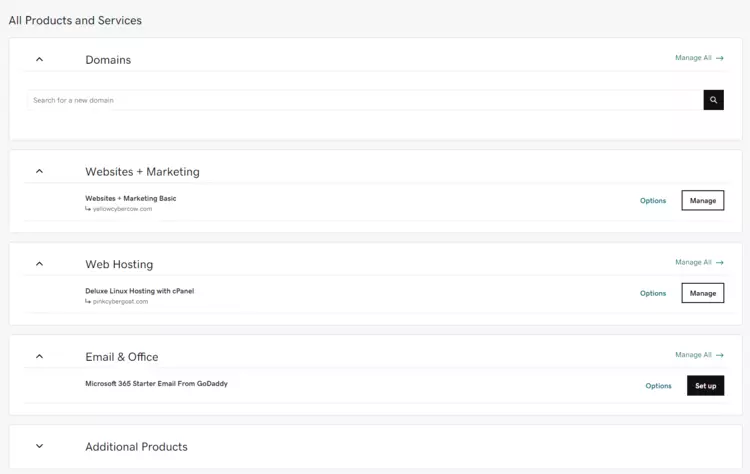
Let’s say you want to manage your hosting package and websites. Just click the Manage button on the Web Hosting tab. This will open a new interface.
There you can manage your files and PHP settings, as well as view server and account information. You will also find the cPanel login button here.

All in all, both hosters offer very intuitive and easy-to-use user dashboards. GoDaddy requires a bit more clicking around, but the choice between the two is more a matter of personal preference than a difference in functionality.
Let’s see if their control panels prove to be a significant difference.
Control Panel Comparison
HostGator and GoDaddy both use cPanel control panels. However, HostGator only uses a barely modified version of it, while GoDaddy uses the classic cPanel interface.
Although HostGator has a tiny bit of customization built in, the interfaces look very similar, if not almost identical. The only differences are the layout of the sections in the cPanel and the color scheme.

However, GoDaddy’s cPanel is… pretty much the same.
All the necessary tools are available, including file manager, email, and domain management. Just like HostGator, you can also monitor basic server information from the panel on the left side of the screen.
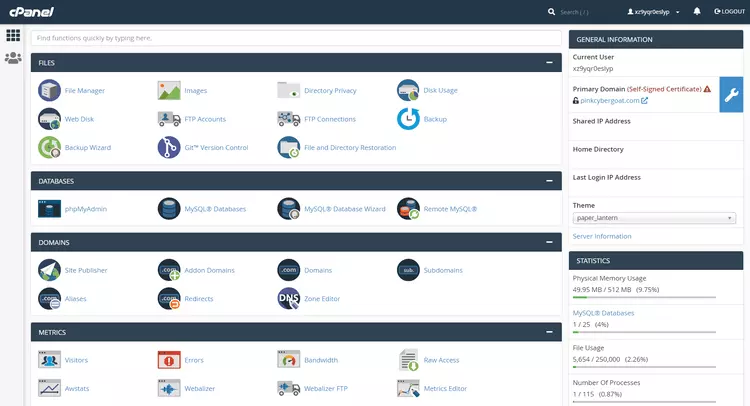
Overall, HostGator and GoDaddy’s cPanel is very easy to use and navigate. It is very useful if you want to install a content management system other than WordPress or set up and manage your email accounts.
In terms of the control panel, it’s a tie between HostGator and GoDaddy.
Website Migration
When it comes to website transfer, both HostGator and GoDaddy offer website migration. It’s just that one makes it a little easier than the other. If you’re a first-time user, you can expect HostGator to migrate your website for free. With GoDaddy, there is a fee for this service.
With HostGator, the migration process is pretty simple. You can find the link to the migration form right in your main dashboard by clicking “Request Migration” under the Quick Links section.
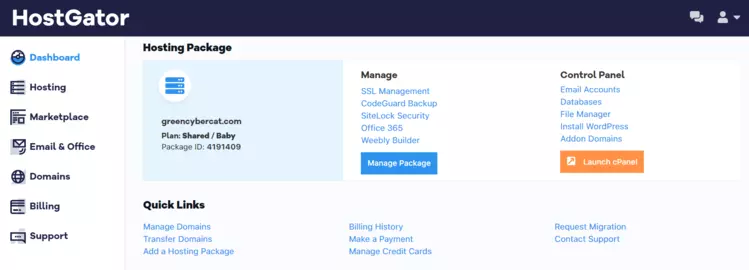
All you have to do is fill out a form and you’re ready to go. HostGator can take care of WordPress and cPanel migrations for you.
With GoDaddy, it’s a little more difficult. With GoDaddy, you can’t just fill out a form like you can with HostGator.
Since the provider is not very detailed about the website migration requirements, you need to contact the customer support to find out the details. The representative will explain you the rules and regulations, as well as the fee (around $99) that will be charged for the migration.
In short, both hosting services offer website migration. With HostGator it is free of charge, and with GoDaddy it is paid for.
Website Builder Experience
Both HostGator and GoDaddy offer beginner-friendly website builders that you can use to get your website started. If you choose HostGator, you’ll have access to a limited version of the Gator builder. At GoDaddy, you can create a one-page website using GoDaddy Websites+Marketing Builder.
If you use HostGator, I recommend you check out the Gator website builder. While you can only access the relatively limited Basic Website Builder plan, it’s good enough for simple websites. With the flexible drag-and-drop editing interface, you can create a website with up to six pages.

At the same time, Gator Builder has more than 100 modern design templates. If you just want to get online quickly, you might consider building your website based on one of these templates.

If we look at the GoDaddy builder, we will notice that it has some limitations. First of all, it only lets you create a one-page website, which is not enough for most people. On the other hand, the editing tool is quite sleek and intuitive.
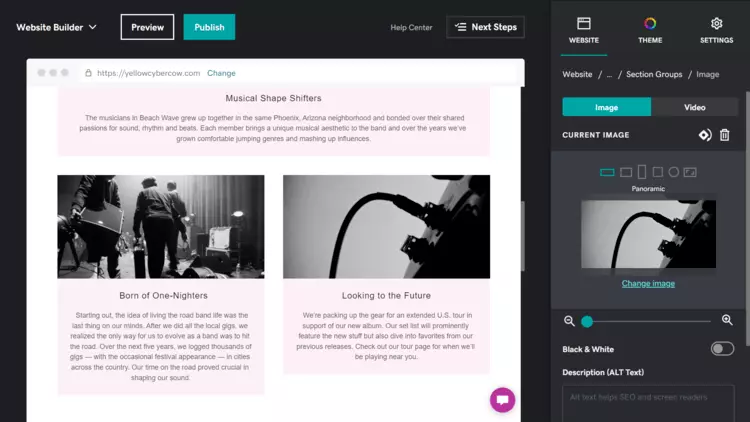
However, the GoDaddy builder is one of my favorites, mainly because of its simplicity. If you’re happy with a one-page website, I’d definitely recommend giving it a try. It’s simple and intuitive, and it’s designed specifically for beginners who want to get online quickly. The templates it offers are also very modern and elegant. They are really a pleasure to look at.

In the end, though, HostGator’s website builder is better, if we’re being objective. It is still limited, but at least you can use it to create a 6-page website, while GoDaddy only offers one page.
All in all, both providers are very easy to use. HostGator’s native control dashboard is very comprehensive and easy to navigate. GoDaddy’s account management panel was a bit more confusing, but still just as functional. The vendors were even more similar in terms of the cPanel and website builder. GoDaddy was a bit disappointing, however, as it only provided a site builder page. More so, HostGator outshined Godaddy with its free website migration option.
Winner: HostGator
HostGator vs GoDaddy Performance
In terms of performance, the battle between GoDaddy and HostGator was neck-and-neck. Both providers are very reliable and have proven very fast load times for their websites. The biggest difference was in response times – 525 ms for HostGator, 341 ms for GoDaddy.
I determined these results by creating a simple website with both providers and running tests over a two-month period, continuously monitoring the results.
Uptime & Response Time
As you can see, HostGator’s uptime is nearly perfect. My server was online for the entire two months with an impressive uptime of over 99.99%. HostGator offers a 99.9% uptime guarantee, but you shouldn’t have to worry about it being that low.

Unfortunately, HostGator’s average response time of 525ms is a bit concerning. It is certainly on the higher side, and there were numerous times when the response time peaked above 750ms. However, the results are still lower than the market average of 600ms. Just a little.
On the other side of the equation, GoDaddy’s uptime is just as good at 99.98%. This website also had 3 failures, causing a total of 16 minutes of downtime. GoDaddy offers the same 99.9% uptime guarantee as HostGator, and it seems that’s nothing to worry about either.
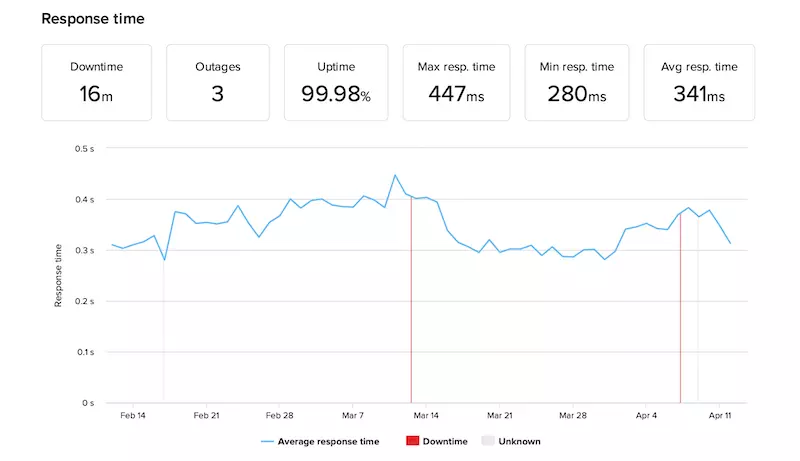
Fortunately, my GoDaddy server had an excellent average response time of 341 ms. The maximum response time was only 447 ms. These results are great and helped restore my confidence in GoDaddy.
So both HostGator and GoDaddy seem to be very reliable and even deliver higher uptime than promised. However, GoDaddy had a better average response time – 341 ms compared to 525 ms for HostGator.
Website Speed
Just as important as uptime and response time is loading speed. Website visitors expect websites to load within 3 seconds. If they don’t, the bounce rate increases significantly with each additional second.
To see how fast these two providers are, I compared the loading speeds of GoDaddy and HostGator on fully setup WordPress websites. I installed the Astra theme on both providers and chose the “Tech Startup” template for this purpose.
To better understand the results, you should pay attention to a few metrics:
You see, we pay special attention to LCP and TTFB here. These measures are just a few of many that Google takes into account when placing a website on the search results page.
It’s really quite simple: the better the results are, the better your chances are of getting a higher ranking.
With that in mind, HostGator has certainly demonstrated some speed. Its Largest Contentful Paint is 1.1s, and the Fully Loaded Time is almost as fast at 1.2s.

Alternatively, GoDaddy was a close runner-up. The biggest content-rich frame on GoDaddy was exactly the same as the fully loaded time – a very fast 1.5 seconds.
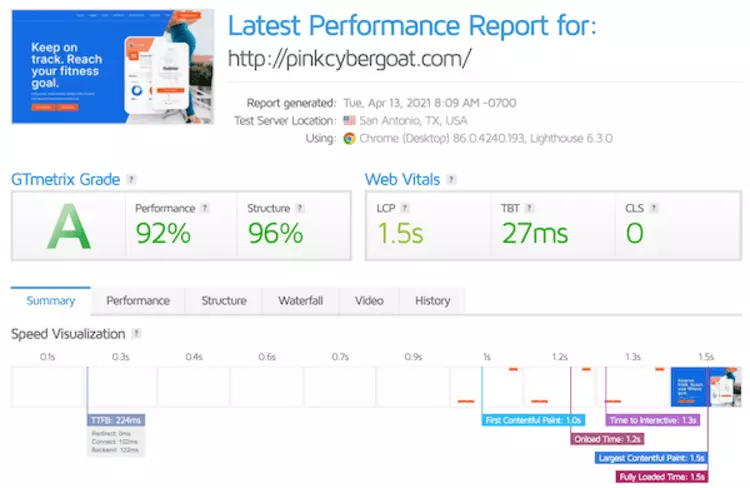
So when it comes to loading speed, both providers are excellent. With 1.2s and 1.5s Fully Loaded Times, HostGator and GoDaddy have enough leeway not to exceed the 3-second mark.
Although their TTFB are a bit further apart at 154ms for HostGator and 224ms for GoDaddy. Regardless of the difference, the servers at both providers seem to be very capable.
So overall, it’s hard to call either provider “better” than the other when it comes to performance.
Stress Testing Results
As the final nail in the coffin, I wanted to see what kind of traffic each provider could handle. As a starting point, I sent 50 virtual visitors to each website.
That’s a pretty high volume of traffic, because 50 bots are cavorting on your site at the same time. That could slow down or even overwhelm a less capable server pretty easily. How did they manage it?
It was no problem for HostGator to handle this traffic.

In fact, I don’t think it makes any difference between one visitor and 50. That’s pretty clear if you look at the graph. The blue line (response time) was very stable, and apart from one jump, it didn’t change when the number of visitors increased (gray line).
Just like in the speed test, GoDaddy is close behind. But still a runner-up. It failed the test with 50 visitors. To find his limits, I decreased the number by 5 and ran the test again. The first run was with 40 visitors.
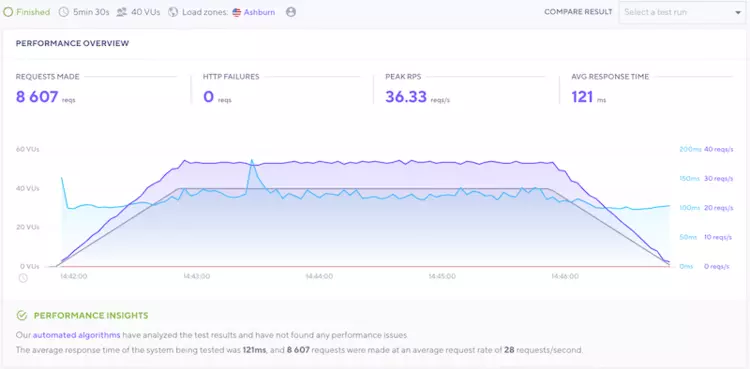
And 40 visitors is a great result. If this number of visitors would stay on the website every day for a month, it would result in tens of thousands of monthly visitors.
With that many visitors, the server did not slow down, and it responded in 121 ms on average. This becomes very clear when you look at the response time (blue line). It remained very stable, and the number of visitors (gray line) had little to no effect on it.
And although GoDaddy had great results, HostGator outperformed the competition, without question.
All in all, both HostGator and GoDaddy showed great results in terms of performance. The providers were very reliable, with higher than guaranteed uptime. Loading speed was very pleasing, and traffic was handled almost smoothly.
Winner: HostGator
Website Security
When it comes to security, both providers are on the very simple side. But even here, HostGator manages to outdo GoDaddy with something as simple as offering free SSL certificates in all of its plans. However, don’t jump to conclusions too quickly. Let’s take a look at what each of them offers individually.
First, while HostGator offers SSL for free even on its cheapest plans, GoDaddy is not so generous. Greedy, even. You can only get a free certificate with the Ultimate and Maximum plans. And even then, it’s only valid for one year on the Ultimate plan.
An SSL certificate at GoDaddy would cost you $4.75/month. Sure, the package includes a firewall and malware scan, but I think the whole thing is outrageous. It’s more expensive than the hosting package itself! Especially when it should be free, and yet it has the audacity to charge renewal fees ($7.99) after a year.
The second important point is the backups of the website. However, neither of the providers offers automatic backups:
I should say that both of them allow you to create backups manually via your cPanel. But that is entirely your responsibility. Automated backups remove that burden.
And finally, HostGator offers a free server-level firewall for all packages, while GoDaddy only offers this in the paid website security package I mentioned above. Yes, the package with SSL in it. I’m still pissed about that.
Overall, HostGator is a bit better equipped than GoDaddy when it comes to security. Still, neither of them are very security-oriented out of the box.
Winner: HostGator
Customer Support
As for customer support, both providers offer the same 24/7 live chat and phone support. However, HostGator also has ticket support for more complex issues, which GoDaddy does not. HostGator’s staff seems much more professional, while GoDaddy has a very active community forum.
For starters, I took a close look at HostGator’s support. If you live in the US, you can get toll-free phone support 24/7. For international customers, a number is available, but it’s not free.
Fortunately, HostGator’s live chat is excellent. I was immediately connected to a representative and asked a few questions about the security features included in the Baby Shared Hosting plan. The support representative I chatted with gave me the answers within a few minutes.

The employee even walked me through the available security services and explained how to set them up.
Unfortunately, my experience with GoDaddy’s live chat support wasn’t nearly as good. For one, I had to wait 34 minutes to be connected to a representative.
I asked a similar question about the security features included in the Deluxe Shared Hosting plan and was not satisfied with the answer.
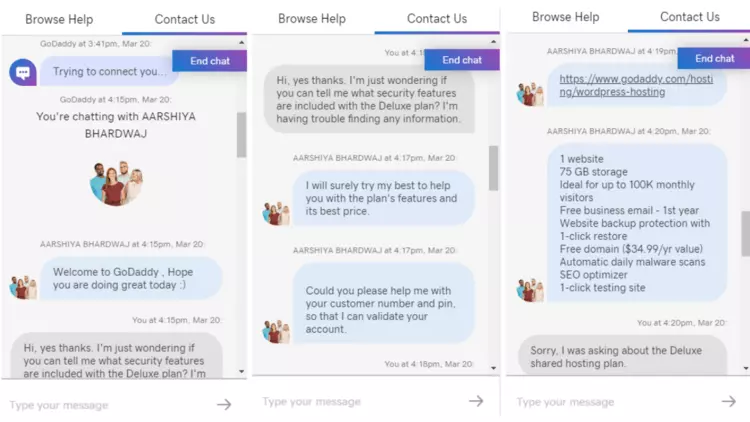
All they could do was copy the information from the GoDaddy website – and it wasn’t even relevant to the plan I was asking about!
GoDaddy also offers phone support in 51 different countries around the world. These include the US, Canada, Australia, and the UK, among others. However, I wouldn’t count on this being better than the live chat option.
Fortunately, however, GoDaddy has a great knowledge base and community forum. Users can use these to find answers to their own questions. I particularly like GoDaddy’s knowledge base for its intuitive, beginner-friendly layout. The built-in search bar is extremely useful, and the content is heavily categorized by topic and product.
However, HostGator’s knowledge base is no less impressive. It also includes a large selection of articles, guides and instructional documents to help you set up and manage your website.
As far as customer service is concerned, HostGator is way ahead of GoDaddy. Both providers offer impressive knowledge bases and phone support, but HostGator’s live chat is far superior to GoDaddy’s.
Winner: HostGator
Conclusion
The showdown between HostGator and GoDaddy has provided valuable insights into their respective strengths and weaknesses. In our quick comparison, we analyzed crucial aspects like pricing, hosting management ease, account dashboard, control panel, website migration, and website builder experience. When it comes to performance, both companies demonstrated commendable uptime and response times, though HostGator excelled in website speed and stress testing results.
Website security and customer support were equally crucial areas, and GoDaddy emerged as the more reliable choice. Ultimately, the decision between HostGator and GoDaddy boils down to specific needs and preferences, as each platform offers a unique set of features and benefits.
FAQs
Which hosting provider, HostGator or GoDaddy, offers better customer support?
HostGator takes the lead when it comes to customer support. They have a highly responsive 24/7 support team, accessible via phone, live chat, and email. Their support agents are knowledgeable and have consistently helped me resolve issues promptly.
Which hosting service provides better website performance and speed?
HostGator to be more reliable in terms of website performance and speed. Their servers are fast and stable, resulting in quicker loading times for my websites. On the other hand, I encountered occasional slowdowns with GoDaddy’s hosting, which affected my site’s performance.
Are there any significant differences in pricing between HostGator and GoDaddy?
Pricing can vary based on the hosting plan you choose. Both HostGator and GoDaddy offer competitive rates, but HostGator often provides more value for money. They frequently run promotions and discounts, making their plans more budget-friendly without compromising on quality.
Which hosting provider offers a more user-friendly interface for beginners?
As a beginner, I found GoDaddy’s interface to be more user-friendly. Their dashboard is intuitive and straightforward, making it easier to manage domain settings and hosting options. However, HostGator’s interface is also user-friendly and should not pose significant challenges for newcomers.
Can you compare the features provided by HostGator and GoDaddy?
Both HostGator and GoDaddy offer a range of features, including domain registration, website builders, email hosting, and SSL certificates. However, HostGator includes more unlimited features with their plans, such as unlimited bandwidth and disk space, making it a better choice for those with resource-intensive websites.
To read more similar articles, click here.
Thanks for visiting our Website. If you appreciate our work, kindly show us some support in our comments section. 🙂

Norman Dwemer is a tech blogger who focuses on the future of technology. his blog delves into emerging technologies such as artificial intelligence, blockchain, and quantum computing, as well as their potential impact on our lives and society. Rachel’s writings provide a sneak peek into the future of tech, examining the possibilities and risks of these cutting-edge technologies. he also shares the most recent developments and research in these fields, delivering the latest news and insights to his readers. Norman’s visionary outlook on the world of tech has establihed his as an authoritative figure for anyone interested in the forefront of technology.