GoToConnect Review: Businesses save money when using a cloud-based phone system, but most services charge for international calls and only a few integrate with remote information technology (IT) software. Enter GoTo Connect, which we found to be the top communications solution for internal IT teams. With IT ticketing and device management tools for employee tech support, GoTo Connect eliminates extra fees (and third-party subscriptions).
Also, it enables unmetered calling to 52 countries, which helps companies reach their global customer base without breaking their budgets.
Table of Contents
Why We Chose GoTo Connect for Internal IT Services
The Internet has opened up the world to small businesses, allowing them to connect with customers around the globe. But relying on a phone system and cloud applications means spending more time (and money) troubleshooting technical issues. We love that GoTo Connect brings voice-over-Internet protocol (VoIP) services and IT management tools together on a single platform.
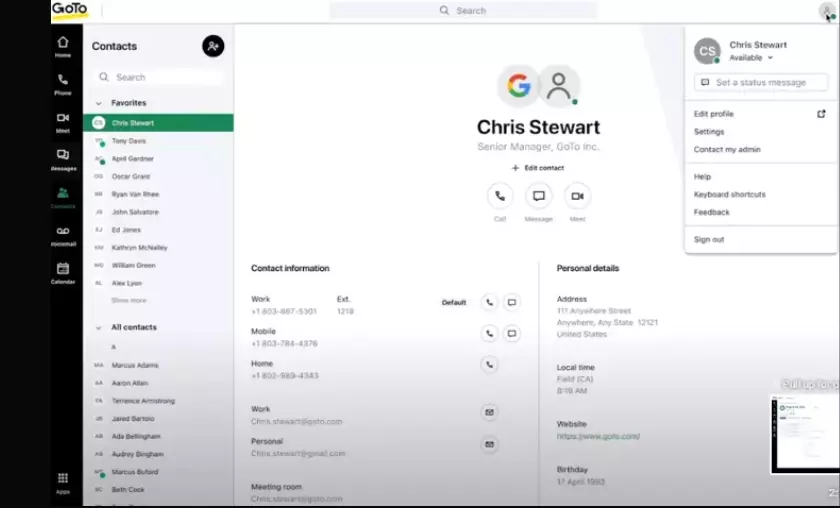
The system’s integrated products and unlimited worldwide calling capabilities allow companies to avoid complex integration processes and serve a broad customer base without sacrificing efficiency or paying high costs for international calls. We appreciate the unified administrator experience, which shows call quality and device status for on-site and remote teams. We also like that employees who need help with hardware, software, or email can send a request to their IT team without leaving the GoTo Connect app.
In addition, small and medium-sized businesses that provide technical support to their customers can benefit from GoTo Essentials. This unique subscription combines GoTo’s feature-rich GoTo Resolve software with VoIP telephony services. Other tools, such as an intuitive visual dial plan editor and intelligent call routing, earn GoTo Connect a place on our list of the best business phone systems.
What We Like About GoTo Connect
What We Don’t Like About GoTo Connect
Ease of Use
The GoTo Connect mobile and desktop applications are intuitive and visually appealing. The main screen is uncluttered, with one-click access to voice, messaging, meetings, contacts and favorites. On the left sidebar, you can toggle between GoTo products, but you won’t see these icons if your company doesn’t subscribe to GoTo Contact Center or GoTo Training.
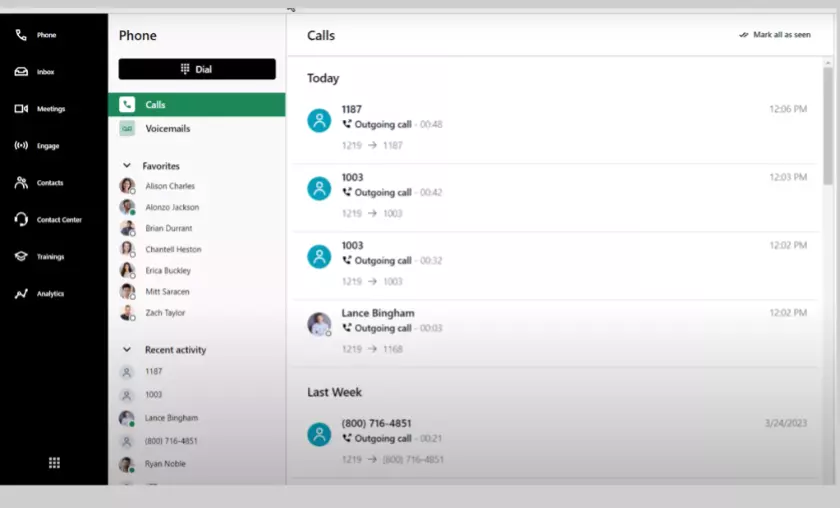
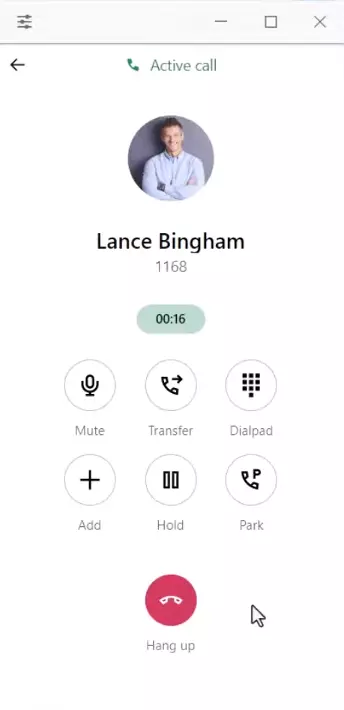
We love GoTo’s new softphone experience for desktop users. It opens a floating window with basic calling functions, so you can minimize the GoTo Connect app but still answer incoming calls. Like the vendor’s other applications, this tool is easy to use, with simple icons. Red means stop (or end the call), while green means continue (or answer a call). We appreciate the ability to switch devices without interrupting the call (call flip) and to see the timestamps of all interactions, from messages to missed calls.
The administration panel streamlines administrative processes, such as setting up accounts and viewing open help requests. The graphs are clear, making it easy to understand call volume and quality at a glance. Overall, we were impressed with how easy GoTo’s all-in-one phone system was to use, especially considering its many advanced features.
GoTo Connect Features
GoTo Connect offers numerous features for IT departments, administrators and employees. Video conferencing and chat messaging tools also make it an excellent solution for managing remote teams. Discover here the GoTo Connect features that enhance customer and technical support experiences.
GoTo Admin
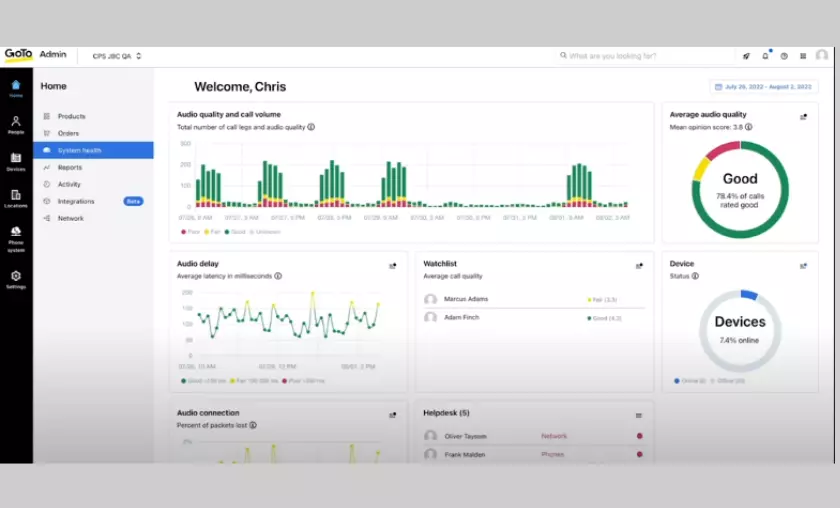
Only a few VoIP providers offer quality of service reports and some, such as RingCentral, give a real-time view of system status. These management tools help you optimize networks for VoIP and manage users or devices. Using the GoTo Connect system health dashboard is especially convenient, as it covers all the GoTo products your company subscribes to. It’s easy to monitor each connection or view company-wide statistics. We especially like the watch list, which allows you to monitor employees with acceptable or poor call quality. You can also click on individual users to learn more about their call quality history.
Internal Helpdesk Ticketing
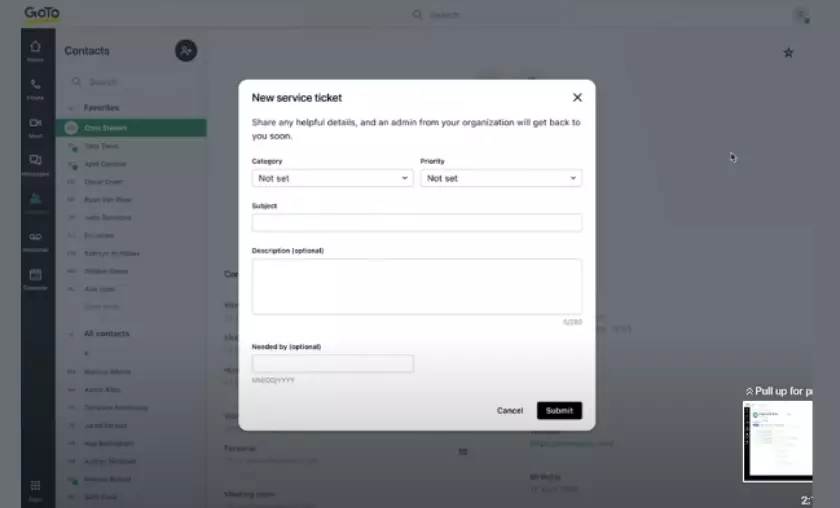
This feature is unique to GoTo Connect and is invaluable to companies with an IT department. It incorporates help desk capabilities into the GoTo Connect phone application. Employees can choose from more than a dozen support categories and attach a screenshot if desired. IT staff can filter requests by priority or type. Each submitted form has a quick links section that administrators can click on to view the employee’s profiles, devices, history, and technical status.
Floating Softphone App
While several business phone systems allow users to minimize applications, most do not offer a condensed softphone. We appreciate how the GoTo Connect app floats over other windows, keeping your communication tools close by. It has fewer features than the main desktop app but includes other essentials such as mute, transfer, park, and hold. Each person can manage up to five simultaneous calls. We like how clicking on the banner displays the number of calls and their status (on hold, parked, or active).
Tip
Companies can increase productivity by reducing application changes and using automated telephone features, such as artificial intelligence (AI) transcription of meetings and automatic routing to call queues.
Videoconferencing
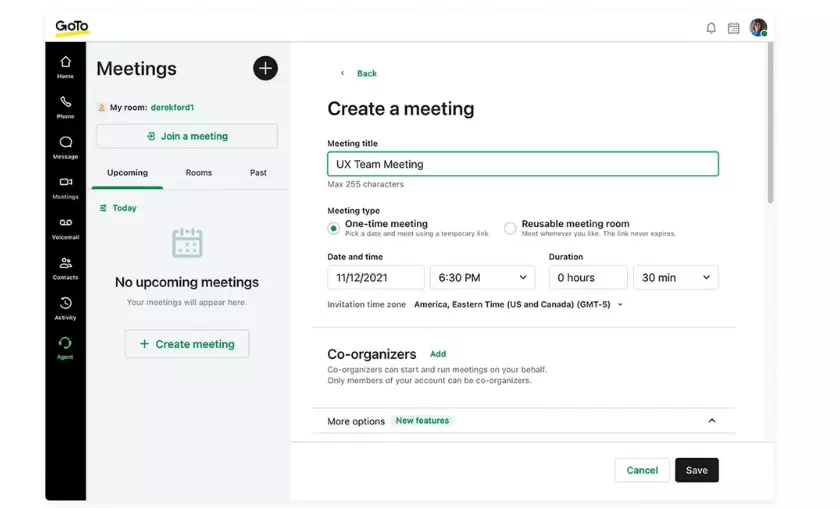
Secure video conferencing is a critical component of a modern business phone system and GoTo Connect offers this feature with all subscriptions. Users can share screens, join via web browsers and chat with meeting attendees. However, GoTo’s offering lags behind other cloud telephony services such as Zoom, which we found to be the best phone system for video conferencing.
Visual Dial Plan Editor
Many enterprise telephony systems have some version of a dial plan editor or phone tree configuration tool. These include drop-down lists for simple call flows in Ooma and graphical dial plan editors for advanced multi-location call assignments in 8×8. We preferred to use GoTo Connect for this task, as it has intuitive drag-and-drop functionality and is available in the admin panel. You can configure the virtual receptionist to support advanced routing options and features such as “Find Me/Follow Me” (It should be noted that Ooma also has a tool called “Find Me Follow Me”).
Call Transfer and Parking
This very common feature allows an employee to send a call to a co-worker’s phone. Most cloud phone systems and call center software offer this feature, but we like that GoTo Connect offers three transfer options: direct transfer, hot transfer, and voicemail. Direct transfers pass the call directly to another person, while hot transfers allow the employee to speak to his or her co-worker before forwarding the call. Users can also transfer a call to a voice mailbox. This utility is valuable on shared lines, such as when an assistant screens an executive’s calls.
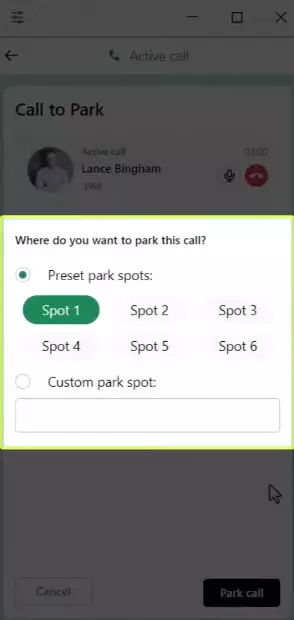
GoTo Connect has recently added more ways to manage incoming calls. For example, the system can now announce the extension or ask for callers’ names. Users can enable this feature in the desktop or mobile applications.
Pricing
GoTo Connect offers two business phone system plans, Basic and Standard, which you can conveniently purchase online. A third subscription, Premium, includes cloud-based call center features such as social media messaging and SMS queuing. Although this option is not listed on the GoTo Connect website, the vendor confirmed to us that companies can sign up for this plan by requesting a custom quote.
We like that GoTo Connect makes customer service and collaboration with international customers easy and cost-effective. The Standard subscription includes unlimited outbound calling to 52 countries and costs $25 to $31 less per user with monthly billing than the 8×8 international calling plan. However, GoTo’s Basic plan lacks virtual fax and limits video conferencing to four people and 40 minutes. Zoom and Ooma offer cheaper Basic packages with better video features.
That said, we appreciate that GoTo’s standard package offers 1,000 free minutes, while other VoIP phone services charge extra for free-minute packages. In addition, all plans work with a desktop phone, Android or iOS devices, and computers.
Below, we compare pricing and features with plans for two to 10 users.
| Service plan | Price (cost per user per month) | Features |
|---|---|---|
| Basic | $27 | • One auto-attendant greeting • 40-minute video meetings with four participants • One call queue • 40 SMS messages • One ring group • One custom dial plan |
| Standard | $32 | Everything in Basic, plus: • Unlimited ring groups and call queues • Internet faxing • 80 SMS messages • Unlimited custom dial plans • Hot deskingReal-time analytics • 1,000 toll-free minutes • Microsoft Teams, Salesforce, and Slack integrations • Unmetered calls to 52 countries • Call recording • Unmetered video meetings with 150 video conferencing participants |
| Premium | Custom quote | Everything in Standard, plus: • 5,000 toll-free minutes • 250 video-conferencing participants • SMS queuesIntelligent call routing • Real-time analytics dashboard • Social media integration • Unlimited ring groups and call queues • Agent monitoring tools • Webchat |
In addition to the above packages, companies that want to combine an office phone system with IT support will appreciate GoTo Connect Essentials. This subscription includes all the features of GoTo Connect Standard, such as SMS, team chat, and video conferencing, but adds GoTo Resolve Standard with remote desktop control and custom device management. Pricing starts at $35 per user, per month, for 20 users.
Implementation/Onboarding
Many small businesses can start using GoTo Connect services within a day. The exact timeframe will vary depending on the number of users, the complexity of the call routing, and the user setup you require. When a new position is set up on GoTo Connect, the person receives a welcome email with their account details, a detail we appreciate.
However, we were disappointed with GoTo’s training and onboarding materials. They lack interactive training modules and videos. Most of the documentation also lacks screenshots. The knowledge base has many articles, but they refer to different software versions, and we could not find information for some of the newer features. Other competitors offer webinars and on-demand tutorials with screenshots, GIFs, and videos.
Customer Support
Although GoTo Connect offers 24/7 customer support, options may vary depending on your location. During our research, conducted in the United States, we were only able to access customer service through email or an online ticketing system. The company responds to emails within 24 hours. This is not up to par with GoTo Connect alternatives, which offer live chat and phone support.
However, we found it helpful that a GoTo manager monitors the vendor’s community forum and responds to user questions within a few hours. This is a plus over its rivals, as most vendor message boards are either inactive or rely on self-help from peers rather than company employees.
Limitations
GoTo Connect’s self-service and customer service options lag far behind most of the business phone systems we’ve reviewed. This may be fine if most of your team is familiar with web- or app-based calling, but it makes it difficult to quickly train staff and take advantage of all the features and tools.
GoTo Connect also lacks the AI-based tools that many similar products have or are developing. The platform does not provide real-time call or meeting transcripts, does not use speech recognition to automate actions, nor does it automate agent training.
FAQ’s
How does GoTo Connect’s real-time analytics empower businesses to optimize their communication infrastructure?
GoTo Connect’s real-time analytics offer comprehensive insights into call quality, call volume, and system performance. This data empowers businesses to make informed decisions about network optimization, resource allocation, and troubleshooting. By identifying trends and patterns, businesses can ensure smooth communication operations and enhance the overall user experience.
How does GoTo Connect facilitate global customer engagement for businesses?
GoTo Connect’s unlimited calling to 52 countries eliminates the financial barriers associated with international calls. Businesses can now engage with their global customer base seamlessly, fostering stronger relationships and improving customer satisfaction. This feature is particularly advantageous for companies aiming to expand their market reach and enhance cross-border collaboration.
How does GoTo Connect’s basic package compare to its higher-tier offerings in terms of value?
While GoTo Connect’s basic package may be comparatively limited, it still provides essential communication features necessary for small businesses. The higher-tier packages offer additional functionalities such as internet faxing, advanced SMS capabilities, and integrations with popular platforms like Microsoft Teams and Salesforce. Businesses seeking a more comprehensive communication solution may find greater value in the upgraded plans.
Can GoTo Connect seamlessly adapt to the changing communication needs of rapidly growing businesses?
Yes, GoTo Connect’s scalability ensures it can accommodate the evolving communication needs of businesses as they grow. The platform can easily scale up to accommodate an increasing number of users, additional features, and expanding geographic reach. This flexibility allows businesses to maintain consistent and efficient communication, regardless of their growth trajectory.
How does GoTo Connect’s community forum contribute to its customer support ecosystem?
GoTo Connect’s community forum serves as an interactive platform where users can seek advice, share insights, and collaborate on problem-solving. With active participation from GoTo managers, users receive prompt responses and guidance on various issues. This community-driven support mechanism complements traditional support channels, providing an additional resource for users to tap into for assistance and knowledge sharing..

Henry Sprung is an e-commerce tech blogger with several years of experience in online retail. Alex’s blog focuses on topics such as online marketplaces, payment processing, and digital marketing for e-commerce businesses. Henry’s expertise in e-commerce provides valuable insights into the latest trends in online retail and how businesses can use these platforms to grow their sales. He is a valuable resource for online retailers and entrepreneurs looking to start their own e-commerce businesses.
To read more similar articles, click here
Thanks for visiting our Website. If you appreciate our work, kindly show us some support in our comments section. 🙂