In this comparison between Bluehost and DreamHost, I will show the similarities and differences between the two providers. I have analyzed several factors, such as prices, usability, performance, security and customer support. These are the most important points to consider when deciding which provider is best for your website.
If you’ve been around for a while, you know that combining Bluehost and DreamHost is like putting Ares and Mars in the same boxing ring. These are two big WordPress-focused hosters that both promise to be the best. They even have the same WordPress recommendation under their belts. Comparing two hosting providers to two gods of war from different mythologies may be an exaggeration, but I really wanted to make something clear.
So this comparison is not about who is good and who is bad. We have 2 very strong competitors here.
To that end, I bought plans from Bluehost and DreamHost and made sure to really put pressure on them. Let’s see who holds up better in the end.
Table of Contents
Bluehost vs DreamHost: Quick Comparison
At first glance, Bluehost and DreamHost have many features in common. They both focus on WordPress and WP optimization, but they also support other CMSs. The prices don’t differ much either, especially when it comes to renewals. The difference, however, is that Bluehost is geared towards beginners and offers many features for businesses, while DreamHost is more of a universal option.
I’ve summarized all of their features in a nice little showdown. However, since this article has become quite long, you can simply draw a conclusion.
| Bluehost | DreamHost | |
| Rating | 4.5⭐⭐⭐⭐⭐ | 4.4⭐⭐⭐⭐ |
| Price from | From $2.95/month | From $2.59/month |
| Free domain | Yes | Yes |
| Hosting types | Shared, WordPress, WooCommerce, VPS, and dedicated hosting | Shared, WordPress, VPS, Cloud Dedicated |
| Control panel | Modern native dashboard with the classic cPanel integration | Custom control panel |
| Security | Free SSL, 24/7 server monitoring, and Cloudflare DDoS protection | SSL certificates, Web Application Firewall, daily backup, domain privacy protection |
| Website migration | Free automated WordPress migration or paid ($149.99) professional site transfer | Free website migration plugin, paid options for website migration |
| Extras | Staging, emails, website builder, Cloudflare CDN (content delivery network) | Domain privacy |
| Website | www.bluehost.com | www.dreamhost.com |
Winner: Bluehost
Pricing Comparison
Bluehost’s shared hosting, which starts at $2.95/month, is a bit more expensive than DreamHost’s, which is $2.59/month for an entry-level plan. Also, both providers offer similar scalability options at fairly similar prices. Choices include managed WordPress, VPS hosting, and dedicated servers.
| Hosting type | Bluehost | DreamHost |
| Shared hosting | ✅ | ✅ |
| WordPress hosting | ✅ | ✅ |
| WooCommerce hosting | ✅ | ✅ |
| Cloud hosting | ❌ | ✅ |
| VPS hosting | ✅ | ✅ |
| Dedicated hosting | ✅ | ✅ |
| Visit Bluehost | Visit DreamHost |
Shared hosting is definitely the first choice for the majority of users. High-quality hosting providers are able to host both the smallest personal websites and medium-sized corporate websites on their shared servers. So that’s the option I’m focusing on in this article.
Both providers offer a free domain, SSL certificates, unmetered bandwidth, and the same 50GB SSD space for a single website. However, other features are different:
Apart from not having email accounts, DreamHost is both cheaper and offers better features. Daily backups and domain privacy can easily be worth $30 extra per year.
But like everything nice, Bluehost and DreamHost prices come with certain conditions. That is, you have to choose the longest billing period to get the cheapest price, and it will increase after that billing period expires. However, DreamHost is cheaper no matter where you look – in the advertisement or in the price renewal.
No matter how good the features of these cheap plans look, they are very limited in any case. What if you want to add a second website? In that case, you should consider other tariffs as well.
In total, Bluehost offers 4 plans that range from $2.95/month to $13.95/month. Starting with the second one, you get to host unlimited websites with unlimited storage.
If you’re looking for the best value, skip the most expensive plan altogether in my eyes. For a steep price and an even steeper renewal, it offers nothing special. So the 2 options we’re looking at are Plus and Choice Plus.
Best Value
To get the best long-term price with Bluehost, choose the Plus plan with a 36-month term. Unlimited websites and storage are quite affordable at $4.95/month initially, and renewal is not as expensive as other plans.
As for DreamHost, the choice is much simpler. It has only 2 plans – Starter for $2.59 and Unlimited for $3.95 per month.
The Unlimited plan comes with unlimited storage, websites, as well as professional email accounts for just a little over $1 extra. This immediately looks like a much better value than Starter.
Best Value
If you know that you need more than one website, DreamHost unlimited plan offers the best value. Choose it with the 36-month upfront payment. The total is $142.20 – that’s the price of Bluehost’s entry-level plan. On the other hand, the renewal is very expensive with a total of $395.64/month.
DreamHost renewal for the Unlimited plan brings it much closer to Bluehost’s prices. So, you get the better deal at first, but the renewals don’t differ much. And that’s why the price alone is not enough to choose a provider.
By the way, DreamHost offers a 97-day money-back guarantee for its shared hosting plans. This is the longest refund period available. Bluehost, on the other hand, allows you to cancel within 30 days of purchase and receive a refund.
The bottom line is that DreamHost is much cheaper than Bluehost to begin with. Especially when we look at the entry-level offers. On the other hand, the price differences are not too big when it comes to renewals. Especially when you look at the more expensive options.
Winner: DreamHost
Hosting Management: Ease Of Use
What I can tell you from the start is that Bluehost is much more beginner-friendly than DreamHost. There are two dashboards – one for normal settings and the other (cPanel) for advanced tools. DreamHost, on the other hand, offers one dashboard that takes some getting used to.
Now don’t get me wrong. DreamHost’s dashboard has all the tools you need. However, if this is your first time working with it, it will take you some time to find your way around it.
Of course, usability can mean different things, which is why I plan to analyze the user interfaces, control panels and website builders separately. This way you can get a more accurate picture of what to expect.
Default User Dashboard
As far as the user interface is concerned, Bluehost and DreamHost hardly differ. All the main management, like installations and domain configuration, is done through the main interface. Both providers install WordPress when you first sign up. If that’s what you want.
At the same time, Bluehost is perhaps a bit more beginner-friendly. When you sign up for the first time, the WordPress installation process is initiated, which basically creates a website for you.
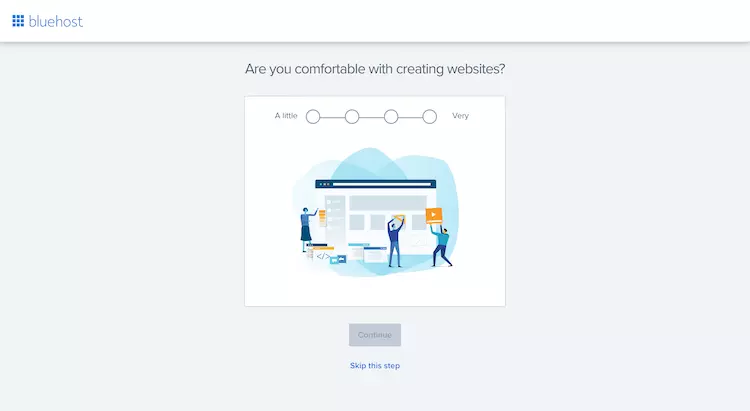
You can skip or continue the process. In any case, you will soon see the main dashboard.
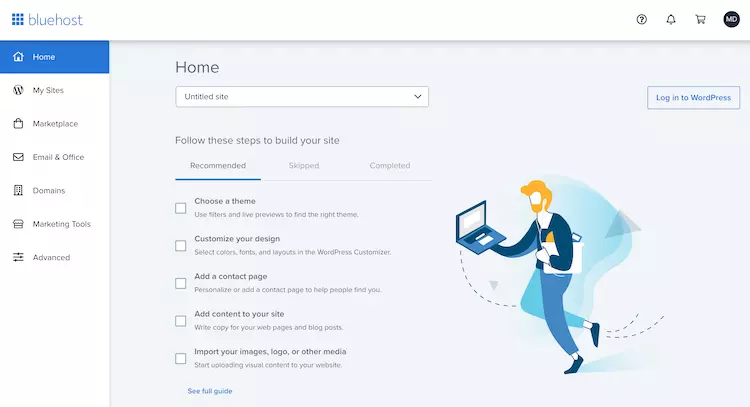
The menu on the left contains all the administration tools. The My Websites section is by far the most useful. It lists all the websites you’ve created and is the navigation point through which you can access the administration areas of each of them. This is another useful interface for performance, security, and even plugin settings.
Basically, you don’t need any advanced settings to get your website up and running with Bluehost. However, the Advanced tab will take you to the cPanel.
The process with DreamHost starts similarly and the WordPress installation is even easier. All you need to do is click the button and everything will be done automatically.
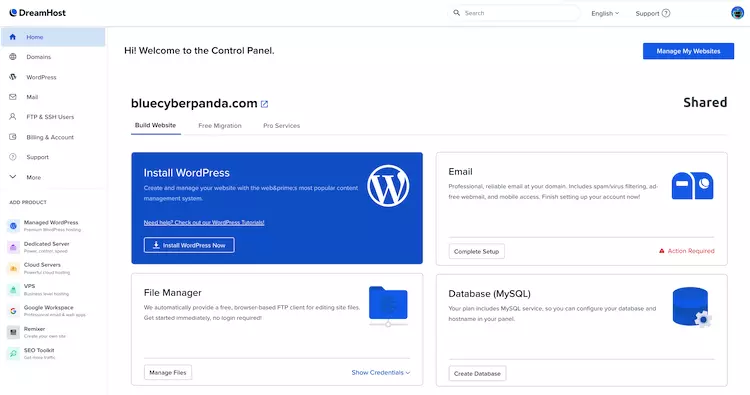
DreamHost’s user management dashboard is also the control center. Therefore, navigation here becomes a bit more complex.
The Home and Domains tabs are not confusing. What is confusing is that there is no tab like My Sites where I can see my websites. So when I click on WordPress, where do I go? To my WP website? Or do I go to another administration interface? Actually, you won’t go to either place because the WordPress menu item is only there for WordPress installation and promotion of Managed WordPress plans.
But you will get used to DreamHost’s user interface. There’s no doubt about that. Although you may notice right at the start that it’s a little different than what you may be used to.
Ok, so we’ve established that Bluehost wins the user interface round. Let’s see who wins the control panel round, shall we?
Control Panel Comparison
While Bluehost integrates the classic cPanel control panel, the DreamHost control panel is the main user dashboard. If you are familiar with cPanel, then you know how powerful it is. The DreamHost control panel, on the other hand, while very powerful, can give you a bit of a headache at first.
Bluehost has done this useful thing and integrated cPanel directly into its dashboard. I find this incredibly handy. All you have to do is click on the Advanced tab, and voila! Long live cPanel!
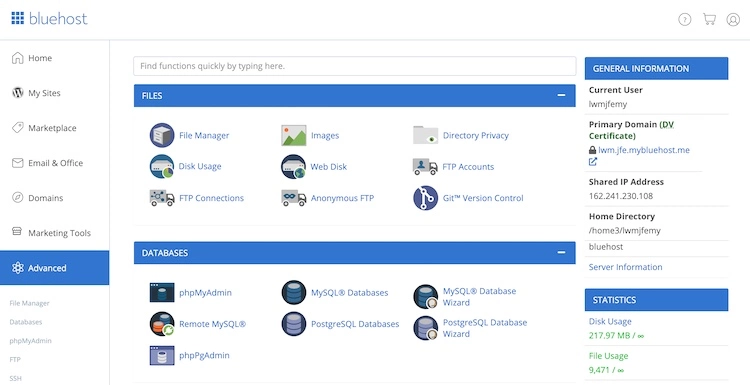
cPanel is great for creating free email accounts, accessing databases or file managers. At the same time, Bluehost has tweaked it a bit.
The Bluehost version of cPanel does not have such standard modules as domain management or the Softaculous app installer. Domains are now integrated into a separate dashboard. And as for the apps… Well… You can install WordPress under My Sites or scroll all the way down to the Marketplace to find a few other options.
These omissions are a bit much. In trying to make your life easier, Bluehost may have just tried to do too much.
Okay, now it’s DreamHost’s turn. The provider has opted to create a native control panel that integrates with the man dashboard. At first glance, everything looks amazing, with the menu on the left containing the usual management tools for domains, WordPress, email and FTP.
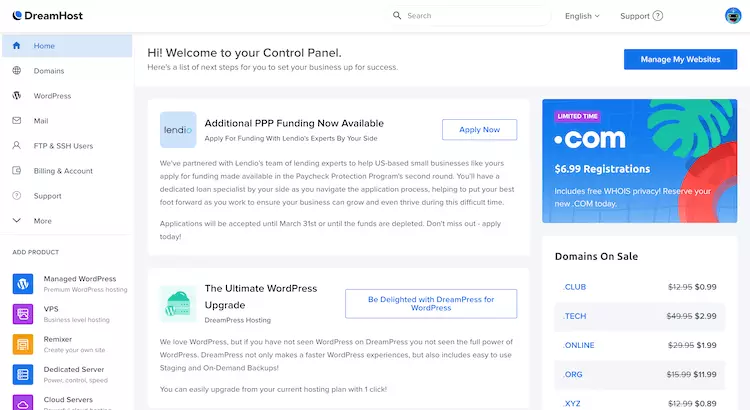
But within these menu items there are some strange navigation options. For example, under Domains there is a Websites button where you can see all your sites. I wouldn’t even think of looking under Domains for a general website management area. So it takes a bit of time to get used to DreamHost’s strange UX choices.
That said, the control panel is functional, and that’s the most important thing.
Ultimately, I think both vendors are on the same level when it comes to the actual control panel. Bluehost has left out some of the important stuff, while DreamHost has confused itself with some of the navigation options. Nevertheless, both control panels are perfectly functional, and you’ll be able to manage your website like a pro in no time.
Extra Website Management Features
To help you create and manage websites, Bluehost offers the possibility to create staging environments and use its WordPress-based website builder. DreamHost, on the other hand, offers not one but 2 website builders. However, site staging is not available.
First things first, Bluehost staging is one of the best features of this provider. The provider is directly integrated with WordPress and allows you to create a copy of the website that is visible only to you. If you want, you can use it to make changes and test (or fix bugs). Once everything works as you want, you can publish these changes to the live version with one click.
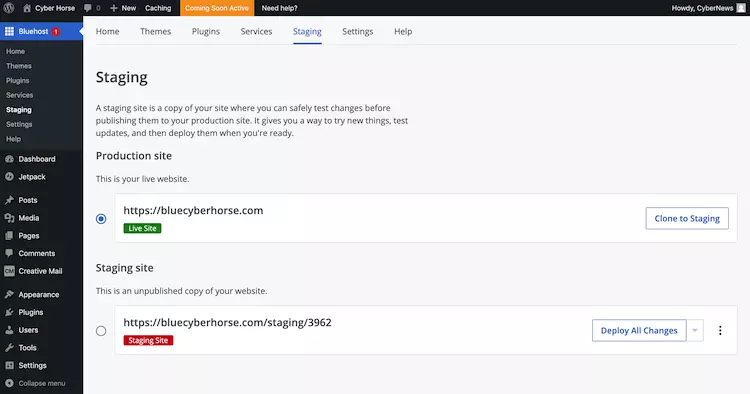
This feature can be a lifesaver. Imagine you want to update a plugin, but you are not sure if it won’t damage the website. Do it with the staging copy and test it out!
Another WordPress-related feature that Bluehost offers is the website builder. This is a simple tool that creates a website for you based on a few questions.
You can convert Bluehost’s demo content into your own, customize some design options and colors, and you’re ready to go.
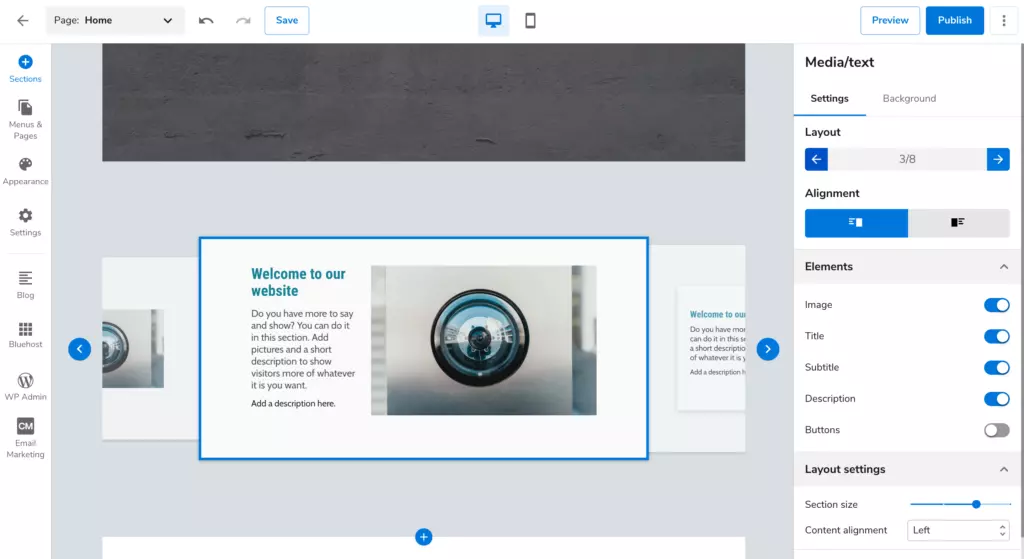
What makes this builder special is that it works as a WordPress plugin, and you can easily turn your simple website into a powerful WordPress website as soon as you are ready.
DreamHost also offers a similar builder, but this time you know you’re working with WordPress from the start.
With the BoldGrid website builder, you can choose from dozens of templates and determine which pages you want to design. It’s much more powerful from the start, since you can add additional plugins to design your own templates and other website elements.
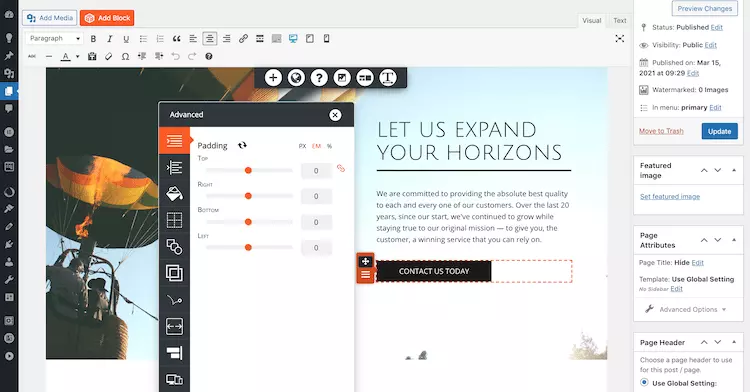
Of course, for the sake of simplicity, you can just convert the demo content into your own – there is no easier way to create a website.
Another website builder, Remixer, is not as powerful. Personally, I would only use it for a temporary “coming soon” announcement.

You can choose from 6 themes and a set of templates for each design element. It really doesn’t get any simpler than this.
Although both Bluehost and DreamHost have some additional tools to help you out, Bluehost wins. 2 DreamHost website builder can’t beat the convenience of the staging tool.
In the end, both providers are easy to use and don’t cause any problems when it comes to managing websites and hosting. However, I give Bluehost more points here because the dashboard is a bit easier to navigate and it includes staging.
Winner: DreamHost
Bluehost vs DreamHost Performance
Performance is where DreamHost is more reliable, faster and stronger. It showed slightly better uptime with long-term monitoring, loaded a website faster, and was able to handle more traffic than Bluehost.
In this part of the comparison between Bluehost and DreamHost, I took a detailed look at the performance of the two providers.
Uptime & Response Time
During 2 months of monitoring, both providers achieved high reliability ratings, although DreamHost had fewer outages than Bluehost.
Bluehost’s uptime is 99.99% with a total of 11 minutes of downtime caused by 6 outages. This is a very good result for shared hosting.
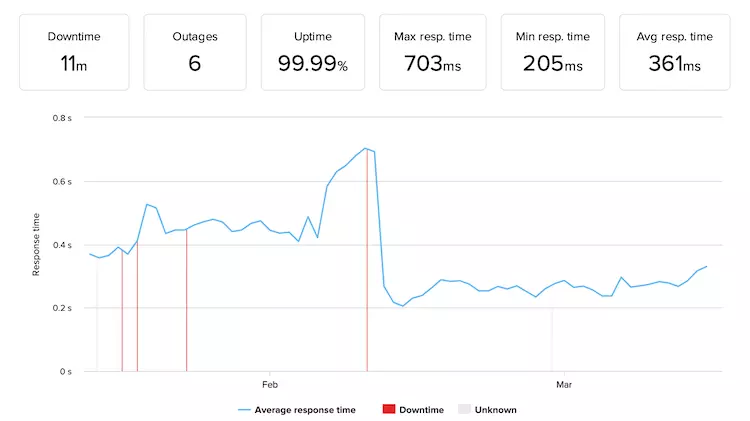
Considering speed, Bluehost server is also fast. The average response time was 361 ms. At the same time, the speed improved only in the second half of the test, which shows a connection with the failures that all occurred at the same time. The clear line of improvement is encouraging – Bluehost fixes problems without causing difficulties for users.
Meanwhile, DreamHost’s uptime was better than 99.99%, with only one outage that lasted only a minute. For a provider that promises 100% uptime, this is an excellent result.
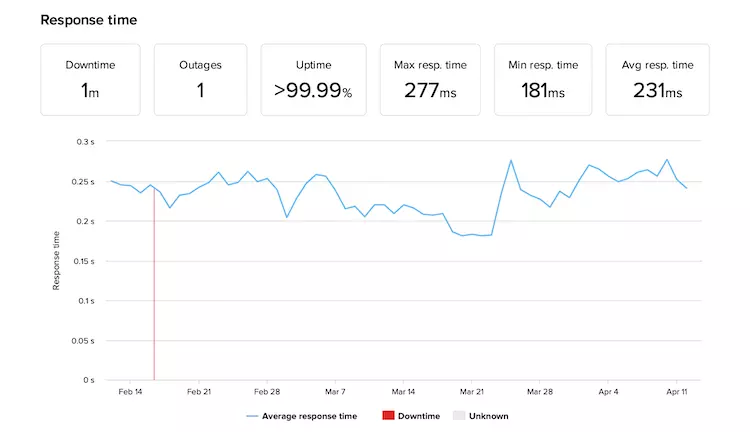
In terms of response time, DreamHost was also faster, with an average of 231 ms. This is one of the best results for shared hosting you can expect.
Overall, both providers show good reliability results, with DreamHost being slightly faster and more reliable.
Website Speed
When comparing website speed, DreamHost is again slightly ahead. In this comparison, there are 3 measures that are most important for us:
Bluehost’s Largest Contentful Paint on a fully built website is 1.8 seconds, which means that the provider just about meets the recommended 2.5 seconds. At the same time, this is not exactly the fastest possible result.
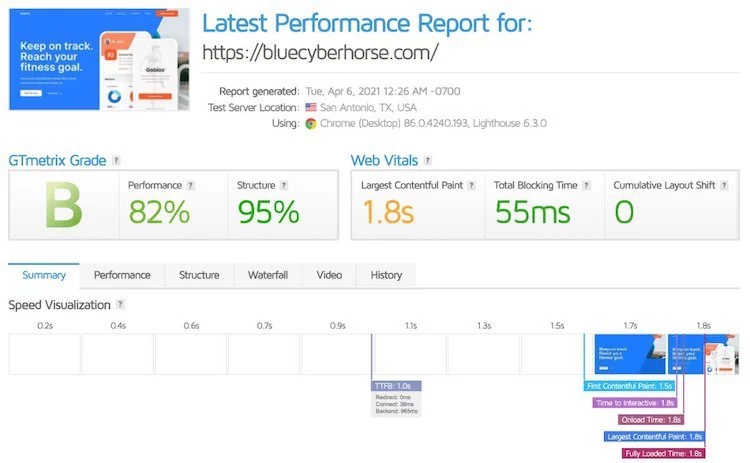
LCP is not exceptional, but there is no further delay until the website is fully loaded. So I would say that loading your website in 1.8 seconds is an excellent result.
However, TTFB shows that the server could be faster. It takes a full second to respond to the first request. If it weren’t for this delay, we would see Bluehost loading websites in less than a second.
Our competitor number 2 shows slightly better results. DreamHost’s Largest Contentful Paint is slightly faster at 1.4 seconds. Even this is not the best result in the industry, but it is perfectly fine.
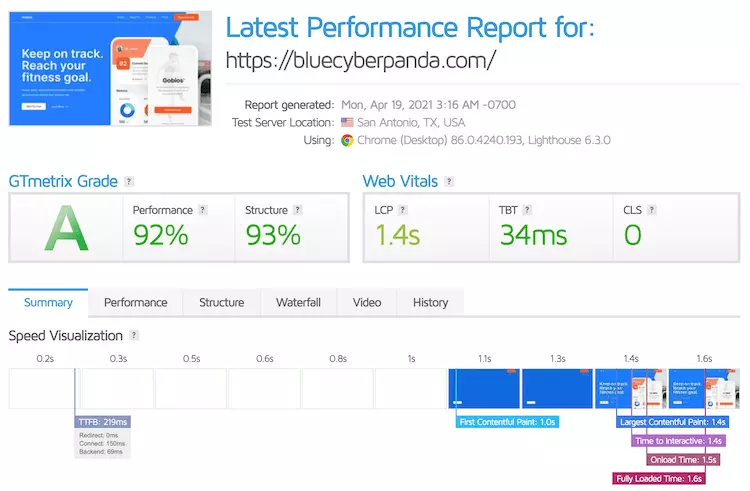
There is a short delay of 1.6 seconds in load time (Fully Loaded Time), which is a very similar result to Bluehost.
One thing that distinguishes DreamHost from Bluehost here is the TTFB. DreamHost responds much faster to the first request.
Once again, DreamHost shows slightly better results than Bluehost in terms of speed, but the actual difference is not that big. What I can tell you is that a human eye cannot see the difference between the two.
CyberNews Pro Tip
Website speed also depends on where your website is hosted. The closer the server is to your visitor, the more likely the page will load quickly. Both Bluehost and DreamHost have servers in the USA. So the speed of your website is best for visitors coming from the North American region.
Stress Testing
The stress test shows the real difference, taking DreamHost to the next level. I sent 50 bots to each website I created with the providers to see if they could handle the traffic. After all, websites are there to be visited, right?
I felt the same way with Bluehost when I first realized how much tax I had to pay. No joke, it was way too much for Bluehost (or me) to even think about.
Bluehost didn’t handle all 50 bots, but I tested to see how much it could handle. It turned out to be 15.
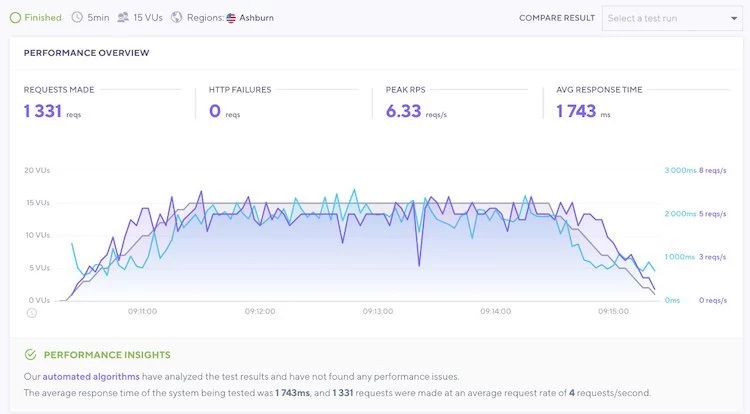
Even with 15 visitors, Bluehost’s speed (represented by the blue line) increased along with the bots (gray line). This shows that the provider slowed down a bit to handle all the incoming traffic.
But we shouldn’t berate Bluehost too much. Even 15 visitors is quite a lot for a shared hosting server, as you know…. It is shared. That means you have to be kind and let your neighbors use some valuable server resources.
On the other hand, DreamHost had no such problem. It was able to welcome all 50 bots that decided to visit.
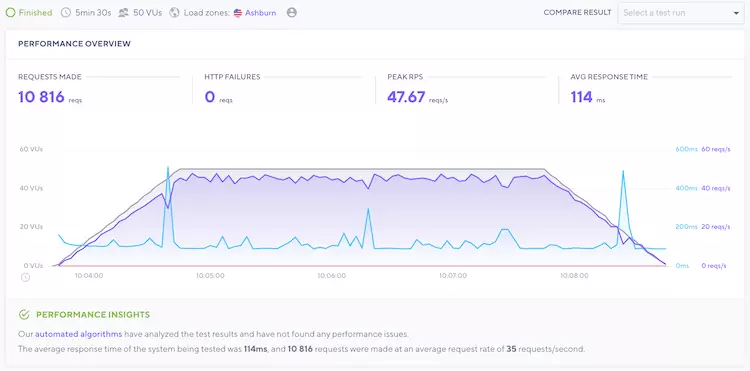
Even with 15 visitors, Bluehost’s speed (represented by the blue line) increased along with the bots (gray line). This shows that the provider slowed down a bit to handle all the incoming traffic.
But we shouldn’t berate Bluehost too much. Even 15 visitors is quite a lot for a shared hosting server, as you know…. It is shared. That means you have to be kind and let your neighbors use some valuable server resources.
On the other hand, DreamHost had no such problem. It was able to welcome all 50 bots that decided to visit.
Winner: Bluehost
Website Security
A comparison between Bluehost and DreamHost is not complete without a security analysis. In this area, DreamHost performs better because it offers more security features than Bluehost. Features you have to pay for with Bluehost.
When you buy a Bluehost plan, you get a basic security package that includes an SSL certificate and server monitoring. In addition, backups are created, but the provider does not guarantee their restoration. And if this were possible, a fee would be charged.
Therefore, it is recommended to take care of the backup yourself or buy a third-party solution. If you are willing to pay for it, you can get it:
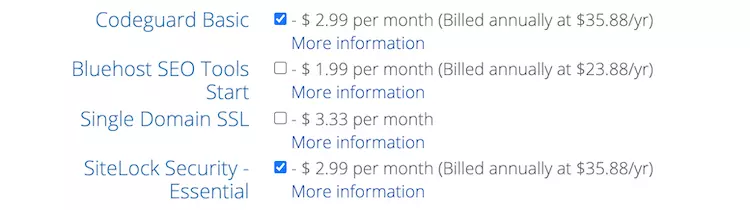
So while Bluehost provides the bare essentials for security, you have to pay for the rest. And that’s where DreamHost takes the lead.
No matter which DreamHost subscription you purchase, you get:

All in all, DreamHost takes security seriously and doesn’t consider it as a way to make money, like Bluehost does. It gives you the minimum, and then makes you pay for the rest. So, naturally, DreamHost conquers security in this comparison.
Winner: DreamHost
Customer Support
DreamHost drops the ball when it comes to customer support. It has an “during working hours only” live chat, a 24/7 email ticketing system and paid phone support. While Bluehost has 24/7 live chat and phone support. However, both of them have extensive knowledge bases.
You will by no means go through your hosting experience like a hot knife through butter. You will need help at one point or another. That’s why customer support is one of the most important factors you should consider when choosing a hosting provider.
It’s quite easy to test the customer support when comparing between different providers. Give them the same problem and watch them squirm (evil laugh). And that’s exactly what I did.
I did wait a few minutes for Bluehost’s support representative to get back to me, but I received quick responses. I appreciated that.
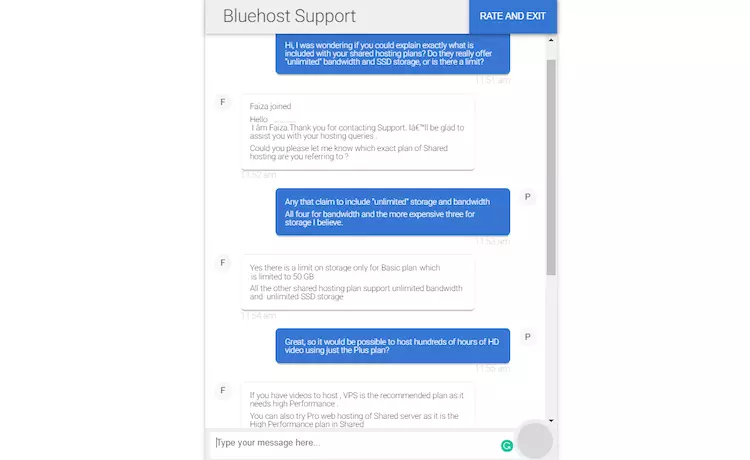
I asked about the unlimited nature of shared hosting, and the employee wasn’t exactly eager to give me an answer. Oh dear! The trick of unlimited storage is as old as hosting itself. Who would be naive enough to reveal this secret? It’s like a magician revealing his secrets.
With DreamHost, on the other hand, I had to wait a bit longer for an agent to connect. Not to mention that I had to use the live chat option during business hours.
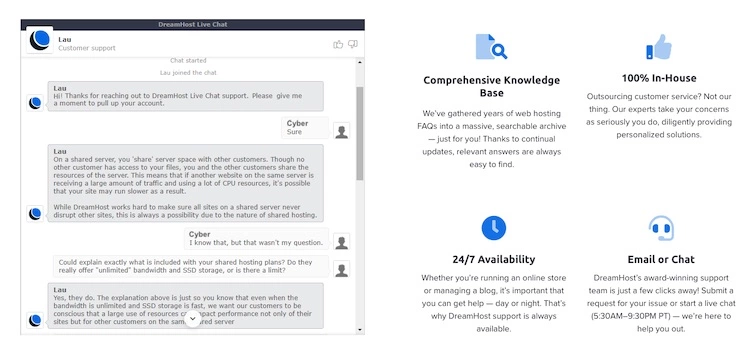
I felt like the agent was just playing dumb to avoid having to answer my question. I refuse to believe that he didn’t really understand. Eventually it was explained to me what “unlimited” actually means.
Other than that problem, both employees were friendly and polite. They didn’t want to be honest, but considering the question, I can’t blame them. They are probably instructed to avoid the question. The good news is that they are capable enough to solve technical problems. That’s where they’re needed most anyway.
If you want to search for answers yourself, you should know that Bluehost and DreamHost have extensive knowledge bases. They contain tons of articles and tutorials.
If you decide to use DreamHost, the first thing you should try is the knowledge base. One thing I noticed in my experience is that you will be sent there anyway. Just skip the middleman.
Bluehost’s knowledge base is just like that. There are several categories, but you can use the search bar if you’re looking for something specific.
Note that Bluehost and DreamHost have similar customer service. However, Bluehost’s is a bit better because the live chat is available 24/7. As far as knowledge bases are concerned, the providers are the same.
Winner: Bluehost
Conclusion
In the ultimate showdown between Bluehost and DreamHost, a quick comparison highlights significant differences in various aspects of web hosting. Both providers offer competitive pricing, but DreamHost’s transparent and inclusive approach sets it apart. While Bluehost excels in user-friendly hosting management with its default dashboard, DreamHost provides advanced customization options through its control panel, appealing to more tech-savvy users. Moreover, Bluehost offers a plethora of extra website management features, granting users greater control and flexibility.
In terms of performance, DreamHost proves to be a reliable choice with impressive uptime and response times, ensuring consistent website availability. On the other hand, Bluehost takes the lead in website speed and stress testing, catering to users with performance-sensitive needs. Security-wise, both companies implement robust measures, but Bluehost places strong emphasis on safeguarding user data and digital assets, making it a preferred choice for those prioritizing website protection.
When it comes to customer support, both providers offer responsive assistance, but Bluehost stands out with exceptional support services, delivering timely and comprehensive solutions to user queries. Ultimately, the choice between Bluehost and DreamHost will depend on individual preferences and specific hosting requirements. Whether seeking simplicity, high performance, or top-notch customer service, both hosting providers offer distinct advantages, making them suitable for various types of users and businesses.
FAQs
What are the main differences between Bluehost and DreamHost?
In my experience, the main differences between Bluehost and DreamHost lie in their pricing, user-friendliness, and performance. Bluehost is known for its budget-friendly plans and ease of use, making it ideal for beginners. On the other hand, DreamHost is a bit more expensive but offers more features and resources for advanced users who want more control over their hosting environment.
Which hosting provider is more suitable for beginners?
Bluehost is the winner here. As a beginner myself, I found Bluehost’s user interface and onboarding process very intuitive and user-friendly. They offer a one-click WordPress installation and a straightforward cPanel, making it easy for newcomers to get started with their website.
Which hosting provider has better features and customization options?
DreamHost wins in the features and customization department. While Bluehost has sufficient features for most websites, DreamHost offers more advanced options, such as custom server configurations and SSH access. This makes it a better choice for developers or users who need more control over their hosting environment.
Are there any major drawbacks to consider for each hosting provider?
Yes, there are a couple of drawbacks to consider. With Bluehost, I noticed that their introductory pricing was quite attractive, but the renewal rates were significantly higher. It’s essential to keep this in mind when budgeting for long-term hosting. On the other hand, DreamHost might be a bit overwhelming for beginners due to its extensive customization options, and the pricing might be a bit higher for those on a tight budget.
Which hosting provider offers a better money-back guarantee?
Both Bluehost and DreamHost offer a 30-day money-back guarantee. So, you can try either of them risk-free and see which one works best for you.
To read more similar articles, click here.
Thanks for visiting our Website. If you appreciate our work, kindly show us some support in our comments section. 🙂

Norman Dwemer is a tech blogger who focuses on the future of technology. his blog delves into emerging technologies such as artificial intelligence, blockchain, and quantum computing, as well as their potential impact on our lives and society. Rachel’s writings provide a sneak peek into the future of tech, examining the possibilities and risks of these cutting-edge technologies. he also shares the most recent developments and research in these fields, delivering the latest news and insights to his readers. Norman’s visionary outlook on the world of tech has establihed his as an authoritative figure for anyone interested in the forefront of technology.