Best WordPress SMTP Mail Plugin: Supercharge Your Email Marketing Efforts! (March 2026)

If you run an online store or membership site, you need to send countless emails every day. But WordPress PHP mail feature can’t support this bulk email transaction. This default system is not specifically programmed for this task.
Moreover, many hosting providers disable this feature for security reasons. For this reason, you need an SMTP service. It can improve the deliverability of your emails overnight. Otherwise, most of your emails will end up in the spam section of your audience.
Best WordPress SMTP Mail Plugin: In this article, we will introduce the 7 best WordPress SMTP plugins. Before that, we will give you some basic knowledge about SMTP plugins services.
Table of Contents
What is SMTP?

SMTP stands for Simple Mail Transfer Protocol. It helps you send bulk emails to a large number of audiences at the same time. Most newbies don’t understand how this protocol works. This protocol requires two things at a time: an SMTP plugin and an SMTP server.
Once you install an SMTP plugin, it takes full control of your WP_mail function. Then it connects your website to an SMTP server (also known as SMTP gateway). If you want to send bulk emails, your plugin will first forward all emails to the connected server.
The server then authenticates each of your emails and breaks them down into relevant parts. Right after the authentication is completed, the SMTP server sends all your emails to the recipients’ inboxes according to their email addresses.
Let us know why you need an SMTP plugin.
Why Do You Need A WordPress SMTP Plugin

Your web hosting server cannot handle multiple destinations. They are usually designed to reach only one destination at a time. For this reason, most hosting providers don’t support bulk email services. However, if you have a commercial website, you need to send or receive hundreds of emails every day.
An SMTP plugin can help your website in the following ways:
Why Should You Consider SMTP Server As Well
You may ask why you need an SMTP protocol to send emails. You can do it manually from your website. But the fact is, you can do it manually when your email volume is low. If you think of sending thousands of emails every day, the wp_mail function cannot support you anyway.
SMTP server can save your following ways:
Now, we are going to cover the best SMTP plugins that you can use to connect the SMTP servers and boost user engagement
7 Best WordPress SMTP Plugins to Improve Email Deliverability And IP Reputation
The WordPress SMTP plugin takes full control of your WP_Mail function. It tracks all your email statuses, keeps a record of your email transaction, and scrutinizes the errors of your failed emails.
We have tested a number of SMTP plugins. According to our analysis, the followings are the best-performing SMTP plugins for WordPress users at this moment.
We are going to highlight their pros-cons and recommendations. It will help you choose the best WordPress SMTP plugin for your website.
Note:
We have sorted this list based on their installation number. But as for bonus, we are going to introduce you to weMail, a compact solution of email marketing and SMTP services.
Introducing weMail:
An Easy and Reliable Email Marketing Tool at a Low Cost

If you are looking for an affordable SMTP plugin that also offers email marketing solutions, weMail must be on your checklist. With more than 20,000 active installations, it is one of the most powerful SMTP plugins for small to large organizations on the web.
It helps you focus more on growing your subscriber list, sending beautiful emails and creating engagement through your WordPress dashboard. You can also easily view signup forms, automate emails, collect leads and add subscribers to your list.
weMail Features
What weMail is Better For:
If you are a small business owner looking for an affordable SMTP plugin to grow your subscriber list, then weMail is incomparable to others. With the free version, you can manage up to 3,000 subscribers, which is quite enough for a small audience.
Now we will present the best WordPress SMTP plugins according to the number of their installations.
1. WP Mail SMTP

With over 2 million active installations, WP Mail SMTP is probably the most used SMTP plugin for WordPress users. It is very easy to set up. If you have any problems, you can upgrade to the Elite plan. An expert from the team will handle the setup process for you.
The free version of the plugin allows you to integrate with some major email gateways. Such as SendGrid, Mailgun and Gmail, for example. But to integrate Amazon SES and Microsoft SMTP, you need to upgrade to the Pro version.
- Easy integration with the best email gateways.
- Detailed email reports with charts, tracking and deliverability statistics.
- Record all email details sent from your website.
- Take full control of your website’s notification emails.
- You can manually enable or disable SMTP authentication.
- Supported by the WPForms team.
- Only developers and agency plan users can use the same API key on multiple websites.
- You cannot support Microsoft and Amazon SES unless you are a pro user.
Our Verdict on WP Mail SMTP 👑

WP Mail SMTP can give you a stress-free life. You can send all kinds of transactional emails with this plugin. It has 24 hours premium support available.
2. Easy WP SMTP

Easy WP SMTP avoids all conflicts with the PHP mail () function and can forward all your emails to your users’ inbox. With over 600,000 active installations, it is also in high demand among WordPress users. Easy WP SMTP is inspired by the WP Mail SMTP plugin.
It has a debug logging feature that allows you to track whether your emails are arriving in users’ inboxes or not. Also, you can use the import and export feature to place the same configuration on multiple websites if you want.
- A 100% free WordPress SMTP plugin.
- Supports hotmail, yahoo and Gmail/GSuite servers.
- Can be integrated with multiple websites.
- Ability to specify a reply email address.
- Easy to check email delivery success rate.
- Top-notch user interface.
- Does not provide direct ways to integrate email gateways.
- Very limited service is available for Amazon SES and Microsoft SMTP.
Our Verdict on Easy WP SMTP 👑
If you are a beginner and new to WordPress, you can use this plugin to enhance your email marketing skills. This is because this plugin is completely free. You just need to take the subscription fee of your SMTP server.
3. Post SMTP Mailer

With more than 300,000 active installations, Post SMTP Mailer is another free and feature-rich WordPress SMTP plugin. After you install the plugin, it connects Zend_Mail to your website and replaces the default PHP Mailer and WordPress SMTP library. The Chrome extension notifies you immediately when an email doesn’t arrive in your inbox.
It has a smart setup wizard and a connectivity tester. With it, you can scan your SMTP server to check if there is a configuration error or a firewall blockage.
- Connectivity tester and setup wizard ensure that there is no configuration error.
- Investigates the causes of failed emails and resends them.
- Supports custom email headers and forced recipients (cc, bcc, to).
- Since it replaces the WordPress library, you will never lose a PHP mail again.
- Saves HTML mail, multipart and international alphabets.
- Since this plugin is free, it is difficult to get instant support.
- You cannot use this plugin without a third-party SMTP service provider.
Our Verdict on Post SMTP Mailer 👑
Since this plugin is free, you will not get premium support. By integrating Mailgun API with this plugin, you can send 10,000 emails per month for free. Also, by integrating SendGrid API, you can send 100 emails per day for free.
4. Mailgun SMTP

If you are looking for a developer-friendly SMTP plugin, you should take a look at Mailgun SMTP. It has a RESTful API that lets you send transactional emails in bulk. Using the API, you can check the current status of all your emails at any time.
Mailgun offers 24-hour support for its premium users. It also stores your email data for up to 15 days. The number of active installations of the plugin is over 90,000.
- Provides email address validation and email tracking.
- 24/7 support, including detailed documentation.
- You can optimize the schedule of email sending.
- It supports all powerful languages (C#, Java, Python, PHP and Ruby).
- Gives you an email log to retrieve information when needed.
- The free plan allows you to send 5000 emails per month for the first three months.
- You can’t create your own domain.
Our Verdict on Mailgun SMTP 👑
Mailgun SMTP is a bit difficult to configure for regular users. This plugin is much better for developers. You can maximize your ROI with this plugin if you are a developer. Technical support is available for premium users.
5. Mail Bank SMTP

Mail Bank SMTP allows you to send emails using an existing Yahoo, Outlook or Gmail. It uses the Zend framework to maximize the functionality of your WordPress site. It has an email logger that records every email you send. It allows you to delete unnecessary emails one by one or in bulk.
You will find different authentication methods in this plugin. Mail Bank SMTP is very compatible with other email and contact form plugins. Besides the premium versions, it offers you a free plan to check its prospects. The number of active installations of the plugin is over 40,000.
- Offers you various SMTP services (Google SMTP, Sendgrid, Mailgun).
- The email logger and analytics provide you with a comprehensive email report.
- You can either encrypt (TLS/SSL) or not encrypt your emails.
- You can troubleshoot deliverability errors using the debugging report.
- You can choose one of many authentication types (OAuth 2.0, Lain Authentication, Cram-MD5).
- Most exciting features are reserved for premium users only.
- The premium plans are a bit expensive compared to the available services.
Our Verdict on Mail Bank SMTP 👑
Mail Bank SMTP is developed by Tech Banker. They have another SMTP plugin called WP Mail Booster that is completely free. If you find Mail Bank SMTP too expensive, you can use this free plugin to meet your basic needs.
6. Gmail SMTP

Gmail SMTP is specially designed and developed for Gmail users. If you don’t have an SMTP server and want to use Gmail as your server, this plugin is the best solution for you. All you need is a Gmail API to use this plugin.
Gmail SMTP uses the OAuth 2.0 protocol for authentication. It does not require you to store your username and password, which provides more security for users. At the moment, this plugin has more than 20,000 active installations.
- Uses PHPMailer library to send emails through PHP mail functionality.
- The website administrator can set up a redirect to a web URL.
- Uses TLS/SSL for encryption when sending an email.
- You don’t need to enable the less secure applications to resolve SMTP connection errors.
- Uses the WordPress default wp_mail() function, which is an outdated technology.
- With the free plan, you can only send 150 emails per day.
Our Verdict on Gmail SMTP 👑
You cannot integrate or switch to other SMTP servers with this plugin. You can use this plugin if you are willing to use only Gmail SMTP server. There is no premium support available with this plugin.
7. Mailjet SMTP

Mailjet is currently a popular SMTP plugin in the commercial online community. With this plugin, business websites can customize their marketing campaigns and send transactional emails in bulk. It has a template gallery from which you can choose the right template for your campaigns.
Mailjet has an analytics feature that gives you real-time reports on email deliverability. With more than 20,000 active installations, DHL, Kia, Microsoft, American Express and many other well-known companies use this plugin.
- Offers a range of email templates that you can use to design your email campaign.
- Features a real-time dashboard to monitor email performance.
- Provides you with a drag-and-drop builder for designing your emails.
- You can choose from a variety of ports to enjoy more flexibility.
- By default, you can only send 200 emails per day.
- There is not the same price plan for all countries in the world.
Our Verdict on Mailjet SMTP 👑
Right now, Mailjet is one of the cheapest WordPress SMTP plugins available on the internet. However, the prices vary depending on the user’s location. So take a look at the price list before you buy it.
How to Set Up An SMTP Plugin for WordPress
You may be wondering how to set up your desired SMTP plugin on your WordPress website. This is very easy to do. Since WP Mail SMTP is the number one and most commonly used on the web, we will show you how to configure this plugin on your website.
Step 01:
Install & Activate the WP Mail SMTP Plugin
Follow the navigation Plugins > Add New.
Type WP Mail SMTP in the search box at the top right.
Click Install Now. Then activate it.
Step 02
Click Back to the Dashboard.

Step 03

Go to WP Mail SMTP > Settings. You will get to the General section.
Step 04
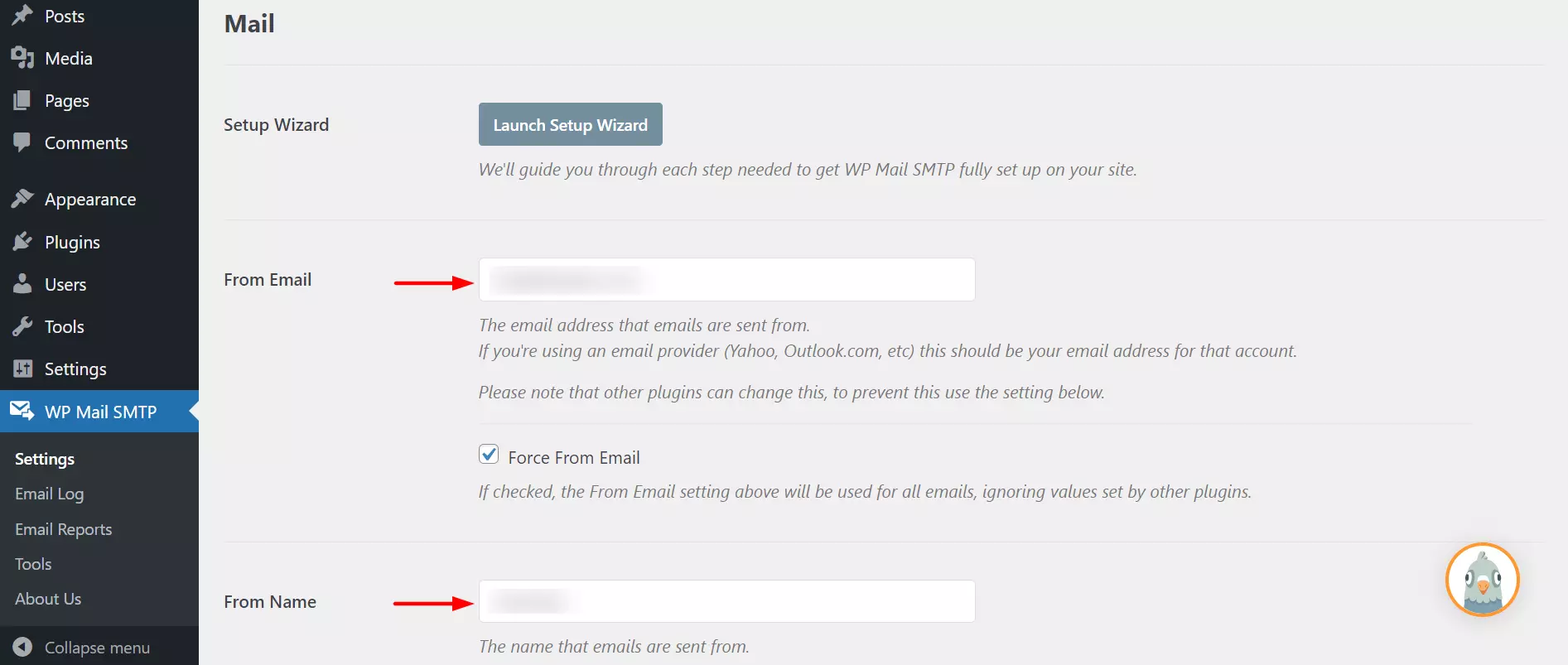
Enter the email address in From Email. All your WordPress emails will be sent from this email ID. Then enter a name in the From Name field. Make sure this name matches the email address.

Step 05
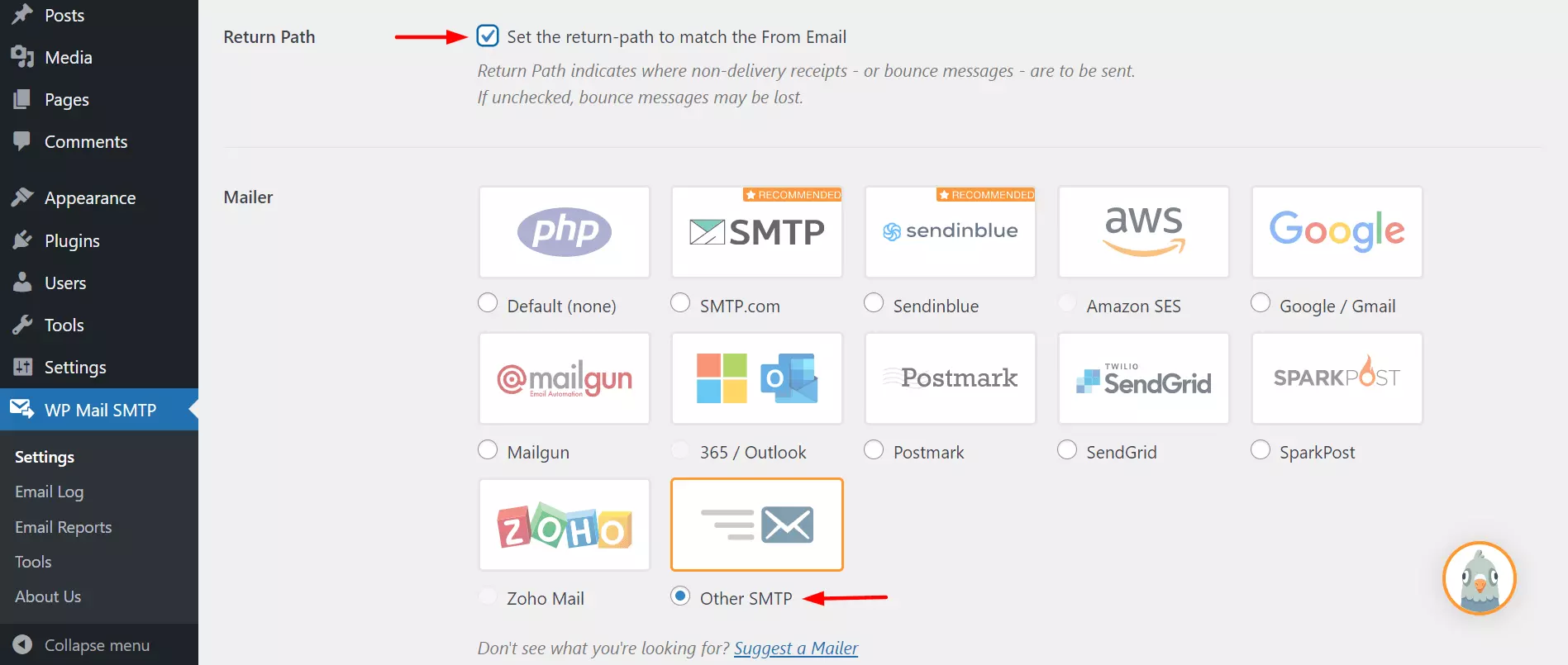
Scroll down a bit until you get to the Return Path section. Check the box to receive notifications about rejected and received emails. Then, in the Mailer section, select your preferred gateway. In this case, we’ll select Other SMTP.
Step 06
Scroll down a bit to get to the Return Path section. Check the box to receive notifications about rejected and received emails. Then, in the Mailer section, select your preferred gateway. In this case, we’ll select Other SMTP.
Step 07
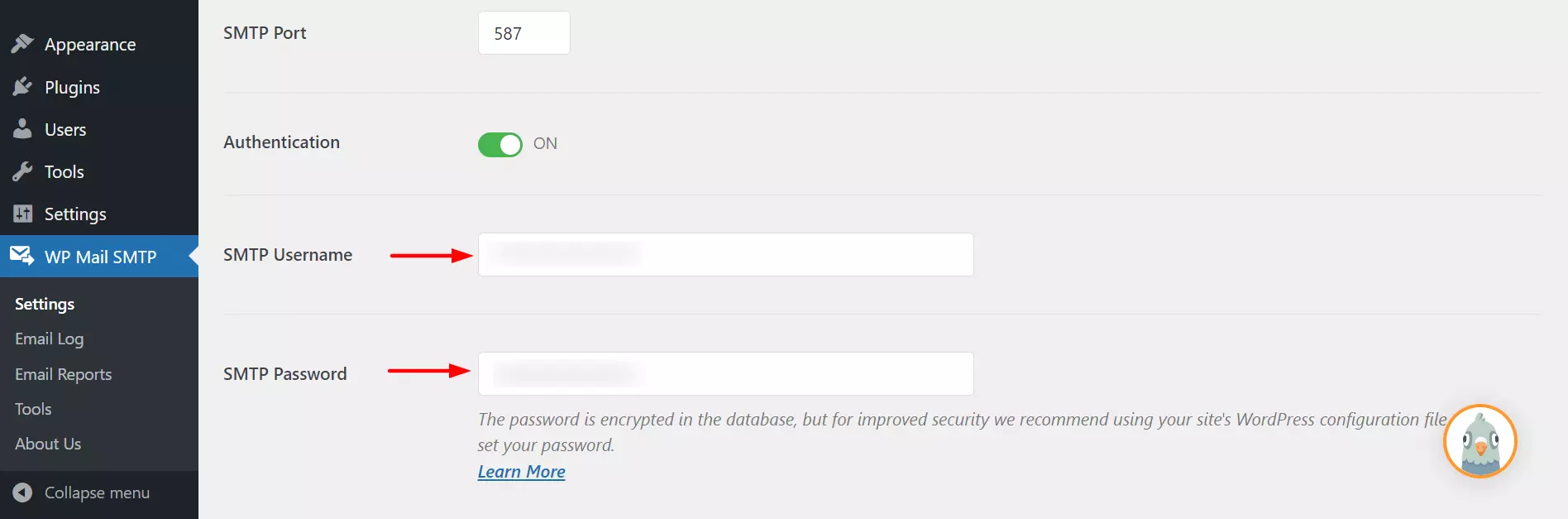
There are just a few more options left. Scroll down further. Fill in the SMTP username and password section. It is better not to save your SMTP password here. Rather do it in the wp-config.php file.
Step 08
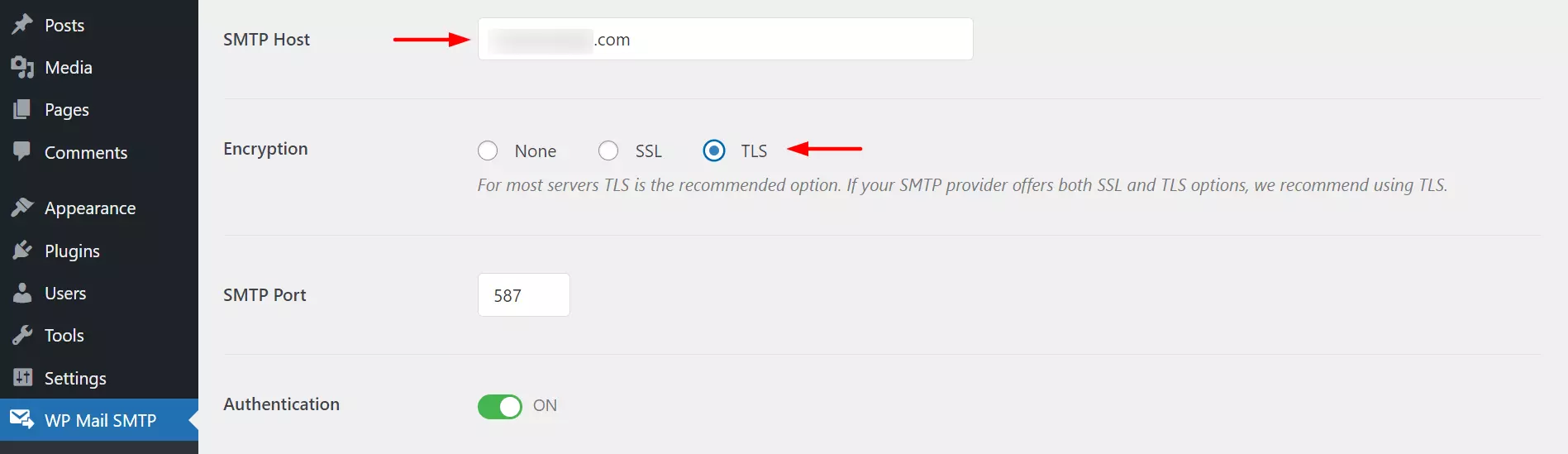
Now you need to select an SMTP server and configure it according to the settings you made in WP SMTP plugin.
Conclusion
Choosing the best WordPress SMTP mail plugin is crucial to ensure reliable and efficient email sending through your website. After evaluating several options, we have identified the most important factors that you should consider when making your decision.
During our examination of the best WordPress SMTP mail plugins, we looked at their features, compatibility, ease of use, customer support, and overall performance. While each plugin has its own strengths, there are a few standout candidates.
Plugin A proved to be a powerful choice as it offers a range of features such as email logging, debugging tools, and robust security measures. It is aimed at experienced users and developers looking for advanced customization options and seamless integration with popular email services.
Plugin B stands out for its simplicity and ease of use, making it a great option for beginners or website owners who value a hassle-free setup process. With reliable email delivery and a user-friendly interface, it simplifies configuration and ensures smooth communication with your audience.
Plugin C features exceptional customer support that provides quick assistance and guidance when needed. Its advanced email tracking and reporting features allow you to monitor the effectiveness of your email campaigns, making it an attractive choice for businesses and marketers.
When choosing the best WordPress SMTP mail plugin for your specific needs, be sure to consider factors such as your technical knowledge, desired level of customization, budget, and expected email volume. Moreover, you can further assist your decision-making process by obtaining user reviews and recommendations from trusted sources.
FAQ’s
What is SMTP Plugin in WordPress?
The SMTP plugin connects and configures a website to a mail server and manages all outgoing emails to ensure better deliverability.
Is Post SMTP Mailer free?
Yes, Post SMTP Mailer is a completely free plugin for WordPress users.
Is WP SMTP Plugin free?
No. WP SMTP plugin is a freemium plugin.
What is wp_mail in WordPress?
wp_mail is a feature built into PHP that allows users to send emails.
Do I need SMTP for WordPress?
WordPress uses the PHP mail feature by default to send emails. WordPress will continue to support this feature as long as your email volume is low. But if you are thinking of email blasting, there is no alternative to SMTP services.

Alan Brock is an entrepreneurship-focused tech blogger with a track record of founding several startups and involvement in the tech startup scene for many years. Eric’s blog delves into startup funding, team building, and product development. He provides a critical perspective on the challenges and opportunities that come with starting a business, as well as the latest trends in the startup world. Alan’s experience as a startup founder has made him a go-to source for anyone looking to launch their own tech startup.
To read more similar articles, click here.
Thanks for visiting our Website. If you appreciate our work, kindly show us some support in our comments section. 🙂