Astra Theme Review: The Fastest, Most Customizable WordPress Theme Out There! (March 2026)

Astra Theme Review: If you’ve been in the WordPress ecosystem for a while, you’ve probably already heard of Astra. With up to 2.4 million active users, Astra is one of the most popular WordPress themes.
And there is no doubt that it is for a good reason.
Astra is a powerful and feature-packed WordPress theme that makes it easy for developers and beginners alike to quickly create elegant sites.
It is also one of the fastest, lightest & most customizable themes available.
But choosing the right theme for your website can be challenging, especially considering the plethora of highly rated alternatives out there. If you’re looking for an honest and detailed analysis of the Astra theme, you’re in the right place!
In this Astra review, we’ll provide answers to the most important questions on your mind, such as: what is the performance of Astra? Are sites built with Astra mobile optimized? Is the theme easy to use and customize? Is it compatible with WordPress plugins? Does the premium version have a good price-performance ratio? But before we do that, let’s learn more about the theme and what you can build with it.
Table of Contents
Astra Theme: An Overview

Astra is one of the most advanced themes in the WordPress repository. The theme has been developed by a leading WordPress development company, Brainstorm Force.
Brainstorm Force has been around for over 10 years and is the company behind powerful plugins such as Convert Pro, Schema Pro, and Ultimate Addons for Elementor.

Since its launch, Astra has become one of the most popular WordPress themes. It is highly recommended by several major players in the ecosystem, such as Chris Lema, a WordPress and WooCommerce expert, and Syed Balkhi, founder of WPBeginner.
The free version of the theme is the first and only non-default WordPress theme to have surpassed 1 million active installations.
Astra Theme: Key Features and Benefits?
If you are wondering why Astra is so popular and why you should consider it, here are a few reasons:
Astra Theme vs. Other Popular WordPress Themes
| Features | Astra | Avada | Divi | OceanWP | GeneratePress |
|---|---|---|---|---|---|
| Price: | Starts Free, has 3 paid plans, and the highest one is $187/yr. | Starts from $69/mo | Starts from $89/yr | Starts free | Starts from $59/yr |
| Speed: | Lightweight theme, very fast speed | Reasonably fast | Reasonably fast | Lightweight, faster than Avada and Divi | Lightweight and very fast |
| Plugin Compatibility: | It’s a pretty common theme that’s compatible with most WP plugins. | Compatible with usual plugins such as WooCcommerce | Compatible with usual themes plugins such as WooCcommerce | Compatible with most common plugins | Compatible with most common plugins |
| Customization: | Highly customizable | Highly customizable | Highly customizable | Highly customizable | Highly customizable |
| Support: | Community support for the free version and developer’s support for paid. | Paid support available by Developers | Paid support available by Developers | Paid support available by Developers | Paid support available by Developers |
Astra Theme Review (7 Major Factors)
Let’s take a little deeper to find out if Astra is the right product for your next project.
1. Astra Theme: Performance and Speed Analysis
One of the key factors that determine the performance of your website is the theme you use.
Your site’s theme provides the structure of your pages and their underlying code. It should balance beauty and efficiency to deliver stunning visuals without slowing down pages.
As a major player in the WordPress theme industry, Astra focuses heavily on performance in its advertising.
In the text on their website, they make two important statements:
To test these claims and see how fast Astra really is, we will perform performance tests in 2 scenarios:
In the first scenario, the “Hello World” post displays a simple page with the following appearance.
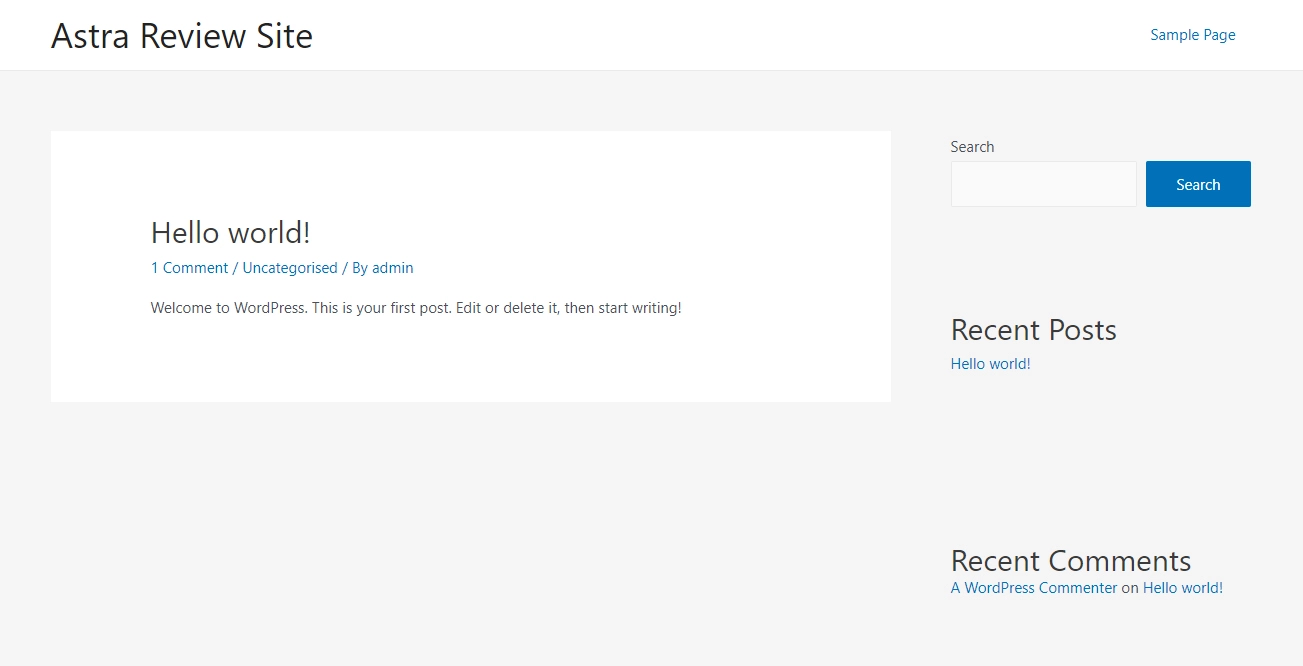
Next, we will perform speed tests in Pingdom, GT Metrix & Google PageSpeed Insights.
Speed Test Results
These are the results of the Pingdom test.

We got an A performance grade of 96, and the page size is 66.3 KB (slightly above the promised 50 KB). These are really impressive figures.
The file size is probably due to the fact that we selected an e-commerce theme instead of a standard blog theme. Still, it works fine.
GT Metrix results are also quite similar:

And these are the results of Google PageSpeed Insights:
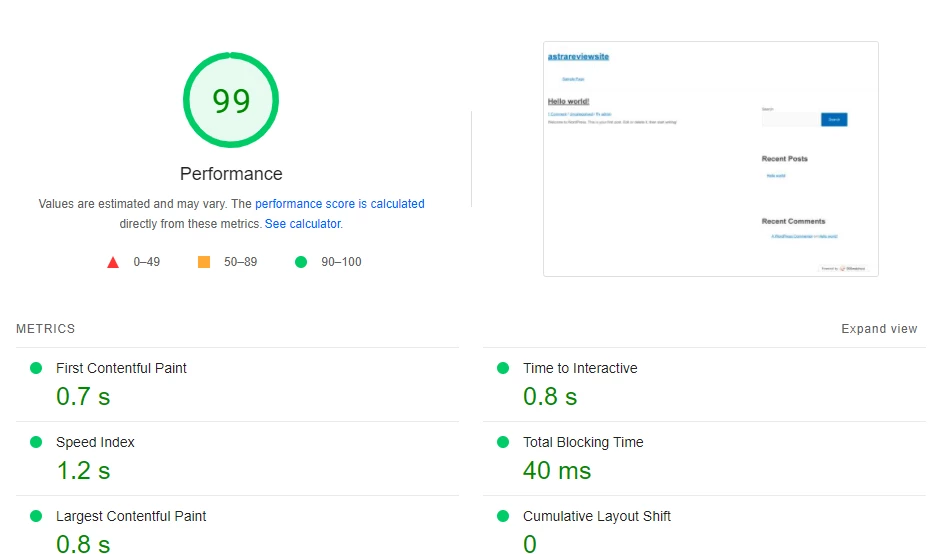
We see that the page load time ranges from 0.8s to 1.0s. Pretty decent performance compared to Astra’s claims.
When we import an Astra starter site, the conditions are now a bit more challenging. Our home page now has a more complex structure and contains more images and code.

It is important to note that importing this starter site also installs some plugins such as WooCommerce, Spectre & WPForms Lite.
When we tested our new initial site, we obtained the following results.
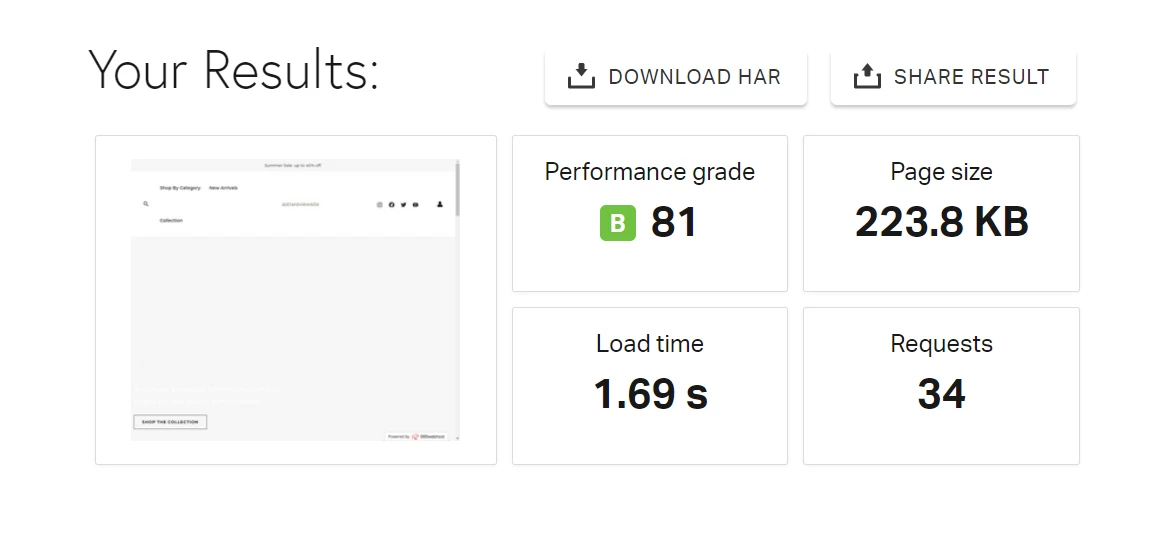


Despite the significant increase in page size (from 66 KB to 224 KB), the home page of the site stays afloat in terms of speed. Load times range from 1.1s to 1.69s, which is very good.
Anything under 2s is great for most users in the real world. We should also note that the choice of theme is only one of the factors responsible for the speed of your site. Another important factor is hosting. For the best performance and excellent page load times, we highly recommend the managed WordPress hosting plans.
The cloud-based WordPress servers offer top-notch hosting that is highly optimized for performance, security, and high availability.
The next area in which we will test Astra is responsiveness and mobile usability.
2. Astra Theme’s Mobile Friendliness
Having a theme that optimizes the viewing experience on different devices and screen sizes is very important for the success of your site. Fortunately, Astra not only supports mobile devices on the front end but also on the back end.
While editing your pages with the default WordPress customizer, you can easily switch between 3 different screen sizes (desktop, tablet, and mobile). This allows you to make sure everything looks good on every device you expect your site visitors to use.
In each case, Astra automatically adjusts the page elements to fit the screen size.
If you notice something out of place on any device, you can adjust the settings for that particular device.
For example, you may want to set the margin or padding of a particular section to be different on various devices.

You will also get the Mobile Header module. This feature allows you to configure different logos, menu styles and header colors exclusively for mobile devices.
Another way to test Astra’s compatibility with mobile devices is to use the Google PageSpeed Insights mobile score. For this test we will use the most dynamic home site.
Here’re the results:
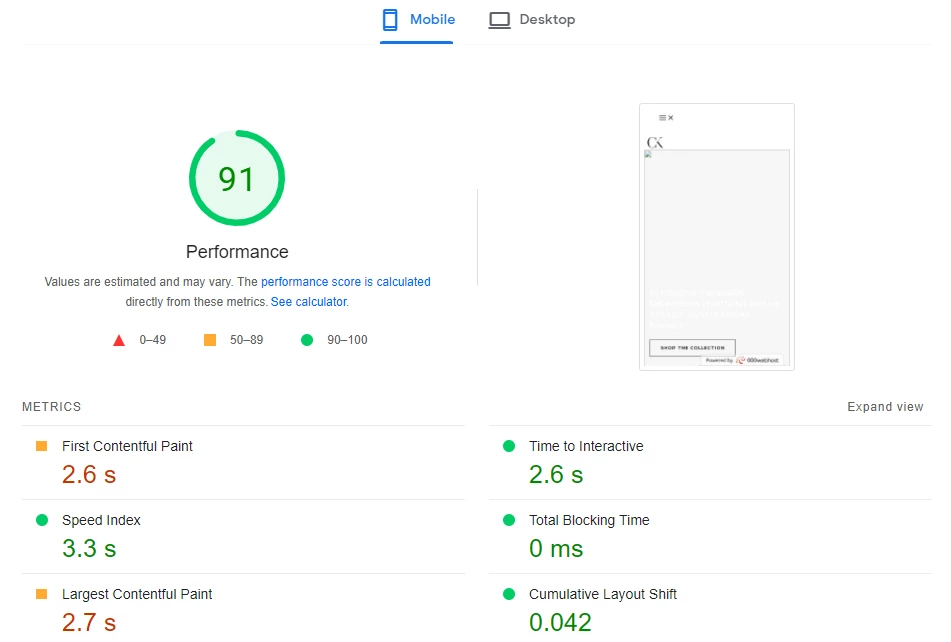
Google rates the site’s mobile performance at 91%, well above average. Such a high level of mobile responsiveness adds so many winning points to the Astra theme analysis.
3. How Easy Is It to Install Astra and Build a Site Using a Starter Template?
Another aspect in which Astra shines is the ease of use and installation.
With over 600 starter templates for the default block editor and different page builders, even newbies can set up their site design in minutes. Start with downloading Astra in the default WordPress first.
You will need to download it through WordPress. Next, go to the backend and navigate to Appearance. Follow this process from here on out:
Appearance > Themes > Add New
Search for Astra and install it. Once you have done this, you can easily access the starter templates for free.
To do this, you only need to navigate to Appearance > Astra Options & click Install Importer Plugin.

This will automatically install the Starter Templates plugin for free. This free version of the plugin gives you access to over 240 unique starter sites.
On the next page, you can search for startup templates based on your industry.
As mentioned before, you have a lot of options properly classified in different niches.

After selecting the template, you can choose to import the customizer settings, widgets or the entire content of the initial site.
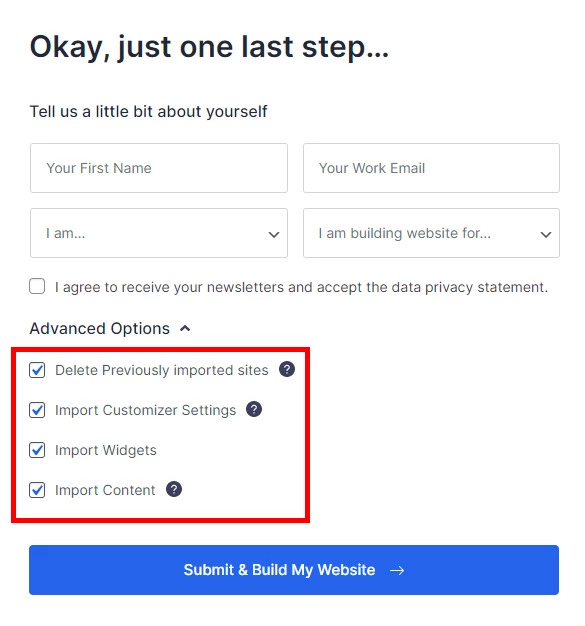
When you are done, click Submit & Build My Website, & Astra will complete your site in just over 30 seconds.
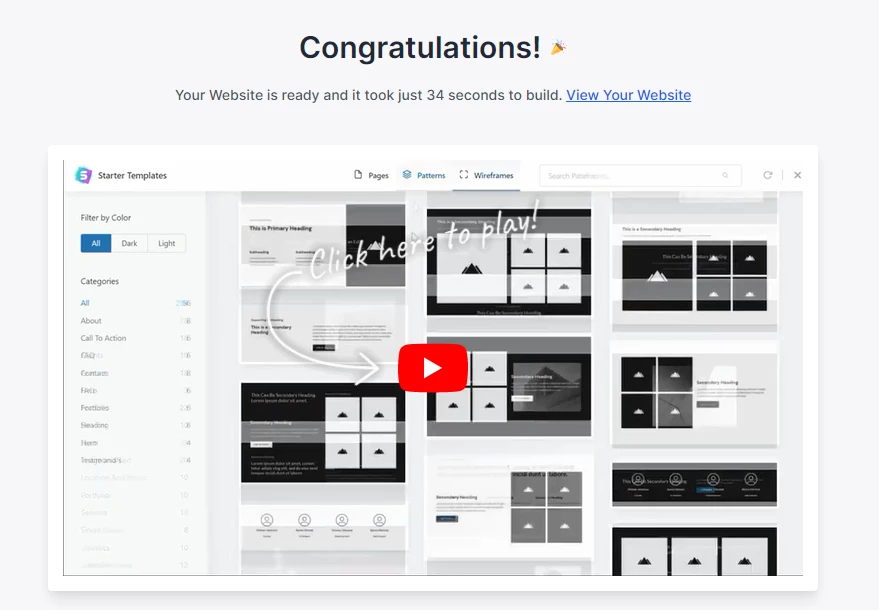
That’s how easy it is to set up your web design structure with Astra.
But an initial template is not enough. You will need to customize your site to suit your needs. Let’s see how many customization options you have with Astra.
4. Customization Options in Astra Theme?
With Astra, you have great flexibility in customizing the look and feel of your website.
From the Astra options page, you can set your site’s logo, customize the fonts or adjust the footer and header settings.
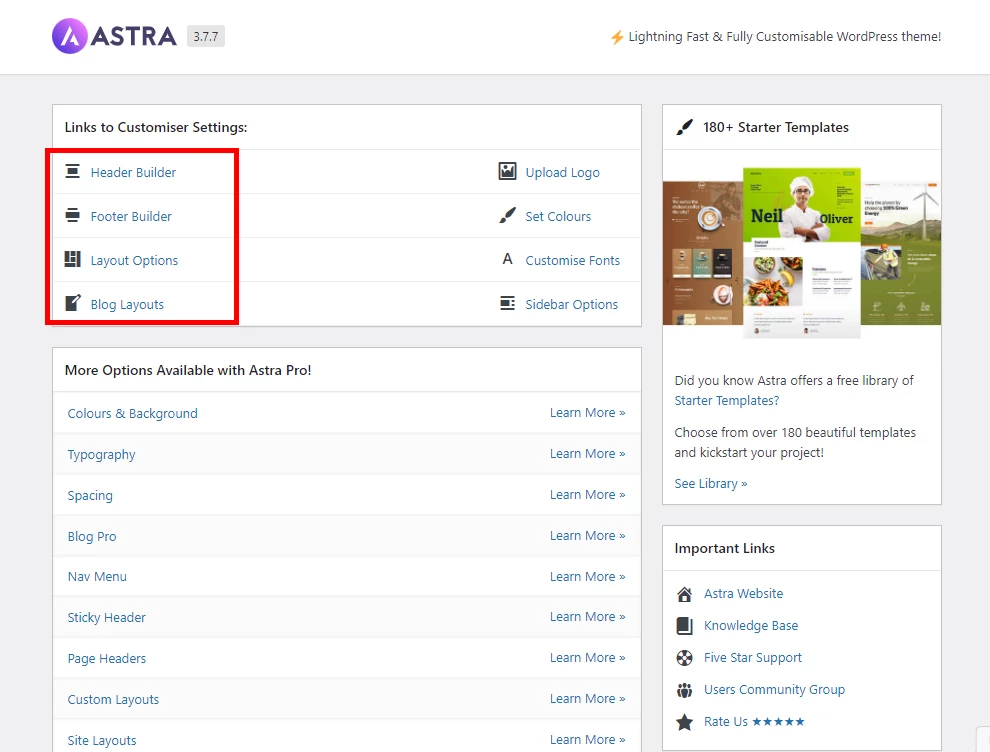
Clicking on any of these links will redirect you to the WordPress Customizer.
To access advanced options such as site-wide spacing and navigation menu options, you will need to obtain an Astra Pro license.
Apart from the default customizer, the theme also supports the block editor and other page builders such as Elementor and Beaver Builder. You can also replace or add new content to any page using the block editor.

To make adding content to your pages and posts even easier, Brainstorm Force has also developed a handy plugin called Spectre.
The plugin contains a lot of powerful blocks to build your site with the block editor. When installed, it immediately adds new blocks to the default editor block library.
If you are not building with Gutenberg, you can use Ultimate Addons for Elementor or Ultimate Addons for Beaver Builder.
5. Astra Theme’s Compatibility with Page Builders and Plugins
If you are concerned that your theme limits the type of plugins you can add to your site, you can be assured of Astra’s compatibility with third-party WordPress plugins.
Of course, for all eCommerce business owners, WooCommerce compatibility is a major concern. The good news is that Astra includes many WooCommerce-ready templates.
These templates are highly optimized for the speed of your online store. For even better performance, you can try turbo-fast WooCommerce hosting.
The theme also integrates with other popular plugins such as Easy Digital Downloads, LearnDash, and LifterLMS.
6. Astra Theme’s Pricing and Support Review
In terms of pricing, Astra offers annual and lifetime packages. Each package has 3 plans that focus on different services.
These are some of the main advantages of each plan:
The Growth Bundle also promises access to other future Brainstorm Force products.
If you opt for the one-time payment, you can get Astra Pro ($47/year) and ($227/lifetime), Essential Bundle ($137/year) and ($677/lifetime), and Growth Bundle ($187/year) & ($937/lifetime).
7. Astra Theme’s SEO
Astra, known for its exceptional speed and lightweight design, is one of the best available themes you can use to create an SEO website. With average load times under 2 seconds, Astra boosts website performance, a crucial factor for Google ranking.
In addition, Astra integrates seamlessly with schema pro review, a brilliant SEO plugin that allows you to create Rich Snippets, improving your chances of ranking higher and getting more traffic.
And with some knowledge of HTML and CSS, you can make the website load even faster by removing extra elements from the code.
Now that you’re clear on Astra Theme Analysis, it’s time to look at some examples of amazing websites built with Astra.
Some Examples of Websites Built Using Astra?
One of the factors that make Astra stand out is the fact that it is a multi-purpose solution for every conceivable type of WordPress website. You can literally build almost any type of site with it.
To demonstrate this, Astra includes “Starter Templates” tailored to different business niches.
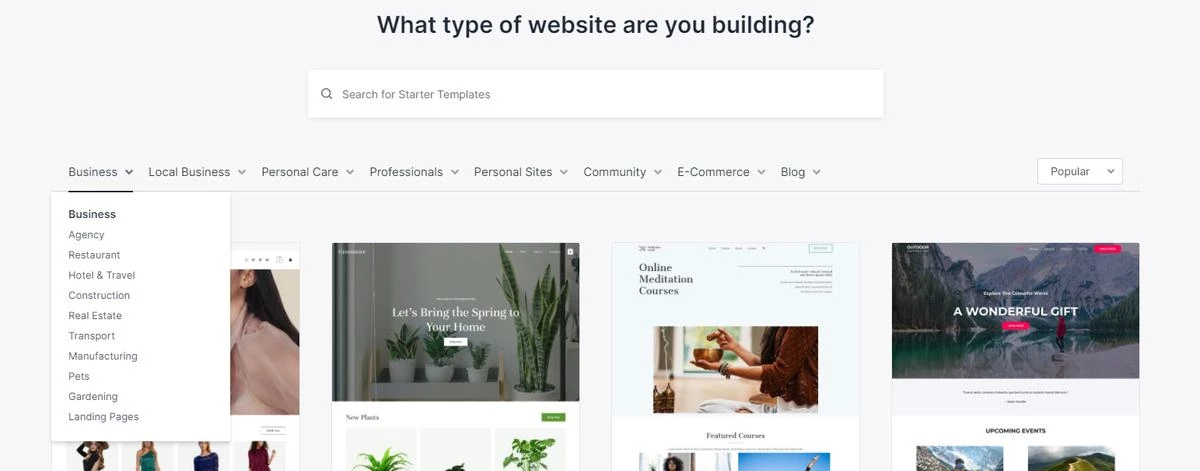
A starter template is a ready-made design that you can easily import and configure in a matter of minutes. From there, you can make as many changes as you wish, depending on your needs.
These starter sites are divided into various industries:
- Web Design
- Manufacturing
- Interior Design.
- Photography
- Hotel & Travel
- Restaurants
- Real Estate
- Construction
FAQs
Can I use Astra with the Elementor page builder to create a visually stunning and highly customized website without any coding knowledge?
Yes, Astra is fully compatible with the Elementor page builder, empowering you to design and customize your website’s appearance and layout using a drag-and-drop interface.
With Astra’s seamless integration, you can create visually stunning websites without requiring any coding expertise.
Are there specific Astra templates available for photographers to showcase their portfolios in a visually captivating manner?
Yes, Astra offers dedicated templates tailored for photographers, allowing them to create visually captivating portfolio websites.
These templates provide pre-designed layouts and features that highlight the beauty of their photography and enable them to showcase their work in an engaging and professional manner.
How does Astra optimize the loading speed of my website to ensure a fast and smooth user experience?
Astra prioritizes performance and loading speed by utilizing lightweight code and following best practices for optimization.
This results in faster page load times, contributing to an enhanced user experience. Additionally, Astra offers features like lazy loading and minification of CSS and JavaScript files to further optimize loading speed.
Can I easily translate my Astra website into multiple languages to cater to an international audience?
Astra supports seamless integration with popular multilingual plugins such as WPML and Polylang, enabling you to effortlessly translate your website into multiple languages.
This allows you to provide a localized experience for your international audience and expand your reach.
How does Astra ensure the security of my website and protect it from potential vulnerabilities?
Astra prioritizes security by following WordPress coding standards and implementing robust security measures. The theme undergoes regular updates and adheres to industry best practices to address any potential vulnerabilities promptly.
It is also essential to practice good security habits, such as keeping your theme and plugins updated and implementing strong login credentials.

Mike DaVinci HighTechBlogging.com
Mike DaVinci is a skilled content writer with a talent for storytelling. He specializes in creating captivating narratives that engage readers and leave them feeling inspired. His writing has been featured in various publications, including magazines, blogs, and business websites. Mike’s particular interest in human interest stories allows him to uncover the heart of any story and convey it to his readers in an emotional and authentic way. He believes that storytelling is a powerful tool for connecting with people and inspiring positive change in the world.
To read more similar articles, click here
Thanks for visiting our Website. If you appreciate our work, kindly show us some support in our comments section. 🙂