Okta Review: Okta’s suite of automated identity products for the workplace increases the security of your network and allows IT to focus on higher-level issues. Whether you need single sign-on (SSO) or multi-factor authentication (MFA) technology — or both! — Okta’s web-based software provides users with a seamless login experience across desktop, browser, and mobile devices.
As information technology (IT) departments grow, a tipping point is reached. The volume of routine service requests from users for new passwords or to reset them prevents technicians from working on higher-level problems.
However, you can’t afford to take passwords and their security lightly – you need to protect your network and your data. Your solution? Automated password management.
Okta is one of the best identity management software providers on the market. Let’s review its features, pricing, and support options so you can see how your company could benefit from using it.
Table of Contents
Who is Okta for?
Founded in 2009, Okta has identity and access management solutions for workplaces and consumers. Its main product is a single sign-on web application that allows users to log into multiple applications such as Gmail, Office 365, and Salesforce through a centralized interface.
While Okta’s individual products range from $2/month per user to $15/month per user, its minimum contract is $1,500/year. Customer support packages, which are priced based on total users, cost extra.
This pricing scheme could put it out of reach for smaller companies, and its customer base consists of large companies such as FedEx, Hewlett-Packard, and T-Mobile.
Okta’s Features
Okta security software has separate product suites for workplace and consumer identity management. Workplace identity applications include:
We will focus on Okta’s SSO and MFA functions because they provide the basis for identity management.
Single Sign-On (SSO)
SSO software allows users to log into multiple websites and applications with a single password. For example, at The Ascent, I have separate employee accounts for Slack, Trello, and Microsoft Outlook. Our SSO provider allows me to directly access these applications after logging into their interface.
In addition to the standard SSO functionality, Okta includes:
After logging in to your Okta account, the home page has tiles for each connected application and website that you can now open without needing to log in again. You can also manage multiple settings for each application from this page.
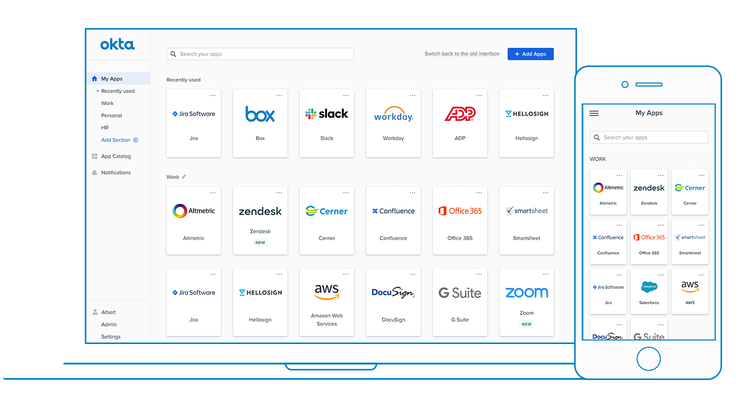
Okta’s mobile app for iOS and Android devices also provides quick SSO access to Okta-connected accounts when your employees are out of the office.
Multi-Factor Authentication
SSO technology streamlines access to applications, but another key problem remains: ensuring that passwords are not compromised. All passwords should be easy to remember and difficult to guess, but at best this only slows down bad actors and their password discovery strategies.
The AMF solves this problem by requiring one or more additional identification “factor(s)” in addition to the password in order to access the account. For example, every time I access my bank account from my laptop, I have to enter a one-time code that the bank sends me by SMS to my smartphone.
The three types of authentication factors are:
Okta has a wide range of authentication options with different levels of security.

Okta also offers contextual access management, which prompts for more authentication factors based on risk levels due to logins from unexpected locations, devices, or networks.
Reports
Okta reports provide the information you need for practical usage and security information, from general usage to authentication troubleshooting.
Okta has three categories of reports:
Specify the time period of a report, filter results, view events by actor and their location on a map, etc. You can also download the reports as a CSV file. The following system log report uses the event filter to show only started user sessions.
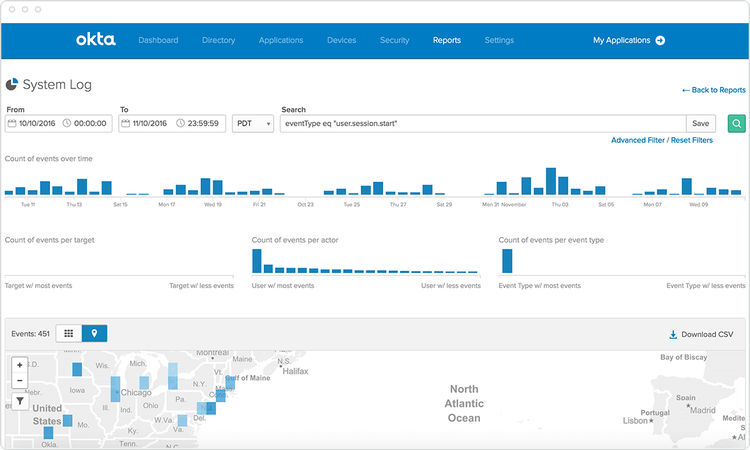
Every device (also known as an “endpoint”) that employees use to connect to your network is a potential access point for hackers. If you have a network security operations center (SOC), these reports provide critical information for endpoint security.
Okta’s Ease of Use
IT staff likes how Okta streamlines the onboarding process for new users while increasing network security with multiple MFA options.
They also claim that it works equally well on the company network and on remote Wi-Fi connections. Some comment that the technical documentation should be better organized and that problems can arise when third-party vendors update their applications.
Company employees who use multiple applications like to have them aggregated in the Okta interface without having to log in to each application individually.
Most user issues revolve around practical issues, such as password length, updating passwords in various applications, and the frequency with which new Okta logins are required.
I have used Okta and other identity management software, and I believe that ease of use comes down to educating users on how these applications work. While IT professionals appreciate how they affect their workloads, too often this software is dropped on users with little explanation or training.
I worked at a university that suddenly announced one day that we were now using identity management software, and it took me a long and increasingly frustrating afternoon to figure out how to sync my accounts, applications, and passwords with it. And when was it time to update a password?
Wow, Nelly! I felt like I was chasing my tail for the next hour or so as I tried to update and resynchronize everything.
Okta’s Pricing
Okta’s workplace identity products include:
Other products ranging in price from $2/month per user to $15/month per user include a universal directory, lifecycle management, API access management, advanced server access, and gateway access. Customer support packages are sold separately.
Okta’s pricing requires a minimum contract of $1,500 per year, but it offers deep discounts to large organizations that add more users. The SSO plan has a free trial version.
Otka offers non-profit organizations 25 free licenses for all Okta products, a 50% discount on public training courses, and unlimited free passes to Oktane’s annual customer conference.
Okta’s Support
Okta’s four customer support plans include:
The Basic plan has 12/5 support Monday through Friday from 9 a.m. to 9 p.m. ET. ET, but the others have 24/7/365 support. Pricing is based on budget and depends on the number of users.
Okta’s online resources include:
Okta resources are located in two locations: the help center and a separate content library, which can sometimes make it difficult to find what you are looking for.
Benefits of Okta
Okta reduces IT workload, which directly impacts your bottom line. Without Okta’s identity management automation, your IT department is continually resolving support tickets to grant employees access to different sites and applications, while enforcing secure password protocols.
Okta claims that customers using its SSO have experienced a 50% decrease in login-related support requests. Users are also able to log in and use new applications 50% faster, and IT integration of acquired companies is up to five times faster.
Okta MFA reduces the time and expense of security breaches because 80% of them involve compromised passwords.
Let’s take a closer look at three other Okta features that can streamline your operations: browser extensions and plugins, ThreatInsight, and passwordless authentication.
Browser Extensions
The Okta dashboard is a useful resource for employees, but they can access the applications and websites there more quickly through browser extensions and plugins.
Supported browsers are:
The Chrome extension below allows you to choose the apps you want to add to your account, generate secure and random passwords for them, and switch between multiple Okta accounts. It also prevents websites from storing your login credentials.
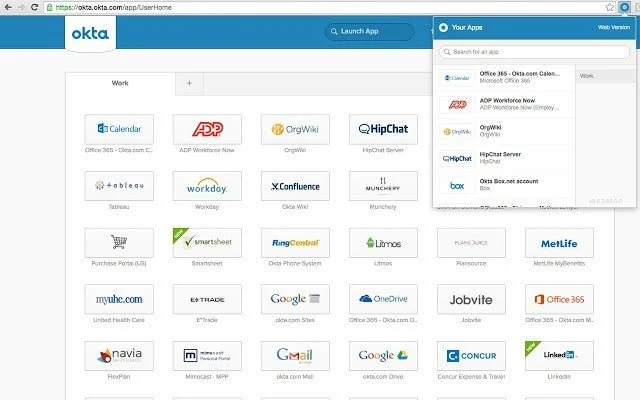
For convenience, Okta administrators can use browser extensions to access the administration console.
ThreatInsight
The best security stops problems before they occur, and Otka’s ThreatInsight collects data from Okta’s entire customer base to detect and blacklist malicious IP addresses. ThreatInsight can log suspicious IPs without blocking access, or logging and block these authentication attempts.
ThreatInsight protects your network from multiple intrusion methods:
Whether these data breach attempts are financially motivated or the work of would-be hackers, ThreatInsight works to minimize downtime, increase security and avoid unwanted financial repercussions.
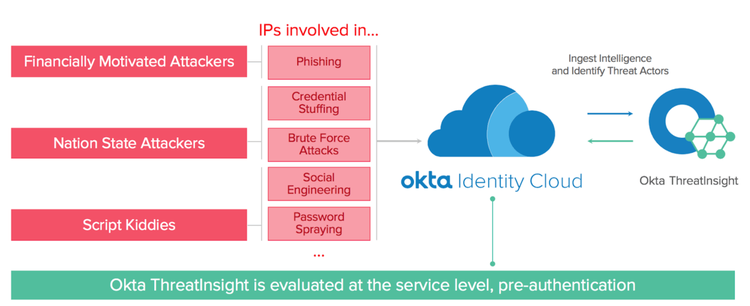
ThreatInsight also uses rate limiting to avoid locking out administrators and users during a distributed denial of service (DDoS) attack.
Passwordless Authentication
Passwords are a perpetual weak link in your security system because even the strongest passwords only slow down bad actors without completely thwarting them. Okta lets you go beyond passwords with passwordless logins.
Workplace identity passwordless options include:
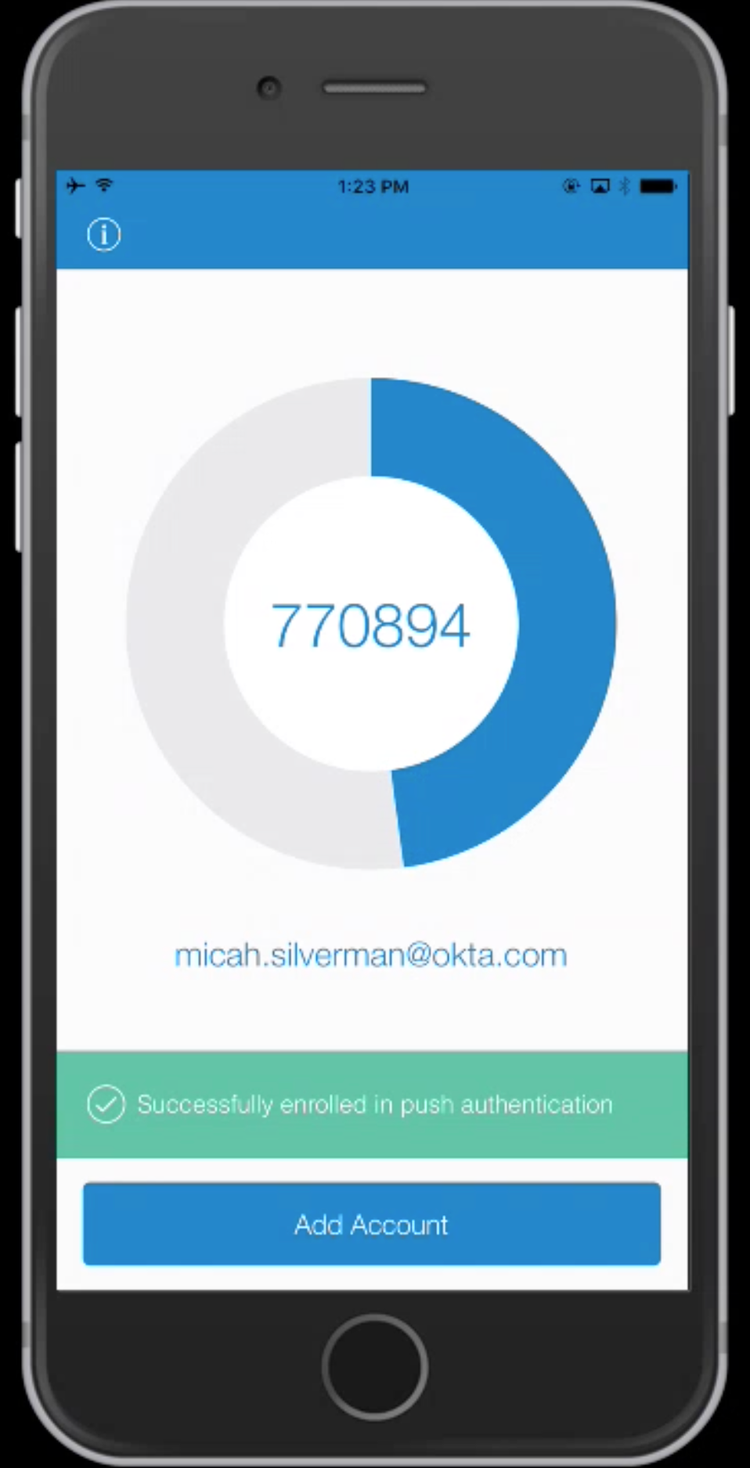
Factor sequencing, for example, allows you to choose highly secure factors such as Okta Verify. This application allows users to confirm their identities by approving a push notification or entering a one-time code without the need for a second factor.
Passwordless authentication addresses the clashing positions on passwords illustrated by recent research: 66% of IT and IT security professionals surveyed in the U.S., U.K., Germany and France said protecting passwords is very important, but 51% also said password management is too difficult.
Improve Your Identity Management with Okta
Okta’s broad feature set, its add-on apps and browser extensions, and its thousands of native integrations with third parties make it a leader in the identity management industry. Its cost of entry, however, probably puts it out of reach for many small businesses.
Conduct a thorough cost-benefit analysis to determine whether you have the IT needs and budget to make your investment profitable.
How Okta Compares
| Free Plan | Phone Support | Monthly Billing | Mobile App | |
|---|---|---|---|---|
| Okta | ✅ | ✅ | ✅ | |
| PRODUCT LINK: google cloud identity | ✅ | ✅ | ✅ | ✅ |
| PRODUCT LINK: LastPass for business | ✅ | ✅ | ||
| PRODUCT LINK: onelogin | ✅ | ✅ | ✅ | |
| PRODUCT LINK: azure active directory | ✅ | ✅ | ✅ |
FAQs
How does Single Sign-On (SSO) work in Okta?
Single Sign-On (SSO) is a cornerstone of Okta’s identity management strategy. SSO operates by allowing users to authenticate themselves once through Okta’s centralized portal and subsequently access multiple applications without the need for repeated logins. This not only streamlines the login process but also heightens efficiency and productivity by eliminating the need for remembering and inputting multiple sets of credentials across various platforms.
What is Multi-Factor Authentication (MFA) in Okta?
Multi-Factor Authentication (MFA) within the Okta framework fortifies security by introducing additional layers of verification beyond the traditional password. This entails users providing multiple forms of identification, such as something they know (password), something they possess (e.g., a smartphone for receiving verification codes), or something unique to them (biometric markers like fingerprints or facial recognition). By employing MFA, Okta enhances security and thwarts unauthorized access attempts.
Can Okta be integrated with third-party applications?
Certainly, Okta’s integration capabilities extend to over 5,000 third-party applications through its expansive Okta Application Network. This intricate network facilitates swift and seamless access to a diverse array of applications without the hassle of juggling various sets of login credentials. This not only enhances convenience but also minimizes the administrative burden of managing numerous user access points.
What is Okta’s ThreatInsight feature?
At the core of Okta’s security apparatus is ThreatInsight, a dynamic feature that leverages aggregated data from Okta’s extensive user base. This data-driven mechanism identifies and blacklists potentially malicious IP addresses, preemptively countering security threats such as unauthorized access, phishing schemes, and other cyberattacks. By proactively identifying anomalous patterns and behavior, ThreatInsight augments Okta’s defense mechanisms, ensuring robust protection against evolving security risks.
What types of customer support plans does Okta offer?
Okta caters to diverse customer support needs through four distinctive support plans: Basic, Premier, Premier Access, and Premier Plus. These plans offer varying levels of support responsiveness, engagement with dedicated customer success managers, and supplementary privileges such as on-site consultations and VIP support hotlines. From timely assistance to tailored guidance, Okta’s support plans cater to organizations’ unique requirements.

Mike DaVinci HighTechBlogging.com
Mike DaVinci is a skilled content writer with a talent for storytelling. He specializes in creating captivating narratives that engage readers and leave them feeling inspired. His writing has been featured in various publications, including magazines, blogs, and business websites. Mike’s particular interest in human interest stories allows him to uncover the heart of any story and convey it to his readers in an emotional and authentic way. He believes that storytelling is a powerful tool for connecting with people and inspiring positive change in the world.
To read more similar articles, click here
Thanks for visiting our Website. If you appreciate our work, kindly show us some support in our comments section. 🙂