MonsterInsights Review: The Ultimate Plugin for Supercharging Your Website Analytics! (September 2026)

MonsterInsights Review: You may have heard that MonsterInsights is the best Google Analytics plugin for WordPress. It’s highly rated with reviews all over the web and is used on millions of sites, including big brands like Microsoft, Bloomberg, FedEx, Zillow, and more.
While there is a free version, you’ll need to purchase MonsterInsights Pro to unlock all of its advanced features, such as e-commerce reporting, conversion tracking, and priority support.
So you might be wondering: is MonsterInsights worth it for you?
In this article, we’re going to explain the real benefits that MonsterInsights provides, so you can decide for yourself. In addition, we’ll show you some MonsterInsights reviews from real users.
Table of Contents
MonsterInsights vs. Google Analytics: What’s the Difference?
You may be wondering, why spend money on MonsterInsights when you can copy and paste the Google Analytics tracking code yourself?
This is the biggest misconception people have about MonsterInsights. It offers so much more than the default tracking code.
Did you know that by default, Google Analytics does not track accurately:
To track these, you would have to modify your tracking code and configure each one separately in your Google Analytics account. That’s a lot of work, especially if you have multiple sites. Not to mention that making a mistake in the code could mess up your analytics or even crash your entire site.
Also, if you add Google Analytics tracking yourself, you’ll need to know how to run reports in Google Analytics to get all the data you need. This can be time-consuming and confusing if you’re not an analytics expert.
So, if you want to focus on growing your business instead of learning code and advanced analytics, MonsterInsights is a great solution.
It makes it extremely easy to connect our websites to our Google Analytics accounts. In addition, the dashboard reports are very easy to use and give you easy-to-understand reports right in your WordPress admin area. In addition, MonsterInsights connects to Google Analytics 4 (GA4), the latest version of Google Analytics.
Let’s take a closer look at some of the benefits MonsterInsights offers.
Benefits of Using MonsterInsights on Your Site
What exactly does MonsterInsights do that you can’t do yourself? Let’s take a look at some of the main benefits.
1. Easy Google Analytics Setup
If you run a website, whether it’s a blog, an e-commerce store, or a business site, then you know the importance of data when it comes to making decisions.
MonsterInsights makes things simple. You can properly set up Google Analytics on your WordPress site with just a few clicks, without touching any code.=
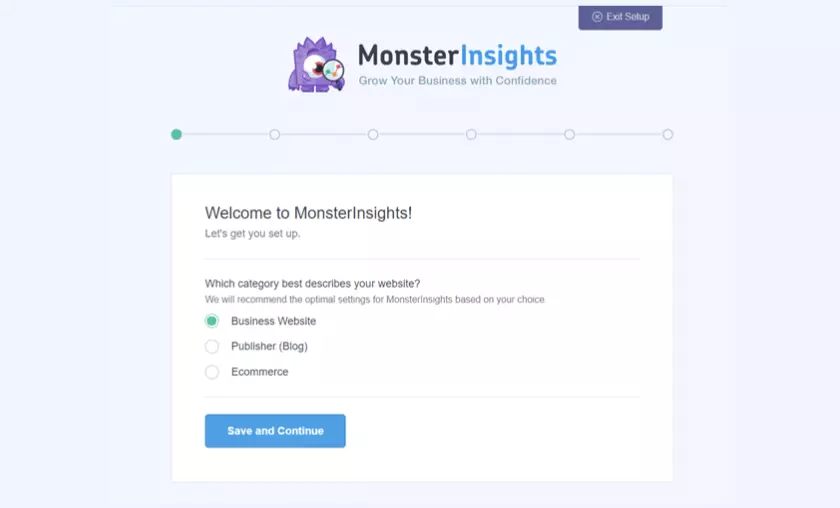
Your setup wizard will guide you through all the steps, so you don’t have to worry about making any mistakes when setting up Analytics or facing inaccuracies in data reporting.
2. Understand Your Audience with Advanced Tracking
MonsterInsights is more than just a plugin to integrate Google Analytics with your website. It allows you to understand your website visitors and learn what content they like, what devices they use, how they find your site, and much more.
Here’s a closer look at some of the data you can track using MonsterInsights:
3. Save Time on Finding and Viewing Reports
One of the problems many users face with Google Analytics is its complexity and high learning curve. This makes you wonder if Google Analytics is worth it. You would have to be an expert to navigate your way around Analytics, find the right report, and then use the statistics that matter for your business.
But with MonsterInsights, you can view the reports within your WordPress dashboard. You can check how well your website is doing at a glance, without having to leave the dashboard.
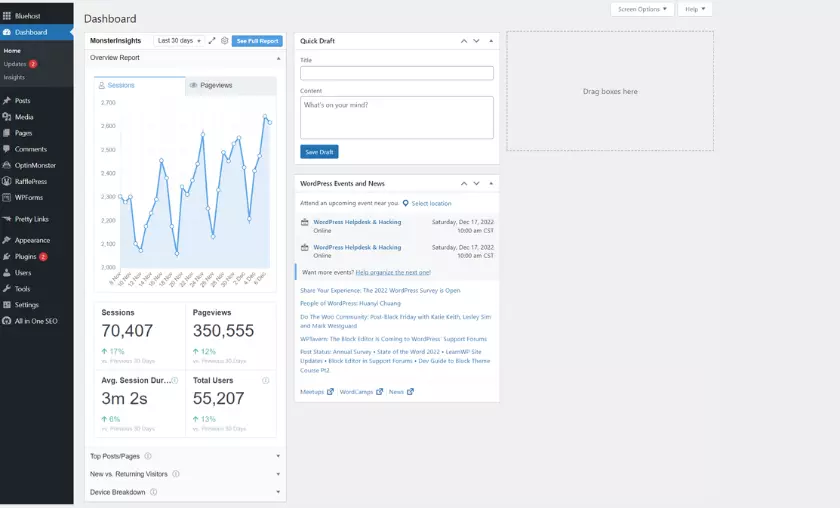
And you’ll get important reports to grow your business. It makes it easy for anyone to find valuable data and gain insights to drive your site’s performance.
4. Helps to Increase Your Website Traffic
Once you know how visitors use your site, you can use the data to increase traffic to your website.
For example, you can find out what your best pages are and try similar topics that your audience likes to get more visitors. Or you can look at the top-ranked keywords in Google to attract more organic traffic.
5. Helps You Learn How to Grow Your Email List
As you start getting more visitors, you can grow your email list and capture leads. And MonsterInsights reports can help in optimizing your website to get more subscribers.
You can start by looking at your top landing pages and placing a pop-up on them to collect emails.
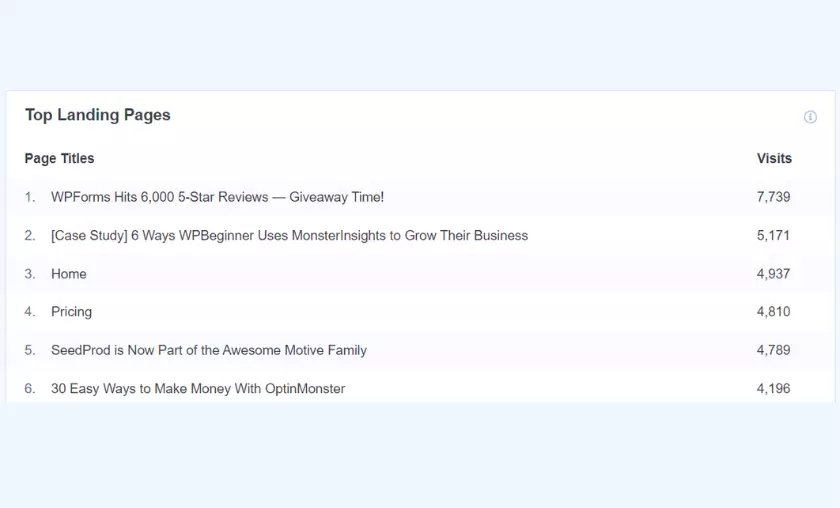
Another way MonsterInsights can help is by highlighting pages that have a high bounce rate. To reduce the bounce rate, you can offer content updates or offers to increase your email subscriptions.
6. Shows You How to Boost Your Sales Conversions
In addition to collecting emails, you can even increase your sales conversions.
For example, MonsterInsights allows you to see the average scroll depth of your website. You can use this information to place your calls to action (CTAs) in the right place and increase conversions.
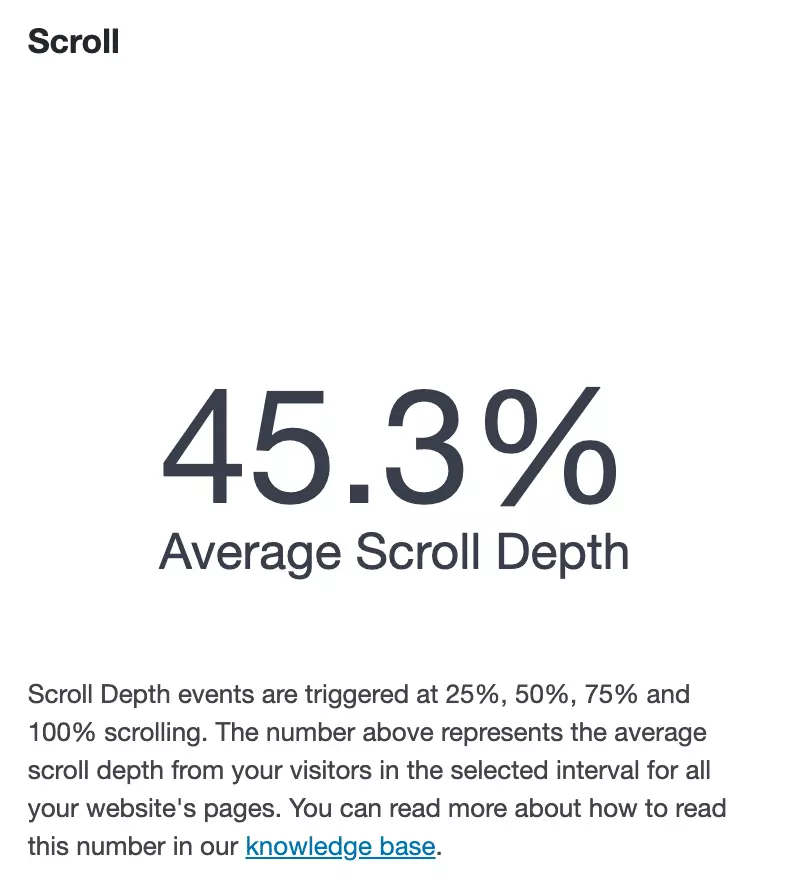
And if you have an e-commerce store, then the plugin can help you focus your marketing efforts on the sources that convert best or promote the products that convert best.
With that, let’s take a look at each MonsterInsights report in detail.
Make Informed Decisions with MonsterInsights Reports
MonsterInsights offers multiple reports that are very easy to understand and provide you with information to grow your website. These reports help you keep up with modern tracking standards. Let’s start with your general report.
Overview Report
When you install the Google Analytics plugin for WordPress, the first report you will see is the general report. You can access it by logging in to your admin area and from your dashboard, click on Insights ” Reports.
In the general report, you will be able to see all the important metrics needed to check the performance of a website. You can view the number of sessions, page views, average session duration and total users of your website for the selected date range.

If you scroll down, you will find more statistics such as new vs. returning visitors, breakdown by device, your top 10 countries, top 10 referral sources, and top publications/pages.
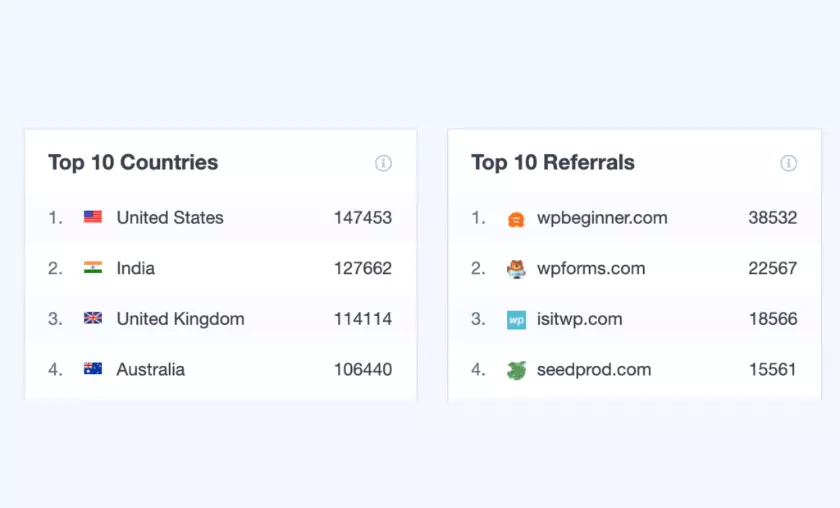
You can find more information in our definitive guide to MonsterInsights dashboard reports.
Publishers Report
The next report you will see is the Publishers report which is available to users who have a MonsterInsights Plus plan. The report gives you an idea of how visitors are using your website.
For example, you can see your top landing pages and how many visits each one received. The report provides information on what content topics your audience likes.
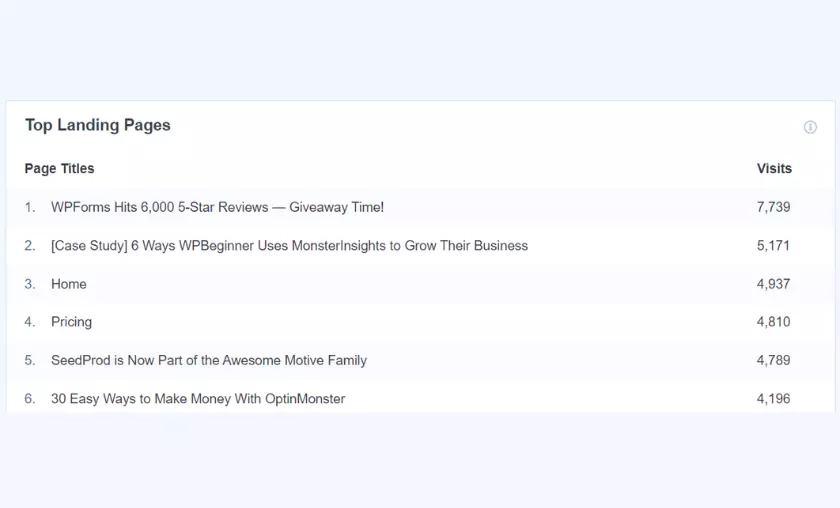
Below, you will see more important reports such as top outbound links and top affiliate links.
Using the information in these reports, you can form partnerships, discover opportunities to get backlinks and increase your revenue by promoting your best affiliates.
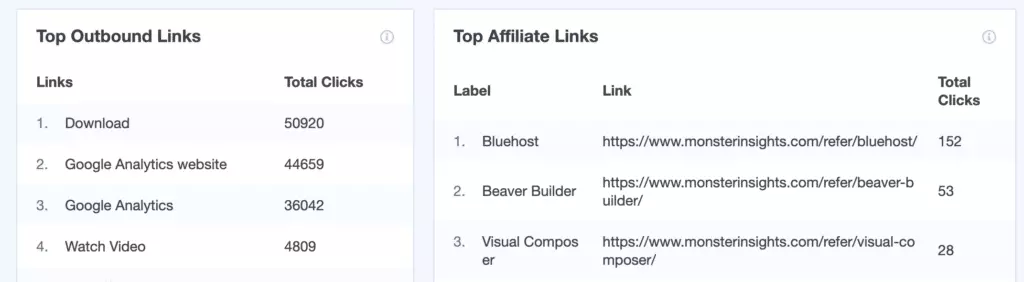
And if you offer downloadable content on your website, MonsterInsights automatically tracks your performance.
It provides a report showing your top download links. Using the data, you can gain insight into the type of content that gets the most downloads, so you can create similar content in the future.

If you scroll down, you will find more information in the Publishers report. You can see demographic information about your audience, such as their age and gender. You can also see their top interests and the average scroll depth of your site.
Search Console Report
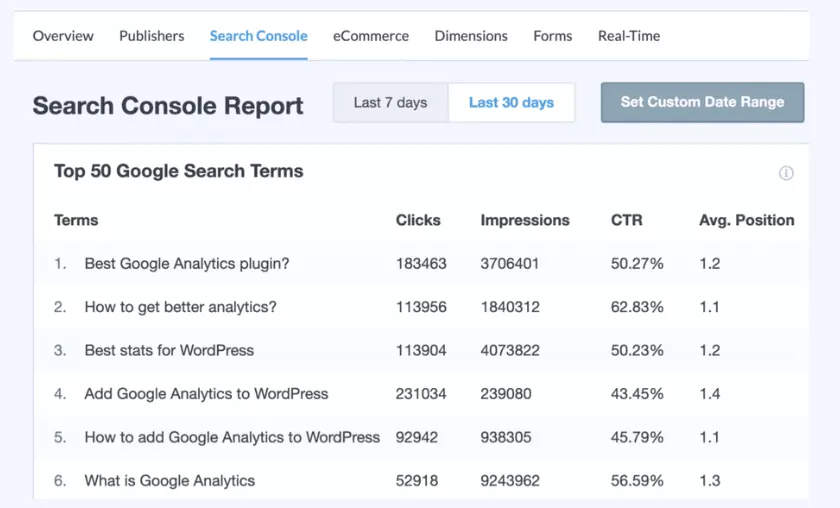
Want to know how people are finding your website in search engines? Through MonsterInsights, you can view Google Search Console reports in your WordPress dashboard.
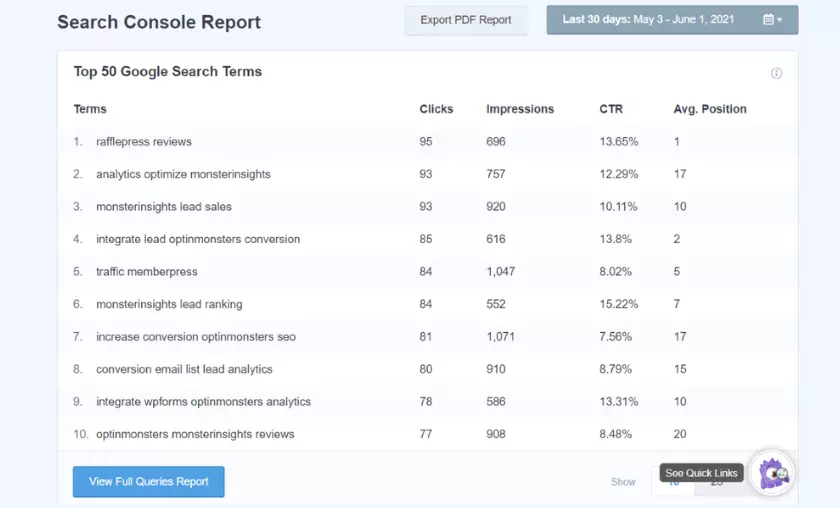
The report shows the top 50 Google search terms your site is ranking for. For each keyword, you can see the number of clicks, impressions, CTR, and average position.
The report data is invaluable, as it helps you target search terms that generate organic traffic. It also allows you to narrow down content ideas, so you can create posts that cover similar keywords.
Forms Report

Another feature offered by MonsterInsights is that it allows you to track all types of forms on your WordPress website in Google Analytics.
Using its form plugin, you can track views, submissions, and conversions of your forms. And the best part is that it is compatible with other form plugins like WPForms, Gravity Forms, Formidable Forms, and many more.
eCommerce Report

If you have an online store, then MonsterInsights helps you track its performance without having to do any additional configuration.
MonsterInsights eCommerce addon allows you to add Google Analytics eCommerce tracking to your WooCommerce, LifterLMS, MemberPress, GiveWP, and Easy Digital Downloads store.
The report provides information about your site’s conversion rate, transactions, revenue, and average order value. That’s not all, you can also find your best-performing products, their order total, percentage of sales, and total revenue.
You can even examine your top conversion sources and optimize your marketing campaigns for visitors to those websites. This way you can maximize your revenue.
Other metrics tracked in the report include total purchases added, total purchases withdrawn, new customers, and abandoned purchases.

Dimensions Report
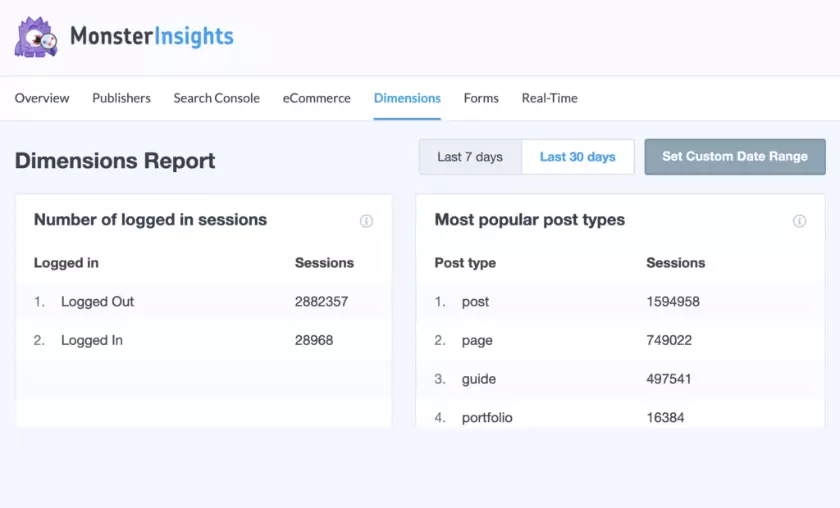
Through the MonsterInsights Dimensions add-on, you can set up advanced WordPress visitor tracking. The add-on allows you to set up custom dimensions, which Google Analytics does not track automatically.
You can and see the performance of things that matter to your business, such as the performance of authors on your site, find the most popular post types, categories, tags, best post time, and popular keywords of focus.
Realtime Report

With the real-time report, MonsterInsights shows you the number of active users at any given time on your website.
The report is useful if you have a campaign running and want to see how many people are visiting your website as a result of that campaign.
Site Speed Report
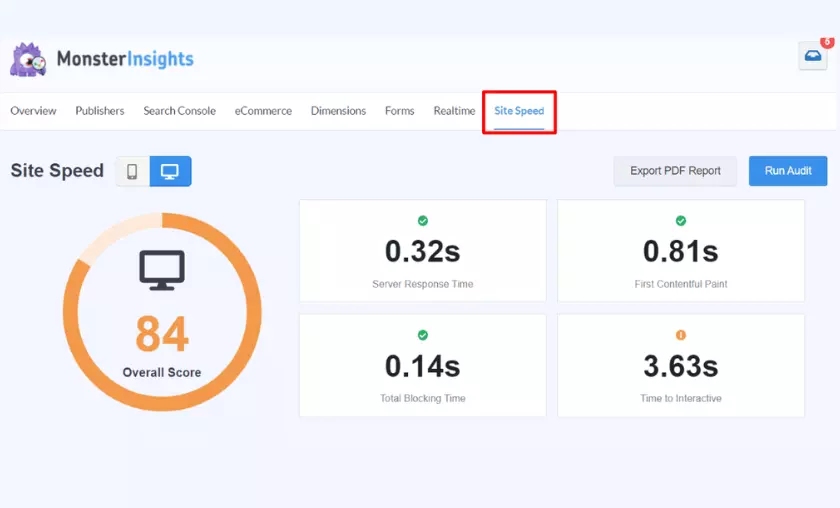
Next, you will see the Site Speed tab. You can access this tab at any time to get up-to-date reports on site speed and Core Web Vitals.
Media Report

Finally, if you have embedded videos on your site, you’ll want to use the Media plugin. With the plugin enabled, you will be able to track how many of your visitors are watching your videos, how far they go, etc.
MonsterInsights vs. Other WordPress Analytics Plugins.
But how does it compare to other Google Analytics plugins for WordPress? Here are a few things MonsterInsights excels at:
For example, if you compare MonsterInsights with most Google Analytics plugins, you will see that with MonsterInsights you can track your e-commerce store, forms, set up custom dimensions, and much more.
This differentiates MosnterInsights from other plugins, which do not have a proper channel to resolve customer queries and you would have to rely on forums to get answers.
Let’s take the case of Jetpack and MonsterInsights. Jetpack is bloated, requires additional steps to set up Google Analytics, and doesn’t offer additional tracking options like MonsterInsights.
Most plugins offer basic reports that provide information that is not enough to make decisions. For example, if you compare MonsterInsights with Google Site Kit (Google’s own WordPress plugin), you will see many differences in the reports.
Google Site Kit offers very basic reports that are good for a quick summary of your website, but that’s about it.
However, MonsterInsights is available worldwide. Not only that, but it is the best WordPress GDPR plugin and offers an EU compliance plugin through which you can make your website more GDPR compliant.
FAQ’s
What sets MonsterInsights apart from other Google Analytics plugins for WordPress?
MonsterInsights distinguishes itself through its extensive tracking options, including advanced tracking features for videos, forms, file downloads, and custom dimensions. Additionally, the plugin offers dedicated customer support, comprehensive documentation, and user-friendly reports, making it stand out among other analytics plugins.
Does MonsterInsights offer real-time tracking of website visitors?
Yes, MonsterInsights provides a real-time report that displays the number of active users on your website at any given moment. This feature is valuable for monitoring the impact of ongoing campaigns or promotions and gauging website activity in real time.
How can MonsterInsights help improve my website’s sales conversions?
MonsterInsights enables you to track key metrics related to sales conversions on your eCommerce store. You can view the conversion rate, total transactions, revenue, and average order value. Additionally, the plugin identifies top-performing products and their conversion sources, allowing you to optimize marketing efforts and increase sales conversions.
Is MonsterInsights GDPR compliant?
Yes, MonsterInsights is GDPR compliant, making it suitable for use globally, including in regions with strict data protection laws. The plugin offers an EU compliance addon, which automatically anonymizes users’ personal data to ensure compliance with GDPR and CCPA regulations.
Can I use MonsterInsights to optimize my email list growth?
Absolutely! MonsterInsights reports can help optimize your website for better email list growth. By identifying top landing pages and pages with high bounce rates, you can strategically place pop-ups or offers to capture more email subscribers and reduce bounce rates.

Mike DaVinci HighTechBlogging.com
Mike DaVinci is a skilled content writer with a talent for storytelling. He specializes in creating captivating narratives that engage readers and leave them feeling inspired. His writing has been featured in various publications, including magazines, blogs, and business websites. Mike’s particular interest in human interest stories allows him to uncover the heart of any story and convey it to his readers in an emotional and authentic way. He believes that storytelling is a powerful tool for connecting with people and inspiring positive change in the world.
To read more similar articles, click here
Thanks for visiting our Website. If you appreciate our work, kindly show us some support in our comments section. 🙂