In this article, I’ll dive deep into the comparison between WP Engine and Bluehost, two of the biggest names in the hosting world. You’ll find all the information you need about their pricing options, ease of use, performance, security, and customer support.
WP Engine and Bluehost are two names you’ll almost certainly come across when you’re looking for hosting options for a WordPress website.
WP Engine is one of the most popular providers of managed WordPress hosting. The provider focuses exclusively on WordPress hosting. Its target audience seems to be various businesses and larger scale websites. It can simply be considered as a top-notch, worry-free hosting option.
At the same time, Bluehost is one of the most popular shared hosting providers on the market. Its ease of use and good performance are what attract beginners looking for a simple and affordable startup. Moreover, Bluehost is heavily focused on WordPress, just not as exclusive as WP Engine.
As you may have noticed, WP Engine and Bluehost have slightly different approaches. However, that makes comparing the two even more interesting. So let’s take a look at their summaries first.
Table of Contents
WP Engine vs Bluehost: Quick Comparison
Although both WP Engine and Bluehost are hosting providers that cater to customers who need WordPress hosting, the two couldn’t be more different. WP Engine is a managed hosting provider, while Bluehost is mostly known for its WordPress-heavy shared hosting services. WP Engine has much better performance metrics and is more advanced, while Bluehost is much friendlier to your wallet.
Here’s a quick look at both providers. Since this article is quite detailed, you can go straight to the final verdict if you want to know my concluding thoughts.
| Bluehost | WP Engine | |
| Rating | 4.5⭐⭐⭐⭐⭐ | 4.2⭐⭐⭐⭐ |
| Price from | From $2.95/mo | From $20.00/mo |
| Free domain | Yes | No |
| Hosting types | Shared, WordPress, WooCommerce, VPS, and dedicated hosting | Managed WordPress and WooCommerce hosting |
| Control panel | Modern native dashboard with the classic cPanel integration | A native hosting management panel |
| Security | Free SSL, 24/7 server monitoring, and Cloudflare DDoS protection | Free SSL, daily automated backups, server monitoring, threat detection & blocking |
| Support | 24/7 live chat, ticketing, and phone | 24/7 live chat, ticket, and phone |
| Website migration | Free automated WordPress migration or paid ($149.99) professional site transfer | Free automated WordPress migrations via plugin |
| Extras | Staging, emails, website builder, Cloudflare CDN (content delivery network) | Staging, Production, and Development environments, CDN |
| Website | www.bluehost.com | www.wpengine.com |
Winner: Bluehost
Pricing Comparison
If it’s just about pricing, WP Engine is much more expensive than Bluehost. WP Engine offers 4 plans + a custom one, with prices ranging from $20.00/month to $194.00/month. Bluehost’s cheapest plan costs $2.95/month, while the most expensive costs $13.95/month. In addition, Bluehost has managed WordPress plans starting at $9.95/month, but the only advantage is that it makes scalability a little easier.
Of course, the prices of the two providers differ fundamentally. But what matters is what you get for that price. For a better understanding, let’s compare the rates of the cheapest providers.
First of all, there are a few similarities between the two. WP Engine and Bluehost both have a free SSL certificate and CDN in their entry-level plans and allow you to host a website. However, that’s where the similarities end.
| Provider | Plan | Free domain | WordPress-oriented | Storage | Bandwidth |
| WP Engine | Startup ($20.00/month) | No | Yes | 10GB | 50GB |
| Bluehost | Basic ($2.95/month) | Yes | Yes | 50GB | Unlimited |
A comparison of the entry-level offerings shows that Bluehost offers more storage, a free domain, and unlimited bandwidth.
While WP Engine offers nothing of the sort, it hosts its sites on Google Cloud servers, offers staging, daily backups, and custom caching.
So, the decision is up to you. If you’re looking for a cheap deal for a small website, Bluehost is the better choice. If you’re looking for a more business-oriented approach, WP Engine’s daily backups and additional tools like staging or custom caching might win you over.
Despite all that, the special prices apply only to the first payment. Renewal rates are usually significantly higher.
But overall, Bluehost is much cheaper than WP Engine. WP Engine, after all, is considered more of a premium provider. However, both providers offer pretty good deals for the price you pay.
Now that we know what WP Engine and Bluehost’s cheapest plans have to offer: Are they the best overall? Or is there an offer with better value for money? After some more research, here’s what I found out.
WP Engine has 4 managed hosting plans that range from $20.00/month to $194.00/month with a 1-year billing period.
However, Not All Plans Bring The Same Value. That Is Why I Suggest You Consider:
Certainly, your personal needs determine the choice, so you should go for what works best for you.
Best Value
The cheapest option at WP Engine is the Startup plan with a one-year billing period. The plan costs $20.00/month, which totals $270 for the first payment. After renewal, the price increases to $300 for the next year.
Bluehost also has 4 plans to choose from. Prices here range from $2.95/month to $13.95/month with a 3-year billing plan.
Unlike WP Engine, Bluehost recommends the best plan which is Choice Plus. However, I personally feel that Plus offers much more value in terms of resources offered for the price paid.
Let’s move on to the Choice Plus and Pro plans: both offer some useful features like domain privacy and automatic backups. However, if you have no particular need for these features, these plans are way too expensive. And the renewal fees make the price even steeper.
Best Value
Bluehost’s most eye-catching plan is Plus. If you opt for a 36-month billing period, you’ll get the lowest monthly rates. This makes the plan $4.95/mo or $178.20 total. Renewal fees bring the total to $431.64.
If you’ve already made up your mind while reading my article, just because of the price difference, I can’t blame you.
However, keep in mind that WP Engine is a managed hosting provider, which means you don’t have to worry about automatic updates, managed upgrades, daily backups or continuous monitoring of your website. The hoster takes care of all that for you.
Moreover, WP Engine offers a generous 60-day money-back guarantee, which means you have enough time to test the offer. Bluehost, on the other hand, comes with the usual 30-day money-back guarantee.
As for the price comparison between Bluehost and WP Engine, Bluehost offers lower prices. However, considering that Bluehost offers shared hosting and WP Engine offers managed hosting, WP Engine’s prices are not particularly high either.
Winner: Bluehost
Hosting Management: Ease Of Use
Simplicity is the name of the game when it comes to user interfaces and control panels. And let me tell you, WP Engine vs Bluehost game is very head-to-head here. Both vendors made sure that their UI and control panels are intuitive and easy to use.
Account Management Dashboard
WP Engine has a completely customized dashboard. And although WP Engine management is more advanced than typical shared hosting, the dashboard requires almost no effort to use effectively.
A lot of the essential information can be found in the main dashboard.

On the far left of the menu, you’ll find all the tools and features you need to manage your websites, such as Billing, Tools, and Websites. On the right side, you’ll find your website’s statistics, which can help you manage your space and track the number of visitors.
Bluehost also has its own user interface. This dashboard acts as a hosting management and website control panel. From here you can install WordPress, set up your domains and email accounts. Easily manage your entire website. All these tools can be found in the menu on the left.

Another thing I absolutely love about Bluehost’s dashboard is the task list in the middle of the dashboard. While it’s pretty much useless for advanced users, it’s extremely helpful for new users and helps keep things in order when creating a website.
All in all, I find both providers’ dashboards easy to use. Both dashboards are very straightforward and well organized. Bluehost, however, seems to be geared more towards beginners.
Control Panel Comparison
While Bluehost has integrated a customized cPanel alongside the native management panel, WP Engine has decided to create its own control panel.
Once you click on the website you want to manage, you will find a menu on the left side where you can manage all 3 environments (Production, Staging and Development). Each of them has its own menu options like SSL, Domains, CDN and many more and can be managed independently.
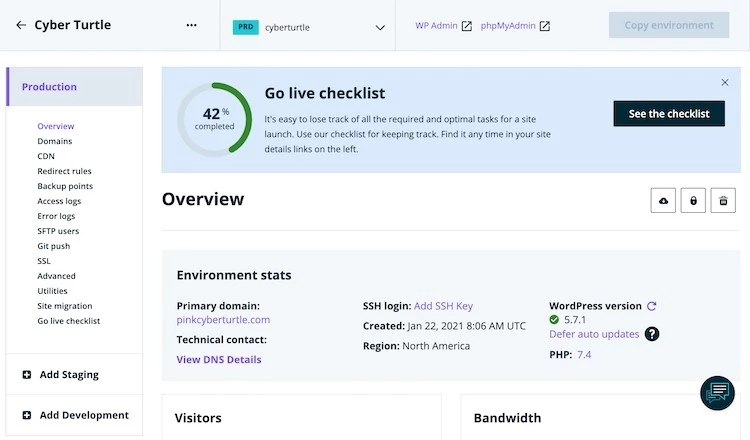
Remember that WP Engine takes care of performance, automatic updates and security measures, so you don’t have to worry about that.
Bluehost has integrated a custom cPanel alongside the native admin panel.
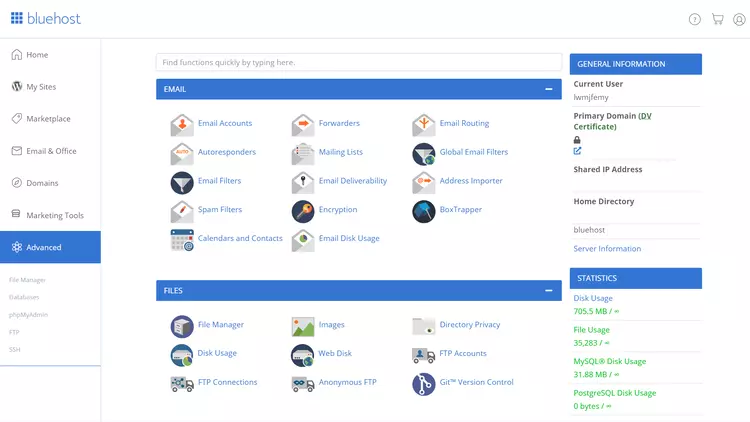
I must note that the native administration panel is still the main control area. cPanel is used as an advanced administration tool for managing files, databases and free email accounts.
This means that you might not even end up using it as all the functions like installing WordPress or other applications can be found in the main administration panel. Even domain management can be found in Bluehost’s own administration panel under the domains section.
Choosing a winner between the two providers is a very subjective matter. Both WP Engine and Bluehost offer users a very user-friendly, intuitive experience, which makes their services even more attractive. However, Bluehost also has an integrated cPanel that some users may be more familiar and comfortable with.
Extra hosting Management Features
Besides the extremely easy-to-use dashboards, both providers offer some very useful additional features.
WP Engine has production, staging and development environments integrated into its services. WP Engine’s 3 environments are one of the main reasons why customers choose its services.
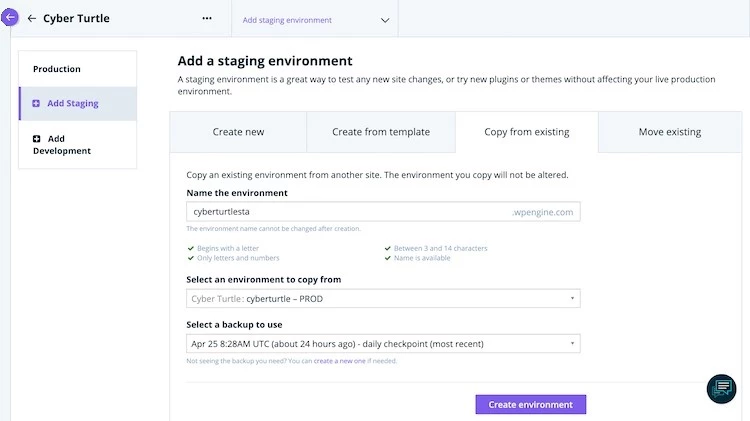
These environments allow you to experiment, create and test your website before transferring everything to the live website.
Bluehost has also set up a staging feature for WordPress sites. The creation process is very simple.
To create a staging environment, you need to find a pre-installed Bluehost plugin in your WordPress admin panel and select Staging.
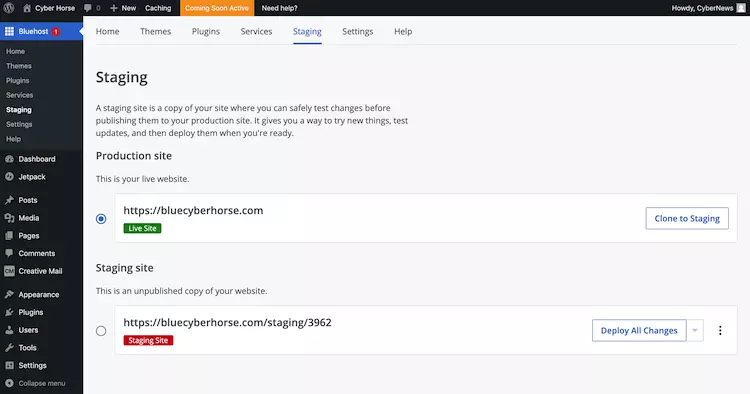
Just a few clicks and you can experiment with your website. Now, make a copy of your website, and experiment safely.
Besides, Bluehost gives you access to its marketing tools, such as Google Ads and Google My Business.

With them, you can set up and manage a small marketing campaign directly from your dashboard. You can run ads or place your business on Google Maps for indirect searches like “best pizzeria”.
So it seems that both providers offer staging options. And both make staging as easy as possible. Also, Bluehost offers a marketing tool that you can use to increase the visibility of your website.
Overall, both providers are very user-friendly and offer intuitive and easy-to-navigate native panels. However, Bluehost also features cPanel. Moreover, WP Engine and Bluehost offer the staging feature, with Bluehost additionally offering marketing tools.
Winner: Bluehost
WP Engine vs Bluehost Performance
When it comes to performance, WP Engine has a winner over Bluehost. WP Engine is both faster and more reliable than Bluehost. The uptime was higher, the loading speed was faster, and it was able to handle more traffic. However, Bluehost also showed good results and a faster average response time than WP Engine.
Uptime & Response Time
Let me explain how I would like to evaluate these metrics. An uptime between 99.9% and 99.95% is fine. Anything above that is fantastic, and anything below that is not so great. An uptime of 100% is perfect, of course.
An average response time of 200-450 ms is great, anything over 1 s is pretty bad, and anything in between is fine.
Both Providers Were Examined For A Similar Period – Around Two Months.
During this time, WP Engine has achieved very impressive results. Even though there is an uptime guarantee of 99.95%, what you actually get is much better. During these 2 months, WP Engine did not have a single failure, resulting in a perfect uptime of 100%.
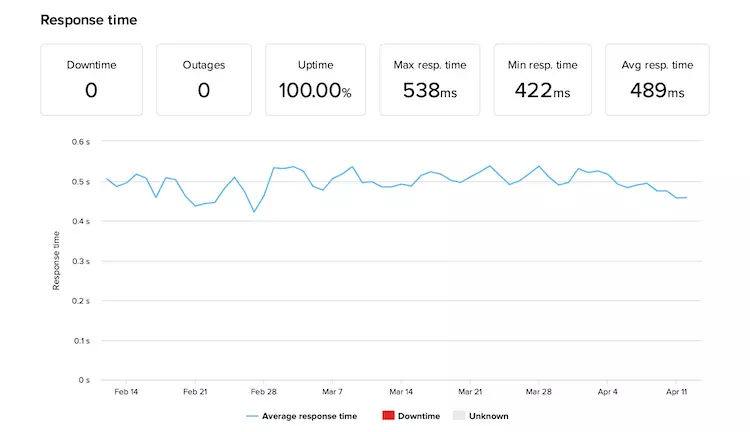
The average response time was 489 ms. However, I had expected better. The time is not bad by any means, but it could be better. Especially when you know that the average response time on the market is 600 ms.
To be honest, Bluehost’s performance is also very good. In fact, it is among the best performing shared hosting providers.
In 2 months of testing, there were 6 failures, which added up to 11 minutes of downtime. Still an amazing 99.99% uptime. Especially when you have no uptime guarantee at all. Bluehost’s average response time of 361 ms is also very good!
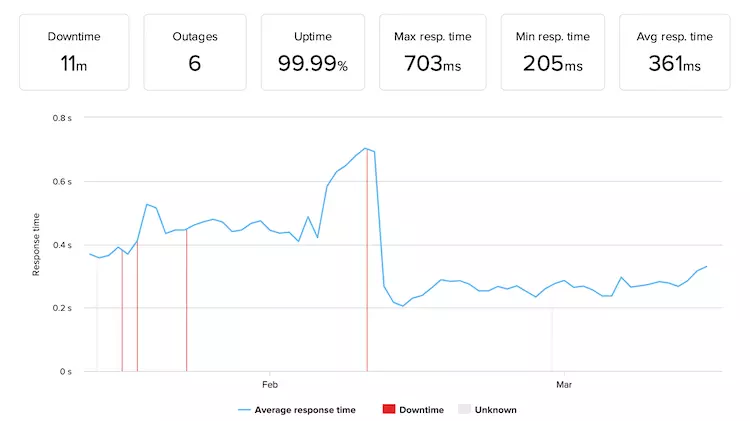
In short, WP Engine showed slightly better results. The uptime was reliable and was 100%. The response time was also very good. Alternatively, Bluehost was equally impressive with its slightly better average response time and still very reliable uptime of 99.99%.
Website Speed
To test the speed of WP Engine and Bluehost, I performed a load speed test. I created identical circumstances: I installed identical templates on both providers. Also, both are hosted and tested from the USA.
Good To Know
To improve performance results, you can host your website on the server closest to your target audience. WP Engine has servers in the USA, Belgium, Germany, the UK, Taiwan, and Australia. In contrast, Bluehost only has data centers in the US.
Before We Talk About The Results, I Would Like To Point Out 3 Measures You Should Focus On:
Considering that, WP Engine has done a pretty good job. Its LCP is only 938ms. This is easily within the norms.
The Fully Loaded Time is 1.1s, and that’s an amazing result. Pretty far away from the dreaded 3-second mark.
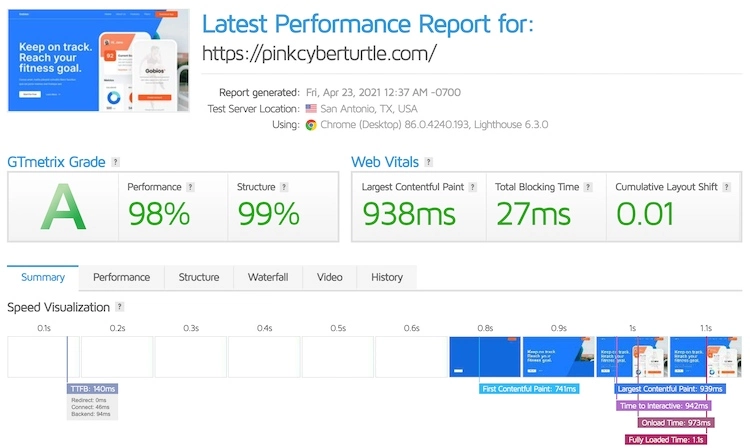
Now looking at the TTFB, which is 140ms, it is clear that WP Engine has managed to keep all the recommended times. Great loading speed and very responsive server. Simply put, a great performance.
Bluehost showed slightly less impressive results. In this case, LCP and Fully Loaded Time are at the same 1.8s. This is not as good as WP Engine, but definitely a reasonably good result.

However, a bit of a concern here is TTFB, which is at 1 second. This means that the server could be a little faster. So if it wasn’t for the slow server response, the page could load faster.
In summary, WP Engine gives much faster results. The loading time was very fast, and the server response time was great. However, Bluehost also delivered very good results, above the market average.
Stress Testing Results
Finally, I wanted to see how well both providers could handle increased traffic. So I sent 50 virtual users to the website for five minutes to move around at the same time.
Simply put, 50 VUs on the site at the same time is a pretty high traffic volume. If it stayed that way for months, it could result in as many as 50,000 monthly visitors.
So I don’t expect any provider to be able to handle that kind of traffic. If that seems like too much, I’ll reduce that number by 5 until I have success.
The first run with WP Engine is at 30VUs. And that is quite to be expected. The provider itself says that its cheapest plan can handle up to 25 000 monthly visitors.
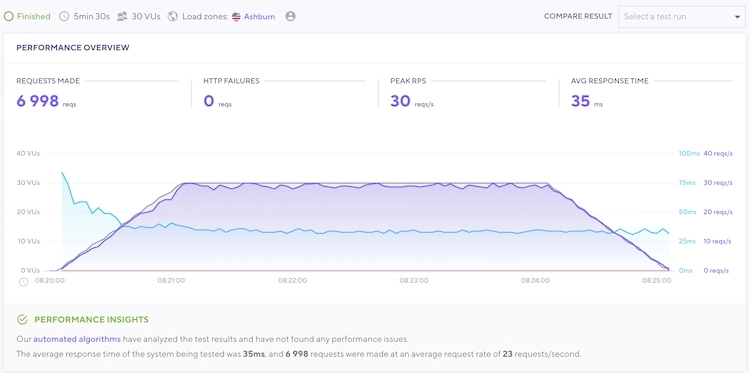
It seems that he is telling the truth. It is encouraging that the response time (blue line) has remained very stable despite the high volume of traffic and has not shown any exaggerated reactions to the increase in the number of visitors (gray line).
On The Other Hand, Bluehost Has Processed 15VUs.
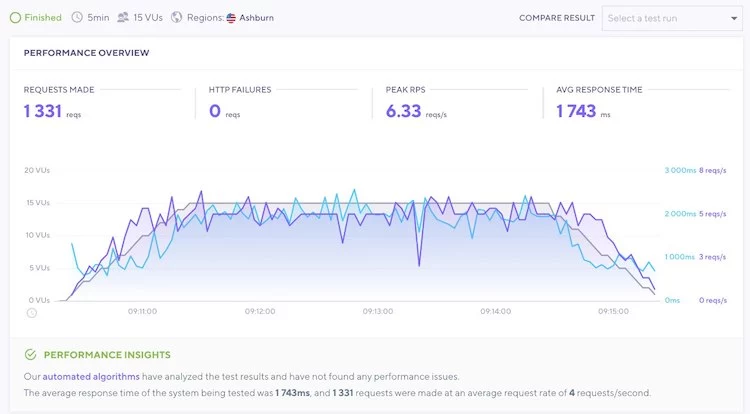
And it seems that the response time (blue line) depends much more on the number of visitors (gray line).
And even though the server slowed down to handle the many visitors, 15 VU is still quite a lot. About 15 000 unique visitors per month.
In short, WP Engine handled more traffic. The plans state an approximate number of monthly visitors, and that’s what it can handle. Alternatively, Bluehost has handled pretty intense traffic without failures.
When comparing the performance of WP Engine and Bluehost, one of the two providers stands out much more. WP Engine is much faster, more reliable and can handle a larger amount of traffic. If you want top-notch performance, WP Engine is definitely the better option.
Winner: WP Engine
Website security
Speaking of security, it seems like there is a clear winner in this comparison between WP Engine and Bluehost. WP Engine offers a far more secure platform with daily automatic backups, its own firewall and automatic threat detection, among other features. At the same time, Bluehost only offers the basics – SSL certificates and CDN integration.
WP Engine does quite a lot when it comes to security. First of all, it has all the basics – SSL certificates, one-click CDN activation, daily backups and multi-factor authentication.
On Top Of That, WP Engine Adds More Security Features Without Any Additional Fees.
At the same time, Bluehost offers – SSLs, Cloudflare CDN integration and two-factor authentication. However, if you want to have automatic backups and protection against malicious attacks with Bluehost, you have to pay extra.
Of course, the higher price level of WP Engine offers more security features. But at the same time, Bluehost offers security measures against the most common threats. Nevertheless, Bluehost should consider further measures to increase the security of its customers.
In terms of security, WP Engine is clearly the leader and offers very strong security features. Bluehost lags behind and offers additional security measures at an additional cost.
Winner: WP Engine
Customer Support
Both WP Engine and Bluehost have similar support options that include 24/7 live chat and phone support, as well as extensive knowledge bases. However, WP Engine goes a step further and adds email ticket support to the package.
I usually prefer to open a live chat when I have a question, as I have found that this is usually the fastest way to get an answer. And that’s exactly what I tested for this comparison between WP Engine and Bluehost.
I was curious to know a bit more about the money-back guarantee of the two providers. And that’s exactly what I asked.
The first thing I did was contact WP Engine’s sales team, and I was connected almost immediately.
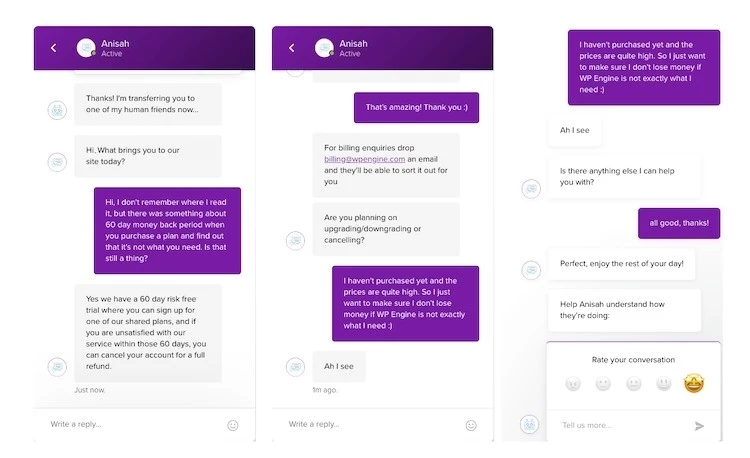
The responses were very fast. Each time the employee took less than a minute to respond to my message.
Although the conversation was short, it was pleasant. My question was answered immediately and on the spot. There were no links to terms and conditions or attempts to sell me a rate. So I have to say that I was very satisfied.
When I contacted Bluehost with the same question, I was connected in no time and the answer came immediately.
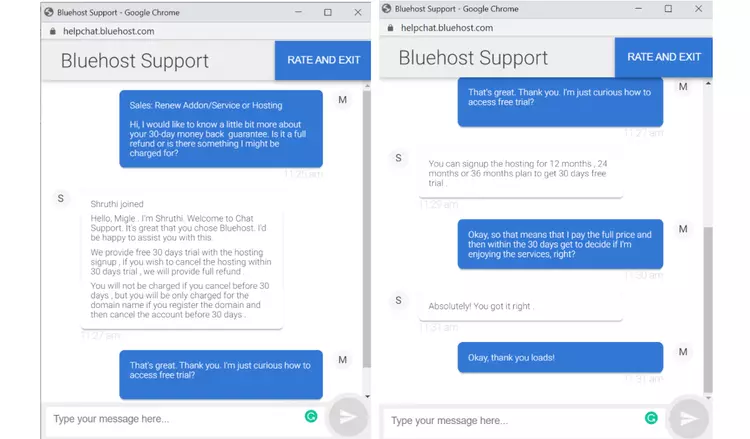
The representative gave me a detailed summary of the money-back terms. Once again, no links, no intrusive advertising. Just a quick and simple answer, which is exactly what I was looking for.
Although the conversation was very short, I must note that the responses between messages were a bit slower than WP Engine. It’s not much though, so no need to worry.
Besides the live chat option, both providers have great knowledge bases where you can find many useful articles on various topics that interest you.
First of all, WP Engine’s support center is very well organized. It has different themes with suggestions for the most important (most viewed) articles. If you want, you can also use a search bar to look for specific guides and explanations about web hosting or website management.
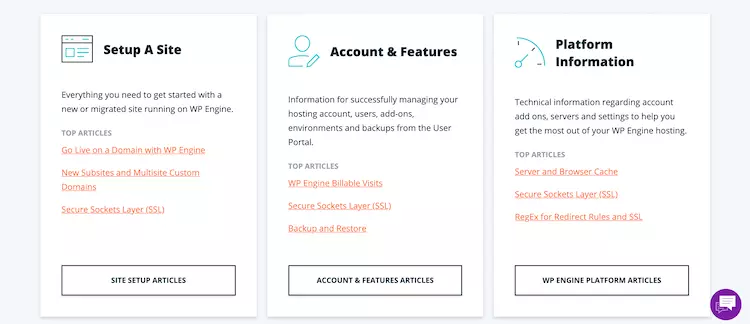
Bluehost’s knowledge base is as well organized as WP Engine’s. It is very clear, you can select a specific topic or search for a specific question.

Both providers have a lot of useful and up-to-date articles on their base. Still, I have to say that I like the look of WP Engine better. However, that doesn’t mean that Bluehost’s is any less useful or functional.
All in all, WP Engine and Bluehost are very similar in terms of live chat. Both agents responded quickly and were really impressively professional. However, with WP Engine, you can get customer support via email, which is not possible with Bluehost. Moreover, both providers have very impressive and up-to-date knowledge bases.
Winner: Bluehost
Conclusion
The ultimate showdown between WP Engine and Bluehost reveals a comprehensive comparison of these two popular hosting providers. The quick comparison highlights various aspects, starting with a pricing analysis that allows users to assess the best value for their investment. The ease of use in hosting management is a crucial factor, and both WP Engine and Bluehost provide user-friendly account management dashboards. Control panel comparison showcases the differences in interface and functionality. Furthermore, extra hosting management features add value to the services offered by both providers. When it comes to performance, uptime and response time are crucial, and the stress testing results demonstrate the reliability of WP Engine and Bluehost.
Additionally, website speed plays a significant role, and both providers deliver impressive performance. Lastly, website security and customer support are key considerations, and both WP Engine and Bluehost offer robust security measures and reliable customer support. Ultimately, choosing between WP Engine and Bluehost depends on individual needs and preferences, as both hosting providers offer excellent services to cater to various website requirements.
FAQs
Why should I choose WP Engine over Bluehost?
As someone who has used both WP Engine and Bluehost, I can confidently say that WP Engine offers superior performance and specialized hosting services specifically designed for WordPress websites. They have a strong focus on speed and security, providing advanced caching mechanisms and robust security features. Additionally, WP Engine offers dedicated WordPress support, ensuring that you have access to knowledgeable experts who can assist with any WordPress-related issues.
How does Bluehost compare to WP Engine in terms of pricing?
From my experience, Bluehost tends to offer more affordable hosting plans compared to WP Engine. They have a range of hosting options suitable for various budgets, making it an attractive choice for individuals or small businesses on a tight budget. However, it’s worth noting that WP Engine’s pricing reflects the premium performance and specialized WordPress features they provide. So, if you prioritize top-notch performance and support, WP Engine might be worth the investment.
Can you speak to the customer support offered by WP Engine and Bluehost?
Both WP Engine and Bluehost offer customer support, but there are some differences in their approaches. WP Engine is known for its excellent customer service, providing 24/7 access to WordPress experts who can assist with any technical issues or inquiries. Their support team is highly responsive and knowledgeable about WordPress-specific matters. On the other hand, Bluehost offers general customer support for a wide range of hosting-related issues, but they may not have the same level of expertise in WordPress-specific problems.
Are there any specific features that set WP Engine and Bluehost apart?
Absolutely. WP Engine stands out with its specialized features tailored for WordPress users. These include automatic WordPress updates, daily backups, staging environments for testing changes, and a variety of developer-friendly tools. WP Engine also offers a content delivery network (CDN) to enhance website speed and performance. Bluehost, on the other hand, offers a more general hosting environment with features that cater to a wider range of users. They provide a user-friendly interface, one-click WordPress installation, and integration with popular CMS platforms.
What are the potential drawbacks of using WP Engine or Bluehost?
One potential drawback of WP Engine is its higher pricing compared to Bluehost. The premium performance and specialized features come at a cost, making it less suitable for those on a tight budget. Additionally, WP Engine has certain limitations on the number of visits or bandwidth allowed depending on the hosting plan you choose. As for Bluehost, while they offer competitive pricing, their customer support may not be as specialized or responsive when it comes to WordPress-related queries.
To read more similar articles, click here.
Thanks for visiting our Website. If you appreciate our work, kindly show us some support in our comments section. 🙂

Norman Dwemer is a tech blogger who focuses on the future of technology. his blog delves into emerging technologies such as artificial intelligence, blockchain, and quantum computing, as well as their potential impact on our lives and society. Rachel’s writings provide a sneak peek into the future of tech, examining the possibilities and risks of these cutting-edge technologies. he also shares the most recent developments and research in these fields, delivering the latest news and insights to his readers. Norman’s visionary outlook on the world of tech has establihed his as an authoritative figure for anyone interested in the forefront of technology.