Thinking of using Pagely to host your WordPress site?
With plans starting at $299 per month, Pagely is not for casual webmasters (nor is it aimed at them).
Instead, Pagely is managed WordPress hosting for serious businesses and webmasters where reliability, flexibility, and support are paramount.
But does it deliver what it promises, and is it worth what it costs? In my Pagely review, I try to find out.
Overall, Pagely offers high performance and a focus on security that mission-critical webmasters should love.
Read on for my full review of Pagely. I’ll start with a quick introduction to what makes Pagely unique. Next, I’ll get into a more practical look at the pros and cons of hosting with Pagely.
Table of Contents
A Quick Introduction To Pagely And Its Features

Launched in 2009, Pagely is one of the oldest managed WordPress hosts, if not the oldest.
Rather than going low to reach casual users as we’ve seen with other managed hosts, Pagely has consistently gone “channel up”, differentiating itself with service, features and performance rather than low prices.
So if you read older reviews on Pagely, you may see lower prices. Pagely used to be more of a mass market host before targeting more serious users.
What Pagely Offers
Pagely’s hosting stack is based on Amazon Web Services (AWS). In that stack, and along with the expected availability of technology such as PHP 7 and HTTP/2, Pagely adds a set of services called “Press”:
In addition, you can choose from 13 different data centers, white-glove website migrations and tons of developer tools, such as WP-CLI.
Testing Pagely’s Performance On A Live Site

If you pay $299 a month, you probably want your WordPress site to load fast. So, does WordPress load fast on Pagely?
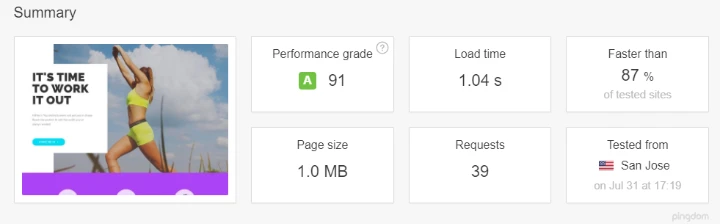
I then ran it through GTmetrix, where it loaded in an equally stellar 1.2 s from a test server in Vancouver, Canada:

Finally, I wanted to see how it performed on a large scale, so I subjected it to a load impact test with 50 simultaneous visitors:

As you can see, with the exception of that one spike at the beginning, my test site’s load times (green) remained rock-steady as the number of visitors (blue) increased.
Overall? Around 1 second page load time, which is right where you want to be. No problems so far…
Six Things You’ll Like About Pagely Hosting

I’ll talk about a couple of cons in the next section, but let’s start with the good stuff (beyond the performance you’ve seen above!).
1. The New Custom Atomic Dashboard Is Great
To help you manage your site, Pagely offers their “Atomic Dashboard” (yes, you don’t have to use cPanel when you pay $299 a month!).
Pagely’s old dashboard looked a bit dated (you’ll see a screenshot below), but the new Atomic Dashboard looks great.
It has a whole new design that, in addition to improving aesthetics, makes it easier to find important functions.
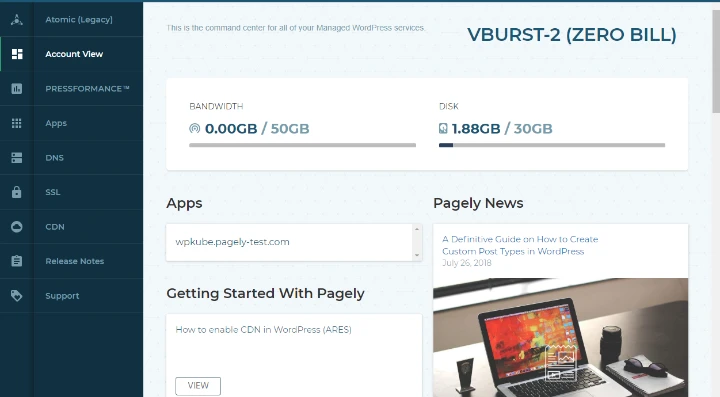
You’ll see more screenshots of this dashboard when I talk about specific functions.
2. All Those “Press” Features Make Running A Website A Lot Simpler
I told you about all the “Press” features above, so I’m going to keep this section short. But Pagely has done a great job of making your life easier with all those features, and they’ve also eliminated the need to look for external services/plugins in quite a few areas.
With Pagely, you don’t have to:
And another useful feature is that you can manage many of those features directly from your Atomic Dashboard. For example, this is how you manage DNS records from Atomic:
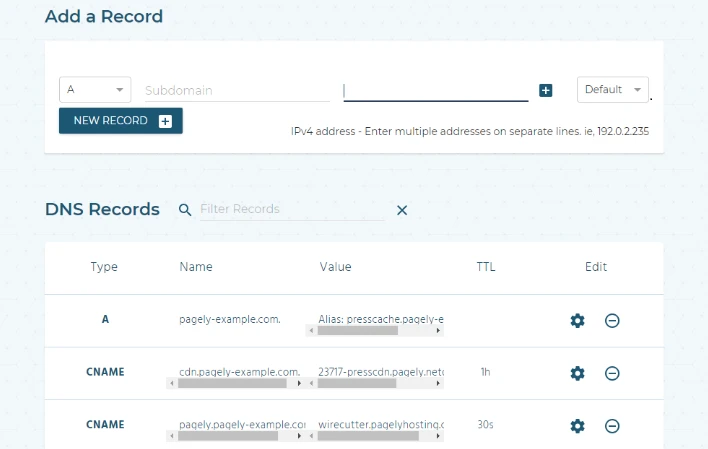
If you’re thinking of paying $299 a month for a host, you’re looking for convenience and not intervention, right?
3. Automatic Offsite Backups With 14 Day Retention
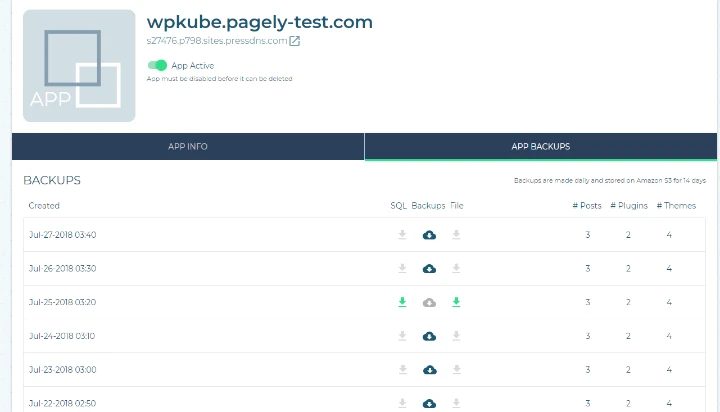
Pagely performs automatic backups of your WordPress site every day. These backups are stored on AWS and are kept for 14 days, which is pretty standard in the managed WordPress hosting industry.
You can also download any of these backups from Atomic Dashboard:
4. Flexible staging and site synchronization commands
Staging sites makes it easy to test changes before pushing them to the live site. Pagely staging is not as simple as the one-click staging offered by other managed WordPress hosting, but the advantage you get is flexibility.
Using Pagely’s sync command or clone tool, you can quickly clone your live site, test the changes, and then push updates to the live site as needed using your own workflows.
The only drawback is that it requires some technical know-how to get up and running.
5. A focus on security in addition to free restoration hacks.
Pagely has a great reputation for security. To my knowledge, Pagely has never had a single security incident (which is not the case for all managed WordPress hosts).
Beyond the basic PressArmor features I described above, Pagely details their entire security model on this page.
And, in the off-chance that something happens to your site, Pagely will “clean up and restore the client’s site to pristine condition, free of charge.”
6. No artificial limits on monthly visits like other managed WordPress hosts.
One thing I don’t like about most WordPress hosts are those artificial monthly visit limits.
While it simplifies billing, it’s not as accurate a measure of your actual usage (i.e., not all visits are equal – why treat someone who bounces right away the same as someone who consumes a lot of content).
Pagely has no artificial visitor limits in its plan: as long as your bandwidth allows, you can keep serving your site. And if you ever reach your plan’s bandwidth limit, you can simply pay for more bandwidth instead of having to switch to a new plan level.
What Are The Downsides Of Pagely, Then?

Well, the most obvious one is the price….
Pagely’s cheapest VPS plan starts at $199 per month, and the VPS plans go up to $2,249+ per month. And if you want one of the enterprise plans, it’s starting at $2,500 per month.
While we’ve seen managed WordPress hosts like Kinsta downgrade, Pagely seems to be committed to staying in the top tier.
That’s fine – it just means that casual webmasters will never be able to enjoy all of the above features.
Beyond that, I think the pricing should be accompanied by more accessible after-hours support.
For VPS customers, Pagely offers two methods of support:
No phone support – but I have no problem with that because it’s pretty standard and I find live chat more reliable anyway.
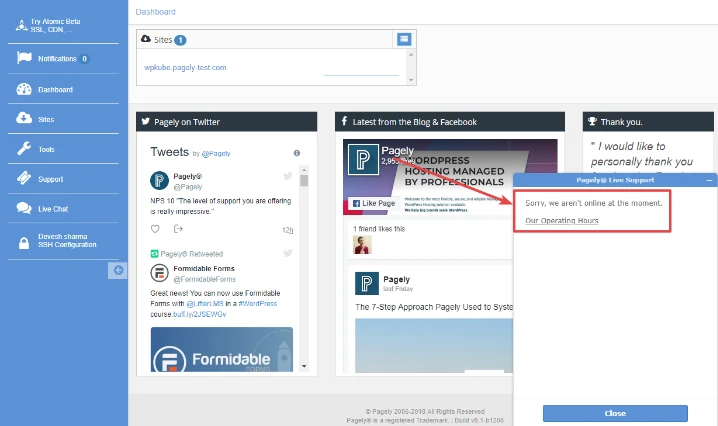
But… live chat is only available from 9am – 5pm MST AZ on Wednesdays and Thursdays. Ticket support is available 24/7, however.
Note:
I believe Enterprise customers have access to a dedicated Slack channel in addition to the other support methods.
What are the benefits of Pagely’s premium DNS and global CDN?
Does Pagely offer scalability for growing websites?
Can Pagely assist with optimizing website images?
What kind of backup and disaster recovery options does Pagely offer?
Is Pagely suitable for e-commerce websites?

Mike DaVinci Hightechblogging.com
Mike DaVinci is a skilled content writer with a talent for storytelling. He specializes in creating captivating narratives that engage readers and leave them feeling inspired. His writing has been featured in various publications, including magazines, blogs, and business websites. Mike’s particular interest in human interest stories allows him to uncover the heart of any story and convey it to his readers in an emotional and authentic way. He believes that storytelling is a powerful tool for connecting with people and inspiring positive change in the world.
To read more similar articles, click here
Thanks for visiting our Website. If you appreciate our work, kindly show us some support in our comments section. 🙂