Thinking about using Cloudways to host your WordPress site? Read our hands-on Cloudways review to decide if this service fits your needs.
Cloud hosting has many advantages. It’s easily scalable, you can have a lot of control over server options, and it’s often low-budget. The problem is that most cloud hosting platforms – such as Google Cloud or Amazon Web Services (AWS) – are too complicated to use for most non-developers.
Cloudways’ goal is to simplify cloud hosting so that even non-developers can benefit from cloud hosting. It is a managed cloud service that supports WordPress, among other platforms. With Cloudways, you can easily deploy a website on a high-performance cloud server through an easy-to-use interface.
In this Cloudways review, we’ll take a look at how the service works and what features it offers. We’ll also cover its performance, support, and pricing to help you decide if it’s a good option for you. Let’s get to work.
Cloudways review for WordPress: Features ⚙️

To begin with, it’s essential to clarify that Cloudways doesn’t function as a conventional hosting provider. Rather, it empowers you to establish web applications on a variety of cloud hosts such as DigitalOcean, Linode, Vultr, AWS, and Google Cloud. Among the assortment of available applications, WordPress is naturally included.
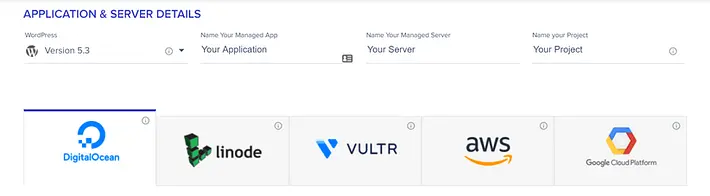
When establishing a new website, Cloudways provides you with the capability to customize various aspects, ranging from selecting the preferred cloud service to determining the server size. Additionally, depending on the chosen host, you may have the opportunity to select from multiple server locations.

All these operations occur within a single interface. In practice, Cloudways allows you to effortlessly establish a WordPress website utilizing your preferred cloud provider within a few minutes.
When it comes to user-friendliness, Cloudways excels. Irrespective of your server configuration preferences, you can also conveniently access the following features:
- Managed hosting and security services
- One-click SSL certificate setup
- Simple server scaling should you need more resources
- Support for multiple PHP versions
- Support for both MySQL and MariaDB database management systems
- SSH and FTP access
- Git integration
Cloudways does not provide support for sending or hosting emails. However, they offer a convenient integration with SendGrid for free email sending. Additionally, you can utilize services like Google Workspace (formerly G Suite) for a paid option or Zoho Mail for a free option to host your emails. Alternatively, Cloudways also offers a dedicated integration with Rackspace for cost-effective email hosting.
In general, Cloudways provides a wide range of features that are comparable to leading WordPress-managed hosting options like SiteGround or WP Engine. It’s worth noting that while this Cloudways review focuses on WordPress, the platform is also compatible with other content management systems such as Magento and Drupal.
Performance 📈
As Cloudways depends on third-party cloud hosting platform servers, performance may differ based on your specific configuration. In our test scenario, we opted for the most basic DigitalOcean setup, which comprised 1 GB of RAM and 25 GB of SSD storage. Furthermore, each server includes the following components:
- Caching configuration and a pre-installed caching plugin for WordPress.
- PHP 7 set as the default option.
- A customized content delivery network (CDN).
You have the flexibility to scale your server at any given moment, allowing you to increase the amount of RAM or storage for a performance boost when needed. Keep in mind that downgrading your server requires the process of cloning and restoring your server configuration. However, Cloudways simplifies this process by offering one-click backup and restore options.
While cloud hosting theoretically promises nearly flawless uptime, the actual results may vary depending on the hosting provider you select. Cloudways, on the other hand, maintains comprehensive records of incidents that have occurred, which you can review whenever necessary.
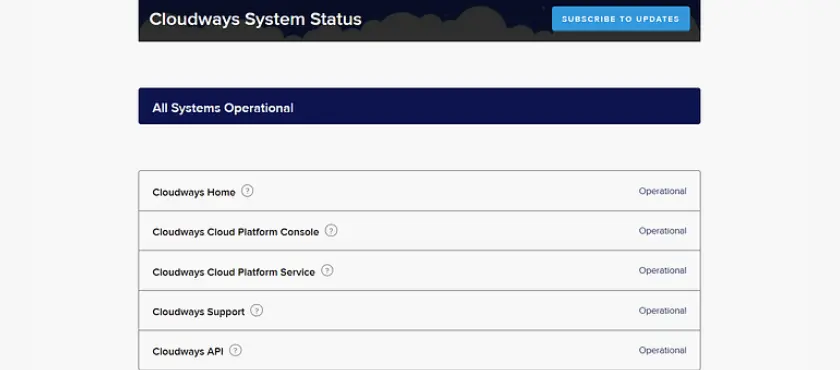
Cloudways boasts exceptional WordPress performance on paper, but to determine if it truly meets the anticipated standards, we conducted a series of tests.
Page speed tests with Pingdom
To swiftly assess the performance of a WordPress website, conducting a rapid page loading speed test is the most effective approach. As previously mentioned, we established a fresh WordPress website on a DigitalOcean server and incorporated the WordPress Theme Unit Test Data. This allowed us to create a basic website alongside one of the default themes, enabling us to simulate a typical scenario.
Once the website was prepared, we proceeded to conduct page loading tests from various locations using Pingdom.
All in all, these results are outstanding, especially when taking into account that our test page has a weight of 6.5 MB. Such impressive performance should be expected from a well-configured cloud server.
The marginal increase in loading times observed during the test conducted with an Australian server is to be expected. Since our website’s server is situated in New York, the disparity in distance explains the higher recorded duration.
Page speed tests with BlazeMeter
Relying solely on a single page loading test doesn’t provide a comprehensive view of overall performance. It’s crucial to assess how your website performs during traffic surges. This is where BlazeMeter proves invaluable. We utilized this tool to simulate the impact of up to 30 virtual users accessing our site over a three-minute duration. Here are the findings from the simulation:

Under moderate stress, our site’s server exhibited an average response time of 0.25 seconds, showcasing its ability to handle traffic effectively. This indicates that even with a basic Cloudways setup, your website should be equipped to manage moderate levels of incoming visitors. In terms of performance, Cloudways deserves recognition for its optimized server configurations.
Support options 🧑💻
Upon establishing a WordPress website on a DigitalOcean server, we had inquiries to address with Cloudways’ support team. Promising round-the-clock availability and impressive response times, Cloudways offers support through multiple channels, including phone, live chat, and a ticket system. Notably, they provide an ‘account manager’ as a distinct feature, who can be reached via scheduled calls to assist with any queries you may have.
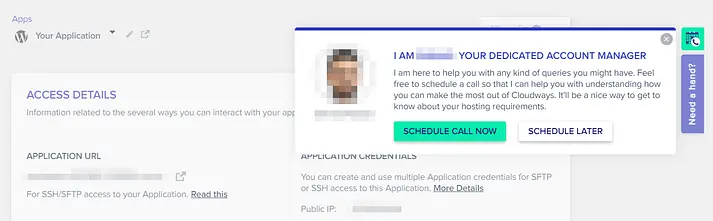
To avoid waiting for a scheduled call, we opted to initiate a live chat for immediate assistance. As part of their support process, Cloudways employs a chatbot to guide users in finding answers to frequently encountered technical inquiries before connecting with a live agent.
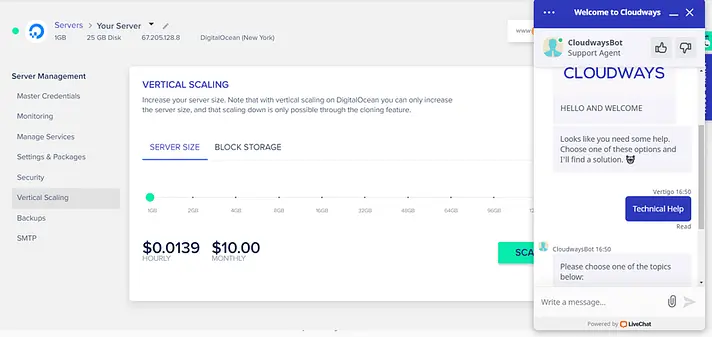
Nevertheless, the process of navigating through the chatbot to reach a live agent was straightforward, and we were promptly connected with someone. However, regrettably, the support experience itself left room for improvement. We encountered occasional delays in receiving responses, which led us to inquire about the agent’s presence. Furthermore, the replies we did receive were not as informative as we had hoped for.

It’s important to note that your personal experience with Cloudways support may differ. Live chat agents often handle multiple requests simultaneously, making them less suitable for detailed technical inquiries. However, considering the simplicity of the questions we posed, we would have expected better service, especially from a ‘premium’ platform.
For users seeking more dedicated support, there is an option to avail premium support by paying an additional fee. This provides a more focused and specialized level of assistance.
Cloudways pricing 💸
This is where things get a little more complicated with our Cloudways review. As you may already know, most cloud hosting providers typically charge based on resource consumption. With Cloudways, you’re paying for hosting through a secondary service, which means it’s going to be more expensive than paying the host directly.
Also, prices vary depending on the cloud hosting provider you choose. Cloudways does not offer “plans” per se, but allows you to set up as many servers as you want and then bills you at the end of the month.
In this regard, Cloudways offers monthly and hourly pricing for all of its cloud hosting solutions:

DigitalOcean and Vultr are the two best options if you are looking for relatively cheap cloud hosting. For about $11-20 per month, you can get basic servers with around:
These specifications are more than enough for a growing WordPress website and can always be expanded as needed. At this starting point, Cloudways is a bit cheaper than most managed WordPress hosting options.
On the other hand, AWS and Google Cloud have monthly options that start at about $30 per month. This is more in line with managed WordPress hosts like Kinsta or WP Engine.
Our Cloudways review pros 👍 and cons 👎
We’ve covered a lot of information in this Cloudways review, so let’s quickly go over the pros and cons of this service.
Pros
Cons
Cloudways
⭐⭐⭐⭐⭐ 4.7 out of 5
Cloudways specializes in managed cloud hosting, providing a platform that allows users to easily deploy and manage websites on popular cloud infrastructure providers such as AWS, Google Cloud, and DigitalOcean. With features such as easy scalability, dedicated resources, and 24/7 support, Cloudways is a great option for those looking for reliable, high-performance cloud hosting with an easy-to-use interface.
User Rating
⭐⭐⭐⭐⭐
Reliability
⭐⭐⭐⭐⭐
Performance
⭐⭐⭐⭐⭐
Pros
Cons
The Final Verdict
Experience Cloud Hosting Made Easy: Introducing Cloudways. Say goodbye to intimidation! With Cloudways, you unlock the full potential of top cloud hosting providers on a remarkably user-friendly platform. Deploying a WordPress website is now as effortless as with any regular host.


Henry Sprung is an e-commerce tech blogger with several years of experience in online retail. Alex’s blog focuses on topics such as online marketplaces, payment processing, and digital marketing for e-commerce businesses. Henry’s expertise in e-commerce provides valuable insights into the latest trends in online retail and how businesses can use these platforms to grow their sales. He is a valuable resource for online retailers and entrepreneurs looking to start their own e-commerce businesses.
To read more similar articles, click here
Thanks for visiting our Website. If you appreciate our work, kindly show us some support in our comments section 🙂