Nexcess Review: Unleash Your Website’s Potential with Nexcess Hosting (September 2026)

Are you considering using Nexcess Managed WordPress Hosting for your WordPress website?
Nexcess is a subsidiary of Liquid Web, a popular hoster that has made a big push into the WordPress space with the acquisition of popular WordPress plugin companies like iThemes, Restrict Content Pro, The Events Calendar, and others.
While Liquid Web offers a variety of different hosting types, Liquid Web uses Nexcess to house its managed WordPress and WooCommerce hosting plans (as well as managed Magento hosting).
In our hands-on test of Nexcess, we’ll focus mostly on regular managed WordPress hosting (and that’s what we’re testing for performance). However, we will also touch a bit on the managed WooCommerce plans, as this is a really interesting option for WooCommerce stores.
In general, Nexcess offers great performance and features for the money, but it does have some drawbacks, so you’ll want to make sure it’s the right host for you.
At the end of our Nexcess review, we’ll share some thoughts on when Nexcess makes sense and when you should choose a different host.
Table of Contents
How We Tested Nexcess
To make our Nexcess review as objective as possible, we purchased our own hosting from Nexcess and used it for our own testing.
Basically, we want to experience Nexcess exactly as you would experience Nexcess, and then share that experience with you to help you make your decision.
For reference, we’re testing the entry-level Spark Managed WordPress hosting plan, which costs less than $20 per month even when billed monthly.
Nexcess Key Features

To start off our review, let’s take a quick look at the features. We won’t go into too much depth, since you can find all of this in the Nexcess marketing brochure, but we think it’s useful to quickly show what you have access to.
Performance Features:
Other features:
Security & Maintenance Features:
If you have a WooCommerce store, Nexcess‘ separate managed WooCommerce hosting plans offer many useful features to help you make your store a success.
First, you get access to the Nexcess StoreBuilder tool, which attempts to simplify the process of creating a working WooCommerce store and create more of a “Shopify” experience.
Second, you get built-in performance features, including:
Finally, you get access to a variety of free plugins, themes, and eCommerce tools. The exact list depends on your plan, but the pool of options includes:
Nexcess Performance Tests
How fast your website loads is incredibly important, as it affects your visitors’ experience, your search engine optimization, your conversion rates, and much more.
Your website hosting plays a key role in your website load times, especially when you have a high volume of visitors, so it’s important to choose a host that offers excellent performance.
To analyze Nexcess‘ performance, we set up our own WordPress test site and ran it through two different speed tools:
- WebPageTest – we configured it to run nine different tests and get the median value. This way we can see a variety of metrics such as Time to First Byte (TTFB), Largest Contentful Paint (LCP), and Full Load Time.
- Load Focus – WebPageTest shows us performance for a single visitor, but your site will likely have multiple visitors at once. This is where Load Focus comes into play, allowing us to see if Nexcess can maintain its performance in a high traffic scenario (20 visitors browsing in a 60-second window).
To create a realistic test environment, we set up our test site with a full demo site from the popular Astra theme.
Overall, Nexcess performed very well in both tests. In the WebPageTest, our test page loaded in less than a second, even though we throttled the connection speed to 20 Mbps download. That’s pretty good, though a smidge behind hosts like Kinsta and WP Engine:

Nexcess‘ performance was even more impressive in the more difficult load-focus test, where it maintained an excellent average response time of 0.435 seconds (and was even a tiny bit faster than Kinsta):
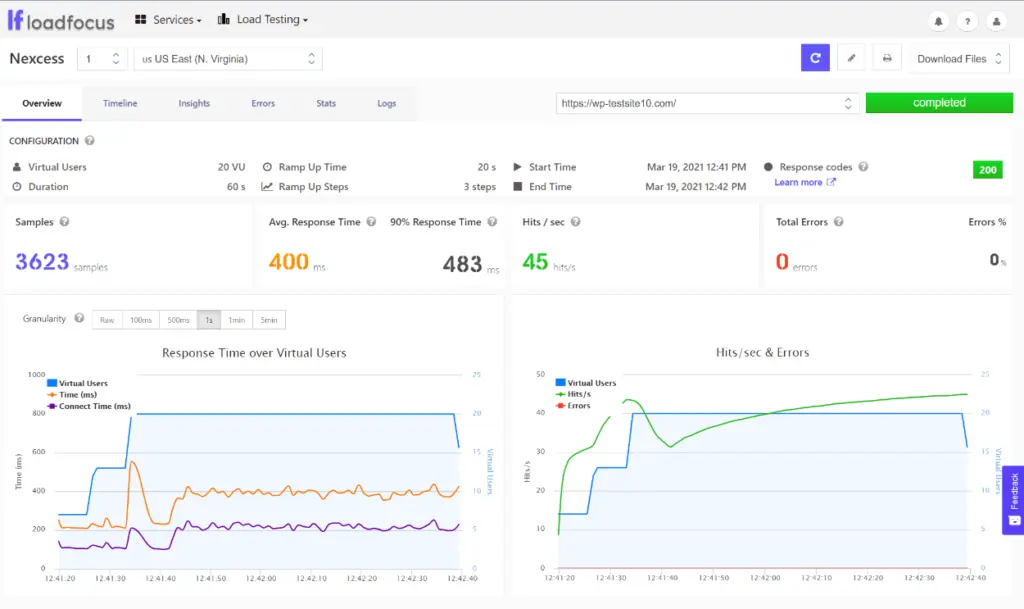
Overall, Nexcess offers excellent performance at a price that is lower than other similarly designed hosts, which is a great value.
Nexcess User Experience
Nexcess offers its own custom dashboard to help you manage your WordPress website(s).
The dashboard is well designed and helps you access important features, but it’s not the most beginner-friendly dashboard you’ll find. Don’t get us wrong – it’s certainly something that most non-technical WordPress users won’t have a problem with. It just doesn’t offer the simplified experience and terminology you’d get with a provider like Bluehost.
Also, the dashboard lacks some features you’ll find on other hosts, such as a file manager in the browser (you’ll need to use FTP) or a redirect manager.
When you first log in to the Nexcess dashboard, you get a basic summary of key billing information and announcements:

To access the actual management dashboards, you need to go to Plans → (Select Plan) → (Select Location).
Site Dashboard
The main dashboard of the custom website gives you access to all the tools and features of your website – you can switch between different sections using the sidebar on the left.
The default area is Performance, where you can enable performance features (such as auto-scaling, the Content Delivery Network, and Nginx acceleration). You can also clear your website’s cache and view basic usage statistics here:

Here’s what you can do in the other areas:
I won’t show you every single area, but let’s take a look at some of the most interesting features….
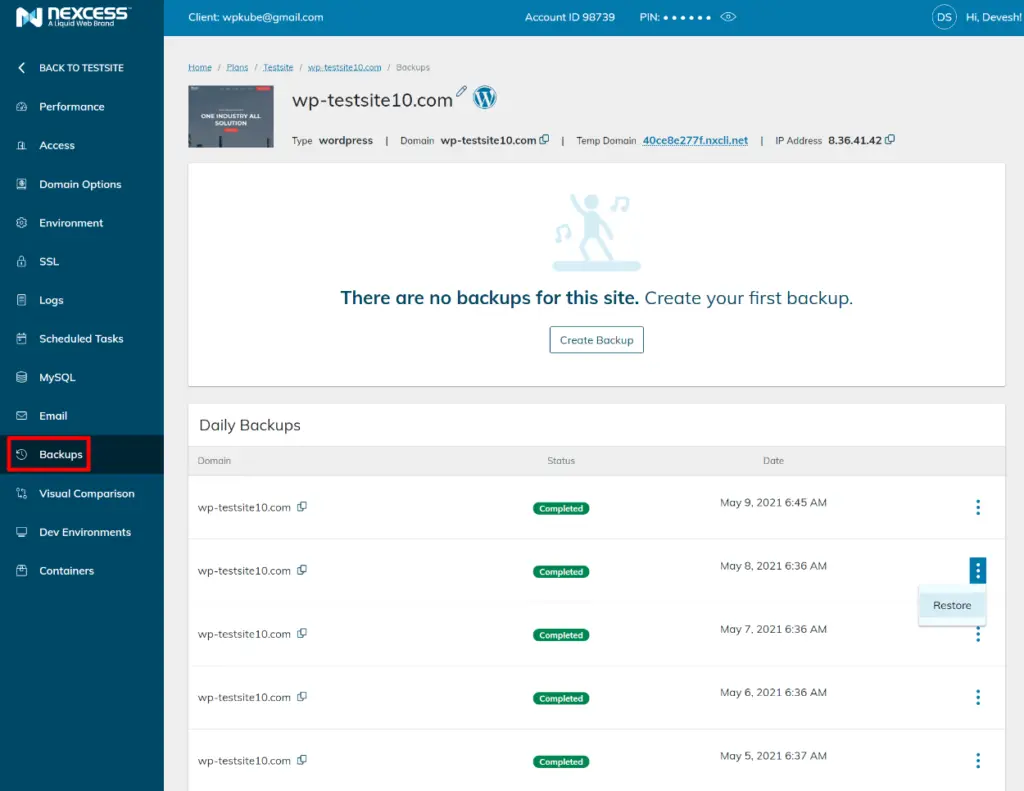
Nexcess automatically creates a backup of your website every day, which you can access from the Backups section. You can also manually create a backup if necessary and easily restore each backup:
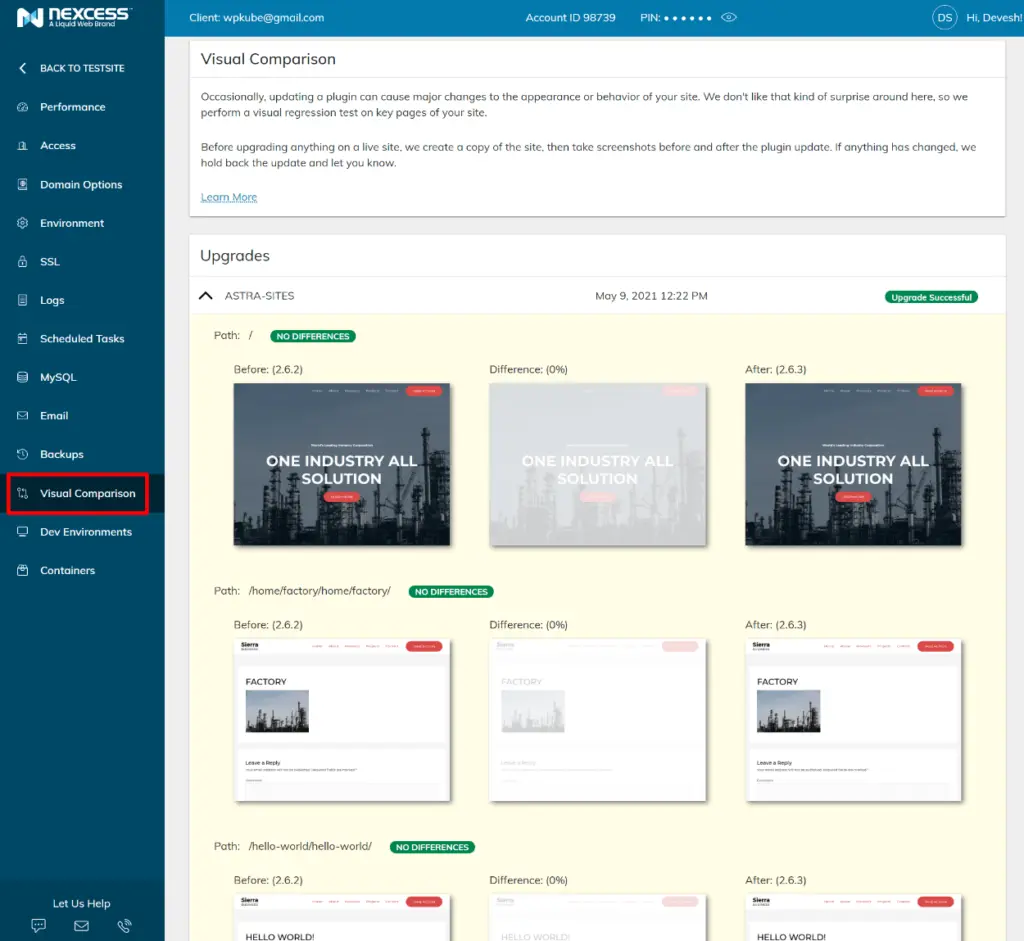
The Visual Comparison tab is a very useful feature for testing updates. Every time you update a plugin, Nexcess automatically performs a visual comparison between your website before and after to detect any problems. If your website looks different after an update, it’s a sign that something went wrong.
If something goes wrong, Nexcess automatically delays the update and sends you a message so you can investigate the problem before it occurs on your site:
The last area we will look at is the Development Environments tab, which allows you to easily set up a development or staging environment:
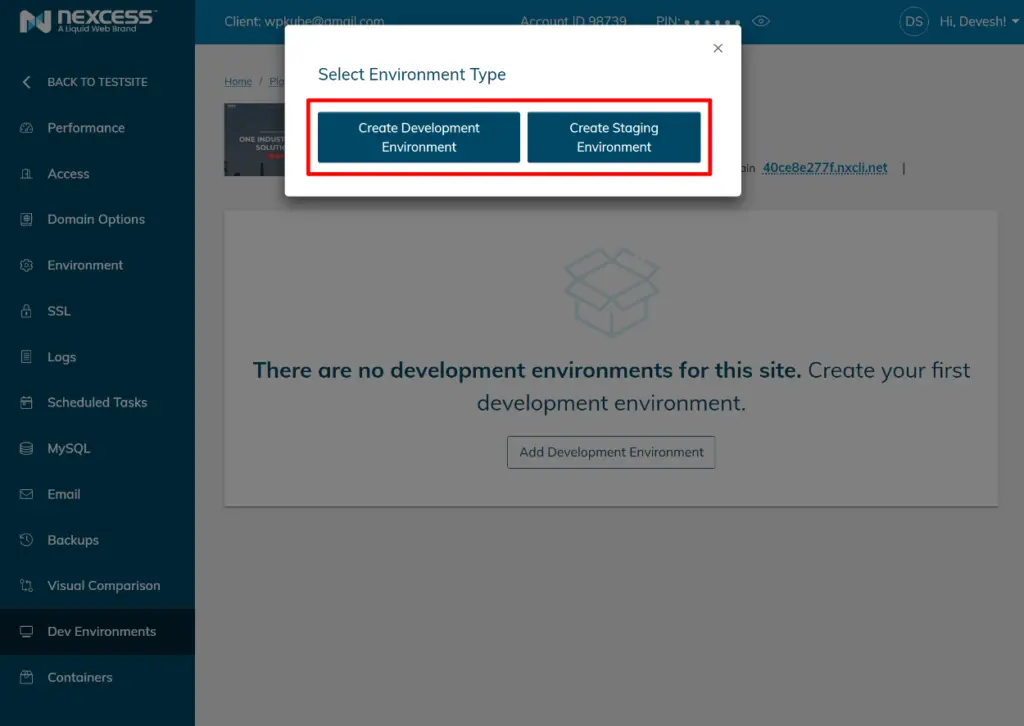
When you create a staging environment, you can choose whether or not to copy user data. There’s also a handy option that lets you anonymize user data on your staging site, which is useful for membership sites and WooCommerce stores:
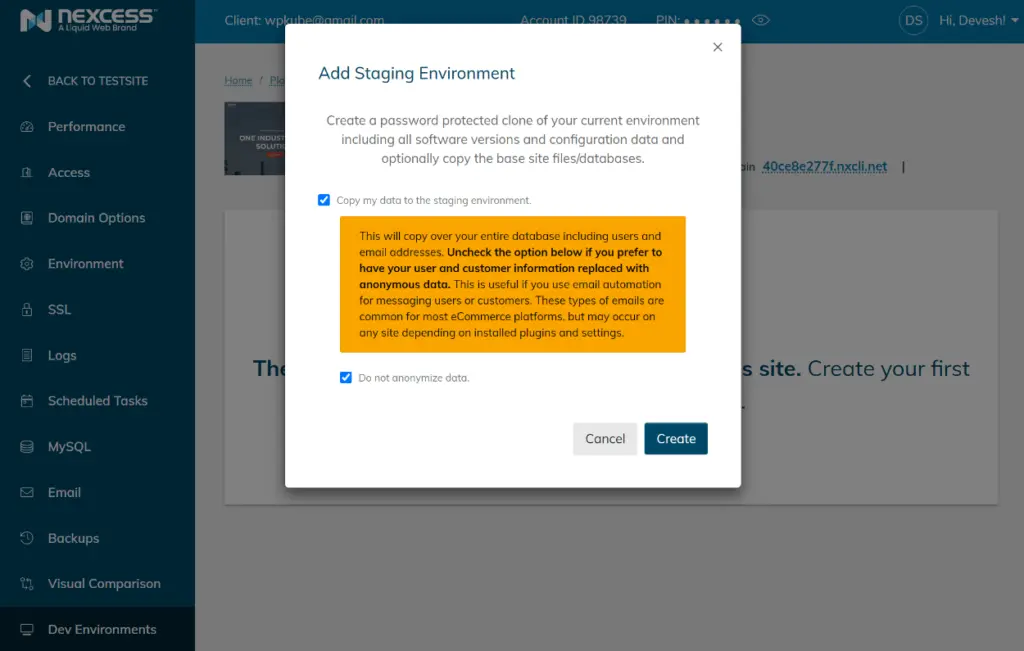
Once you’ve set up your staging environment, you’ll have an identical, password-protected clone of your site to work on, including access to a full site dashboard just for that staging site.
Nexcess Support Review
Nexcess offers 24/7 support for all its plans. You can get support via live chat, email/ticket, and phone, with dedicated phone numbers for America, Australia, and the UK.
However, not all channels seem to be available 24/7, so you may have to rely on ticket support outside of business hours. For example, we tried to start a live chat at 8pm EST on Sunday and there were no live chat staff available, so ticket support was the only option.
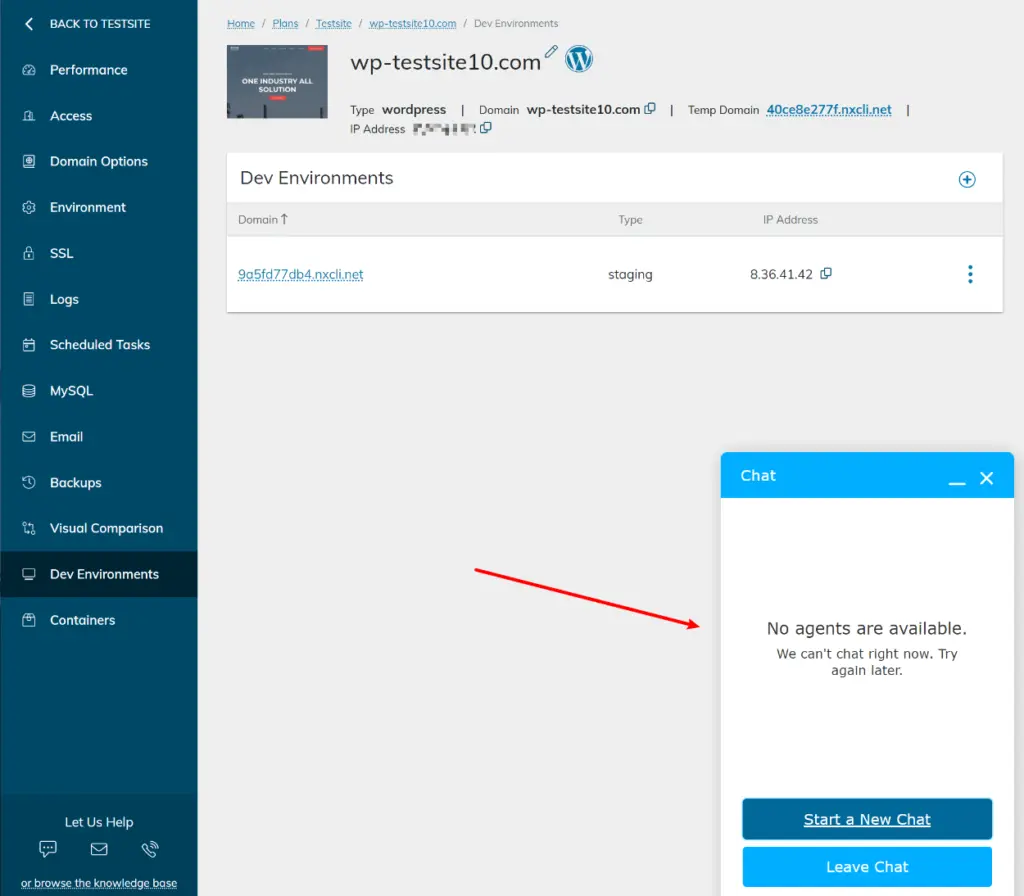
As for the quality of support, it’s a mixed bag. The support team itself is friendly and helpful, but many other users complain about long response times and the fact that you can’t access live chat support 24/7 can be frustrating if you have an urgent problem.
Overall, the support should be fine for most users, but people who really value an immediate response and white-jacket support might want to opt for a provider like Kinsta, Flywheel or WP Engine. These providers all offer 24/7 live chat support and you can usually get in touch with support immediately (or at least within 10 minutes). Of course, they also cost a bit more than Nexcess, so you don’t get anything for free.
Nexcess Pricing Review
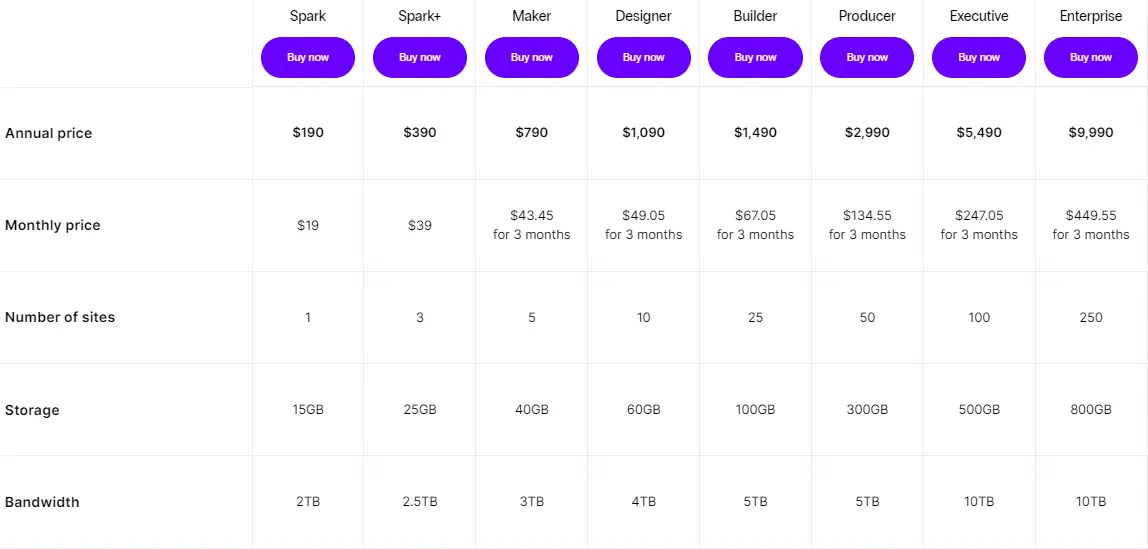
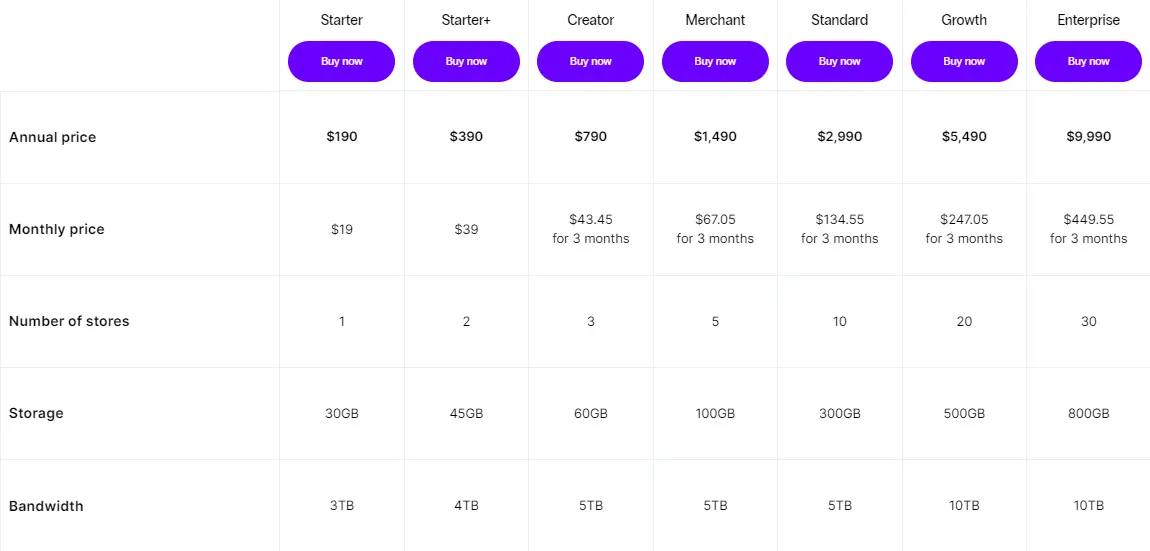
Nexcess offers a wide range of plans for all budgets, from the Spark plan for under $20 that we tested, to plans for businesses that cost nearly $1,000 per month.
With all plans, you can pay either monthly or annually and get two months free (or four months free in the first year).
Nexcess plans don’t include arbitrary visit limits like you’ll find with many other managed WordPress hosting providers. Instead, your only limits are:
If you use the managed WooCommerce hosting, there is also a limit for the maximum number of orders per hour.
Nexcess Managed WordPress Hosting Pricing
Nexcess Managed WooCommerce Hosting Pricing
FAQs
Is Nexcess good?
Nexcess offers excellent performance for the money, which is the most important factor in web hosting. However, the support is not quite as good as other managed WordPress hosts.
What is Nexcess?
Nexcess is a subsidiary of Liquid Web that offers managed hosting solutions for WordPress and WooCommerce (as well as some other platforms like Magento).
What’s the difference between managed WordPress and managed WooCommerce plans?
The managed WordPress hosting plans are for “regular” WordPress websites, while the managed WooCommerce plans are optimized for eCommerce stores with WooCommerce-specific features and benefits like free WooCommerce plugins.
To read more similar articles, click here.
Thanks for visiting our Website. If you appreciate our work, kindly show us some support in our comments section. 🙂

Norman Dwemer is a tech blogger who focuses on the future of technology. his blog delves into emerging technologies such as artificial intelligence, blockchain, and quantum computing, as well as their potential impact on our lives and society. Rachel’s writings provide a sneak peek into the future of tech, examining the possibilities and risks of these cutting-edge technologies. he also shares the most recent developments and research in these fields, delivering the latest news and insights to his readers. Norman’s visionary outlook on the world of tech has establihed his as an authoritative figure for anyone interested in the forefront of technology.